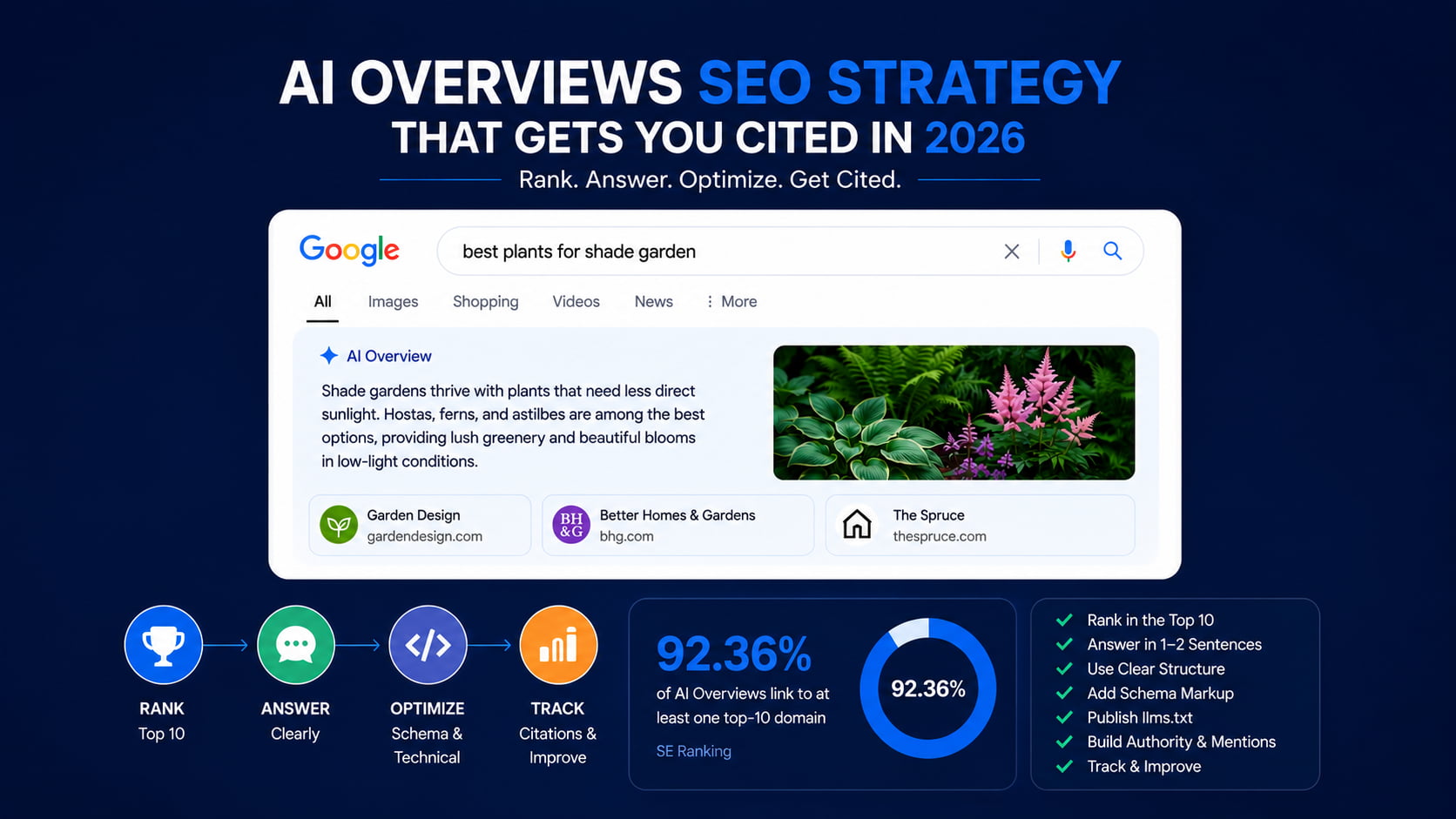
Most guides treat AI Overviews like a new game with secret rules. The data says otherwise: Google links at least one top-10 domain in 92.36% of AI Overviews, according to SE Ranking research.
You don’t need tricks. You need three layers: a page that ranks, answers an AI can lift, and a technical layer most sites skip. Here’s how to build all three across every client site you manage.
What are Google AI Overviews?
AI Overviews are AI-generated summaries that appear at the top of Google results, answering the query directly and citing a handful of source pages. Google builds them with its Gemini models and shows them mainly on informational and long-tail queries, almost always alongside other SERP features.
They change the click math. More searches end without a click, but a citation puts your brand at the top of the page, and Google reports that clicks from results pages with AI Overviews are higher quality, with users spending more time on the site (Google Search Central).
They also rarely travel alone. AI Overviews appear next to at least one other SERP feature 99.25% of the time, with People Also Ask present in 98.54% of cases (SE Ranking). If you report to clients on generative engine optimization, that context matters: the AIO is one feature in a crowded page, not the whole game.
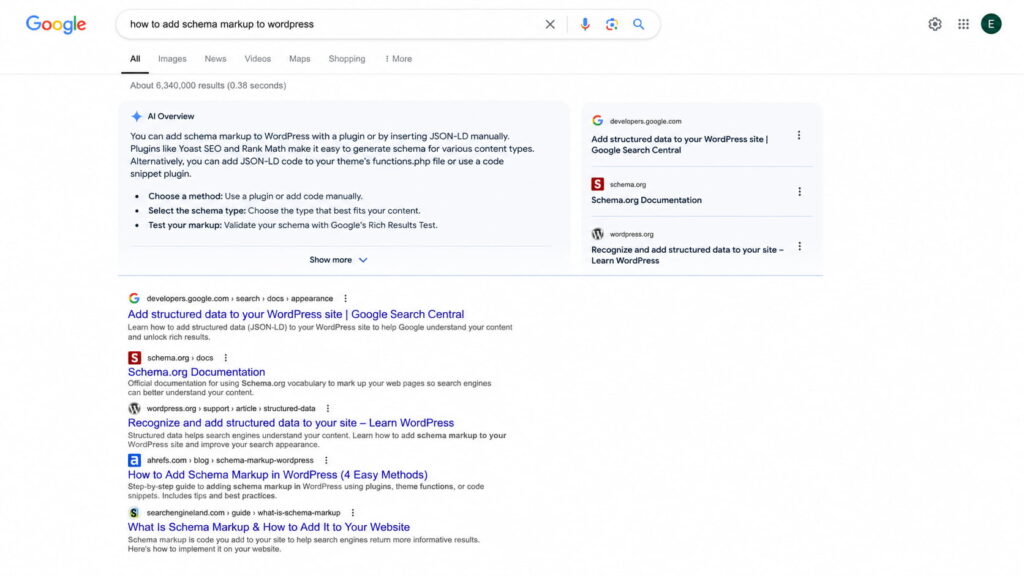
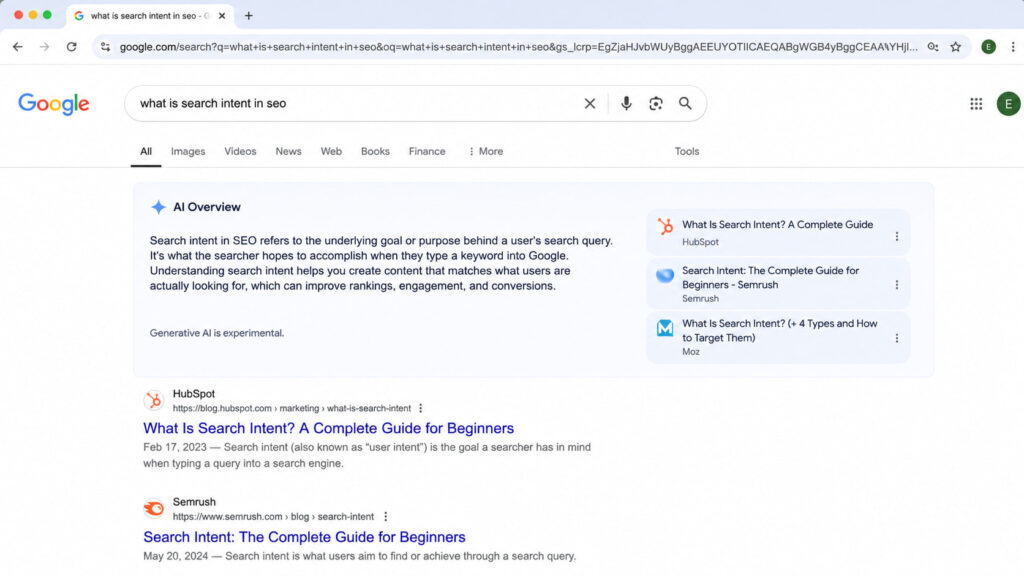
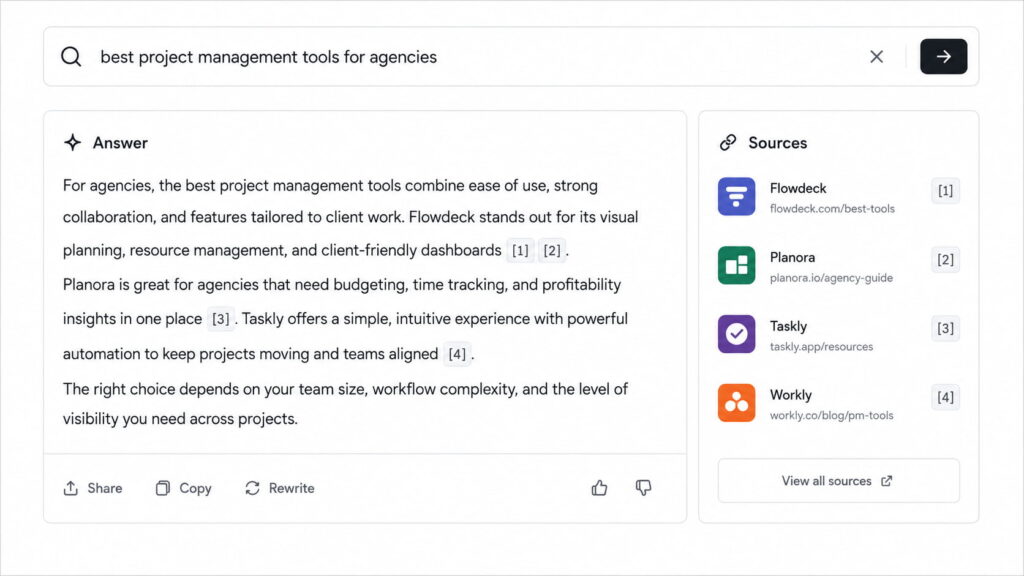
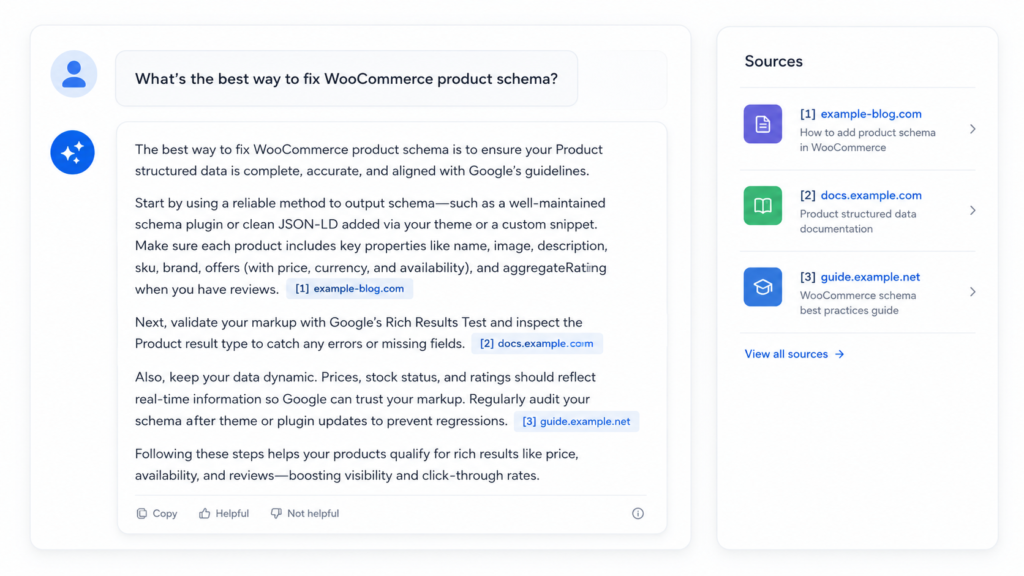
Caption: An AI Overview cites three sources above the first organic result: the citation slot sits higher than position 1.
How Google picks the sources it cites
Google’s official position is short: a page only needs to be indexed and eligible to appear in Search with a snippet. Per Google Search Central, “there are no additional requirements to appear in AI Overviews or AI Mode, nor other special optimizations necessary.”
The controls that do exist are the standard snippet controls: nosnippet, data-nosnippet, max-snippet, and noindex. Those limit what Google can show from your pages, in AI Overviews and everywhere else.
One thing that does not exist: an AI Overview submission process. If a vendor offers to “submit” a client’s site to AI Overviews, that service is fiction. Send them Google’s documentation and keep your budget.
The uncomfortable truth: you still have to rank
The anchor stat: 92.36% of AI Overviews link to at least one domain ranking in the organic top 10, and 63.19% of the time they pull from pages in the top 10 for that query (SE Ranking).
The 2026 nuance: Ahrefs analyzed 863K SERPs in March 2026 and found that only 37.9% of the individual URLs cited in AI Overviews rank in the top 10 for that exact query, down from roughly 76% a year earlier (Ahrefs). The cause is query fan-out: Google splits the search into related sub-queries and cites pages that rank for those. Ranking still matters, but Google now rewards covering the whole topic, not just the head keyword.
Our position: if your page doesn’t rank in the top 10-20 for the topic, optimizing “for AI” is starting the house from the roof. First improve your site’s SEO and fix your SEO issues. The SEO retainer you already run for clients is still 80% of the AI Overview game.
How to show up in AI Overviews, step by step
Here is the full sequence. Each step gets its own section below.
Rank the page in Google’s top 10 for the query.
Answer the question in the first one or two sentences.
Structure the content with clear headings, lists, and tables.
Add relevant schema markup to remove ambiguity.
Publish an llms.txt file at your domain root.
Build author bios and brand mentions that AI systems recognize.
Track your citations and reformat the pages that miss.
Steps 1 through 3 are content work. Steps 4 and 5 are the machine-readability layer. Steps 6 and 7 are what keep citations coming after the first win.
Write answers an AI can lift
AI Overviews don’t cite pages. They cite fragments: the two sentences, the list, or the table that answers a sub-question cleanly.
Your job is to leave liftable fragments on every page. For an agency running 10+ client sites, this isn’t a page-by-page tweak. It’s an editorial standard you apply to every new piece and retrofit onto the pages that already rank.
Answer the question in the first two sentences
The pattern is answer-first: state the answer in the first one or two sentences under the heading, then expand. Definition sections that follow a “What is X” heading with an immediate answer are among the most-cited fragments in AI Overviews.
Compare the two openings for a client’s service page section titled “How much does lawn aeration cost?”:
Liftable: “Lawn aeration costs $75 to $200 for most residential yards. Price scales with lot size and soil condition.”
Not liftable: “Every lawn is different. Before we talk numbers, it’s worth understanding what aeration does for your soil, and why the timing matters…”
The second version is how most service pages are written. Three paragraphs of context, then the answer. An AI summarizer skips it and lifts the competitor’s version instead.
Structure content for extraction: headings, lists, tables
Formatting is extraction engineering. The standard to impose across every client site:
Paragraphs of 2-3 sentences, one idea each
A clean H2/H3 hierarchy that mirrors real sub-questions
Numbered lists for steps and processes
Tables for anything with two or more attributes
A key takeaways section on long pieces
This is the same formatting that wins featured snippets, and the overlap is not a coincidence. AI Overviews appear next to People Also Ask 98.54% of the time (SE Ranking), so optimizing for PAA and snippets is optimizing for AI Overviews with the same hour of work.
Target long-tail, question-based queries
Long queries are AI Overview territory. Searches of four or more words trigger an AI Overview in 60.85% of cases (SE Ranking), and question queries are their natural habitat.
The tactic: mine People Also Ask and the real questions in each client’s niche, then give each question its own H2 or H3 with a direct answer underneath. Match the phrasing to the search intent behind the question, not to the keyword tool’s phrasing. An e-commerce client’s questions (“does X fit Y”) look nothing like a local service client’s (“how much does X cost near me”), so the mining is per niche, not per template.
Does schema markup get you into AI Overviews?
Most of the pages ranking for this question say yes, and most of them sell schema tools. The honest answer has more nuance: schema is not a ticket into AI Overviews, but it is the machine-readability layer that removes ambiguity about what your content is.
We build a schema plugin, so read the evidence yourself before taking our word for it. Both directions of it.
What the data actually says
The experimental evidence is sobering. A 2026 Ahrefs test tracked 1,885 pages that added JSON-LD between August 2025 and March 2026 against 4,000 control pages, and found no meaningful citation lift on any platform: AI Overviews moved -4.6%, AI Mode +2.4%, ChatGPT +2.2% (via Search Engine Journal).
The correlational evidence points the other way. Roughly 71% of pages cited by ChatGPT and 65% of pages cited by Google AI Mode carry structured data (Stackmatix), and the same Ahrefs analysis found across 6 million URLs that AI-cited pages are about three times more likely to include JSON-LD.
Study
What it measured
What it found
What it means
Ahrefs controlled test (2026)
Citation change after adding JSON-LD
No lift vs. control group
Schema alone doesn’t earn citations
Ahrefs correlation (6M URLs)
JSON-LD presence on AI-cited pages
Cited pages ~3x more likely to carry schema
Well-run sites tend to have schema
Stackmatix (2026)
Structured data on cited pages
~71% (ChatGPT), ~65% (AI Mode)
Machine-readability travels with citations
Google Search Central docs
Requirements for AI features
No special markup required
Schema is for clarity, not admission
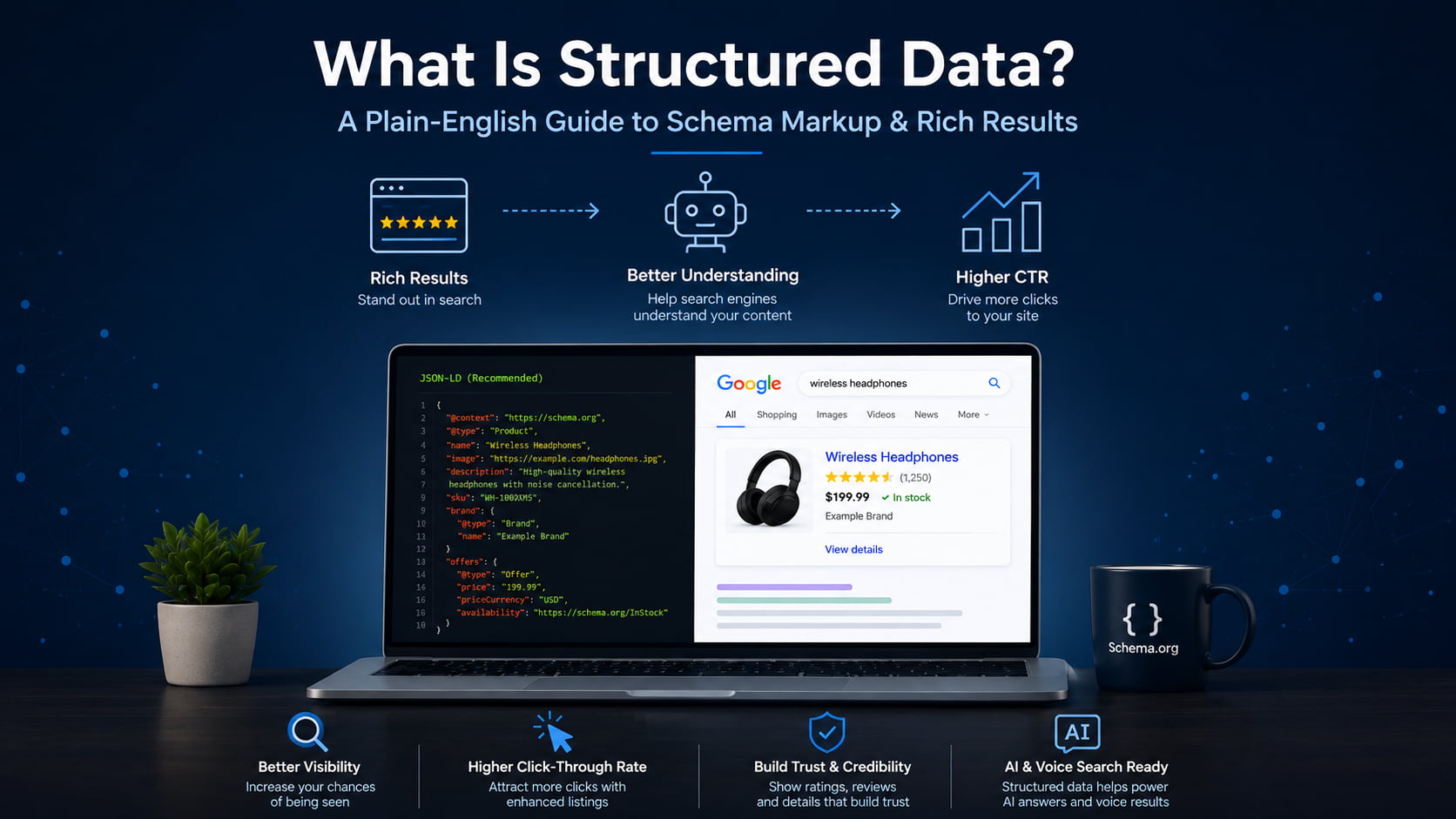
Correlation is not causation. Sites that implement schema also publish stronger content, earn more links, and keep their technical setup clean. Schema won’t substitute for ranking or for liftable fragments. What it does is remove ambiguity about entities: who the author is, what the product is, which question each FAQ block answers. That clarity powers rich results and supports E-E-A-T, which is why what structured data is and how to use schema markup still belong in your technical checklist.
Our position: apply schema for the complete machine-readability layer, not for a promised citation.
Applying schema across a WordPress site without writing code
Auditing schema by hand across 10 client sites is the kind of work that eats a retainer. This is the workflow we built Schemafy for.
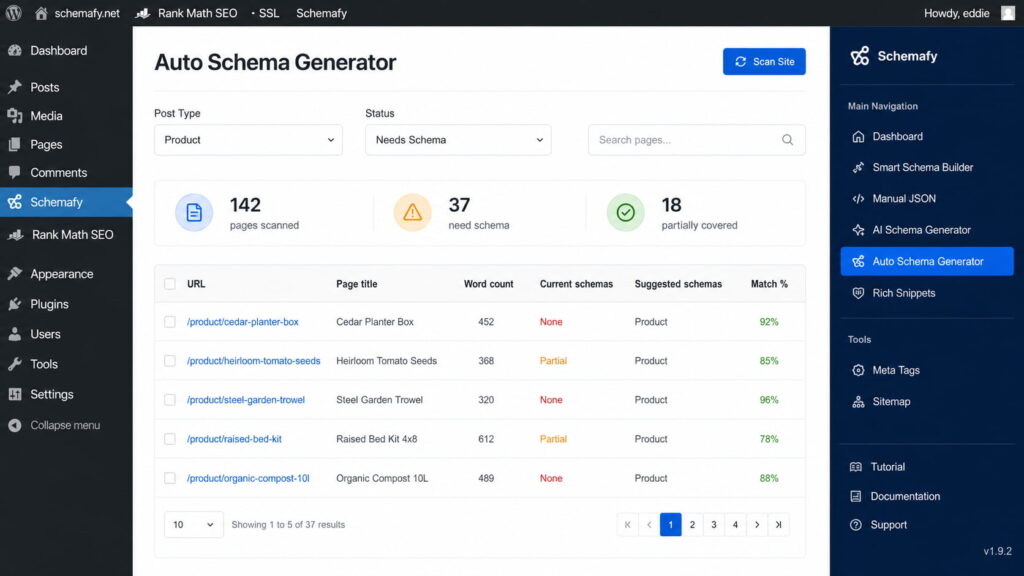
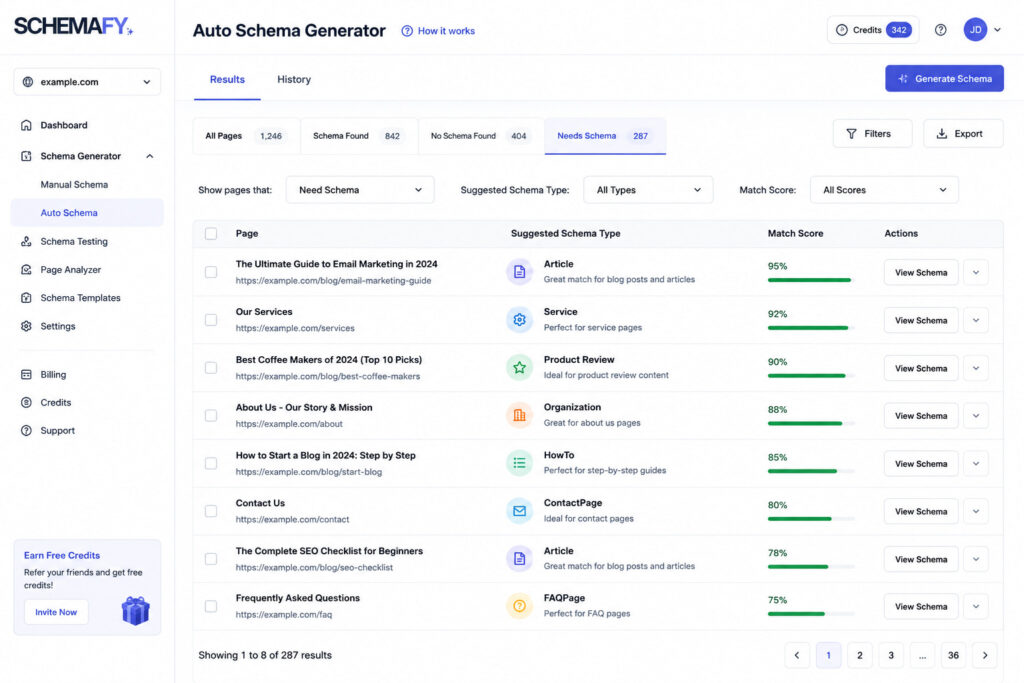
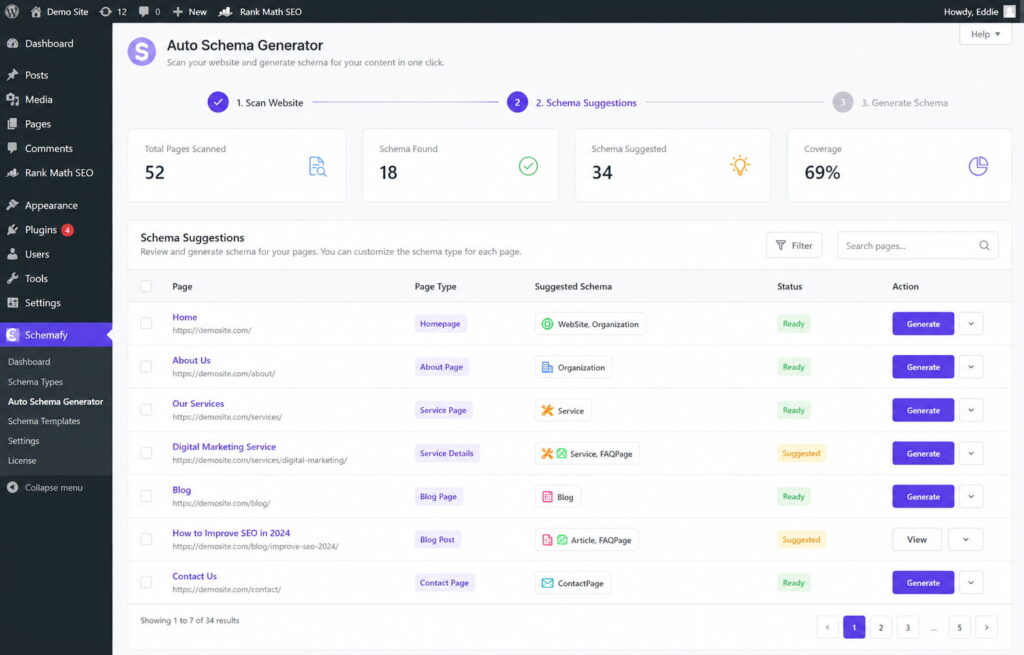
Open WP Admin → Schemafy → Auto Schema Generator and click Scan Site. The scan analyzes every page and detects schema opportunities per page. Filter by Post Type (Post, Page, Product) and Status (Needs Schema, Partially Covered, Fully Covered), then review the suggested schemas and match percentages page by page. Prioritize Article with a real author, FAQPage, Organization, and Product. No JSON-LD to write.
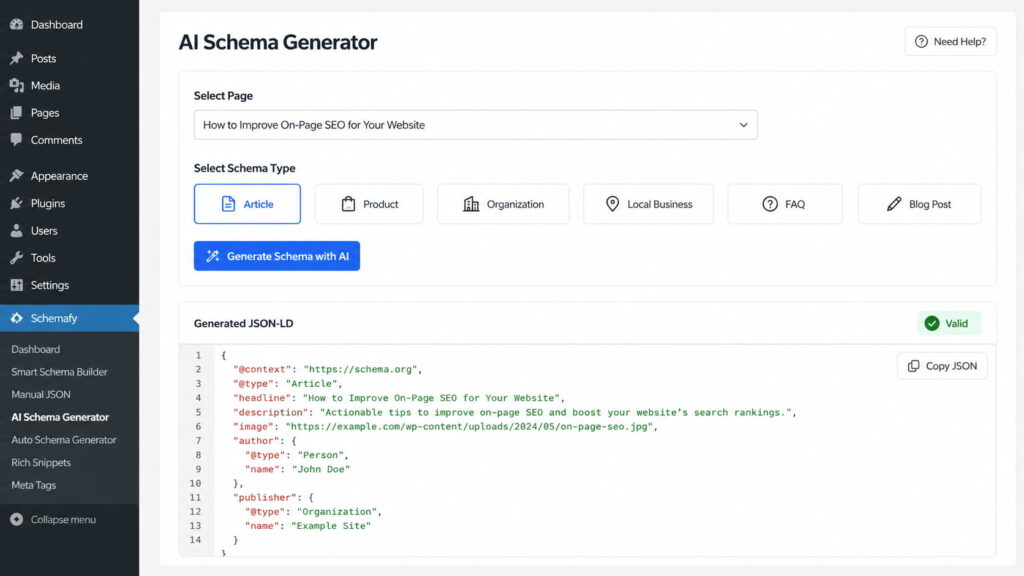
For complex or custom types, the AI Schema Generator builds the JSON-LD from the page content and shows a validation status before you save.
The pitch for agency operators is repeatability: the same scan, the same filters, the same priorities, on every one of your 10+ client sites.
Caption: Auto Schema Generator flags 37 product pages missing schema after one Scan Site pass, with the suggested type per page.
[CTA_DOWNLOAD]
Make your site readable to AI systems
Beyond schema, there are two technical pieces specific to AI search that the top-ranking guides barely develop: an llms.txt file and a crawler check. Both are cheap, fast, and easy to package into a technical retainer.
Add an llms.txt file
An llms.txt file is a markdown file at your domain root that summarizes what your site is and points AI systems to your most important content.
Honest status first: llms.txt is an emerging proposal, not a confirmed signal. Google states plainly that “you don’t need to create new machine readable files, AI text files, or markup” to appear in its AI features (Google Search Central). Publish one anyway, for three reasons: it costs minutes, other answer engines and LLM crawlers can read it today, and writing it forces you to define each site’s core pages.
The manual workflow: write the summary and the key URLs in markdown, save the file as llms.txt, and upload it to the domain root through your host’s file manager or FTP. Build one template and reuse it across clients. Budget 15 minutes per site.
Check which AI crawlers actually visit your site
You can’t appear in AI answers if the crawlers behind them never read your pages. The check is manual but simple: open your server logs or your host’s raw access stats (AWStats or equivalent) and search for the AI user agents and their visit frequency. If the logs show bots burning visits on thin pages, optimize crawl budget before anything else.
Crawler
Operator
What it feeds
Googlebot
Google
The Search index, including AI Overviews
Google-Extended
Google
Gemini training and grounding (a robots.txt token, not a separate crawler)
GPTBot
OpenAI
ChatGPT training and search
ClaudeBot
Anthropic
Claude
PerplexityBot
Perplexity
Perplexity answers
Then read each client’s robots.txt. Sites inherited from a previous developer often block AI bots by accident, and unblocking one is a reportable quick win. Know the trade-off before you touch Google-Extended: blocking it limits Gemini training and grounding in some of Google’s other systems, but it does not remove you from AI Overviews in Search. That’s controlled by Googlebot access plus the snippet rules (Google Search Central). If a page is stuck earlier in the pipeline, start with crawling vs indexing instead.
Build the authority signals AI Overviews reward
Every section so far happens on the page. The last layer mostly happens off it.
Real authors. Replace “admin” bylines with a named author, a bio, and credentials on every client site. Person schema connects that author entity to the content, and it’s one of the types Schemafy generates.
First-hand data. Original numbers, real examples, and client-anonymized results are the fragments AI systems can’t find in the other nine posts on the SERP. One proprietary stat outworks a page of paraphrased advice.
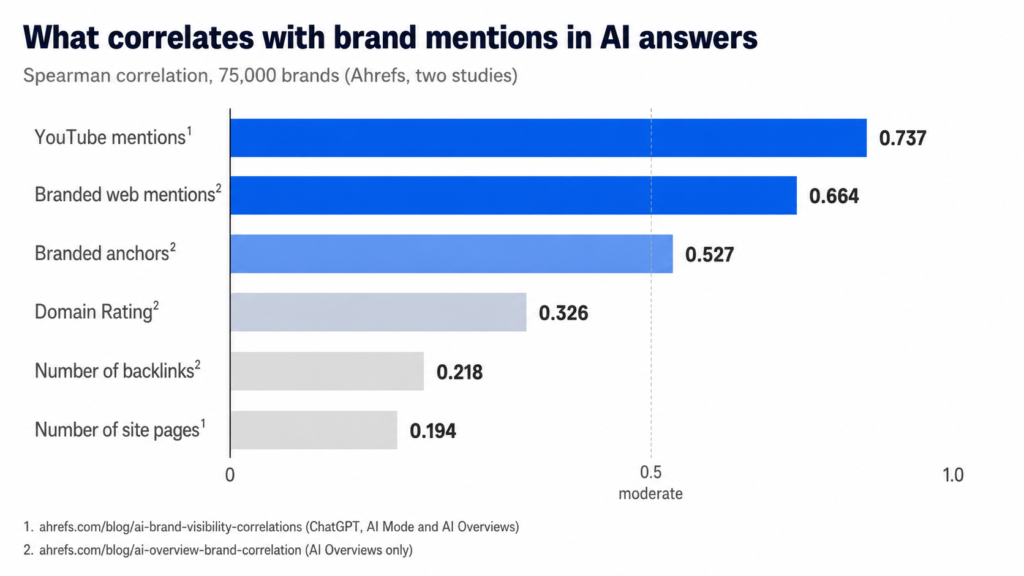
Brand mentions. In Ahrefs’ analysis of 75,000 brands, brand web mentions correlate with AI Overview visibility at 0.664, against 0.218 for backlinks, nearly three times stronger (Ahrefs). Unlinked mentions now do work that link builders used to charge for, which changes how you prioritize off-page SEO signals.
Freshness. More than half of AI Overview citations come from content published in the last two years: 28.76% from 2025 and 26.85% from 2024 (SE Ranking). A refresh calendar for each client’s top pages is now a defensible retainer line.
How to track whether you’re showing up
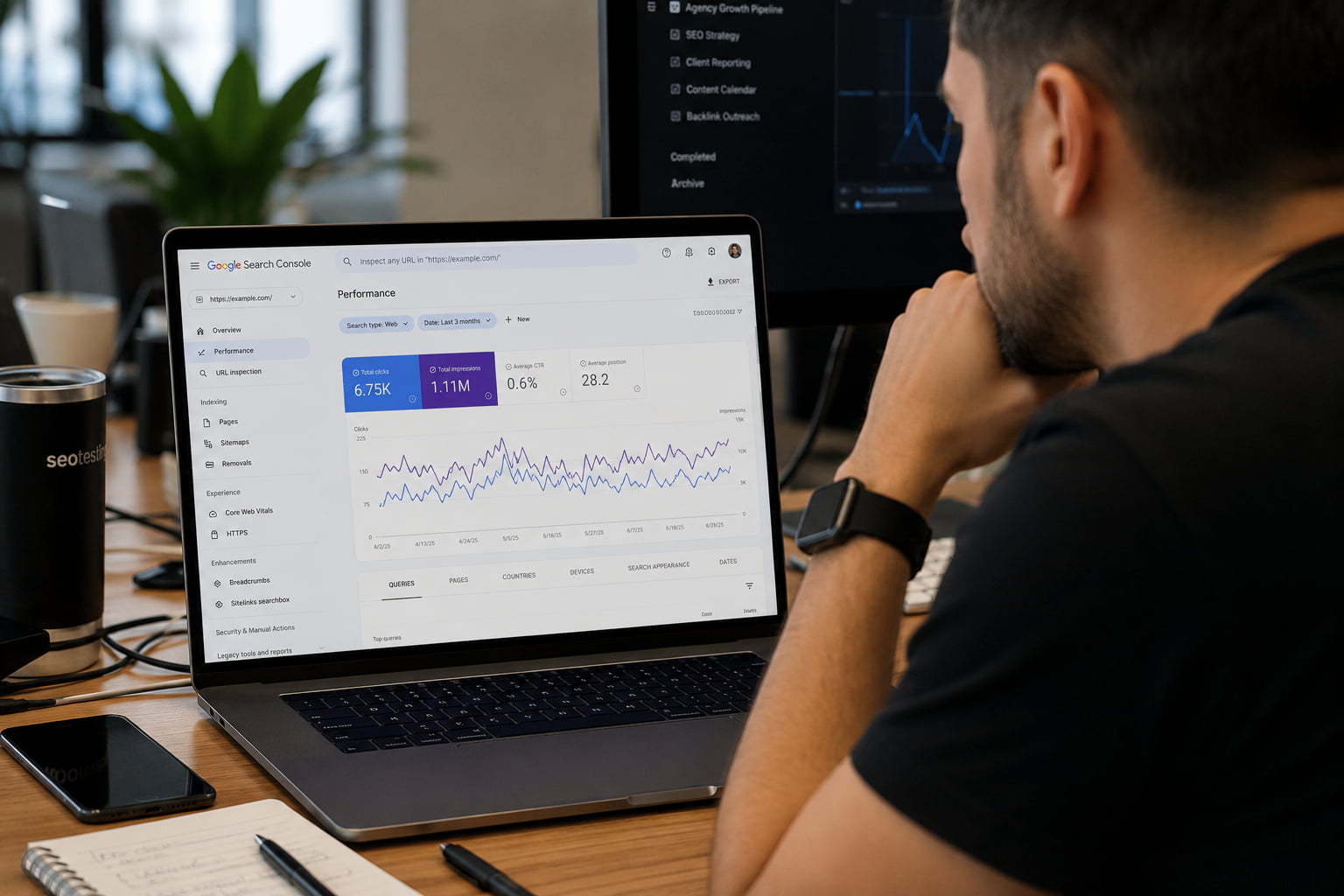
Start with the honest limitation: Search Console does not separate AI Overview traffic. Impressions and clicks from AI features are counted inside the regular “Web” search type in the Performance report (Google Search Central), so there is no filter to pull.
What works instead:
Run manual checks on the client keywords that trigger AI Overviews, and log who gets cited.
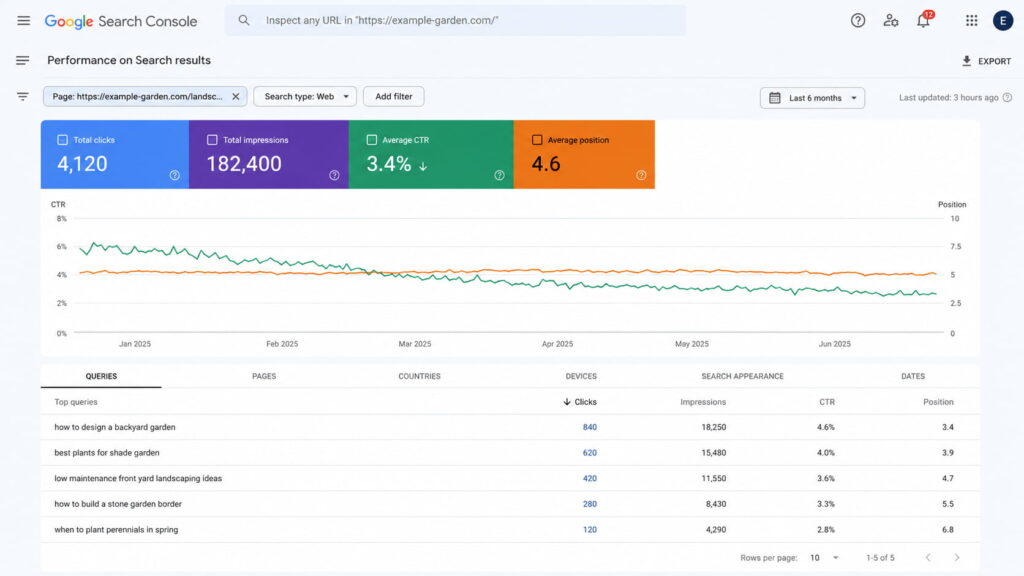
Watch CTR on pages ranking top 10 for AIO queries. Falling CTR with stable position is the signature of an AI Overview absorbing clicks, and it’s the honest way to explain a traffic dip to a client without panic.
Those three feeds answer the only question that matters operationally: which pages to reformat first. The top-10 pages losing CTR are next sprint’s work list.
Caption: Stable position, falling CTR: the page still ranks 4-5 but the AI Overview above it is taking the clicks.
Final thoughts
Showing up in AI Overviews is not a new discipline. It’s ranking, plus fragments an AI can lift, plus an honest technical layer of schema, llms.txt, and crawler access. No secret rules, no submission form.
The concrete next step: for each client, pull the five pages already ranking in the top 10 for queries that trigger an AI Overview. Reformat them answer-first, then run a Schemafy scan to close the schema gaps the audit finds. That short list is where citations come from fastest.
[CTA_DOWNLOAD]
Frequently asked questions
How do I get my website to show up in AI Overviews?
Rank the page in Google’s top 10 for the query, answer the question directly in the first sentences, and structure the content with clear headings and lists. Google links at least one top-10 domain in over 92% of AI Overviews, so traditional SEO remains the foundation. Schema markup and llms.txt add machine-readability on top.
Does schema markup help you appear in AI Overviews?
Not on its own. A 2026 Ahrefs test found no citation lift from adding schema alone, yet most pages cited by AI systems do carry structured data. Schema removes ambiguity about your content and authors and powers rich results, so treat it as a readability layer, not a shortcut.
What triggers an AI Overview in Google?
Google shows AI Overviews when it predicts a generated summary will help, most often on informational, question-style, and long-tail queries. Searches of four or more words trigger them in roughly 61% of cases. Transactional and simple navigational queries trigger them far less often.
How long does it take to show up in AI Overviews?
There is no fixed timeline. If a page already ranks in the top 10, formatting changes like answer-first paragraphs can get it cited once Google recrawls and processes the page. If the page does not rank yet, expect the normal SEO timeline of months before AI Overview visibility follows.
Can I see AI Overview traffic in Google Search Console?
Not separately. Google counts AI Overview impressions and clicks inside the regular Web search data, with no dedicated filter. To estimate impact, track your keywords that trigger AI Overviews, monitor CTR changes on stable rankings, and use an AI visibility tool to log where your pages get cited.
Can I opt out of AI Overviews?
You cannot opt out of AI Overviews appearing on queries, but you can control how your content is used. The nosnippet and max-snippet rules limit or block what Google shows from your pages, and blocking Google-Extended affects Gemini training rather than AI Overviews in Search.
Most guides treat a Google Merchant Center account as a form you fill once. Create it, upload a feed, done in 20 minutes.
The account is the easy part. Keeping products approved is the real work, because Google crawls your product pages and checks that your feed, your landing page, and your structured data all say the same thing. That check is where most new WooCommerce stores fail. This guide covers both halves.
What is a Google Merchant Center account?
A Google Merchant Center account is a free account where you upload and manage the product data Google shows across Search, Shopping, Maps, and YouTube. It is the data source behind both free product listings and paid Shopping ads, not an advertising channel by itself.
Think of it as the layer between your store and every Google surface that displays products. Your WooCommerce catalog feeds Merchant Center, and Merchant Center feeds Google. It is also where Google checks that your prices, availability, and images match what shoppers actually see on your site. Google’s own Get started with Merchant Center doc covers the basics; this guide covers the WooCommerce specifics it skips.
Is Google Merchant Center free?
Yes. Creating the account, uploading products, and appearing in free listings costs $0, per Google’s documentation.
You only pay if you run Shopping ads, and that billing happens in a linked Google Ads account, not in Merchant Center. The two get confused constantly: Merchant Center holds your product data, Google Ads spends your budget. You can use the first without ever touching the second.
Free listings vs Shopping ads: what the account actually gets you
One account powers two very different distribution channels. Here is how they compare:
Free listings
Shopping ads
Where they appear
Shopping tab, Search, Maps, YouTube
Shopping tab, Search results, partner sites
Cost
$0
Pay-per-click budget
Feed requirements
Same product data spec
Same product data spec
Google Ads account
Not required
Required (linked)
For a WooCommerce store with 100 to 1,000 products, free listings alone justify the account. Your products become eligible to appear in the Shopping tab with zero ad spend, and you can add paid campaigns later for the products that earn impressions. If you manage stores for clients, this is also the cleanest pitch for setting up Merchant Center on day one, before there is any ad budget to argue about.
What you need before creating your account
Have these five things ready before you start. Missing any of them causes rejections later:
A Google account (one Merchant Center account per Google account)
An active website with product pages shoppers can buy from online
A visible returns policy and contact information
A working checkout with SSL
Product data on the site that matches what you plan to submit
One warning from Google’s setup documentation deserves bold type: the country you select during account setup cannot be changed later. If you sell across markets, or you are setting up accounts for clients in different countries, choose deliberately. Fixing a wrong country means creating a new account from scratch.
How to create a Google Merchant Center account, step by step
The four steps below take roughly 20 minutes in the current interface (Merchant Center Next). If you run an agency, budget that 20 minutes per client store: the process repeats identically for every domain.
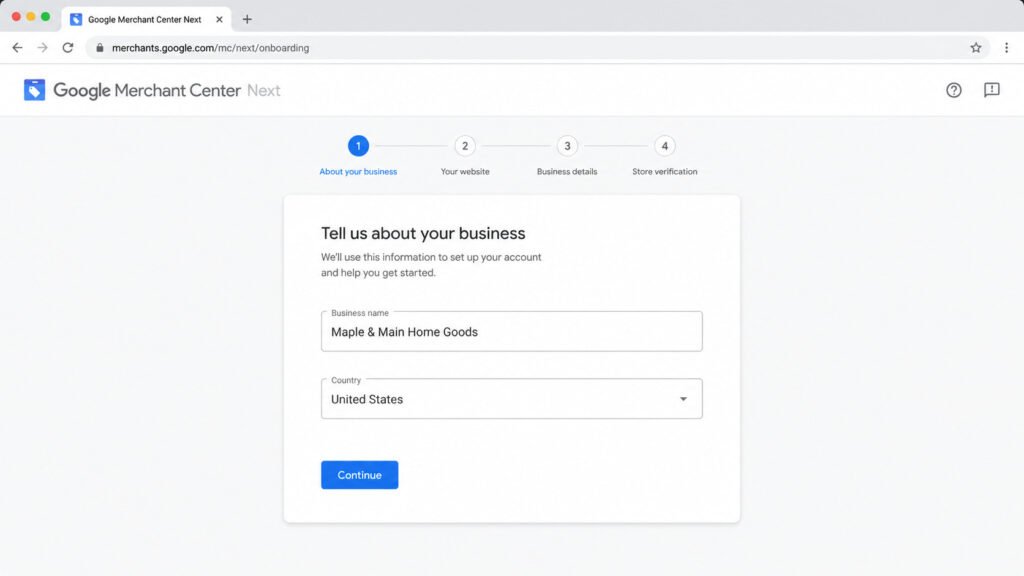
Caption: Merchant Center Next onboarding asks for business details first. The name you enter here appears on your listings.
Step 1: Sign in and add your business details
Go to merchants.google.com and sign in with the Google account that should own the store’s data. One Google account can create one Merchant Center account, per Google’s documentation, so agencies should use the client’s account rather than their own. You will enter a business name, country, and time zone.
The business name is not cosmetic. It appears on your listings, and Google cross-references it against your website. Use your brand name exactly as it appears on your site. A store called “Maple & Main” on the site and “MM Retail LLC” in Merchant Center reads as an inconsistency, and inconsistencies feed the misrepresentation checks covered later in this guide.
Step 2: Verify and claim your website
Verification proves you control the domain. Google’s Configure your accounts doc lists four methods: an HTML tag added to your homepage, Google Tag or Google Analytics if already installed, Google Search Console, or an HTML file upload.
For WordPress stores, Search Console is the shortcut. If your site is already verified there, Merchant Center picks up the verification with one click and nothing new touches your theme. Otherwise, the HTML tag goes in your site’s head section.
Two details trip people up. First, verifying and claiming are separate actions: verification proves control, claiming binds the domain to this specific Merchant Center account. Complete both. Second, only one account can claim a domain at a time, which matters the moment an agency and a client both create accounts.
Step 3: Configure shipping, returns, and tax
These are the settings that silently block listings when they are missing or wrong. Configure shipping with the rates you actually charge, not optimistic estimates. Add your return policy and link it to the policy page on your site. United States sellers also configure tax settings here.
Google compares the shipping cost a shopper sees at your checkout with the cost you declared in Merchant Center, as part of its landing page requirements. A $4.99 declared rate against a $7.99 checkout rate is a mismatch, and mismatches become disapprovals. When in doubt, declare the higher rate.
Step 4: Add your WooCommerce products
This is where the generic guides go Shopify-first and leave WooCommerce owners guessing. You have three ways to get products into Merchant Center:
A file or Google Sheets feed built to the product data specification, maintained by hand or by a feed plugin.
Manual entry in the Merchant Center interface, viable only for catalogs under a couple dozen products.
For a store with 100 to 1,000 products, use the extension. Then audit the attributes Google requires before you sync: id, title, description, link, image_link, price, availability, brand, and GTIN or MPN. The extension maps most of these from WooCommerce fields automatically, but only if those fields are filled. Empty brand and GTIN fields are the single most common gap, and they matter enough to get their own section below.
How Google verifies your product data (and where stores fail)
Submitting a feed is not the finish line. After you sync, Google crawls your product landing pages and compares what it finds against what you submitted. Price, availability, images, all of it. If you want the background on how that crawling works, we cover it in how Google crawls your pages. Large catalogs should also make sure those recrawls aren’t wasting crawl budget on duplicate or filtered URLs.
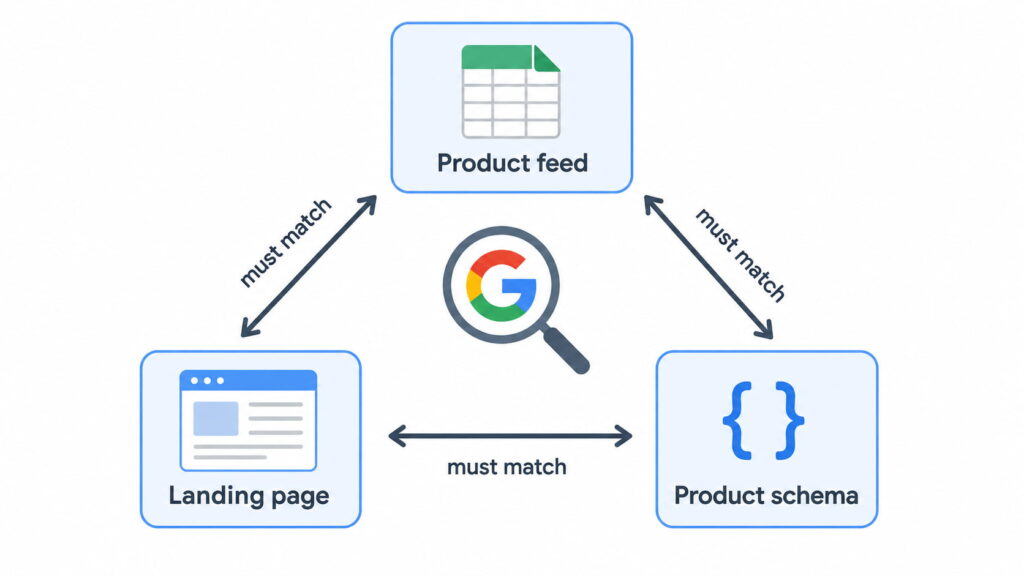
This creates a triangle that has to stay consistent: the feed, the visible page, and the page’s structured data. Most disapprovals for new stores trace back to one corner of that triangle drifting from the other two.
Caption: Google checks all three corners. A price change that reaches one corner but not the other two becomes a disapproval.
Feed, landing page, and Product schema must tell the same story
Google does not only read your page visually. Its structured data documentation for Merchant Center states that markup must be present in the HTML returned by the server, cannot be generated by JavaScript after the page loads, and must match the values shown to the user. Google recommends JSON-LD and uses schema.org markup to read price, availability, and product identifiers directly from your pages.
The technical requirements are specific. Your product page should carry one Offer, or, if it lists several, each offer needs a SKU or GTIN that matches the feed. The Offer itself must include price, priceCurrency, and availability. If you are new to this layer, start with what structured data is. You can also build a valid Product block by hand with a free schema markup generator.
This is where a schema plugin earns its place in an e-commerce stack. A plugin like Schemafy generates the Product schema with its offers by reading price, stock, and ratings directly from your WooCommerce fields, so the markup updates when the product updates and never tells Google a different story than your feed. You can monitor how Google reads that markup in Search Console’s Merchant Listings report.
GTIN, MPN, and Brand: the identifiers that gate your listings
Three identifiers decide how well Google matches your products. GTIN (the global barcode number), MPN (the manufacturer’s part number), and Brand. The rule from Google’s supported attributes documentation: submit the GTIN if the product has one; if it does not, submit MPN plus Brand as the fallback.
Skip them and you pay three times. Matching gets worse, so your products land next to the wrong competitors. You lose eligibility for enriched listings. And in strict categories, missing identifiers become outright disapprovals.
The WooCommerce-specific failure is quieter: WooCommerce has shipped a native “GTIN, UPC, EAN, or ISBN” field on the product Inventory tab since version 9.2, supported by the Google for WooCommerce extension, for both simple products and variations. Most stores never fill it. Those same fields are what your Product schema should expose, and Schemafy maps them into the markup without manual editing. For the broader context on markup strategy, see our schema markup guide.
Common Merchant Center account problems and how to fix them
Three problems cover most of what goes wrong with a new account: item disapprovals, misrepresentation suspensions, and lost website claims. Each has a distinct symptom, cause, and fix. The debugging mindset is the same one you would use to fix common SEO issues: find the mismatch, correct the source, request re-review.
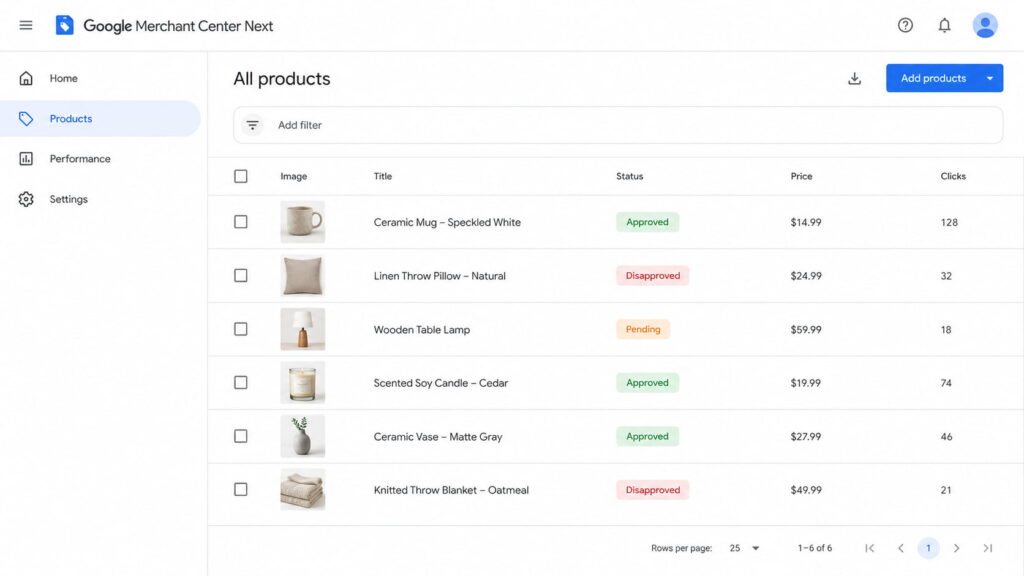
Caption: Products > All products is the first place to look. Disapproved items list the specific policy reason when clicked.
Item disapprovals: price and availability mismatch
Symptom: products flip to “Disapproved” in Products > All products, usually citing a price or availability mismatch. Per Google’s product status documentation, reviews take 3 to 5 business days for Shopping ads and can take weeks for free listings, so each disapproval-fix cycle is expensive.
Cause: in WooCommerce stores, the usual suspect is a page that no longer matches the feed. A cache or CDN serving yesterday’s price. A sale that started in WooCommerce but has not reached the crawled page. Variations whose prices differ from what the schema reports.
Fix: let the extension handle feed sync (it re-syncs on product edits automatically), purge your cache every time prices change, and run the affected URL through Google’s Rich Results Test to confirm the schema on the live page shows the same price and availability as the feed.
Misrepresentation suspensions
This is the account-level suspension that scares store owners most, partly because Google explains it least.
Cause: Google cannot verify the business is what it claims. Common triggers are missing contact information, missing or thin policy pages, a new domain with no external signals, and inconsistencies between feed, site, and checkout. Google’s guidance on keeping products approved points repeatedly at data consistency and transparency.
Fix: complete your business identity in Merchant Center, make contact details and policies visible on the site, and align your branding across feed, storefront, and checkout. Then request review and wait it out. Be realistic: reviews are slow, repeated failed reviews make things worse, and nobody can honestly promise fast reinstatement. Agencies onboarding brand-new client domains should set that expectation before the first sync, because new domains with no history trip these checks most often.
Website claim lost or verification failed
Symptom: Merchant Center reports the website is no longer verified or claimed, and listings stop.
Cause: the HTML verification tag was deleted during a redesign or theme change, a redirect chain broke the homepage check, or another Merchant Center account claimed the domain.
Fix: re-verify through Search Console, which survives theme changes because it is tied to the property rather than a tag in your template. If another account holds the claim, resolve ownership before fighting Google about it. For agencies this is a contract question as much as a technical one: decide up front whether the agency’s account or the client’s account owns the claim, and document it.
What changed in Merchant Center in 2026
The product data spec gets an annual update, and the 2026 round, published by Google, has three changes worth acting on.
Image quality became enforceable policy. The minimum resolution for image_link and additional_image_link rose to 500×500 pixels across all categories, with warnings running since April 14, 2026 and enforcement starting January 31, 2027. Audit your thumbnails now, before warnings become disapprovals.
Video became a real feed asset. Since June 30,2026, videos submitted through video_link are eligible to serve, and Google validates them for policy and quality. A failed video blocks the video, not the offer.
Shipping got product-level controls, including a handling cutoff time and a minimum order value attribute.
The direction is consistent: Google keeps tightening how product data is validated while Shopping surfaces expand into AI experiences. Consistent, machine-readable product data stops being a nice-to-have and becomes the entry ticket.
Final thoughts
Creating a Google Merchant Center account takes 20 minutes. What keeps your products live afterward is consistency: the feed, the landing page, and the Product schema telling Google the same price, the same stock, the same brand, every day.
If you are starting today, the order matters. Create the account, verify through Search Console, connect the Google for WooCommerce extension, and fill in GTIN and Brand on your products before you sync anything. Stores that do the identifier work first skip most of the disapproval cycle entirely. If you manage multiple client stores, turn that order into your standard onboarding checklist, because every shortcut taken during setup resurfaces later as a policy flag.
[CTA_DOWNLOAD]
Frequently asked questions
What is a Google Merchant Center account?
A Google Merchant Center account is a free account where you upload and manage the product data Google shows across Search, Shopping, Maps, and YouTube. It feeds both free product listings and paid Shopping ads, and it is where Google checks that your prices, availability, and images match your website.
Is a Google Merchant Center account free?
Yes. Creating the account, uploading products, and appearing in free listings cost nothing. You only pay when you run Shopping ads through a linked Google Ads account. For many WooCommerce stores, free listings alone justify setting up Merchant Center even with no ad budget.
Do I need a website to use Google Merchant Center?
Yes, in practice. Google requires an active website with product pages you verify and claim during setup, and it crawls those pages to confirm your feed data matches. Your site also needs visible contact information, a returns policy, and a secure checkout to stay in good standing.
Do I need Google Ads to use Merchant Center?
No. Free product listings work through Merchant Center alone. You only need a linked Google Ads account if you want to run paid Shopping campaigns. Many stores start with free listings, measure which products get impressions, and add paid campaigns later for the winners.
How long does Merchant Center verification take?
Website verification is usually instant if you use Google Search Console or a tag already on your site. Product review takes 3 to 5 business days for Shopping ads and can take a few weeks for free listings, and account-level reviews such as a misrepresentation check can take longer still.
Can I change my Merchant Center account country later?
No. The country you select during account setup cannot be changed afterward, so choose carefully if you sell across markets. You can add additional target countries for your feeds, but the account’s base country is permanent; changing it means creating a new account.
Five numbers written down before any changes are made. That snapshot is what turns the traffic went upinto this change worked.
You have probably read five different lists of SEO tips. The problem was never the tips. It was that nobody told you what order to do them in.
This guide on how to improve SEO on your website is sequenced by dependency, not popularity. Publishing new content does nothing if Google cannot index the site.
In 2026 that sequence ends somewhere new: not just ranking, but getting cited by AI systems. A copyable checklist waits at the end.
How to Improve SEO on a Website (Short Answer)
To improve SEO on a website: fix crawling and indexing issues, match each page to search intent, optimize titles, headings and internal links, refresh existing content, add schema markup, earn authority signals, and track results in Search Console. Work in that order, because later steps depend on earlier ones.
Each step assumes the one before it is done. Skipping ahead is how sites end up with beautifully optimized pages that Google never indexed.
Step 1: Get an SEO Baseline Before You Change Anything
Before you touch a single title tag, write down five numbers:
Clicks over the last 28 days (Search Console)
Impressions over the last 28 days (Search Console)
Average position across the whole property
Pages indexed versus pages not indexed
Core Web Vitals status: how many URLs are Good, Needs Improvement, and Poor
This takes about fifteen minutes and it saves months of guessing.
Without a snapshot you cannot prove a gain was yours, and you cannot tell a drop you caused from a drop that came with a core update. When a client asks why traffic fell in week six, “here is what the site looked like in week one” is the only answer that holds up.
Everything you need is free: Google Search Console, Google Analytics 4, and PageSpeed Insights. Save the five numbers in a dated row in a spreadsheet. You will compare against that same row in step 12.
Step 2: Fix Your Technical SEO Foundation
The best page on the internet does not rank if Google cannot crawl it, index it, or load it. Technical SEO is not the part that wins you rankings. It is the part that makes every other step possible.
Three checks handle most of it: what Google has actually indexed, how fast the site loads, and whether duplicate URLs are splitting your signals.
Check What Google Actually Has Indexed
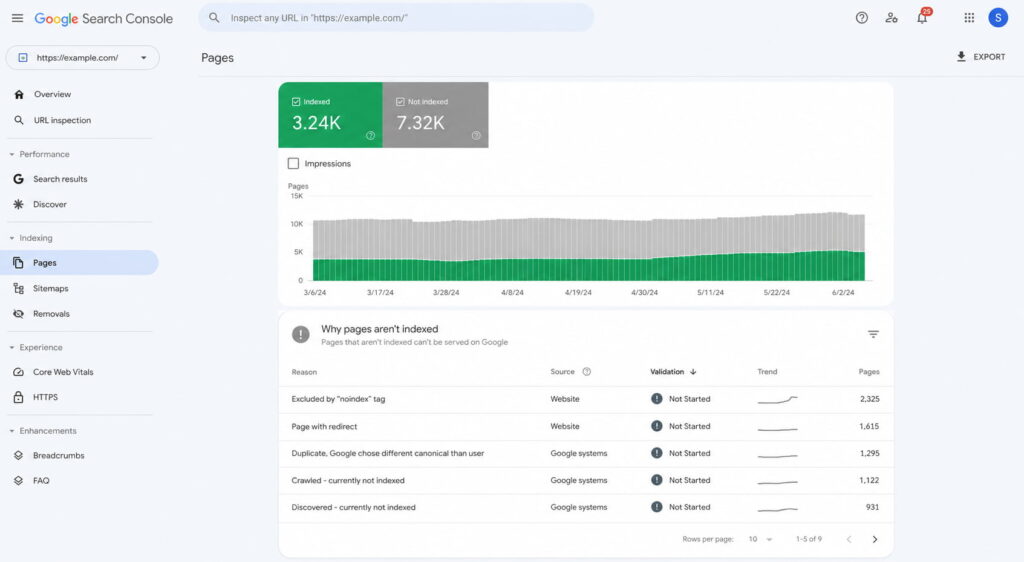
Open Search Console and go to Indexing > Pages. The first number to read is not clicks. It is indexed versus not indexed.
Having excluded pages is normal. Not knowing why is the problem. Open each exclusion reason and match it to an action.
Exclusion reason
What it means
What to do
Crawled, currently not indexed
Google saw the page and chose not to index it
Deepen the content or fix the intent match, or consolidate it into a stronger page
Discovered, currently not indexed
Google knows the URL exists but has not crawled it
Add internal links and reduce how many clicks it sits from the home page
Duplicate without user-selected canonical
Equivalent versions exist and Google picked one for you
Add a self-referencing canonical tag (next section)
Excluded by ‘noindex’ tag
A noindex directive is on the page
Confirm it is intentional; if not, remove it
Redirect error
The redirect chain fails or loops
Fix the chain and leave a single hop
Blocked by robots.txt
A robots.txt rule stops the crawl
Review the rules and unblock anything Google needs to render the page
Two housekeeping tasks close this out. Submit your XML sitemap in Search Console so Google has a clean list of the URLs you care about. Then open robots.txt and confirm it is not blocking CSS or JavaScript, because Google renders pages the way a browser does. This is the same diagnostic order Semrush recommends before touching content.
The exclusion reasons matter more than the totals. Each one maps to a different fix.
Improve Page Speed and Core Web Vitals
Three metrics carry the weight, and each one is simpler than its acronym suggests. LCP measures how long the main element takes to appear. INP measures how long the page takes to respond when someone interacts with it. CLS measures how much the layout jumps around while loading.
Fix them in this order, because that is roughly the order of impact:
Compress images and serve them in WebP with lazy loading.
Delete plugins you are not actively using.
Turn on caching.
Minify CSS and JavaScript.
Put a CDN in front of the site.
Check how heavy your WordPress theme is before you blame anything else.
Run PageSpeed Insights on the mobile tab, not desktop. Google indexes the mobile version of your site first, so the desktop score is the one that does not count.
One honest note, because most guides skip it. Speed is a tiebreaker, not a multiplier. Fixing Core Web Vitals will not move you ten positions on its own.
What it does do is stop you losing to an equally good page that loads faster, and stop visitors leaving before they read anything. Both are worth having. Neither is a ranking strategy.
Clean Up Duplicates With Canonical Tags
The same content is usually reachable at more URLs than you think. With and without a trailing slash. With UTM parameters attached from a paid campaign. Across paginated versions. On http and https.
Google sees each variation as a candidate and picks one. It does not always pick the one you wanted.
That is a self-referencing canonical: the page names itself as the version to index. For the full syntax and the CMS-specific steps, see how to add a canonical tag.
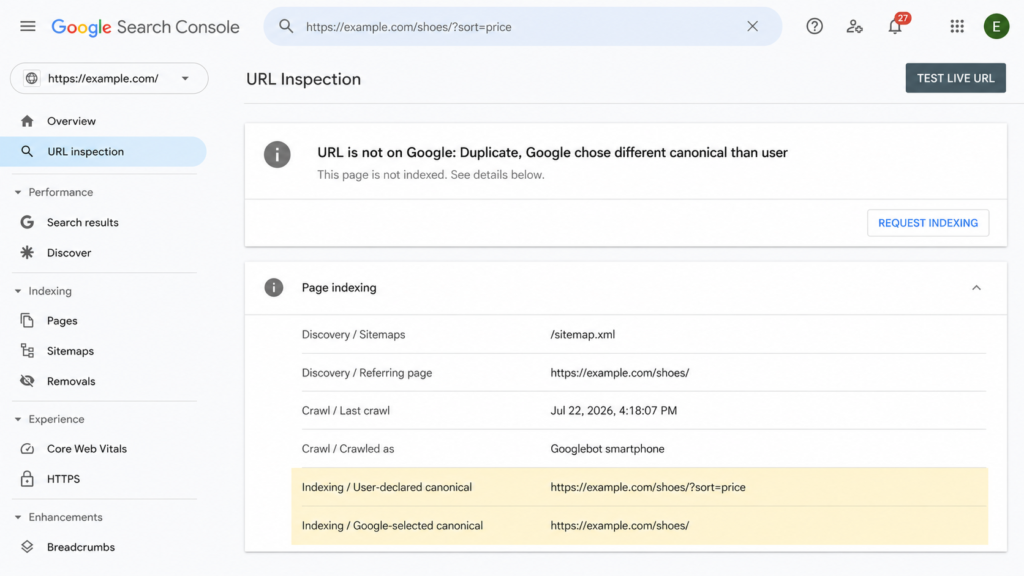
Two things to know. A canonical is a signal, not a command, so Google can override it. And you can check whether it did: if Search Console reports “Duplicate, Google chose different canonical than user” for a URL, your tag was read and ignored, which usually means the two pages are more similar than you assumed.
Step 3: Match Every Page to Search Intent
The most common reason an optimized page does not rank has nothing to do with optimization. The page answers a different question than the one the search results reward.
There are four intents behind any query:
Informational: the searcher wants to understand something. “what is schema markup”
Navigational: the searcher wants a specific site or page. “search console login”
Commercial: the searcher is comparing options before buying. “best crm software”
Transactional: the searcher is ready to act. “buy standing desk”
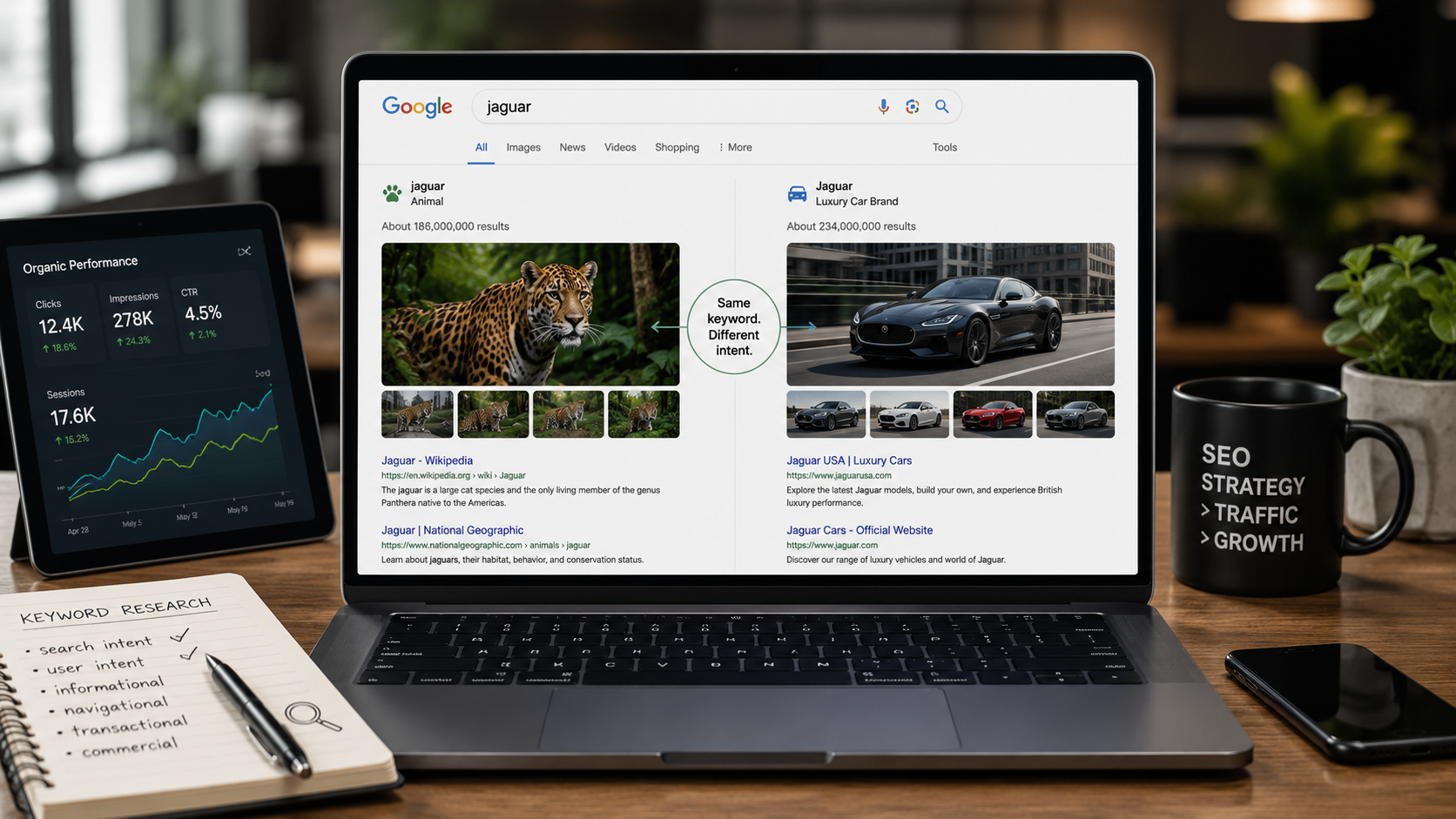
Diagnosing intent takes two minutes and no tools. Search your keyword in an incognito window and look at what format dominates the top ten: a long guide, a listicle, a product page, a comparison, a video. That format is Google telling you what it has already decided the query deserves.
Then match it before a single word gets written.
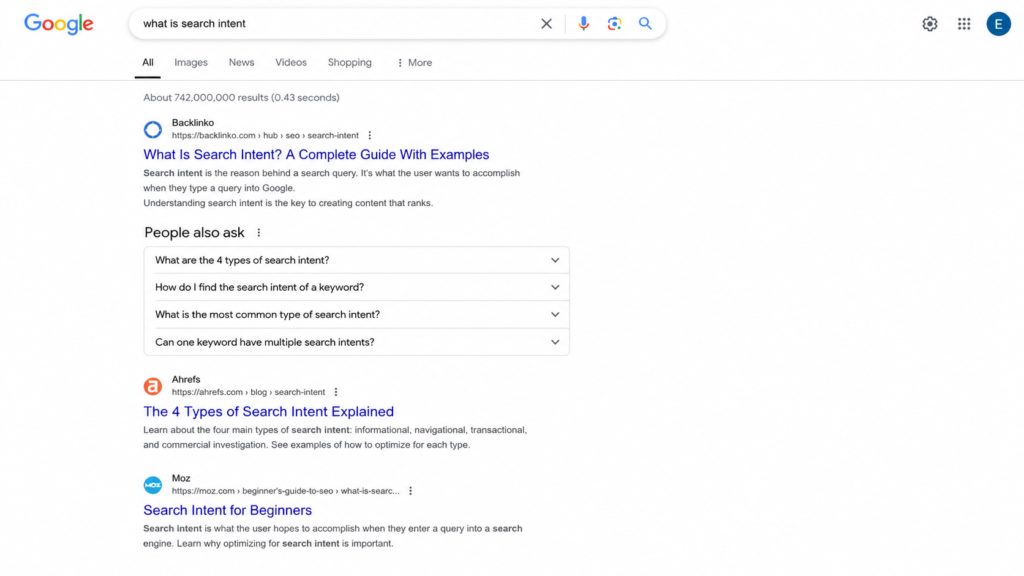
“Best crm software” is the clearest example. The intent is commercial, and every result on page one is a comparison of multiple tools. A product landing page for one CRM will not rank there no matter how well it is written, because it answers a question nobody asked. If you want the full breakdown of the four types of search intent with more examples, that is covered separately.
For anyone briefing writers, this check belongs before the brief, not after the draft. Format decisions made after the writing are expensive.
Step 4: Tighten Your On-Page SEO
On-page is the only group of signals you control completely, and it is the fastest to fix. No third party has to agree, no algorithm has to recrawl a link graph.
Three areas cover almost all of it: what shows in the search result, how the page is structured, and how its URLs and images are named.
Title Tags and Meta Descriptions
The title tag rules are short. Keep it to 60 characters or fewer so it does not get truncated. Put the keyword near the front. Make it unique across the site.
And write it for the person deciding whether to click, not for the crawler.
Meta descriptions follow the same logic at 155 characters or fewer: state the benefit, then give a reason to click.
Here is the nuance almost nobody spells out. The meta description is not a ranking factor, and Google rewrites it most of the time anyway. Neither fact is a reason to skip it.
When Google keeps yours, it is the only sentence of sales copy you get in the search results. When it rewrites yours, it pulls from your page copy, so a page written with a clear benefit still wins.
Write it, then check how it renders before publishing. A free SERP simulator shows you the truncation point on both mobile and desktop, which is faster than publishing and squinting at the live result. If you are implementing these on WordPress, the mechanics of adding meta descriptions in WordPress are covered step by step.
Across a portfolio of client sites, this is also the one on-page task that batches well. Titles and descriptions can be rewritten in bulk without touching a single page’s content.
Heading Hierarchy (H1, H2, H3)
The rules fit in four lines. One H1 per page, containing the primary keyword. H2s for sections. H3s for subsections inside them.
Never skip a level.
The rule people break most often is using headings for styling. If a line is bold and large because it looks good, it should be styled, not marked up as an H3.
This matters more now than it did three years ago. AI systems extract answers block by block, and a clean hierarchy is what makes a single section quotable on its own. A page with a broken heading structure forces the model to guess where an idea starts and stops, and a guess is easy to skip in favor of a competitor who made it obvious.
Correct:
H1: How to Improve SEO on Your Website
  H2: Fix Your Technical Foundation
    H3: Check What Google Has Indexed
    H3: Improve Page Speed
  H2: Match Every Page to Search Intent
Broken:
H1: How to Improve SEO on Your Website
  H3: Check What Google Has Indexed
  H2: Fix Your Technical Foundation
    H4: Improve Page Speed
The second version says the same things. It just makes the relationships unreadable.
URL Slugs and Image Alt Text
Slugs should be short, lowercase, hyphenated, and built around the keyword. Drop stop words. Drop dates, because a slug with 2024 in it ages badly and gives you a reason to break a URL later.
The warning that matters: never change the slug of a page that already ranks without putting a 301 redirect in place. You reset the signals that URL accumulated, and rebuilding them takes months. If you want the full set of rules, we covered what an SEO slug is and how to change one safely.
Alt text has one job: describe the image for someone who cannot see it. That is it. Keyword stuffing alt attributes is a habit left over from 2012 and it helps nothing.
Every informative image needs alt text. Decorative images, the ones that carry no information, take an empty alt attribute so screen readers skip them instead of reading a filename aloud.
While you are in there, name the file before uploading. blue-cotton-tshirt-front.jpg is worth more than IMG_4471.jpg, and it costs three seconds.
Step 5: Update and Consolidate Your Existing SEO Content
This is the highest-return step in the guide, and it is the one most people skip in favor of publishing something new. The reason it works is simple: you are improving pages Google has already crawled, already indexed, and already assigned some level of trust.
Part A: refresh what is close.
In Search Console, filter your queries to positions 8 through 20. These are the queries one push away from the part of page one people actually click. Find the page receiving each one, then do four things to it:
Update figures, screenshots and references that have gone stale.
Add the subtopics the current top five cover and you do not.
Fix the intent match if the format is wrong for the query.
Change the publish date only if the content genuinely changed.
That last one is not a formality. Updating a date without updating the content is a well-known trick and it does not work.
Part B: consolidate what competes.
Keyword cannibalization is when several of your own URLs compete for the same query, and it is more common on older sites than anyone expects. To find it, open Search Console, filter by a specific query, then check the Pages tab. If more than one of your URLs is pulling impressions and clicks for that query, you have cannibalization.
The fix is uncomfortable but mechanical. Pick the strongest page, merge whatever is genuinely useful from the others into it, and 301 the rest.
Two mediocre pages competing for one query split every signal they have earned, internal links included. One consolidated page concentrates them. You are not deleting work, you are stopping it from competing with itself.
Step 6: Target Low-Competition Keywords and Build Topic Clusters
Two ideas that only work together.
Low-competition keywords first. Google Keyword Planner is free and gets you started. If you have Ahrefs or Semrush, filter for keyword difficulty under 30 with volume at or above 100. Those thresholds are not magic numbers, they are a starting filter that keeps you out of fights you cannot win yet.
A young site should not attack head terms. The pages ranking there have years of accumulated links and topical history behind them, and you will spend six months learning that. Long-tail queries convert better anyway, because the searcher has already narrowed what they want.
Topic clusters second. A cluster is one broad pillar page plus 10 to 30 subtopic pieces, where every subtopic links up to the pillar and across to its siblings. The structure is what builds topical authority, and topical authority is what separates a site that ranks from a site that publishes.
For a WordPress site selling a WooCommerce theme, a cluster might look like this. Pillar: a complete guide to WooCommerce product pages. Subtopics: product schema markup, product image optimization, variation handling, category page structure, and product page speed.
Each one is a real query someone searches. Together they tell Google you are not guessing about WooCommerce product pages.
Publishing five connected pieces on one subject beats publishing five disconnected pieces on five subjects, and the gap widens over time. More strategies for increasing organic traffic build on the same principle.
Step 7: Strengthen Your Internal Linking for SEO
Internal linking is the only authority lever you fully control. Backlinks depend on someone else saying yes. Internal links depend on you opening an editor.
Five rules cover it:
Link from your highest-authority pages to the pages you want to lift, not the other way around.
Use descriptive anchor text that names the destination. Never “click here” or “read more.”
Give every important page at least 3 to 5 internal links pointing at it.
Find your orphan pages, the ones with no internal links at all. Google barely crawls them and users never find them.
Keep key pages within three clicks of the home page.
You can audit this without paying for anything. Search Console has a Links report that lists your internally most-linked pages in descending order. The pages you consider important that do not appear near the top of that list are the ones your site structure is quietly ignoring.
Fixing internal links costs an afternoon and no approvals. That combination is rare enough in SEO that it deserves to be higher on most people’s list than it is.
Step 8: Add Schema Markup So Search Engines and AI Can Read Your Pages
Schema markup, written in a format called JSON-LD, is a layer of structured data that tells Google and AI models what each thing on your page actually is.
This is a product. This is its price. This is the author. This is a review, and this is its rating.
Without that layer, machines infer all of it from your text. They are decent at inferring, and “decent” is not what you want deciding whether your product’s price shows up in a search result.
Three reasons it earns a place in this list, and one honest caveat.
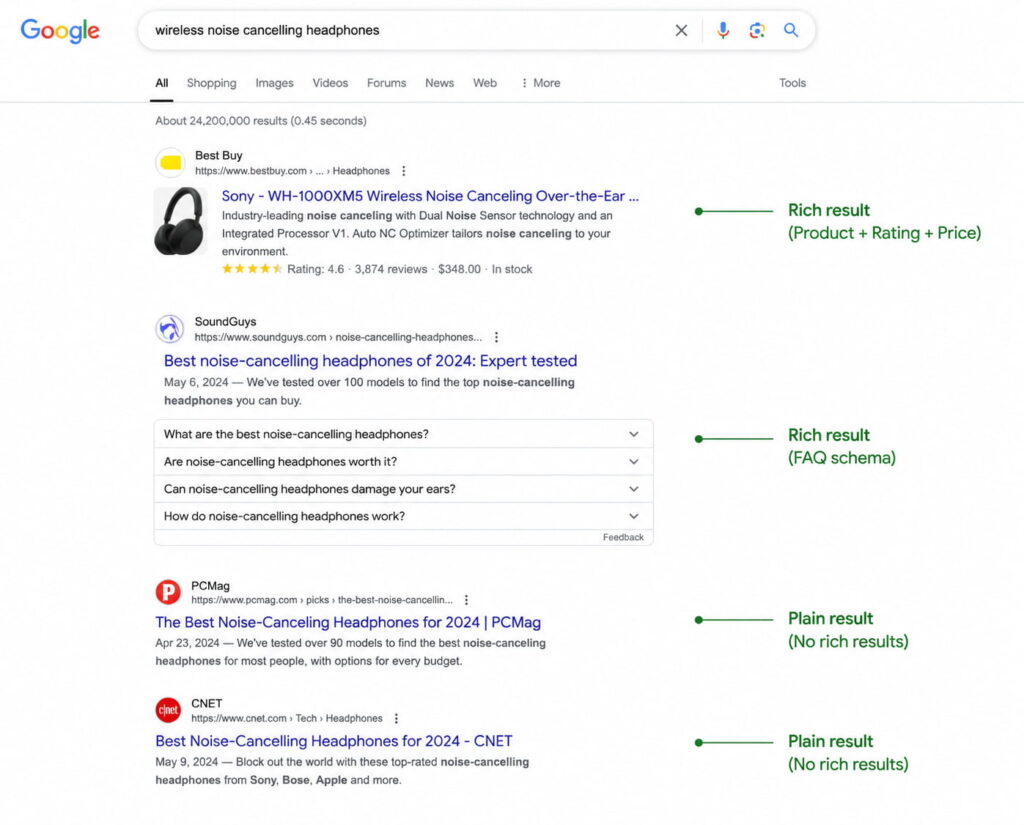
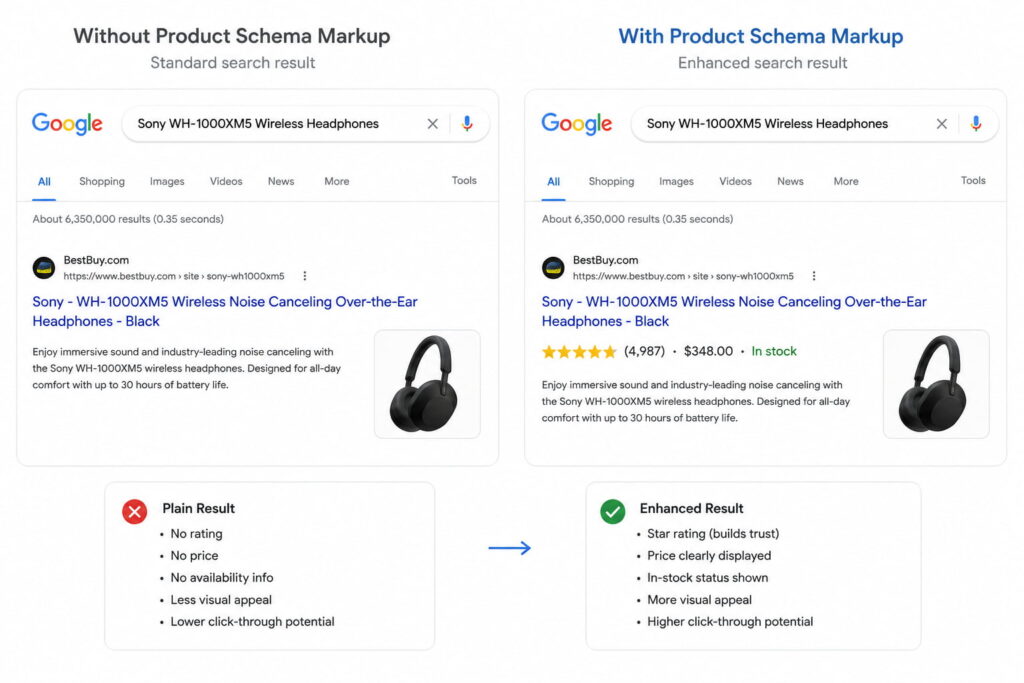
It makes you eligible for rich results. Star ratings, FAQ dropdowns, prices, breadcrumbs. These raise click-through rate without your position changing at all. It is the only lever in this guide that improves the outcome without moving the ranking.
It makes you readable to AI search. AI Overviews are no longer an experiment. How often they appear depends heavily on who is measuring: Conductor’s analysis of 21.9 million searches in the first quarter of 2026 put the figure at 25.11%, while trackers measuring through March 2026 report figures approaching 48%. The spread comes from different keyword sets, different geographies, different sample sizes and different measurement dates, which is why a single number is the wrong thing to quote.
What is consistent is the gap between being cited and not being cited. Seer Interactive, analyzing 5.47 million queries across 53 brands between January 2025 and February 2026, found that pages cited in AI Overviews get 120% more clicks per impression than uncited pages, though they still trail pages on AI-free result pages by 38%.
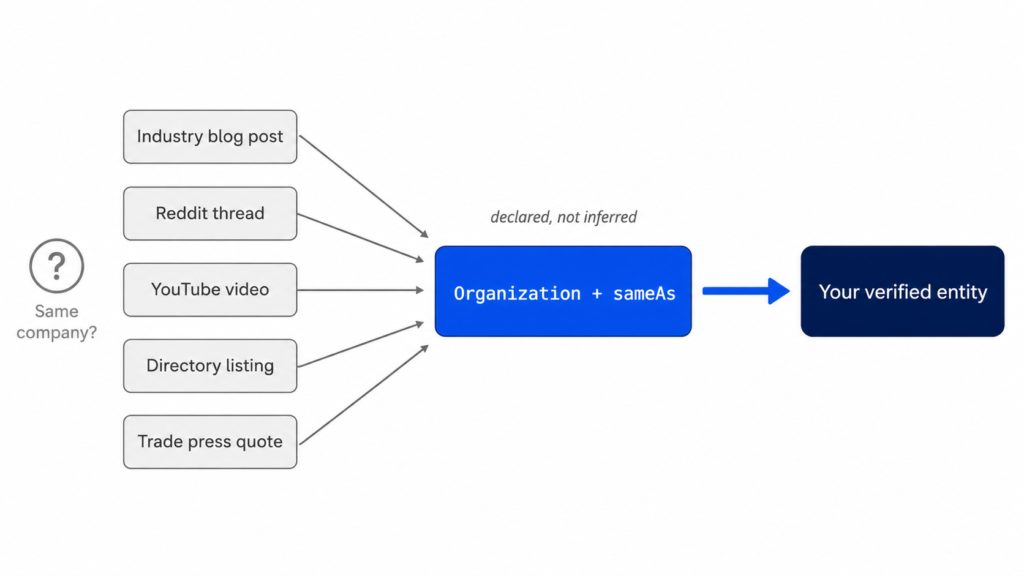
It disambiguates entities. A model needs to know that “Apple” in your article is the company, that the review belongs to the product and not the page, that the author is a person with credentials. Structured data states all of that explicitly. Explicit is what a model needs before it cites you with confidence instead of citing someone clearer.
Now the caveat, because it gets overstated constantly. Schema markup is not a direct ranking factor. It improves understanding, it makes you eligible for rich results, and it makes you easier to cite. It does not move you up the page by itself.
For agencies, schema has one property nothing else in this guide has: it standardizes at the template level. One correct Article template applies to every post on a site, and the same template can be replicated across a portfolio without rewriting a word of content. Our full guide on how to use schema markup goes deeper on each type.
The top two results are not ranked higher because of schema. They just take up more of the screen and answer more of the question before the click.
Which Schema Types to Add First
This list is ordered by return, not alphabetically. If you only get to three, do the first three.
Schema type
When it applies
What it can earn you
Organization (or LocalBusiness)
On the home page of any site. Use LocalBusiness instead if there is a physical address
Knowledge panel eligibility, logo and contact details in search
Article
On every blog post
News and article carousel eligibility, author attribution
Product + Review
On every ecommerce product page
Price, availability and star ratings in the result
FAQPage
On pages with real questions visible to the reader
Expandable questions under your result
BreadcrumbList
Site-wide
A readable navigation path instead of a raw URL
Person
On author pages and bios
Reinforces the authorship signals covered in step 11
One rule overrides all of them: only mark up what is visibly on the page. Google’s structured data guidelines are direct about it. Do not add structured data about information that is not visible to the user, even if the information is accurate, and violating a quality guideline can stop syntactically correct markup from producing a rich result or get it flagged as spam.
The temptation is real, especially with reviews and prices. It is also the fastest way to lose rich result eligibility across an entire site.
How to Add Schema in WordPress Without Code
Three routes, with honest trade-offs.
Route
Control
Effort per page
Scales to a whole site?
Hand-written JSON-LD in the <head>
Total
High
No
Your SEO plugin’s schema module
Low
Low
Partially
A dedicated schema plugin
High
Low
Yes
Route 1, writing JSON-LD by hand. Total control, and a good exercise once. It also breaks the moment someone edits a template, and nobody maintains it across 400 product pages.
Route 2, your SEO plugin’s schema module. Yoast, Rank Math and AIOSEO all ship one. They cover the basics competently. They also support a small number of types and give you limited control over individual fields, which is fine until you need Product with variations or a Person with real credentials.
Route 3, a dedicated schema plugin. This is the category built for the problem: generate JSON-LD per template, inject it automatically, manage it in one place.
Schemafy is one option in that category. It includes a visual builder covering 16 Schema.org types, AI-assisted generation that runs on your own ChatGPT or Claude API key, a manual JSON editor for the edge cases the builder does not cover, a site scan that finds pages missing schema with filters by content type and bulk selection, automatic handling of WooCommerce products, and a single screen where every applied schema can be reviewed and edited.
The objection worth answering directly, because it stops most agencies from testing anything: you do not have to uninstall your current SEO plugin. Compatibility is declared with Yoast SEO, Rank Math, AIOSEO and WooCommerce, which means this is a change you can trial on one client site without renegotiating the stack on the other eleven.
A site scan turns “we should probably add schema” into a list of 412 specific pages and the type each one needs.
Validate Before You Move On
Run every template through two validators: Google’s Rich Results Test and the Schema Markup Validator at schema.org. Templates, not pages. If the Article template is correct, all 300 posts using it are correct.
Then wait. One to two weeks after deployment, open the Enhancements section in Search Console. That is when Google has reprocessed enough of the site to tell you what it actually accepted, which is not always what the validator approved.
Fix errors before warnings. Errors block the rich result entirely. Warnings are recommended fields you left empty, which reduce your chances without eliminating them.
The most common failure has nothing to do with syntax. It is duplicate schema: your SEO plugin and your schema plugin both emit an Article block for the same page, and Google gets two conflicting descriptions of one thing. If a validator shows two of the same type on one URL, turn one of them off before you debug anything else.
Step 9: Win Featured Snippets and AI Overview Citations
Featured snippets look like luck. They are closer to a format-matching exercise, and the process repeats across every client you have.
Find the queries where you already rank in the top 10 but do not hold the snippet. Search Console gives you the ranking queries; a manual search tells you who holds position zero.
Read the format of the current snippet. Paragraph, numbered list, bulleted list, or table. Google has already decided which one this query deserves.
Rebuild that format on your page. A question-form heading, followed immediately by a direct answer of 40 to 60 words, with no warm-up sentence in between.
The reason this works is worth understanding. Google is not picking the best page on the internet and quoting it. It is extracting the block that best fits a format it already chose. Your job is to hand it a clean block.
The same discipline carries over to AI systems, with one addition. Models pull self-contained passages, so every section needs to survive being read in isolation. That means explicit definitions instead of pronouns pointing back three paragraphs, numbers with a citable source attached, and consistent structure from section to section. The generative engine optimization playbook goes deeper on this.
Set expectations honestly while you do it. Being cited in an AI Overview does not return the traffic a blue link produced in 2019. The Seer data above shows the gap between cited and uncited pages is large, and the gap between AI result pages and clean ones is also real. Both facts are true at once.
Step 10: Build SEO Authority Off Your Site
Off-site authority is where most SEO advice gets either vague or reckless. Five approaches are worth your time, and none of them involve buying anything.
Convert unlinked mentions. Someone already wrote your brand name without linking it. A polite email asking for the link converts a meaningful share of these, and it is the cheapest link acquisition that exists.
Be a source. Journalist request platforms like Qwoted and Help a B2B Writer send daily queries from writers who need an expert quote. Answering three a week from a real practitioner earns placements that no outreach sequence will.
Build linkable assets. Original data, a calculator, a template someone can use. People link to things they need again.
Guest post on real sites in your niche. Real means it has its own audience and would exist without link sellers.
Fix your directory profiles. For local clients, identical name, address and phone across every listing. Inconsistent NAP is a slow leak that nobody notices until a rankings audit.
One update for 2026: in AI search, unlinked brand mentions carry weight as an entity signal, not just linked ones. That changes the economics of outreach. Getting mentioned is cheaper than getting linked, and it is no longer worth nothing. The full breakdown of off-page signals that count covers how to measure them.
And the obvious warning, stated once: buying links violates Google’s spam policies. The upside is temporary and the downside lands on a client’s site, not yours.
Step 11: Make E-E-A-T Visible on the Page
Start with the correction, because this is one of the most misrepresented ideas in SEO. E-E-A-T, meaning Experience, Expertise, Authoritativeness and Trust, is not a measurable ranking factor. It is the framework human evaluators at Google apply when they rate results, and those ratings do not directly affect rankings. They feed back into algorithm refinement.
That does not make it useless. It makes it indirect. The signals that communicate E-E-A-T are entirely implementable, and most sites implement none of them:
Real author bios with actual credentials and a link to a full profile page
Person markup on those profiles, and a populated author field inside the Article schema
Publish and last-updated dates visible to readers, not buried in metadata
Sources cited with working links, especially for any claim carrying a number
Complete About and Contact pages with a real address and a real human named
A published editorial policy explaining who reviews content and how
Look at that list again and notice how much of it is structured data. An author bio at the bottom of a post is a paragraph. The same bio with Person markup and an author reference from the article is a machine-readable statement that this named individual with these credentials wrote this specific piece.
That is the link between this step and step 8. Trust signals a human can read are worth something. Trust signals a machine can parse are worth something in a search result.
Step 12: Track the SEO Metrics That Tell You It’s Working
Different signals move at different speeds, so checking everything weekly just generates noise.
Cadence
What to check
Where
Weekly
Impressions, clicks, and queries you have not ranked for before
Search Console, Performance report
Monthly
Average position for target pages, CTR per page, indexed page count, conversions from organic
Search Console plus your analytics
Quarterly
Referring domains, authority metrics, visibility in AI answers
A third-party SEO tool
Two vanity metrics deserve to be ignored. The rank of one isolated keyword moves daily for reasons unrelated to your work. Total traffic without segmentation can rise on a viral piece that converts nobody while your commercial pages quietly decline.
Then close the loop. Open the spreadsheet row from step 1 and compare the same five numbers. Not similar numbers, the same ones, measured the same way, over the same 28-day window. That comparison is the only thing that tells you whether the last three months of work did anything, and it is why the baseline came first.
For tracking visibility inside AI answers specifically, the tooling is still young and uneven. We tested AI SEO tools by use case to sort out which ones measure something real.
The average hides a lot of variance, and the variance is mostly about what you changed.
Technical fixes and title tag rewrites can show up within days or weeks, because Google only has to recrawl a page it already trusts. New content takes months, because it has to be discovered, indexed, evaluated and then compared against pages that have been there for years. Authority takes longest of all, because it depends on other people acting.
One number is worth showing any client who thinks six months is slow. Ahrefs studied 2 million random keywords and found the average top 10 page was over 2 years old, with pages in position one averaging close to 3 years. Only 5.7% of the pages studied reached the top 10 within a year for even one keyword. A later Ahrefs update put the figures higher still.
You are not competing against pages published last month. You are competing against pages that have been compounding since 2022. WebFX reaches similar conclusions on typical timelines.
Your Website SEO Improvement Checklist
Copy this into a project ticket and work down it.
This week
Record the five baseline numbers in a dated spreadsheet row
Review indexed versus not indexed in Search Console and open every exclusion reason
Submit the XML sitemap
Confirm robots.txt is not blocking CSS or JavaScript
Add self-referencing canonical tags
Run PageSpeed Insights on mobile
This month
Check search intent against the live SERP for every target page
Rewrite title tags and meta descriptions
Fix broken heading hierarchy
Clean up slugs and add real alt text
Add internal links pointing at the pages you want to lift
Add schema markup to the home page and every post
This quarter
Refresh the pages ranking in positions 8 to 20
Consolidate cannibalizing URLs and 301 the losers
Publish one new topic cluster
Chase featured snippets on queries where you already rank top 10
Convert unlinked brand mentions and pitch two source requests a week
Make E-E-A-T signals visible: bios, dates, sources, editorial policy
Ongoing
Compare against the baseline monthly
Revalidate schema after every template change
Update figures and screenshots before they go stale
Start With the Layer Most Sites Skip
Most sites work through steps 1 to 7 and stop there. The content is good, the technical foundation is clean, and Google and every AI model are still inferring what each page means from raw text.
Structured data is the cheap step that makes everything above it legible. Try the free schema generator on one page to see what valid markup looks like, or install Schemafy to generate, validate and inject JSON-LD across WordPress without writing code.
[CTA_DOWNLOAD]
Frequently Asked Questions About Improving SEO
These answers are marked up with FAQPage schema, which is exactly what step 8 recommends doing on any page with real questions on it.
How can I improve my website’s SEO for free?
Most high-impact SEO work costs nothing. Use Google Search Console to find indexing errors and pages ranking 8–20, rewrite title tags and meta descriptions, fix internal links, refresh outdated content, compress images, and add schema markup with a free generator. Paid tools speed up research, not results.
What is the fastest way to improve SEO?
Updating pages that already rank on page two. Find queries in positions 8–20 in Search Console, improve the matching page’s intent alignment, title tag and depth, then request reindexing. These pages already have authority, so gains often show in weeks instead of months.
How long does it take to improve SEO?
Most sites see measurable movement in three to six months, and six to twelve months in competitive niches. Google states meaningful results typically take four to twelve months. Technical fixes and title tag changes can show within days; new content and authority building take considerably longer.
Does schema markup improve SEO rankings?
Schema markup is not a direct ranking factor. It helps search engines and AI systems understand what your page contains, which makes you eligible for rich results like star ratings, FAQs and breadcrumbs. Those richer listings raise click-through rate and improve your odds of being cited in AI answers.
How often should I update my website for SEO?
Audit technical health monthly, review top-performing content quarterly, and refresh pages with outdated statistics or declining traffic at least once a year. Update only when you’re adding real value. Changing a publish date without changing the content does nothing for rankings.
Can I improve my website’s SEO myself without an agency?
Yes. Steps one through eight of this guide, from the baseline and technical fixes through intent matching, on-page optimization, content refreshes, internal linking and schema markup, are all DIY with free tools. Agencies mainly add speed, link building capacity and strategy at scale, not secret techniques.
Does page speed affect SEO?
Yes, but as a tiebreaker rather than a main driver. Google uses Core Web Vitals as a page experience signal, and slow pages lose visitors before they read anything. Test on mobile with PageSpeed Insights, since Google indexes the mobile version of your site first.
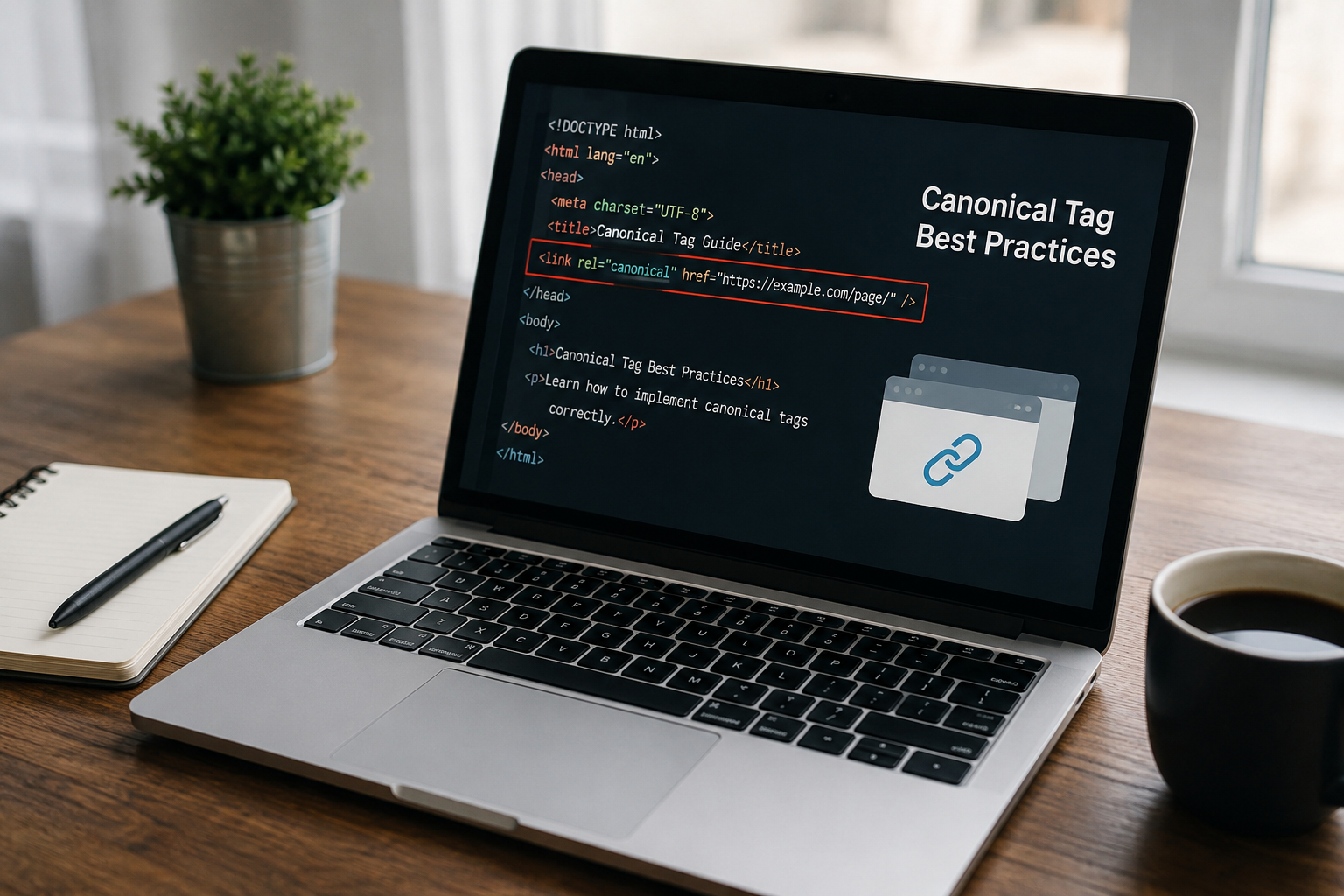
To add a canonical tag in HTML, place a <link rel="canonical"> element inside the <head> of the page, pointing to the absolute, https version of the URL you want indexed. Google only accepts the tag when it sits in the head, and it treats the value as a strong signal, not a command.
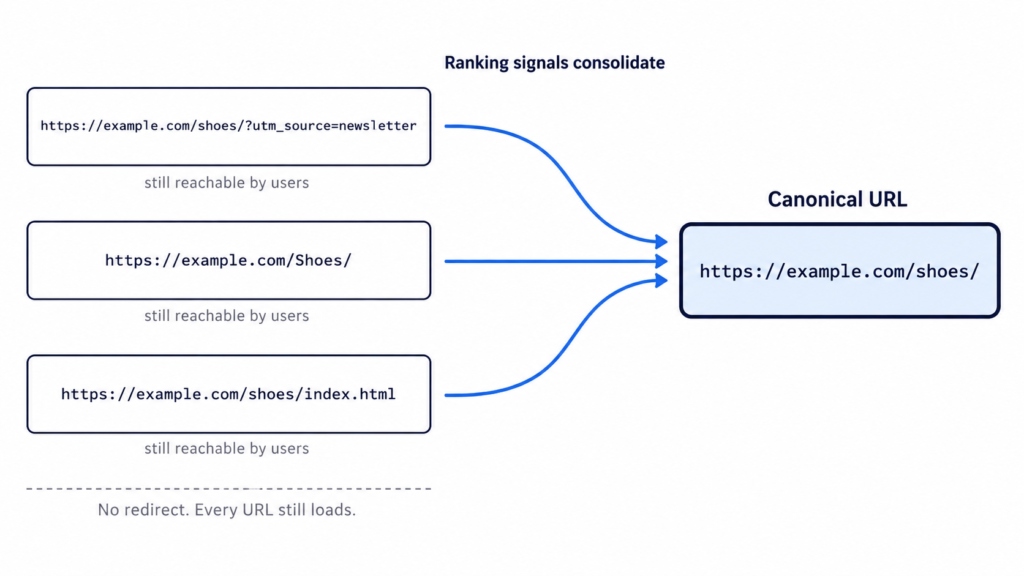
A canonical tag consolidates signals from several duplicate or near-duplicate URLs into one preferred URL. Links, ranking signals and crawl attention get attributed to the version you nominate instead of being split across variants.
The page you didn’t nominate stays reachable. That is the difference between a canonical and a redirect: the user still lands on whatever URL they clicked, and only search engines are told which version to index.
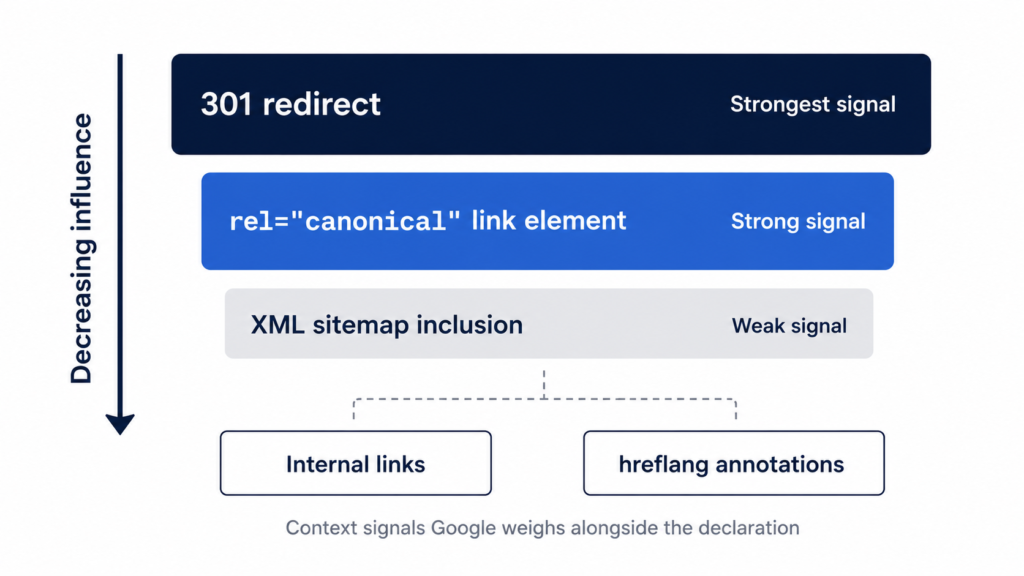
Here is the part most guides skip. Google lists canonicalization methods “in order of how strongly they can influence canonicalization”, and describes rel="canonical" as “a strong signal that the specified URL should become canonical.” A signal, not a directive. Google can and does pick a different URL.
In %currentyear% that choice reaches further than the blue links, because the canonical URL is also the one generative engines tend to cite when they summarize your content.
Three URLs, one set of consolidated signals, and every page still loads for the user.
Canonical tag syntax
The element has three moving parts. Knowing which is which is the difference between pasting a line of code and debugging it six months later when Search Console reports something odd.
<head>
  <!-- element: link, not meta -->
  <link
    rel="canonical"
    href="https://example.com/page/" />
  <!-- rel = the relation type, href = the preferred URL, absolute -->
</head>
Anatomy of the tag
Three parts, and one naming correction worth making up front.
<link> is a link element, not a meta tag. People call it “the canonical meta tag” constantly and it is wrong. It belongs to the same family as your stylesheet and favicon declarations.
rel="canonical" is the relation type, a registered link relation defined in RFC 6596. That is the spec Google points to.
href="…" is the preferred URL, and the only part you change per page.
<link> is a void element, so it takes no closing tag. Writing /> is valid but an XHTML habit rather than a requirement. Both forms parse identically in HTML5.
Absolute vs. relative URLs
Always use an absolute URL with the protocol included.
Then the detail almost nobody covers: the URL has to match the indexable version exactly. Same protocol, same www decision, same trailing slash, same casing as the slug you actually publish.
<!-- ✅ absolute, https, matches the indexable version exactly -->
<link rel="canonical" href="https://example.com/blog/canonical-tags/" />
<!-- ❌ relative: resolves against page context, breaks on staging -->
<link rel="canonical" href="/blog/canonical-tags/" />
A canonical pointing at a URL that redirects or returns a 404 cancels the signal entirely.
How to add a canonical tag in HTML: step by step
Four steps. The fourth one decides whether the first three matter.
Step 1: Choose the canonical version of the URL
Pick the version with the most internal and external links, the most complete content, and existing rankings. When two candidates are close, the one already earning impressions wins.
Get that from data rather than memory. Search Console tells you which URL already receives impressions for the query you care about, and a crawl surfaces the duplicates you forgot existed: parameter variants, uppercase paths, /index.html leftovers, http alongside https, www alongside non-www. It also helps to preview the URL in search results first, since the canonical is the version people actually see.
One default saves you work. Google already prefers HTTPS over HTTP unless something contradicts it: an invalid certificate, insecure dependencies, an HTTPS page redirecting to HTTP, or an HTTPS page canonicalizing to its own HTTP version.
Do not canonicalize toward a page that is substantially different. Google clusters by content similarity, and if the two are not close enough it discards your declaration.
Put it before heavy scripts. A parser that hits malformed markup can close the head early, and everything after that point lands in the body where the tag is worthless.
<!DOCTYPE html>
<html lang="en">
<head>
  <meta charset="utf-8" />
  <title>How to Add a Canonical Tag in HTML</title>
  <meta name="description" content="Where the canonical tag goes and how to verify it." />
  <link rel="canonical" href="https://example.com/blog/canonical-tags/" />
  <!-- heavy scripts go after this line -->
</head>
<body>
  <!-- page content -->
</body>
</html>
On a templated site, the file to edit is the head partial or the layout, not each page. That is also where the rest of your head tags live, so one edit covers every URL the template renders.
Step 3: Add a self-referencing canonical to every indexable page
Best practice is that every indexable page points at itself, not just the ones you know are duplicated. Google lists it as a “do”: include a rel="canonical" link on the canonical page itself.
It protects against duplicates you never created on purpose: tracking parameters, uppercase variants, and scrapers republishing your HTML.
<!-- on https://example.com/blog/canonical-tags/ -->
<link rel="canonical" href="https://example.com/blog/canonical-tags/" />

<!-- the ?utm_source=newsletter variant inherits the exact same value -->
On a templated or programmatic site this is one template change, not a per-URL task. The same partial that emits the tag for 12 pages emits it for 12,000.
Google does not require it. Yoast and effectively every other SEO framework recommend it anyway, and it costs nothing.
Step 4: Keep every other signal pointing the same way
The canonical is one vote among several. Google weighs redirects, internal links, sitemap entries and hreflang alongside it, and it publishes the ranking: redirects are the strongest signal, rel="canonical" is a strong signal, sitemap inclusion is a weak one. The documentation also notes that “these methods can stack and thus become more effective when combined.”
So align them:
Link internally only to the canonical URL.
Include only canonical URLs in the XML sitemap.
Make sure redirects do not land on a different version.
Point hreflang annotations at canonical URLs.
Google is blunt about the failure mode: “Don’t specify different URLs as canonical for the same page using different canonicalization techniques.” When these signals contradict each other, Google resolves the conflict itself and Search Console reports it as “Duplicate, Google chose different canonical than user.”
Google publishes the order. A redirect outranks the tag, and the tag outranks the sitemap.
Canonical tag examples for 5 common scenarios
Five setups that cover most of what you will hit, each with the code and the one rule that matters.
Self-referencing canonical
The default state for every indexable page: the page nominates itself.
<!-- on https://example.com/blog/canonical-tags/ -->
<link rel="canonical" href="https://example.com/blog/canonical-tags/" />
Watch the homepage. The canonical is https://example.com/, not https://example.com/index.html, even when the file behind it literally is index.html.
Duplicate and near-duplicate pages
One product reachable from two category paths, both nominating the clean URL.
<!-- on /shoes/running/model-x/ and on /sale/model-x/ -->
<link rel="canonical" href="https://example.com/products/model-x/" />
Never chain canonicals. If A points to B and B points to C, Google has to guess what you meant.
URLs with tracking or filter parameters
Parameter variants that produce the same page: ?utm_source=, ?sort=price, ?color=blue.
<!-- on /shoes/?sort=price and /shoes/?utm_source=newsletter -->
<link rel="canonical" href="https://example.com/shoes/" />
The nuance almost nobody gives you: if a filtered view has genuinely different content and its own search intent, like “blue running shoes,” it may deserve to be indexable and self-canonical rather than folded into the parent.
Paginated series
Do not canonicalize pages 2, 3 and 4 back to page 1. It is the most repeated mistake in the industry and it tells Google to drop everything past the first page.
<!-- on https://example.com/blog/page/3/ -->
<link rel="canonical" href="https://example.com/blog/page/3/" />
So noindex on the republisher’s copy is the primary play, and the canonical below is the fallback for partners who will not set one.
<!-- on the republished copy, pointing back to your original -->
<link rel="canonical" href="https://example.com/blog/original-post/" />
Plenty of platforms let the republisher do neither. When that happens, an attributed link back to the original is the only lever you have left.
Other ways to declare a canonical URL
The HTML <link> is what Google prefers. Three alternatives exist for pages where you cannot touch the head, and the strength ordering from Step 4 is why they are not equivalent.
HTTP header (for PDFs and non-HTML files)
PDFs, images and other files have no <head>, so the header is the only route.
HTTP/1.1 200 OK
Link: <https://example.com/downloads/white-paper.pdf>; rel="canonical"
The syntax comes from RFC 5988, and Google supports the method for web search results only. Do not assume it carries over to Images or Discover.
Two configurations, in standard Apache and Nginx syntax rather than anything Google publishes:
<Files "white-paper.pdf">
  Header set Link '<https://example.com/downloads/white-paper.pdf>; rel="canonical"'
</Files>
location = /downloads/white-paper.pdf {
  add_header Link '<https://example.com/downloads/white-paper.pdf>; rel="canonical"';
}
XML sitemap
Google classifies sitemap inclusion as “a weak signal that helps the URLs that are included in a sitemap become canonical.” Weak, but it stacks with the <link> rather than competing with it.
Only canonical URLs belong in the sitemap. Listing both the parameter variant and the clean URL is a contradiction Google has to resolve on your behalf.
Server-rendered HTML first, in other words. Either the tag lives in the source and JavaScript leaves it alone, or it is absent from the source and JavaScript owns it. Never both.
The anti-pattern is injecting a canonical over a page that already ships a different one. Two canonicals and Google ignores both. This shows up constantly in React and Next.js builds where the framework emits one value and a client-side SEO component overwrites it with another.
How to add canonical tags in WordPress, Shopify and Webflow
Google notes that on a CMS you may not be able to edit the HTML directly, and should look for the search engine settings screen instead. What that screen is depends on the platform.
WordPress
Yoast, Rank Math and AIOSEO all insert a self-referencing canonical automatically. If you run one of them, the tag already exists. Check before adding anything.
To override it manually, open the post editor, scroll to the SEO panel, and use the Advanced tab. The canonical URL field is there.
On a custom theme with no SEO plugin, hook into wp_head from functions.php and echo the element. That puts it in the same place as adding a meta description in WordPress, which keeps the template as the single source of truth.
Editing the theme header file directly works, but survives exactly until the next theme update. Use a child theme or the hook.
Shopify
Canonicals are generated automatically, and for most stores the defaults are correct.
The known gap is the duplicate created when a product is reachable at /collections/x/products/y as well as /products/y. Fixing it means editing the canonical logic in theme.liquid, and several popular themes already handle the case.
Webflow, Wix and Squarespace
All three expose a canonical field in the per-page SEO settings, so no code is involved. Left blank, it falls back to a self-referencing canonical.
The rule that applies to all of them: if the CMS already injects a canonical, do not add a second one by hand. Two canonicals on one page invalidate each other.
How to verify your canonical tag is working
Four methods, in order of what they can actually prove.
Method
What it checks
What it can’t tell you
View Source
The raw HTML Google receives
Whether JavaScript changes it later
DevTools → Elements
The rendered DOM
Whether Google agrees with the value
URL Inspection (Search Console)
User-declared vs Google-selected canonical
Anything about URLs Google hasn’t processed
Site crawler
Every canonical on the site at once
What Google actually selected
Start with View Source and Ctrl+F for “canonical”. That is the raw HTML Google reads before rendering. Then check the same value in DevTools. If the two disagree, JavaScript is rewriting the tag and you know where the problem lives.
Neither one tells you whether Google listened. For that you need URL Inspection in Search Console, which reports User-declared canonical and Google-selected canonical as two lines. Read them together:
The two match. You are done.
They differ. Google overrode your declaration, so the problem is in the surrounding signals rather than the tag.
Search Console has no data for the URL. It has not been processed yet.
Above a few dozen URLs, run a site crawler and audit every canonical at once. It is the only way to catch chains and mismatches at scale, and the same pass surfaces missing structured data, which is where a plugin like Schemafy enters the picture.
One expectation to set first. After you fix the underlying issue, Google can hold the pages in the same duplicate cluster for up to two weeks. Do not touch the tag again on day three.
[SCREENSHOT: The URL Inspection panel in Google Search Console showing the Page indexing section, with “User-declared canonical” and “Google-selected canonical” listing two different URLs.]
The only screen that tells you whether Google honored the tag or overruled it.
8 canonical tag mistakes that make Google ignore your tag
Two or more canonicals on one page. Google ignores all of them and selects its own. Usually a plugin injects one and someone adds a second by hand.
Canonical outside the <head>. Anywhere in the body and it does nothing.
Relative URL, or the wrong domain or protocol. Relative paths resolve against page context, which breaks the moment a staging environment gets crawled.
Canonical pointing at a redirect, a 404 or a noindex page. You have declared a preference for a URL that cannot be indexed.
Combining noindex with rel="canonical". Contradictory instructions. Google does not recommend noindex “to prevent selection of a canonical page within a single site, because it will completely block the page from Search.”
Canonical chains. A points to B, B points to C. Point everything at the final URL instead.
Canonicalizing pages that are not genuinely equivalent. Google clusters by content similarity, and discards declarations between pages that are too different.
A canonical that contradicts the sitemap and the internal links. Three signals pointing three directions, and Google breaks the tie without you.
Canonical vs. 301 redirect vs. noindex vs. hreflang
Four instructions, four different outcomes for the person clicking the link.
Method
Use it when
What happens to the user
rel="canonical"
Duplicates that must stay reachable
Sees the page they clicked
301 redirect
The old URL should stop existing
Gets sent to the new URL
noindex
Page is useful to users, not to Search
Sees the page, no signals consolidated
hreflang
Same content, different language or region
Sees their language version
The decision comes down to one question: should the duplicate still be reachable? If yes, canonical. If the old URL has no reason to exist, redirect it and stop maintaining two things.
noindex is for pages that earn their keep with users and have no business ranking: thank-you pages, logins, account screens, filtered views with no search demand. It removes the page from Search without consolidating anything, so it is not a canonicalization tool.
Hreflang is a different job entirely. Every language version stays indexed, and the annotations tell Google which one to serve where. One trap worth knowing: a rel="canonical" annotation carrying hreflang, lang, media or type attributes is not used for canonicalization at all. Google ignores those, so keep the two declarations as separate elements.
Get your canonical setup audited
If Search Console keeps selecting a different canonical after you have fixed the tag, stop editing the tag. The problem is almost always the internal linking architecture pointing somewhere your declaration does not.
The practical next step is to audit what the rest of the <head> is telling Google on those same pages, since a canonical that disagrees with your schema markup and sitemap is a signal problem, not a syntax problem. Schemafy is one of the WordPress plugins that shows your schema markup and meta tags in one place.
[CTA_DOWNLOAD]
Frequently asked questions
Where do you put the canonical tag in HTML?
The canonical tag goes inside the <head> section of your HTML document, alongside your title and meta description. Placing it in the <body> makes Google ignore it entirely. On templated sites, add it to the head partial or layout file so it renders on every page.
Does every page need a canonical tag?
Google doesn’t require one, but adding a self-referencing canonical to every indexable page is standard best practice. It protects against duplicates created by tracking parameters, uppercase variants and scrapers. Pages you don’t want indexed should use noindex instead, never both on the same URL.
Can a page have two canonical tags?
No. If Google finds multiple rel="canonical" declarations on one page, it ignores all of them and picks a canonical URL itself. This usually happens when a plugin injects one automatically and someone adds a second manually, or when JavaScript overwrites the server-rendered tag.
Is a canonical tag the same as a 301 redirect?
No. A 301 redirect sends both users and crawlers to a different URL, so the original page becomes inaccessible. A canonical tag only tells search engines which version to index, and users can still reach every version. Use a redirect when the duplicate should no longer exist.
Why is Google ignoring my canonical tag?
Google treats canonical tags as strong signals, not directives, and weighs internal links, redirects and sitemap entries too. If those signals point elsewhere, Google overrides your tag and Search Console reports “Duplicate, Google chose different canonical than user.” Align every signal on one URL to fix it.
Can a canonical tag hurt SEO?
Yes, if it’s misconfigured. Canonicalizing pages that aren’t genuine duplicates, pointing to a 404 or redirected URL, or chaining canonicals can deindex pages that should rank. Audit canonicals whenever traffic drops on a section of the site after a template change.
Most WordPress SEO advice assumes that if you fix everything you control, you win. Clean titles, valid schema, fast pages, sensible internal links. Do that across every client site and the rankings follow.
They often don’t.
Google and the AI systems now summarizing it both weigh something you cannot edit: what the rest of the web says about you.
That is off-page SEO. This guide covers what it actually is, how it differs from on-page and technical work, the six signals that carry weight, the step almost every guide skips, which techniques still work, what gets you penalized, how to measure it, and a 90-day plan you can start this week.
What is off-page SEO?
Off-page SEO is everything that happens away from your own website to build its authority, trust, and relevance: backlinks, brand mentions, reviews, business listings, authorship signals, and community presence. It is the half of SEO you influence but do not directly control.
The most common mistake is treating off-page SEO and link building as the same thing. Links are one signal out of six. Reviews on third-party platforms, mentions with no link attached, directory listings, who your authors are, and where your brand shows up in video and community discussion all feed the same judgment.
You will also see this called off-site SEO or off-page optimization. Same discipline, different labels.
The idea goes back to PageRank, which treated a link as a third-party recommendation rather than a claim the site made about itself. Everything in this article is a descendant of that one assumption: a recommendation you did not write about yourself is worth more than one you did. Semrush’s guide frames it the same way.
Off-page SEO vs. on-page SEO vs. technical SEO
On-page SEO
Technical SEO
Off-page SEO
What it is
What you say about yourself
How easily you can be read
What others say about you
What you control
Full
Full
Influence only
Examples
Content, headings, internal links, meta tags, structured data
Crawlability, speed, indexation, canonicals
Backlinks, brand mentions, reviews, listings, video
How fast it moves
Days to weeks
Days to weeks
Months
That is the whole distinction in one line: on-page is what you say about yourself, technical is how easily you can be read, off-page is what others say about you.
The three do not compete. Off-page authority with no on-page substance sends visitors to a page that cannot convert them, and it gives search engines nothing specific to rank. On-page work with no off-page signal produces a well-built page that nobody vouches for.
Most operators overweight the first two because they are the ones you can finish. You can fix common SEO issues, rewrite URL slugs, and check every title in a SERP preview in an afternoon. Off-page never gets finished, which is exactly why it accumulates into a moat.
Why off-page SEO matters more in AI search
The stakes changed. Off-page signals no longer just decide where you sit in a list of ten blue links. They decide whether ChatGPT, AI Mode, and AI Overviews name you at all. In a generated answer there is no position four to fall back to. You are mentioned or you are absent.
Ahrefs studied 75,000 brands to see which factors track with being mentioned in AI answers. Across ChatGPT, AI Mode, and AI Overviews, YouTube mentions showed the strongest correlation at roughly 0.737, higher than any other factor tested. Branded web mentions came next at 0.66 to 0.71.
Two findings cut against common advice. In the cross-platform study, number of site pages correlated at about 0.194, which is close to nothing. Publishing more is not the lever. And Seer Interactive found the same pattern independently, with domain rating at 0.25 and backlinks at 0.10, so this is not one vendor’s dataset talking.
Now the part most articles quoting these numbers leave out.
Ahrefs published a caveat with both studies. “The usual disclaimer applies: correlation isn’t causation,” the cross-platform study says. “We’ve spotted patterns between search metrics and AI mentions, but that doesn’t mean improving these metrics will automatically boost your AI visibility.” That matters here more than usual, because a brand that is genuinely well known accumulates YouTube mentions, web mentions, and branded searches at the same time, without any of them causing the others. The methodology tightens the point: both studies filtered for domains with a domain rating above 40 and a top keyword doing at least 800 searches a month, which selects for brands that already arrived.
Read the numbers as a description of what visible brands look like, not as a set of dials. The practical takeaway survives either way, and it lines up with what generative engine optimization work has been pointing at: presence across other people’s properties is what these systems draw on.
Caption: Mention-based signals outrank link-based signals in every dataset published so far. Ahrefs cautions that these are correlations, not levers.
The 6 off-page SEO signals that actually count
These are ordered by how much difference they make for a site that still has to earn its authority, not one that already has a household name. A recognized brand can skip most of this list. Everyone else cannot.
1. Backlinks
A backlink is a link from another website to yours. It is the oldest off-page signal and still the most discussed, though no longer the most powerful.
Relevance and quality beat volume, and it is not close. A handful of links from sites that cover your subject will do more than hundreds from unrelated directories. What separates a good link from a bad one:
Topical relevance. The linking page covers a subject adjacent to yours.
Domain authority. The linking site has earned its own credibility.
Real traffic. The specific page linking to you has readers, not just a URL.
Natural anchor text. The visible link text reads like something a human wrote.
Editorial placement. The link sits inside the body content, not in a footer or a sidebar widget.
That fourth point has data behind it now, and it inverts what classic link building teaches. Branded anchors, meaning link text containing your brand name, correlated with AI visibility at 0.628 in AI Mode and 0.527 in AI Overviews. Number of backlinks sat at 0.218. Being linked to by name outperforms being linked to with a keyword you picked.
Three ways to earn links without a PR team: publish original data other people need to cite, offer expert commentary to trade publications covering your sector, and get listed on the resource pages your industry associations already maintain. All three are slow. None of them require buying anything.
2. Brand mentions (linked and unlinked)
A mention with no link still counts. If three industry blogs, a Reddit thread, and a YouTube video name your company, search engines and language models learn two things: that you exist, and what category you belong to.
Unlinked mentions, text written about your brand on other websites, have very little impact on SEO, but a much bigger impact on GEO. LLMs derive their understanding of a brand’s authority from words on the page, from the prevalence of particular words, the co-occurrence of different terms and topics, and the context in which those words are used.
Ryan Law, Director of Content Marketing, Ahrefs
The volume effect is steep. Brands in the top quartile for web mentions averaged 169 AI Overview mentions. The quartile below averaged 14.
The actionable version is unlinked mention reclamation: search for places your brand name appears without a link, then ask for one. Half the time the writer simply forgot. One caveat that trips people up: content on your own domain is not a third-party mention. Writing about yourself does not count, no matter how much of it you publish.
There is a gap in that logic worth noticing. For any of this to accrue to you, something has to establish that the “Acme Analytics” in that Reddit thread is your Acme Analytics. Hold that thought.
3. Reviews and third-party reputation
For most sites in this audience, this means product and vendor reviews on platforms you do not own: software comparison sites, marketplaces, and the community forums where your buyers actually ask each other for recommendations.
Four things matter. Volume, because one review is an anecdote. Average rating, obviously. Velocity, because a steady trickle reads as a real business while forty reviews in one month and silence afterward reads as a campaign. And your response pattern, because how a company answers criticism is itself evidence about the company.
Do not buy reviews. Beyond the platform bans, it fails at the thing you wanted, since purchased reviews cluster in ways that are straightforward to detect.
Google’s search quality guidance points its evaluators toward independent sources when assessing a site rather than the site’s own claims about itself. That is the entire logic of off-page SEO stated as policy.
One distinction to keep straight, because it causes real confusion: reviews collected on your own site are first-party content, and they are what Review and AggregateRating structured data describe. Reputation on third-party platforms is off-page. Marking up the first does not improve the second. They are separate jobs.
4. Business listings and citations
If any of your sites represent a business with a physical location, this one applies. If not, skip it.
A citation is a mention of a business name, address, and phone number in a directory or listing. Consistency matters more than volume here. Mismatched address data across directories is one of the most common problems in this category and one of the easiest to fix, because it is clerical work rather than strategy.
LocalBusiness structured data on the site itself helps tie those external listings back to the business as a single entity, which is the same mechanism the next section covers in full.
5. Author and publisher signals
This is the signal with the most upside and the least attention among operators running many sites.
Search systems increasingly ask who wrote a page, what else that person has published, and whether the organization publishing it is a recognizable entity. Most WordPress installations answer all three questions with “admin.”
The fix is unglamorous and takes an afternoon per site. Give every author a real bio that links to verifiable profiles elsewhere. Keep author identity consistent across the sites where the same person writes, so the profiles resolve to one human rather than five strangers with the same name. Retire the generic account.
Person and Organization structured data are the machine-readable version of the same claim. The bio tells a reader who wrote this. The schema tells a parser the same thing without requiring it to guess.
6. Video, community, and social distribution
Likes are not a ranking factor. Distribution is where the value sits, because distribution produces links, mentions, and branded searches, and those are signals. This is the same distinction that applies to meta descriptions, which are not a ranking factor but still shape whether anyone clicks.
YouTube earns its own paragraph given that 0.737 figure. The likely mechanism is not mysterious. YouTube is among the most-cited domains in AI answers, and its transcripts are also training data. The New York Times reported that OpenAI trained GPT-4 on over a million hours of YouTube transcription. Video sits on both the input and the output side of these systems.
For a small team the realistic version is one video a quarter answering the question you already field on every sales call. Reddit and niche podcasts work on the same principle. Forum spam does not, and it is the fastest way to get a brand name associated with the wrong thing.
The entity layer: connecting off-page signals to your site
Every guide on this subject stops at the moment someone mentions you. That is where the interesting problem starts.
When a search engine or a language model encounters “Acme Analytics” on a site you do not control, it has to decide what that string refers to. Your company. A different company with a similar name. A product. A person. Nothing at all. Until that question resolves, the mention is text on someone else’s page, not authority attached to your business.
Organization structured data with the sameAs property is how you answer it explicitly. sameAs takes a list of URLs that unambiguously identify the same entity: your LinkedIn page, your Crunchbase profile, your Wikipedia entry if you have one, your directory listings, your YouTube channel. You are stating, in a format a parser reads without inference, that all of these are one thing and that thing is you. Person schema does the same job on author pages.
Now the honest part, because this section is where an article like this usually oversells.
Structured data does not create authority. It is not a ranking factor on its own, and adding sameAs to a site nobody mentions accomplishes nothing. What it does is make authority that already exists legible and attributable. It converts something a search engine would otherwise have to infer into something it can read. When the inference is easy anyway, because you are Nike, this changes little. When your brand name is generic, shared, or new, the inference is harder and the declaration does more of the work.
The practical audit takes twenty minutes per site. Does the site declare Organization schema at all? Is sameAs populated with real profiles, or empty? Do author pages carry Person schema, or just a WordPress bio field? For most client sites the answer to all three is no, which makes this the rare off-page problem you can fix without asking anyone else for anything.
Generating those types across a lot of pages without hand-writing JSON-LD is what schema generators are for, Schemafy among them, though a single Organization block on one site is quick enough to write by hand in any schema markup generator. If the underlying concepts are unfamiliar, our guide to structured data covers the vocabulary.
Caption: Off-page work creates the mentions. The entity layer helps make them attributable to you rather than to a similarly named stranger.
Off-page SEO techniques that still work
Ordered by how quickly they pay back for a small team, not by how impressive they sound in a strategy deck.
Unlinked mention reclamation. Search your brand name, filter out your own domain, and email the writers who mentioned you without linking. Highest hit rate of anything on this list.
Broken link building. Find dead links on resource pages in your niche, then offer your equivalent page as the replacement. You are solving the site owner’s problem, which is why it converts.
Expert commentary for trade press. Answer journalist queries in your actual area of competence. One placement in a publication your buyers read beats ten guest posts nobody reads.
Original research or proprietary data. Publish a number nobody else has. This is the only technique that earns links passively for years, and the only one that reliably takes a month of work before it returns anything.
Resource page placement. Industry associations, alumni directories, and tool roundups maintain link lists. Ask to be on them.
Genuine guest contributions. Write for publications you would read. Skip anything that advertises guest post slots, since that market is exactly what Google’s spam policies target.
Creator collaborations. Partner with people who already have your audience’s attention. Their mention carries weight your own channel cannot manufacture.
Real community participation. Answer questions in the forums and subreddits where your buyers gather, under a real name, without pitching. Slowest of all of these, and the hardest to fake.
The first two pay within weeks because they exploit work already done. The last two compound over quarters. Original research sits in between: expensive up front, then it keeps earning. Choosing which of these to run is a search intent question as much as a link-building one, since the goal is to be present where your buyers already look.
5 off-page SEO tactics that can get you penalized
Buying links or using PBNs. Google’s spam policies name link schemes directly. Private blog networks get deindexed in batches, and you lose every link at once.
Low-quality directory farms. Hundreds of listings on sites that exist only to list. They pass no value and establish a pattern that is easy to classify.
Repeated exact-match anchor text. Two hundred links all reading “best project management software” is not a distribution any natural link profile produces. The pattern is the problem, not any single link.
Buying reviews. Platform bans aside, review velocity and language similarity are both measurable, and the penalty tends to arrive as removal of every review you paid for.
Duplicate or inconsistent listings. Less dramatic than the others, but conflicting business data creates ambiguity that suppresses you quietly rather than penalizing you loudly.
One nuance that gets lost: sponsorship is not a violation. Paying for a link becomes a problem when it passes ranking signals without disclosure, which is what rel="sponsored" and rel="nofollow" exist to prevent. Tag the link and the sponsorship is fine.
If you inherit a site with a questionable link history, audit the profile before assuming the worst. The disavow file exists for cases with a manual action or a clear pattern of purchased links, and Google has been consistent that most sites never need it. Reach for it last, not first.
How to measure off-page SEO
Six metrics, each with an obvious home:
Referring domains and month-over-month growth (Ahrefs, Semrush). Growth rate tells you more than the absolute count.
Link profile quality. Relevance and authority of what is pointing at you, not volume.
Branded search volume. The cleanest available proxy for whether awareness is actually rising.
Review volume and average rating across the third-party platforms your buyers check.
Referral traffic (GA4). Which mentions send actual humans.
Mention frequency in AI answers. How often you appear when a model answers a question in your category.
That last one needs a different mental model. In AI search, “position” barely means anything, since a generated answer is not a ranked list you can climb. You measure frequency of mention and share of voice against competitors instead. Answer engine optimization tools and AI visibility trackers exist specifically for this, and the category is young enough that methodologies still differ meaningfully between vendors.
Monthly is the right cadence. Off-page metrics move slowly enough that weekly checks produce noise and anxiety in equal measure. For a client report, three numbers carry the story: referring domains, branded search volume, and AI mention frequency.
A 90-day off-page SEO plan
Days 1 to 30: fix what you own. Roughly 8 to 12 hours. Audit the current backlink profile so you know what you inherited. Fix the entity layer: add Organization schema with a populated sameAs, give author pages Person schema, retire the “admin” byline. Correct listing inconsistencies where a site has a physical location. If you want to hand-write the markup, a JSON-LD editor is enough for a single organization block.
Days 31 to 60: claim what already exists. Roughly 12 to 16 hours. Run unlinked mention reclamation across every mention you can find. Publish one piece of original data, even a small one, drawn from something you already measure. Join one community where your buyers actually spend time and participate without pitching.
Days 61 to 90: build new surface. Roughly 10 to 14 hours. Pitch expert commentary to two trade publications. Record one video answering your most common sales question. Measure against the baseline from day one and adjust.
A word on expectations. Off-page work depends on other publishers, other platforms, and other people choosing to act, which is why it moves slower than anything you can change on your own server. It also compounds, because each mention makes the next one marginally easier to earn. This is a plan of actions, not a promise about a date.
Off-page SEO is a trust problem, not a link problem
On-page SEO is what you claim about yourself. Off-page SEO is what can be verified about you by someone else. The entity layer is what lets a machine match one to the other, and it is the piece almost nobody works on because it does not look like off-page work at all.
Before spending a quarter earning mentions, check whether your sites can even receive credit for them. If a search engine cannot tell that the company being discussed on someone else’s page is the company that owns your domain, those mentions are harder to credit to you.
[CTA_DOWNLOAD]
Off-page SEO FAQs
Is off-page SEO the same as link building?
No. Link building is one part of off-page SEO, but not all of it. Off-page SEO also includes brand mentions, customer reviews, business listings, digital PR, author signals, video presence, and community participation. Anything that builds your reputation outside your own website counts as off-page work.
How long does off-page SEO take to work?
Most sites see measurable movement in three to six months. Off-page SEO depends on other websites, publishers, and customers acting, so it moves slower than on-page changes. Entity-layer fixes are the exception, since those are on your own site and can be shipped in a day.
Can I do off-page SEO myself?
Yes, especially the fundamentals. One person can audit a backlink profile, add Organization and Person schema, fix listing inconsistencies, and set up a mention-reclamation process in about ten to twelve hours. Sustained digital PR and link acquisition are the parts that are hard without dedicated time.
Do social media signals affect SEO?
Not directly. Likes and shares are not ranking factors. But social distribution creates the things that are: links, brand mentions, and branded searches. A post that reaches the right audience can earn coverage, which is what search engines and AI systems actually weigh.
What is the difference between on-page and off-page SEO?
On-page SEO covers what you control on your own site: content, headings, internal links, and page structure. Off-page SEO covers signals that live elsewhere: backlinks, reviews, listings, and brand mentions. On-page is what you claim about yourself; off-page is what others confirm.
How many backlinks do I need to rank?
There is no fixed number. It depends on how competitive your keyword is and how strong your competitors’ link profiles are. For most keywords, a handful of genuinely relevant links plus consistent brand mentions outperforms a large volume of low-quality links.
Does off-page SEO help with ChatGPT and AI Overviews?
Yes, and it may matter more there than in classic search. Ahrefs studied 75,000 brands and found YouTube mentions correlated with AI visibility at roughly 0.737, ahead of every other factor. In a separate study of AI Overviews, backlinks trailed brand mentions 0.218 to 0.664. Ahrefs notes correlation is not causation.
{
  "@context": "https://schema.org",
  "@type": "FAQPage",
  "mainEntity": [
    {
      "@type": "Question",
      "name": "Is off-page SEO the same as link building?",
      "acceptedAnswer": {
        "@type": "Answer",
        "text": "No. Link building is one part of off-page SEO, but not all of it. Off-page SEO also includes brand mentions, customer reviews, business listings, digital PR, author signals, video presence, and community participation. Anything that builds your reputation outside your own website counts as off-page work."
      }
    },
    {
      "@type": "Question",
      "name": "How long does off-page SEO take to work?",
      "acceptedAnswer": {
        "@type": "Answer",
        "text": "Most sites see measurable movement in three to six months. Off-page SEO depends on other websites, publishers, and customers acting, so it moves slower than on-page changes. Entity-layer fixes are the exception, since those are on your own site and can be shipped in a day."
      }
    },
    {
      "@type": "Question",
      "name": "Can I do off-page SEO myself?",
      "acceptedAnswer": {
        "@type": "Answer",
        "text": "Yes, especially the fundamentals. One person can audit a backlink profile, add Organization and Person schema, fix listing inconsistencies, and set up a mention-reclamation process in about ten to twelve hours. Sustained digital PR and link acquisition are the parts that are hard without dedicated time."
      }
    },
    {
      "@type": "Question",
      "name": "Do social media signals affect SEO?",
      "acceptedAnswer": {
        "@type": "Answer",
        "text": "Not directly. Likes and shares are not ranking factors. But social distribution creates the things that are: links, brand mentions, and branded searches. A post that reaches the right audience can earn coverage, which is what search engines and AI systems actually weigh."
      }
    },
    {
      "@type": "Question",
      "name": "What is the difference between on-page and off-page SEO?",
      "acceptedAnswer": {
        "@type": "Answer",
        "text": "On-page SEO covers what you control on your own site: content, headings, internal links, and page structure. Off-page SEO covers signals that live elsewhere: backlinks, reviews, listings, and brand mentions. On-page is what you claim about yourself; off-page is what others confirm."
      }
    },
    {
      "@type": "Question",
      "name": "How many backlinks do I need to rank?",
      "acceptedAnswer": {
        "@type": "Answer",
        "text": "There is no fixed number. It depends on how competitive your keyword is and how strong your competitors' link profiles are. For most keywords, a handful of genuinely relevant links plus consistent brand mentions outperforms a large volume of low-quality links."
      }
    },
    {
      "@type": "Question",
      "name": "Does off-page SEO help with ChatGPT and AI Overviews?",
      "acceptedAnswer": {
        "@type": "Answer",
        "text": "Yes, and it may matter more there than in classic search. Ahrefs studied 75,000 brands and found YouTube mentions correlated with AI visibility at roughly 0.737, ahead of every other factor. In a separate study of AI Overviews, backlinks trailed brand mentions 0.218 to 0.664. Ahrefs notes correlation is not causation."
      }
    }
  ]
}
Two people type “jaguar” into Google. One wants the animal. The other wants the car. Same word, two completely different goals. Search intent is the real question hiding behind the words, and it decides which page Google shows each of them. Get it right and you rank. Get it wrong and no amount of keywords will save you.
Search intent (also called user intent or keyword intent) is the goal behind a search query: the reason someone typed it and what they hope to find. Every Google search is a question or a task, and search engines rank the pages that best satisfy that goal, not just the pages that repeat the keyword.
You will also see it called audience intent. The label matters less than the idea: behind every query is a person trying to do something specific.
Think of it like ordering at a restaurant. The words on the menu matter, but the waiter’s job is to bring what you actually want. Google is the waiter. If you ask for a definition and it hands you a checkout page, it did its job badly, and it knows it.
Why search intent matters for SEO
Google ranks pages on relevance, and relevance is mostly about intent. When your content matches the goal behind a query, it earns the spot. When it doesn’t, it slips, no matter how strong the page looks on paper.
Google says this plainly. “Does your content match intent?” sits among the self-assessment questions in its helpful content guidance for creators. Matching intent against the query is treated as a central ranking criterion in most practitioner guides too, including Ahrefs’ search intent guide.
Miss the intent and you can have the best backlinks in your niche and still not rank. Visitors land, see the wrong kind of page, and bounce straight back to Google. That pattern, called pogo-sticking, tells search engines your page did not answer the question.
There is a business side too. The right intent brings traffic that converts instead of traffic that just visits. A page that meets the searcher where they are is how you turn rankings into leads and increase organic traffic that actually pays off.
The 4 types of search intent
Almost every query falls into one of four types: informational, navigational, commercial, and transactional. Learn to spot them and you can predict what Google wants to show before you write a single word. Most keywords sit cleanly in one type. A few are mixed, which we will cover later.
Informational intent
The user wants to learn something or answer a question. These queries lean on modifiers like “how,” “what,” “why,” “when,” “guide,” and “tutorial.” Examples: “what is search intent” (yes, the query that brought you here) or “how does SEO work.”
Informational is the biggest bucket by far. It is widely cited that around 70% of all searches are informational (Neil Patel), though more recent analysis puts the figure closer to 57% of Google queries (Ahrefs). Either way, it dominates. The ideal format is a blog post or a guide.
Navigational intent
The user is looking for a specific site or page. They already know where they want to go and use search as a shortcut. Examples: “yoast login,” “semrush pricing,” or any brand name typed straight into the search bar.
One practical note: it rarely makes sense to chase navigational queries for a brand you do not own. Someone searching “semrush login” wants Semrush, not your comparison post.
Commercial intent
The user is researching before a purchase. They want to buy eventually, but they are still comparing options. Modifiers give it away: “best,” “top,” “review,” “vs,” and “comparison.” Examples: “best SEO tools” or “Semrush vs Ahrefs.”
These searchers reward pages that help them decide. The ideal format is a comparison, a listicle, or an in-depth review that lays out real trade-offs instead of a sales pitch.
Transactional intent
The user is ready to act, usually to buy or sign up. The query signals a decision already made. Modifiers include “buy,” “price,” “cheap,” “discount,” “coupon,” and “near me.” Examples: “buy SEO software” or “SEO agency near me.”
Serve these searchers a product page, a service page, or a focused landing page. A long explainer here just gets in the way of the thing they came to do.
Search intent examples (keyword by keyword)
Intent is easier to see with real keywords. Each one below belongs to a type, and that type dictates the page format Google rewards. If your page format does not match the right-hand column, you will struggle to rank no matter how good the writing is.
Keyword
Search intent
Page type Google rewards
what is search intent
Informational
Guide / blog post
how to add schema markup
Informational
Tutorial / how-to
meta description length
Informational
Guide with a quick answer
yoast login
Navigational
Specific site page
schemafy blog
Navigational
Brand page
best seo plugins for wordpress
Commercial
Listicle / comparison
semrush vs ahrefs
Commercial
Head-to-head comparison
buy seo software
Transactional
Product / pricing page
seo agency near me
Transactional
Local service / landing page
wordpress hosting coupon
Transactional
Deals / pricing page
Read the table top to bottom and the pattern is clear: the words tell you the goal, and the goal tells you the page.
How to identify the search intent behind a keyword
You do not have to guess. The SERP is the source of truth, because Google has already classified the intent for you and ranked the results that prove it. Here are three ways to read it, from most reliable to least.
Analyze the SERP
Type the keyword into Google and look at what dominates the first page. This is the most direct signal you have, because Google has already done the classification work (Search Engine Land). If the top 10 are guides and blog posts, the intent is informational. If they are product and pricing pages, it is transactional. If comparison articles rank, it is commercial.
SERP features are signals too. People Also Ask boxes and featured snippets point to informational intent. Shopping carousels point to transactional. A local pack means Google reads a “near me” goal even if you did not type those words.
Google’s own SERP is the clearest intent signal: guide-style results and a People Also Ask box mark this as an informational query.
Read the modifiers in the query
The extra words around your main keyword reveal the likely intent before you even open Google. Use this as a quick first read, then confirm with the SERP.
Modifier
Likely intent
how, what, why, guide, tutorial
Informational
best, top, review, vs, comparison
Commercial
buy, price, cheap, coupon, discount, near me
Transactional
brand name, login
Navigational
One rule keeps you honest: SERP evidence overrides the modifier (Ahrefs). If the words say one thing but the ranking pages say another, believe the pages.
Use a keyword tool’s intent labels
Tools like Ahrefs and Semrush now tag intent for you automatically, which is handy when you are sorting hundreds of keywords at once. The same is true of newer AI SEO tools that add intent scoring. Treat these labels as a starting point, not a verdict. A tool guesses from patterns; the live SERP shows what Google actually decided. Always validate against the real results.
How to optimize your content for search intent
Once you know the intent, three moves align your page with it. None of them require a rewrite from scratch.
Match the content type and format
Give the searcher the format their intent expects. A guide for informational queries. A comparison for commercial ones. A product or landing page for transactional ones. The single most common mistake in SEO is publishing a blog post for a transactional keyword, then wondering why a page full of product results outranks it. The content type has to match before anything else you do matters.
Cover the whole topic (content depth)
Answer the main question, then answer the questions around it. People Also Ask boxes are a free checklist of the subtopics Google associates with your query, so mine them and cover what is missing. Keep your headings clear and scannable so a reader can confirm in seconds that your page solves their search. Depth is not word count. It is coverage of what the searcher actually needs.
Align title tags and meta descriptions
Your title tag and meta description are the first intent check a searcher runs, right there in the results. They should reflect the goal and promise the outcome, which lifts click-through rate and reinforces relevance. It also helps to see how the snippet looks before you publish. A no-code plugin like Schemafy lets you edit the meta title and description and preview your snippet the way Google shows it, so you can match the wording to intent without touching code. If you are unsure how much these tags move the needle, here is the reality on meta descriptions and CTR and how to add a meta description in WordPress.
Search intent in the age of AI Overviews and AEO
Search intent is shifting under our feet. More and more informational queries now get answered inside the SERP itself through AI Overviews, so a growing share of searches end without a click. The old goal, rank first, is no longer the whole game.
The new goal is to be the source the AI cites. That means writing answer-first: lead with a direct answer, back it with concrete data, and name your entities clearly so a language model can lift and attribute your point. Structured data helps here, which is why schema markup is becoming table stakes for AI search.
Intent itself is expanding. SE Ranking now lists a sixth type, generative AI intent: queries where the user expects a synthesized answer from an AI engine rather than a list of links (SE Ranking). Optimizing for it has its own name, Answer Engine Optimization, and it overlaps heavily with generative engine optimization. The core skill has not changed. You still start by understanding what the searcher wants. You just have one more surface to satisfy.
Informational intent increasingly resolves inside the SERP: an AI Overview answers the query before the user reaches a single organic link.
Common search intent mistakes to avoid
Most intent problems come down to the same handful of errors:
Forcing transactional keywords into blog posts. If Google ranks product pages, an article will not win the spot.
Ignoring the SERP and guessing. Your assumption about intent loses to the pages already ranking. Check first.
Mixing multiple intents on one page. Trying to inform and sell in the same breath usually does neither well.
Publishing thin content for informational keywords. Informational SERPs reward depth, and a 300-word skim gets buried.
Not updating when the SERP shifts intent. Intent changes over time. A keyword that was informational last year may be commercial now, so re-check your winners.
Get help matching your content to search intent
Aligning your title tags and meta descriptions with intent is where a lot of pages quietly win or lose their click-through. It is a small edit with an outsized effect on how well your snippet matches what the searcher wants.
If you would rather not hand-code any of it, a no-code plugin like Schemafy lets you rewrite meta titles and descriptions and preview the snippet the way Google displays it, so you can tune the wording to intent in a few minutes.
Frequently asked questions
What are the 4 types of search intent?
The four types of search intent are informational (learning something), navigational (finding a specific site), commercial (researching before a purchase), and transactional (ready to buy or act). Each maps to a different content format, so matching the right type is key to ranking.
How do I find the search intent of a keyword?
The most reliable way is to type the keyword into Google and study the top results. If they are guides, the intent is informational; if they are product pages or listicles, it is transactional or commercial. Query modifiers and keyword-tool intent labels help confirm.
What is the most common type of search intent?
Informational intent is the most common, accounting for roughly 70% of all searches. These users want to learn or answer a question, using modifiers like “what,” “how,” and “why.” That is why guides and blog posts dominate informational SERPs.
Can one keyword have multiple search intents?
Yes. Some keywords are ambiguous and show mixed results in the SERP, part informational, part commercial. Google hedges by ranking a blend of formats. In those cases, review the SERP and match the dominant intent while covering secondary angles.
Final thoughts
Search intent, not the keyword itself, is what decides whether you rank. The page that best satisfies the goal behind the query wins, and everything else you do in SEO is downstream of that one match. Backlinks, word count, and clever titles only pay off once the intent is right.
So before you write your next piece, open Google, read the SERP for your target keyword, and commit to a single intent type. Match the format, cover the topic, and align your title and meta description to what the searcher actually wants. Then re-check that same SERP in a few months, because intent shifts over time, and the page that keeps matching it is the page that keeps ranking.
Think of structured data like labels on a shipping container. A machine reads the label and knows what is inside without opening the box. It does the same for your web pages: it tells search engines what your content means, not just what it says.
The term also describes database data, but this guide covers structured data for SEO. Done right, your pages become eligible for rich results, higher click-through, and AI-search citations across every client site you run.
Structured data is a standardized format for labeling the content on a web page so search engines can understand what it means, not just what it says. It uses a shared vocabulary called Schema.org to describe entities like a product, an article, or a business, and it lives in the page’s code where machines read it, invisible to visitors.
That shared vocabulary is the important part. Schema.org gives every entity type an agreed set of properties, so a search engine reading Product knows to look for a name, a price, and a rating in the same place every time.
Back to the shipping analogy. The label does not change what is in the box, it just makes the contents readable without unpacking. On one site, that is a nice-to-have. Across 10 or more client sites, it is the difference between listings that qualify to look better in search and listings that stay plain.
Structured data vs. schema markup vs. rich results
These three terms get blurred constantly, often in the same sentence. Keeping them straight saves you from promising a client something search engines never guaranteed.
Structured data is the concept: labeling content in a machine-readable format. Schema markup is the implementation, the actual code you add using the Schema.org vocabulary. Rich results are the output, the enhanced listing Google may show once it reads valid markup. All schema markup is structured data, but not all structured data is schema markup.
Term
What it is
Example
Structured data
The concept of labeling content so machines understand it
Any machine-readable data format, including database tables
Schema markup
The implementation using the Schema.org vocabulary
A Product JSON-LD block on a product page
Rich result
The enhanced search listing Google may display
A star rating and price shown under a result
How structured data works
The flow is short. You add the markup to a page. Search engines crawl and parse it. They use it to understand the entities on the page and how those entities relate to each other. Pages that qualify may then earn rich results.
There is a bigger payoff behind that. Google uses structured data it finds on the web to understand the content of a page and to gather information about the world, including the people, books, and companies your markup describes. That information feeds the Knowledge Graph, the map of entities Google fills in as your markup confirms who and what your page is about. If you want the full workflow, see our guide on how to use schema markup.
The three formats: JSON-LD, Microdata, RDFa
Schema.org markup comes in three formats. JSON-LD is a <script> block placed in the head or body, kept separate from the visible HTML. Microdata and RDFa are inline attributes woven directly into your HTML tags.
Each has a trade-off. JSON-LD is clean and easy to edit because it sits apart from your layout. Microdata ties the data to the exact HTML element, which some developers like but makes bulk edits fragile. RDFa is the most flexible for combining vocabularies, and also the most verbose. JSON-LD is by far the most common format today, and you can write or check a block in a JSON-LD editor before it goes live.
Why Google recommends JSON-LD
Google’s position is explicit. It recommends JSON-LD because it is the easiest solution for site owners to implement and maintain at scale, and less prone to user errors.
The reason is the separation. Because the JSON-LD block lives apart from your visible content, changing the page layout does not break the data, and updating the data does not touch the layout. You can inject it through a tag manager or a CMS, which is what makes it maintainable across many sites at once.
Structured data examples (with code)
Here is what schema markup actually looks like. This is a minimal, valid Article block. Every field is labeled in plain English so you can see what it does.
You can build either block by hand, or generate one field by field in a schema markup generator. The property names come straight from Schema.org, and Google documents the requirements for each rich result type in its product structured data docs.
The payoff shows up in the search result. Without markup, a product listing is a title, a URL, and a description. With valid Product markup, Google can add the star rating, the price, and the stock status directly to the listing, which takes up more space and gives shoppers a reason to click before they even land.
Common types of schema markup
Schema.org defines hundreds of types, but a handful cover most of what site owners and stores actually need. Here are the high-value ones, each with the rich result it can earn.
Schema type
What it labels
Rich result it can earn
Article
Blog posts and news content
Article and headline enhancements
Product
E-commerce items for sale
Price, availability, star rating
LocalBusiness
Stores and physical locations
Business info, hours, map details
FAQPage
Question-and-answer blocks
Expandable FAQ under the listing
HowTo
Step-by-step tutorials
Step-by-step rich result
Review / AggregateRating
Ratings and opinions
Star ratings
BreadcrumbList
Site hierarchy and navigation
Breadcrumb trail in the result
Organization
Company or brand identity
Knowledge panel and brand details
Event
Concerts, webinars, meetups
Event date and location card
Recipe
Cooking instructions
Recipe card with photo and time
VideoObject
Video content
Video thumbnail and key moments
Two of these are the easiest wins across a whole site. BreadcrumbList and Organization apply to almost every page, take little effort to set up once, and pay off site-wide. FAQPage markup can surface your questions in the People Also Ask box. If you are rolling schema out across many client sites, starting with the types that apply everywhere gives you the most return per hour.
Why structured data matters for SEO and AI search
Here is the honest version. Structured data is not a direct Google ranking factor. Adding a Product block will not, by itself, move you up the results the way meta descriptions are not a direct ranking factor yet still shape performance.
What it does provide is two things: enhanced listings that earn more clicks, and machine-readable context that helps search engines and AI systems confirm what your page is about. Both are covered below.
Rich results and higher CTR
Rich results are enhanced listings: star ratings, FAQ accordions, prices, breadcrumbs, and recipe cards. They occupy more space in the search results and give people more reasons to click, which lifts click-through rate.
The numbers Google publishes are strong. Rotten Tomatoes added structured data to 100,000 unique pages and measured a 25% higher click-through rate for pages with structured data compared to pages without it. Nestlé found that pages shown as rich results have an 82% higher click-through rate than the same pages without a rich result. Rakuten measured that users spend 1.5 times longer on pages with structured data than on pages without.
One caveat matters. Eligibility is not a guarantee. Valid markup makes a page eligible for a rich result, but Google decides when to show one. You can preview how a listing might look in a SERP preview tool before you publish.
Nestlé found that pages shown as rich results have an 82% higher click-through rate than the same pages without one.
AI Overviews, LLM citations, and entity recognition
This is the part most older guides miss. Structured data helps Google’s Knowledge Graph and AI systems, including AI Overviews and assistants like ChatGPT, Gemini, Perplexity, and Claude, verify entities and surface your content in AI-generated answers.
The mechanism is confirmation, not magic. When your markup states clearly that a page is about a specific product, business, or author, it helps machines confirm what the page is about and how its details relate, which makes your content easier to cite accurately. That is the core idea behind Generative Engine Optimization and answer-engine visibility.
Adding structured data is more approachable than the code makes it look. The process is the same for one page or a thousand:
Pick the schema type that matches the page (Product for a product, Article for a post, LocalBusiness for a location).
Generate the JSON-LD for that type, filling in the real values.
Paste the block into the page or push it through your tag manager.
Validate the markup before it goes live.
Request indexing in Search Console so Google recrawls the page.
You can generate the JSON-LD three ways: by hand, with an online generator, or with a WordPress plugin. Plugins are where non-developers stop worrying about code. Tools like Schemafy include an Auto Schema Generator that scans a site and suggests the right types per page, and an AI Schema Generator that produces the JSON-LD for you, so the markup gets created without hand-writing a line of it.
The step that scales badly is doing this page by page. On a single site it is a Saturday afternoon. Across 10 or more client stores, a per-page approach is why schema projects stall, which is exactly why the at-scale route matters.
How to test and validate your structured data
Two canonical tools cover almost everything. Google’s Rich Results Test tells you whether a page is eligible for a rich result. Schema.org’s Schema Markup Validator checks whether your syntax is correct against the vocabulary.
Understand the difference between the two words they return. “Valid” means the syntax is correct. “Eligible for rich results” means the page also meets Google’s specific requirements for a given rich result type. A page can be perfectly valid and still not be eligible, usually because a required property is missing.
For monitoring at scale, the Enhancements reports in Google Search Console track your markup across the whole site and flag errors by type. That is the report agencies live in, because it catches a broken schema on page 400 that no one would test by hand.
Common structured data mistakes to avoid
Most schema problems come from a short list of avoidable errors:
Marking up content that is not visible on the page. The markup must describe what the visitor actually sees.
Missing or mismatched required properties, so the markup validates loosely but fails eligibility.
Forgetting to update markup when the content changes, so the price or availability in your schema no longer matches the page.
Stacking multiple conflicting types on one page, which confuses parsers about what the page is really about.
That fourth one bites agencies hardest. When you manage many sites, stale markup piles up quietly. Build the habit of revalidating after any content change, and the problem never compounds.
Get rich-result-ready schema without the code
For teams that do not want to hand-write and validate JSON-LD across a whole site, a WordPress schema plugin can generate and maintain valid, rich-result-ready structured data automatically. That is the practical route when you are keeping schema correct across 10 or more client stores at once, without turning anyone on the team into a JSON-LD engineer.
Caption: Schemafy scans a site and suggests the right schema type per page, so structured data gets applied across many products without hand-coding.
Frequently asked questions
What is structured data in SEO?
In SEO, structured data is code (usually JSON-LD using the Schema.org vocabulary) added to a page so search engines understand its content and context. It does not directly boost rankings, but it makes pages eligible for rich results and helps them appear in AI-generated answers.
What is an example of structured data?
A common example is Product schema, which labels a page’s product name, price, availability, and review rating. When the markup is valid, Google can show those details, like a star rating and price, directly in the search result, making the listing more prominent and clickable.
What’s the difference between structured data and schema markup?
Structured data is the general concept of labeling content in a machine-readable format. Schema markup is the specific implementation that uses the Schema.org vocabulary. In short: all schema markup is structured data, but not all structured data uses Schema.org.
Does structured data help rankings?
Structured data is not a direct Google ranking factor. It can help indirectly by earning rich results that raise click-through rates, and by helping search engines and AI systems confirm what your page is about, which improves visibility in rich results and AI Overviews.
What is JSON-LD?
JSON-LD (JavaScript Object Notation for Linked Data) is a lightweight code format for adding structured data to a web page. It sits in a script block separate from visible content and is Google’s recommended format because it is clean, flexible, and easy to maintain.
How do I check if my structured data is working?
Use Google’s Rich Results Test to see if a page is eligible for rich results, and the Schema.org Markup Validator to check syntax. For ongoing monitoring across your whole site, watch the Enhancements reports in Google Search Console.
Final thoughts
Structured data stopped being a technical problem and became an operational one. On a single site, it is a nice-to-have. Across 10 or more client sites or stores, it decides whether your listings, and your clients’ listings, are eligible to look better in search and get confirmed by the AI systems that now answer questions directly.
Start where the return is highest. Pick one high-value type, apply it, validate it, and watch Search Console for the change. Organization and BreadcrumbList apply to almost every page, take little effort to set up once, and pay off site-wide, which makes them the right first move before you touch anything product-specific.
One of your clients emails: “Why don’t we show up when I ask ChatGPT for a recommendation?” Now multiply that across 10 or more sites you manage. Generative engine optimization (GEO) is the work of getting your content cited inside AI answers from ChatGPT, Gemini, AI Overviews, Perplexity, Copilot, and Claude. It matters because roughly 60% of searches now end without a click to any external site (Semrush, 2025). This guide sorts the tools by job, not by a flat ranking.
In this guide:
[What Are Generative Engine Optimization Tools?](#what-are-generative-engine-optimization-tools)
[How We Categorized the Tools](#how-we-categorized-the-tools)
[Category 1: AI Visibility & Mention Tracking Tools](#category-1-ai-visibility–mention-tracking-tools)
Caption: For an agency, GEO is a portfolio problem: every client site needs to be readable, trackable, and citable by AI engines.
What Are Generative Engine Optimization Tools?
Generative engine optimization tools help your brand get mentioned and cited inside AI-generated answers. They monitor how large language models like ChatGPT, Gemini, and Perplexity reference you, guide content so it is easier to quote, and structure your pages so AI engines can read and trust them.
That covers three distinct jobs. The first is measurement: tracking your share of voice and citations across AI engines and AI Overviews. The second is creation: shaping content so an LLM is more likely to pull it into an answer. The third is the technical layer: the structured data that tells an engine what your page actually says.
Here is the one-line difference between the two disciplines. SEO optimizes for algorithmic page ranking. GEO optimizes for being synthesized into the answer itself. If you want the longer version, we cover it in our primer on generative engine optimization.
How We Categorized the Tools
Most GEO listicles stop at one category: mention trackers. They tell you whether an AI cites you, then rank a dozen of them by price. That leaves out the layer that decides whether an AI can read your content in the first place.
So we split the market into three:
Measure tools track your visibility inside AI answers.
Create tools help you produce content an LLM wants to cite.
Structure tools build the technical layer, the schema markup and structured data AI engines consume.
For an agency running 10 or more client sites, knowing which category your problem lives in is what stops you from paying for the wrong tool.
Category 1: AI Visibility & Mention Tracking Tools
These tools answer one question: is the AI citing me, and for which prompts? They run large sets of prompts across engines and report where your brand shows up, how often, and in what tone.
Caption: AI answer engines cite a handful of sources per response, so tracking whether you are one of them is the core job of Category 1.
Profound
Profound is built for enterprise teams that need real interaction data across the full field of AI engines. It captures how your brand appears across 10 or more engines, including ChatGPT, Claude, Perplexity, Gemini, Copilot, and Google AI Overviews, and was named a Leader in G2’s Winter 2026 AEO category (Profound).
Best for: large in-house teams and enterprises. Key features: cross-engine mention tracking, sentiment, and the specific prompts that trigger your brand. Pricing: custom, enterprise-tier.
SE Ranking
SE Ranking is the most complete pick because it folds AI visibility into a full-stack SEO platform instead of selling it as a standalone. You can map AI citations back to the same keyword rankings and backlinks you already track, which is exactly what an agency wants when it reports to a client.
Best for: teams that want SEO and GEO in one tool. Key features: AI visibility across six engines (AI Overviews, AI Mode, ChatGPT, Gemini, Perplexity), tied to rank tracking and backlinks. Pricing: from $52/mo, with AI tracking included in the Pro plan (around $95/mo).
Semrush AI Toolkit
Semrush tracks brand mentions across ChatGPT, Google AI Mode, AI Overviews, Gemini, and Perplexity, drawing on a database of more than 289 million prompts (Semrush). If your agency already lives inside Semrush, the toolkit slots into a workflow your team knows.
Best for: teams already on Semrush. Key features: mention tracking, share of voice, and sentiment across five engines. Pricing: $99/mo per domain, added on top of a Semrush plan.
Otterly (budget pick)
Otterly.ai is the entry-level option. It tracks citations and URLs across ChatGPT, Gemini, and Perplexity without the depth or price of an enterprise platform, which makes it a clean starting point.
Best for: solopreneurs and small businesses starting out in GEO. Pricing: from $29/mo. This is the budget pick on the list.
Category 2: GEO Content Creation Tools
These tools help you write content an AI is more likely to pull into an answer. They sit closer to your editorial workflow than to your analytics.
Writesonic
Writesonic combines AI-assisted writing, SERP research, and optimization workflows aimed at raising the odds your content gets cited or included in an AI response. For an agency producing volume across many client sites, that consolidation matters.
Best for: content teams working at scale. Pricing: from $16/mo, with team plans starting around $99/mo.
Surfer / MarketMuse
Surfer optimizes content against target keywords, competitors, and brand voice, so a draft ships with the on-page signals already in place. MarketMuse takes the planning angle: it identifies the topic areas where you can realistically build authority. Read together, one tunes the page and the other picks the battles, and both pair well with getting your meta descriptions right.
Best for: on-page optimization (Surfer) and topical authority planning (MarketMuse). Pricing: Surfer from $89/mo; MarketMuse offers a free tier plus custom plans.
Category 3: Structured Data & Technical GEO Tools
Here is the gap the rest of the market skips. Tracking tools tell you whether you appear in AI answers. They do nothing about why you appear, or why you don’t.
LLMs lean on structured data because it lowers the cost of interpreting meaning and reduces the risk of hallucinating what a page is about. Plain prose forces the model to guess. Schema markup hands it the answer in a format built for machines. That is the job of this category, and it is where a WordPress schema plugin like Schemafy operates.
Schemafy
Schemafy is a WordPress plugin that generates and manages the schema markup, the JSON-LD, that AI engines read when they decide what your page is about. Instead of hand-writing markup for hundreds of pages, you scan a site and apply structured data at scale.
Best for: sites that want their content to be readable and citable by AI engines through clean JSON-LD. Key features: schema generation for the types that matter for AI search (Article, Product, FAQPage, Organization, HowTo, LocalBusiness), JSON-LD validation, and coverage across many pages at once.
The workflow is direct. Open Schemafy → Auto Schema Generator, click Scan Site, and filter by post type to find pages missing schema. Then open Schemafy → AI Schema Generator, select a page and a type such as Article or Product, click Generate Schema with AI, and click Save to Website. If you prefer to check the output by hand, you can validate your JSON-LD before it ships. For the wider picture, see our guide on how to use schema markup for SEO and AI search.
Caption: Schemafy generates and validates JSON-LD per page, so structured data ships across a whole site without hand-coding each one.
Why Schema Markup Is the Foundation of GEO
This is not a vendor claim. In April 2025, Google stated that structured data gives an advantage in search results, and in March 2025 Fabrice Canel of Microsoft Bing confirmed that schema markup helps Copilot’s LLMs understand content (Search Engine Land).
The logic is simple. Without schema, an engine infers your page’s meaning from context, and inference is where errors and hallucinations creep in. With schema, you state it outright: this is a product, this is its price, this is the author, this is the FAQ. JSON-LD is the format recommended by Google and defined by Schema.org, which means it is the same language both classic search and AI engines already parse.
That order matters. A tracker that reports you are invisible in AI answers cannot fix the reason you are invisible. The structured layer comes first. Measurement comes after there is something structured to measure.
“Structured data gives an advantage in search results.” Google, April 2025. Microsoft’s Fabrice Canel confirmed the same month that schema helps Copilot’s LLMs understand content.
Free GEO Tools Worth Trying
Before you commit budget, audit where you stand. A few tools cost nothing and give you a baseline:
HubSpot AI Search Grader grades how your brand shows up in AI answers.
Mangools AI Search Grader runs a lightweight visibility check across engines.
A SERP preview tool shows how your title and description render before you publish.
Treat these as your first pass. They tell you whether you have a visibility problem, a content problem, or a structure problem, which points you at the right paid category next.
How to Choose the Right GEO Tool for Your Stack
Match the tool to the bottleneck, not to the hype.
If you already run a full SEO stack and just need to see your AI footprint, add a visibility layer. SE Ranking suits teams that want it inside their existing rank tracking; Semrush suits teams already in that ecosystem.
If your bottleneck is production, and you cannot ship citable content fast enough across client sites, the answer is a creation tool like Writesonic or Surfer.
If you appear rarely or inconsistently in AI answers, the problem is usually upstream: the engine cannot read your pages cleanly. Fix the technical layer with schema first. That same discipline underpins how you increase organic traffic in classic search, so the work pays off twice.
The practical rule: measure, but first make sure there is something structured to measure.
GEO Tools Comparison Table
Tool
Category
Best For
AI Engines Covered
Starting Price
Profound
Tracking
Enterprise teams
10+ (ChatGPT, Claude, Perplexity, Gemini, Copilot, AI Overviews)
Custom
SE Ranking
Tracking + SEO
SEO and GEO in one
6 (AI Overviews, AI Mode, ChatGPT, Gemini, Perplexity)
From $52/mo
Semrush AI Toolkit
Tracking
Teams on Semrush
5 (ChatGPT, AI Mode, AI Overviews, Gemini, Perplexity)
$99/mo per domain
Otterly.ai
Tracking (budget)
Solopreneurs
ChatGPT, Gemini, Perplexity
From $29/mo
Writesonic
Content creation
Content teams at scale
ChatGPT, Perplexity (research)
From $16/mo
Surfer
Content creation
On-page optimization
Content layer
From $89/mo
MarketMuse
Content creation
Topical authority
Content layer
Free tier; custom
Schemafy
Structured data
Citable content via JSON-LD
Engine-agnostic (all read schema)
Freemium
AI Search Grader
Free audit
A first visibility check
ChatGPT and others
Free
Caption: Visibility trackers show the score. The structured data layer is what actually moves it.
Build Your AI Search Foundation with Schemafy
The trackers on this list tell you the score. They cannot change it. Winning share of answer means building the structured data layer that AI engines read and cite, and that is the part Schemafy handles: clean JSON-LD across your pages, generated and validated without hand-coding each one.
If your content is not showing up in AI answers, start where the engines actually read: your structured data. Audit what your pages are missing, generate the schema, and give every AI engine a page it can quote with confidence.
[CTA_DOWNLOAD]
Frequently Asked Questions
What is the best generative engine optimization tool?
There’s no single best GEO tool. It depends on the job. For AI visibility tracking, SE Ranking and Profound lead; for content, Writesonic; for the technical structured-data foundation that makes content citable by AI, Schemafy. Most teams combine one tracker with a schema layer.
Do I need a separate tool for GEO or is SEO enough?
SEO and GEO work together, but SEO tools alone don’t show whether AI engines cite you. GEO tools track brand mentions across ChatGPT, Gemini, and Perplexity, and help structure content so LLMs can trust and quote it. You need both.
Are there free generative engine optimization tools?
Yes. Free GEO tools like AI Search Grader and HubSpot’s AEO Grader evaluate how your brand appears in AI answers, and free schema generators create basic JSON-LD. They’re good for auditing, but paid tools add continuous tracking and scale.
Does schema markup help with generative engine optimization?
Yes. AI engines prioritize structured data because it reduces the work of interpreting meaning and lowers hallucination risk. Google (2025) confirmed structured data gives an advantage, and Microsoft confirmed schema helps Copilot’s LLMs understand content, making pages easier to cite.
How do GEO tools measure AI visibility?
GEO tools run large sets of prompts across AI engines and track whether your brand is mentioned, cited, or linked. They report share of voice, sentiment, and which prompts trigger your brand, some drawing on databases of hundreds of millions of prompts.
Most people hear “generative engine optimization” and assume it’s SEO wearing a new hat. It isn’t, quite. GEO shares its foundations with SEO, but the way you actually earn visibility is different: you’re not fighting for a rank position anymore. You’re trying to get quoted inside an answer the AI writes for the user.
Generative Engine Optimization (GEO) is the practice of shaping your content, entities, and online presence so generative AI engines like ChatGPT, Perplexity, and Google’s AI Overviews cite or mention you when they answer a question. Instead of ranking a list of links, these engines synthesize a single answer from multiple sources, and GEO improves your odds of being one of them.
A generative engine is any search experience that reads across many pages and writes one summarized answer, rather than handing you ten blue links to sort through yourself (Aggarwal et al., 2024). ChatGPT, Perplexity, Google’s AI Overviews, and Gemini all qualify.
GEO is not paying to appear, and it’s not a trick to manipulate the model. It’s the work of making your content the clearest, most citable source on a topic so the engine reaches for you.
Why GEO Matters in 2026
Search stopped being a page of ten links for a large share of users. ChatGPT reached 900 million weekly active users in February 2026 and crossed a billion monthly app users by June, according to TechCrunch. That’s an audience running everyday queries through a generative engine instead of a results page.
It’s happening inside Google too. AI Overviews now appear on roughly 48% of Google searches and reach more than two billion users, per industry tracking of Google’s rollout. Nearly half of the queries you already target are being answered by a synthesized block before anyone scrolls to your result.
Here’s the uncomfortable part for anyone who lives in Search Console. You can rank well and still be absent from the answer the AI writes. If the engine doesn’t cite you, you’re invisible in that channel regardless of your organic position. GEO is how you close that gap.
How Generative Engines Work: Retrieval, Synthesis, Citation
You can’t optimize for a system you don’t understand, so it’s worth seeing the pipeline. Most generative engines answer a query in three moves:
Retrieve: the engine pulls candidate content from the live web, knowledge graphs, and its own index, often through retrieval-augmented generation (iPullRank).
Synthesize: it merges and rewrites information from several pages into one coherent answer. It doesn’t copy and paste. It paraphrases and combines.
Cite: it attaches source links to specific claims in that answer, so the user can trace where a point came from.
Traditional search stops at step one and shows you the retrieved list. Generative engines go all the way to a written answer with a short citation list attached. That last step, citation, is the entire game for content creators, and the next two sections explain what drives it.
Query Fan-Out
Generative engines rarely search for your exact phrase. They break one prompt into several parallel sub-queries, definitions, comparisons, reviews, then run them at once and stitch the results together. A single question like “best schema plugin for WooCommerce” might quietly fan out into “what is product schema,” “WooCommerce schema plugins compared,” and “how to fix rich snippet errors.”
The practical takeaway: cover a topic with breadth, not just your one head keyword. If your page only answers the literal query, it misses the sub-queries where citations are actually won.
That flips a familiar assumption. You don’t need to own position one to be quoted. You need self-contained passages that answer a sub-question cleanly enough to lift straight into the response.
GEO vs SEO: What’s the Difference?
GEO doesn’t replace SEO. It extends it. Most of what makes you rankable, crawlable pages, quality content, real authority, is also what makes you citable, so your existing organic traffic strategies are the foundation, not wasted effort (Semrush).
The difference is what you’re optimizing toward. SEO chases a position in a list of links. GEO chases a mention inside a synthesized answer. The unit of visibility shrinks from the page to the passage.
Dimension
SEO
GEO
Goal
Rank in the list of links
Get cited in the AI’s answer
Unit of visibility
The page or URL
The passage
Primary surface
Google and Bing results pages
ChatGPT, Perplexity, AI Overviews
Success metric
Position, clicks
Mentions, citations, referral traffic
Foundation
On-page, links, technical
Same foundation, plus extractability and entities
Even a classic on-page concern like meta descriptions still matters here, because the same clarity that helps a human skim a snippet helps an engine decide your passage is worth quoting.
GEO vs AEO: Are They the Same Thing?
Not exactly, and the overlap causes most of the confusion. Answer Engine Optimization (AEO) grew up around featured snippets and voice answers, where the goal was to get your content pulled into a direct answer box. GEO is specific to generative engines that write a fresh answer and cite sources (Wikipedia).
Here’s my take: GEO is the generative subset of AEO, and AEO is the wider umbrella. Fighting over the label is a waste of energy, because the tactics overlap heavily. Make content extractable and authoritative and you serve both.
The distinction earns its keep in one place. AEO leans toward short, directly answerable questions. GEO matters most on broad topics where the engine has to choose between competitors while synthesizing, and you want to be the one it picks.
Core GEO Strategies That Actually Work
These tactics aren’t opinion. They come from the first large-scale study of GEO, the Princeton-led paper that introduced the term and tested content changes across a benchmark of thousands of queries.
The headline finding: GEO methods can boost visibility by up to 40% in generative engine responses, and the biggest gains came from adding statistics, citing sources, and including quotations. The study built GEO-bench, a benchmark of diverse user queries across multiple domains, precisely so these effects could be measured rather than guessed.
“GEO can boost visibility by up to 40% in generative engine responses.” Aggarwal et al., KDD 2024
The four strategies below are where that evidence points.
Make Content Machine-Readable and Crawlable
An engine can’t cite what it can’t parse. That means clean HTML, content that isn’t blocked from crawlers, and structured data that labels what each thing on the page actually is, the author, the product, the article type.
Schema markup won’t rank you inside an LLM on its own, but it removes ambiguity: it tells a machine “this is a Product, this is its brand, this is the review score” instead of leaving it to guess. Adding schema markup for AI search is one of the more concrete levers you control. Several WordPress plugins handle this, Yoast, Rank Math, and Schemafy among them, and tools like Schemafy’s Auto Schema Generator and Smart Schema Builder add JSON-LD without you writing it by hand. If you’d rather work outside a plugin, you can generate JSON-LD with a free tool and validate your schema against Google’s spec before publishing.
Add Statistics, Sources, and Expert Quotes
This is where the Princeton data is loudest. Adding statistics, citing external sources, and including expert quotations were the highest-impact changes the study measured, together pushing visibility up to that 40% ceiling.
The reason is mechanical. A concrete, attributable stat gives the engine something it can lift and cite with confidence. “Traffic went up a lot” is unquotable. “Traffic rose 41% after the change, per this source” is exactly the kind of passage that ends up in an answer.
Build Entity-Level Authority and Third-Party Validation
Generative engines lean on entities: recognizable, consistent things like your brand, your authors, and your products. When those entities show up consistently across the web, the model treats you as a known quantity rather than an unfamiliar page.
You build that signal off your own site as much as on it. Third-party mentions, consistent business and author profiles, and a stable presence on high-quality platforms all reinforce that you’re an entity worth citing. It compounds slowly, which is why it’s hard to fake.
A concrete example: say you publish under an author who also has a filled-out profile on LinkedIn, a byline on two industry publications, and an author schema block that ties those identities to the same name and URL. To an engine, that’s three consistent signals pointing at one entity instead of an anonymous string of text. When it weighs whether to trust a claim from your page, that consistency is what separates a citable source from a page it skips.
Structure Content for Synthesis
Write so a passage can be lifted without its surroundings. Clear headings, one idea per section, and answers that stand on their own make it easy for an engine to grab a clean chunk.
Extractable formats help here: short definitions, lists, comparison tables, and FAQs all give the synthesizer a tidy unit to quote. If a human can skim the section and get the answer, so can the machine.
How to Measure GEO Success
There’s no clean “rank position” to watch, which makes measurement the hardest part of GEO right now. Instead of a single number, you’re tracking a few signals: how often engines mention or cite you, your share of voice against competitors in AI answers, and referral traffic arriving from ChatGPT, Perplexity, and similar sources.
Be honest about the state of the tooling. It’s young, it varies by engine, and no single dashboard covers all of them well yet. Treat anything that claims total coverage with suspicion.
A practical baseline costs you nothing. Keep a fixed set of test prompts that matter to your business, run them across the major engines on a regular cadence, and record whether you’re cited and how you’re described versus competitors. It’s manual, but it’s a real signal while the measurement space matures.
Make it concrete. If you sell WooCommerce SEO services, a test prompt might be “what’s the best way to fix WooCommerce product schema.” Run it in ChatGPT, Perplexity, and Google’s AI Overview once a week, and log three things in a spreadsheet: were you cited at all, which competitors were cited instead, and how the engine summarized the topic. After a month you have a trend line, not a guess, and you can see whether the content changes you made actually moved you into the answer.
Getting Started With GEO
You don’t start GEO from scratch. You start from the SEO foundation you already have and extend it, so the crawlable, authoritative pages you’ve built are already doing double duty.
Pick your highest-value pages and make three passes this week: add concrete statistics and cited sources where you’re making claims, break dense sections into self-contained, extractable answers, and confirm the underlying HTML and structured data are clean so an engine can parse you without friction. None of that requires a new content strategy. It requires making your best existing content easier to quote.
If you want a first-week checklist, keep it small enough to actually finish:
Choose the five pages that already earn the most search traffic.
On each, add one attributable statistic and one linked source to your main claim.
Rewrite one buried answer into a short, self-contained paragraph an engine could lift.
Check that each page’s schema validates and nothing is blocking crawlers.
Save three test prompts for those topics so you can measure citations later.
That’s a few hours of work against pages you already own, and it puts the GEO fundamentals in place before you invest in anything more ambitious.
Frequently Asked Questions
Is GEO replacing SEO?
No. GEO extends SEO rather than replacing it. The fundamentals, crawlability, quality content, and real authority, serve both, and most sites will run GEO and SEO together rather than choosing between them.
Who invented the term GEO?
The term was introduced in 2023 by a research team led by Princeton (with collaborators from Georgia Tech and IIT Delhi) in the paper “GEO: Generative Engine Optimization,” later presented at the KDD 2024 conference (Aggarwal et al.).
How long does GEO take to show results?
It varies. Generative engines re-crawl and re-synthesize continuously, so concrete changes like added statistics, citations, and clean schema can surface within weeks, while entity-level authority builds more slowly. No one can promise a fixed timeline.
What tools track GEO performance?
An emerging category of AI-visibility and brand-mention monitoring tools checks whether engines cite you, though the space is new and uneven. Schema and content tools help you prepare pages to be citable, but keeping your content clean is a different job from tracking citations, so expect to combine a few tools rather than rely on one.
Final thoughts
GEO isn’t a magical new channel. It’s SEO extended into a world where engines synthesize an answer and choose a few sources to cite, and the winners are the sites that make themselves the easiest, most credible thing to quote. The Princeton research makes the same point in numbers: the tactics that lift visibility are the ones that make your content concrete and attributable, not a new set of tricks. If your SEO foundation is solid, you’re most of the way there already.
The fastest way in is to take your most important pages and make them genuinely citable this week: concrete stats, clean structure, machine-readable markup. Do that on your best five pages, keep a handful of test prompts to watch, and you’ll have a real read on whether the engines are starting to cite you long before the tooling catches up.
Think of schema markup as labels on your content. A search engine reads the labels before it decides how to show your page: as a plain blue link, or as a richer result with stars, prices, or dates. The hard part isn’t the code. It’s choosing the right labels and adding them without breaking anything. This guide walks the whole process, from picking a type to scaling across an entire site.
What Is Schema Markup?
Schema markup is structured data, a small block of code you add to a page, that tells search engines what the page is about: a product, an article, an event, a business. Search engines read these labels to understand your content and decide whether to show it as a richer, more eye-catching result.
There are two layers to any web page. There’s what your visitors see: the headline, the photo, the price. And there’s what search engines read in the background: the markup that says “this number is a price” and “this date is when the event starts.”
Schema markup is that second layer. It’s built on a shared vocabulary called Schema.org, which is what makes the next section work.
How Does Schema Markup Work?
Schema.org is a shared dictionary. Google, Bing, and other engines all agreed on the same set of terms: Product, Article, LocalBusiness, Event, and hundreds more, so a label means the same thing to every engine that reads it.
You express those terms in a format. JSON-LD (a block of code a search engine reads) is the one Google recommends, because it sits in the page’s code separate from the visible content, which makes it easier to add and maintain. Google has confirmed the markup can live in either the <head> or the <body> of the page (via Google Search Central).
Here’s the flow. A search engine crawls your page, finds the JSON-LD block, parses it, and maps each field to a type it already understands. If the markup is valid and the page qualifies, that page becomes eligible for a rich result, the enhanced listing with extra detail. Note the word eligible: markup earns you a ticket, not a guaranteed seat.
Why Schema Markup Matters for SEO
Let’s be precise, because a lot of guides aren’t: schema markup is not a direct ranking factor. Adding it won’t push you up the results by itself.
What it does is change how your listing looks and how clearly the engine understands you. And that shows up in clicks. One study of more than 4.5 million queries found users click rich results about 58% of the time, versus roughly 41% for plain results (via Lantern Digital).
Rich results: clicked ~58% of the time. Plain results: ~41%.
The case studies Google publishes point the same way. Rotten Tomatoes added structured data across 100,000 pages and measured a 25% higher click-through rate on marked-up pages versus those without; Nestlé reported an 82% higher click-through rate on pages that showed as rich results (via Google Search Central). A schema plugin generates that eligible markup for you, so the win is operational rather than something you hand-code page by page.
Does Schema Markup Help with AI Search and AEO?
AEO, answer engine optimization, is the new worry: will schema get my page into AI Overviews and AI answers? It’s worth answering honestly.
Google’s own position is blunt. It says there is “no special schema.org structured data that you need to add” to appear in its AI features, and no extra technical requirements beyond being indexed and eligible to show in Search (via Google Search Central). Schema is not a hidden door into AI answers.
That doesn’t make it pointless for AI. Structured data still clarifies entities and relationships on a page, what’s a product, who’s the author, how things connect, which supports machine understanding of content you already have. The honest framing: schema makes your page easier for machines to read; it doesn’t guarantee an AI citation.
Tip: Treat schema as machine-readability, not as a guaranteed ticket into AI Overviews. The content still has to earn the citation.
Common Types of Schema Markup
Schema.org defines hundreds of types, but most sites only ever need a handful. The goal is to match the type to what the page actually is. The WordPress schema markup plugin approach covers the common ones (Schemafy supports 17 schema types), so you pick from a list rather than learning the whole vocabulary.
Here are the types most sites reach for, and when each fits.
Schema type
Best for
Article
Blog posts, guides, news, editorial content
Product
Ecommerce product pages with price, availability, reviews
Article schema is for editorial content: blog posts, guides, and news. The fields that matter most are the headline, the author, the publish date, and a representative image. It’s the default for anything that reads like a story or a how-to.
Product Schema
Product schema describes an item for sale: name, price, availability, and rating. On a WooCommerce store, this is what makes your listings eligible for price and stock detail in search, and it feeds the data Google Merchant Center checks. Get the price and availability right and keep them current.
Organization Schema
Organization schema defines your brand as an entity: name, logo, contact details, and links to your official profiles. It usually lives on the homepage or an “about” page and helps search engines connect every other page to a single, clear identity.
Local Business Schema
Local Business schema is for businesses with a physical presence: a shop, a clinic, a restaurant. It carries address, opening hours, geo-coordinates, and service area. If you do client work, this is one of the most common requests you’ll handle, because local results lean on it heavily.
FAQ Schema
FAQ schema marks up genuine question-and-answer pairs. Be realistic about the payoff: in August 2023, Google restricted FAQ rich results to well-known, authoritative government and health sites, and most other sites stopped seeing them (via Google Search Central). The markup can still help machines parse your Q&A, but don’t add it expecting a rich result, and never invent FAQs just to pad the listing.
Review Schema
Review schema covers ratings and aggregate ratings. Stars earn attention: one analysis found review-star results get about 35% higher click-through than plain links (via Search Engine Journal). Google doesn’t let you star-rate your own business, so reserve this for genuinely eligible review content.
Event Schema
Event schema describes something happening at a time and place: a webinar, a conference, a workshop. The core fields are the name, the start date, the location, and whether it’s online or in person. Useful for marketers running live sessions.
How to Choose the Right Schema Markup Type
The rule is simple: match the schema to the page’s primary purpose, not to whatever type sounds impressive. A product page wants Product. A guide wants Article. A storefront’s homepage wants Organization.
When two types could fit, pick the more specific one. Specific beats generic. LocalBusiness tells an engine far more than the broad Organization it descends from. The more precise the type, the more an engine can do with it.
If guessing makes you nervous, you don’t have to. A scanner can read each page and suggest the type for you, which is the no-code shortcut covered further down. Use this table as a starting map.
Page type
Recommended schema
Blog post or guide
Article
Product page
Product
Homepage / brand page
Organization
Store location page
Local Business
Webinar or event page
Event
How to Use Schema Markup on Your Website
The whole job comes down to six repeatable steps. Run them once and you’ll run them the same way on every page after.
Identify the page type you’re marking up.
Choose the most specific schema type that fits.
Generate the markup in JSON-LD.
Add the markup to the page: paste it manually or auto-inject it with a plugin.
Test the markup with Google’s Rich Results Test.
Monitor results in Google Search Console.
Each step is short. Here’s what each one means in practice.
Step 1: Identify the Page Type
Start by sorting your pages into types: blog posts, product pages, location pages, the homepage, service pages. One page type usually maps to one primary schema, so this first pass tells you most of what you’ll need before you touch any code. A scanner that classifies your pages by type makes this almost automatic on a larger site.
Step 2: Choose the Most Specific Schema Type
For each page, pick the most specific type that describes it. A product is a Product, not a generic Thing. A guide is an Article. Resist the urge to stack five types onto one page. Accuracy and specificity matter more than quantity, and you’ll add supporting types only when they genuinely apply.
Step 3: Generate the Schema in JSON-LD
JSON-LD is the format to use, because it’s the one Google recommends (via Google Search Central). You don’t write it by hand. A free schema markup generator takes your details through a simple form and outputs valid code, so even if you’ve never seen JSON-LD before, you end up with a clean block.
Step 4: Add Schema Markup to the Page
Now the markup has to go onto the page. There are two paths.
The manual path: paste the JSON-LD into the page’s <head>, a template, or your theme’s functions.php. It works, but it’s fragile and it’s per-page: fine for one landing page, painful for two hundred posts.
The no-code path on WordPress: let a plugin inject it. Open WP Admin → Schemafy → Auto Schema Generator and click Scan Site. Filter by Post Type and set Status to Needs Schema, review the schema suggested for each page, then apply and save. Schemafy writes the JSON-LD into the page for you. For a single page with an unusual type, the AI Schema Generator (next section) builds the block from the page’s content.
[SCREENSHOT: Schemafy Auto Schema Generator results list showing pages with Current vs Suggested schemas and match percentages] Schemafy’s Auto Schema Generator lists each page with its current schema, suggested schema, and a match percentage so you can apply markup in bulk.
Step 5: Test the Markup Before Publishing
Before anything goes live, validate it. Two free tools cover it: Google’s Rich Results Test checks whether the page is eligible for a rich result, and the Schema Markup Validator checks the syntax against the Schema.org spec. If you’re editing code directly, a JSON-LD editor with validation flags problems as you type. Invalid markup is usually ignored, so fix every error before you publish.
Step 6: Monitor Results in Google Search Console
After deployment, watch Google Search Console. The Enhancements and Rich Results reports show which marked-up items are valid, which throw errors, and which carry warnings. Over a few weeks, track impressions and click-through for the affected pages, and you can preview your search snippet to see how a listing reads before it ever appears. Monitoring is what turns “I added schema” into “I know it’s working.”
Schema Markup Code Example
Here’s what a minimal, valid Article block looks like. You won’t type this by hand in practice, a generator fills it in, but it’s worth seeing once so the fields make sense.
{
  "@context": "https://schema.org",
  "@type": "Article",
  "headline": "How to Use Schema Markup: Complete Guide for SEO and AI Search",
  "author": { "@type": "Person", "name": "Author Name" },
  "datePublished": "2026-05-28",
  "image": "https://example.com/cover.jpg",
  "publisher": {
    "@type": "Organization",
    "name": "Your Site",
    "logo": { "@type": "ImageObject", "url": "https://example.com/logo.png" }
  }
}
The @type declares what the page is. The headline, author, datePublished, and image are the fields Google leans on for an article. Swap Article for Product or Event and the required fields change accordingly, which is exactly why a tool that knows each type’s fields saves you the lookup.
How to Add Schema Markup Without Coding
If you run WordPress, you never have to touch JSON-LD. That’s the part most guides skip.
The workflow is short. Open Schemafy → AI Schema Generator, select the page (search for it or paste the URL), choose a schema type (Article, Product, Organization, Local Business, FAQ, or Blog Post), and click Generate Schema with AI. Review the generated fields and the JSON-LD preview, check the validation status, then click Save to Website. No code, no copy-paste into a theme file.
[SCREENSHOT: Schemafy AI Schema Generator showing the schema-type chooser and the generated JSON-LD preview with validation status] Schemafy’s AI Schema Generator builds the JSON-LD from the page content and shows a validation status before you save.
For sitewide coverage instead of one page at a time, the Auto Schema Generator scans everything and suggests schema per page, so a whole blog or catalog gets marked up from one screen.
Marking up one page is easy. The real problem shows up at 800 products or 30 client sites, where doing it page by page simply isn’t an option. This is where the workflow has to change from manual to bulk.
Start with a sitewide scan. In Schemafy → Auto Schema Generator, click Scan Site, then use the Post Type filter (Post, Page, Product, or a custom type) and the Status filter to isolate everything that still needs schema. The bulk selection checkbox and coverage counters let you work through hundreds of pages in passes instead of one at a time.
Meta data scales the same way. Under Schemafy → Meta Tags → Bulk Import CSV, click Download Template, fill the url, meta_title, and meta_description columns for every page you want to change, and click Import Rows. Valid rows apply automatically and invalid ones are flagged before they touch the site. It’s the difference between an afternoon and a week.
[SCREENSHOT: Schemafy Auto Schema Generator with Post Type = Product filter applied and bulk selection across many products] Filtering the Auto Schema Generator by Post Type = Product surfaces every product still missing schema for bulk handling.
Schema Markup Best Practices
A few rules keep your markup clean, accurate, and safe from Google’s structured-data policies. They take minutes to follow and save you from manual actions later.
Mark up only what’s visible on the page.
Keep business, product, and review data current.
Use multiple schema types only when they genuinely apply.
Avoid spammy or irrelevant markup.
Re-validate after any redesign or CMS change.
Match Schema to Visible Page Content
Google’s rule is that markup must reflect content users can actually see. Marking up hidden text, placeholder content, or information that isn’t on the page gets the markup ignored, and can trigger a penalty under Google’s structured data policies. If it’s not on the page, don’t put it in the schema.
Keep Business, Product, and Review Data Updated
Stale data is worse than no data. A wrong price or a “in stock” label on a sold-out product creates Merchant Center issues and erodes trust. Opening hours, availability, and ratings all need to match reality. On WooCommerce, letting the plugin keep product schema in sync with the store means the markup updates when the product does.
Use Multiple Schema Types When Relevant
A single page can carry more than one schema. A blog post might combine Article and Breadcrumb markup, for instance. The test is relevance, not volume. Add a second type only when the page truly contains that thing. You can review every schema applied across the site in one place.
[WORKFLOW: open the Rich Snippets screen to view and manage all applied schemas per page — verify exact menu path and labels against the current UI before publishing]
Avoid Spammy or Irrelevant Markup
Markup that misrepresents the page (irrelevant types, fake reviews, marked-up content that doesn’t exist) risks a manual action. Mark up what’s true and relevant to the page, and nothing else. The short-term SERP grab isn’t worth the long-term risk.
Validate Schema Regularly
Schema breaks quietly. A theme update, a CMS migration, or a redesign can strip or mangle your markup without any warning. Make a habit of re-validating after any structural change to the site. A 10-minute check after a redesign catches errors before they cost you rich results.
Common Schema Markup Mistakes to Avoid
Most schema problems come from a short list of recurring errors. Knowing them upfront saves a round of debugging.
Mistake
Why it hurts
Fix
Missing required fields
Page becomes ineligible for the rich result
Use a generator that prompts for required fields
Invalid date or number formats
Markup fails validation
Use ISO formats (e.g., 2026-05-28) and plain numbers
Wrong schema type
Engine misreads the page
Match the type to the page’s actual content
Duplicate markup
Conflicting signals on one page
Keep one source of schema per page
Expecting unsupported rich results
Wasted effort (e.g., FAQ on a non-gov/health site)
Check current eligibility before relying on a result
That last row matters more than it used to: since Google restricted FAQ rich results in 2023 (via Google Search Central), adding FAQ markup expecting stars-style enhancement is a common waste of effort. Generators that prompt for required fields and enforce valid formats quietly remove most of the top rows from this table.
How to Check If Schema Markup Is Working
Three checks tell you whether your schema is doing its job, and together they take about ten minutes.
First, run the page through Google’s Rich Results Test for a per-URL verdict on eligibility. Second, open the Enhancements reports in Search Console to see valid items, errors, and warnings across the whole site over time. Third, watch the live SERP for your marked-up pages. The proof is in how the listing actually appears.
“Working” looks like this: valid items in Search Console, rich-result impressions trending up, and a listing that shows the extra detail you marked up. You can also review everything Schemafy has applied from a single management screen, so you always know which pages carry which schema before you go looking in external tools.
Final Thoughts: The Right Way to Use Schema Markup
The right way to use schema markup isn’t a one-time code paste. It’s a habit: choose the most specific type, generate valid JSON-LD, validate it, monitor the results, and scale the same workflow across the rest of the site. Done consistently, it compounds: every new page ships already legible to search engines, and you stop treating structured data as a chore you bolt on after the fact.
[CTA_DOWNLOAD]
Pick your highest-value page type, usually products or your best guides, and mark it up today; on WordPress you can do the whole thing without writing a line of code, then repeat the same six steps across the rest of the site as you grow.