Category: SEO Knowledge

  • What Is Search Intent? A Complete Guide With Examples

    What Is Search Intent? A Complete Guide With Examples

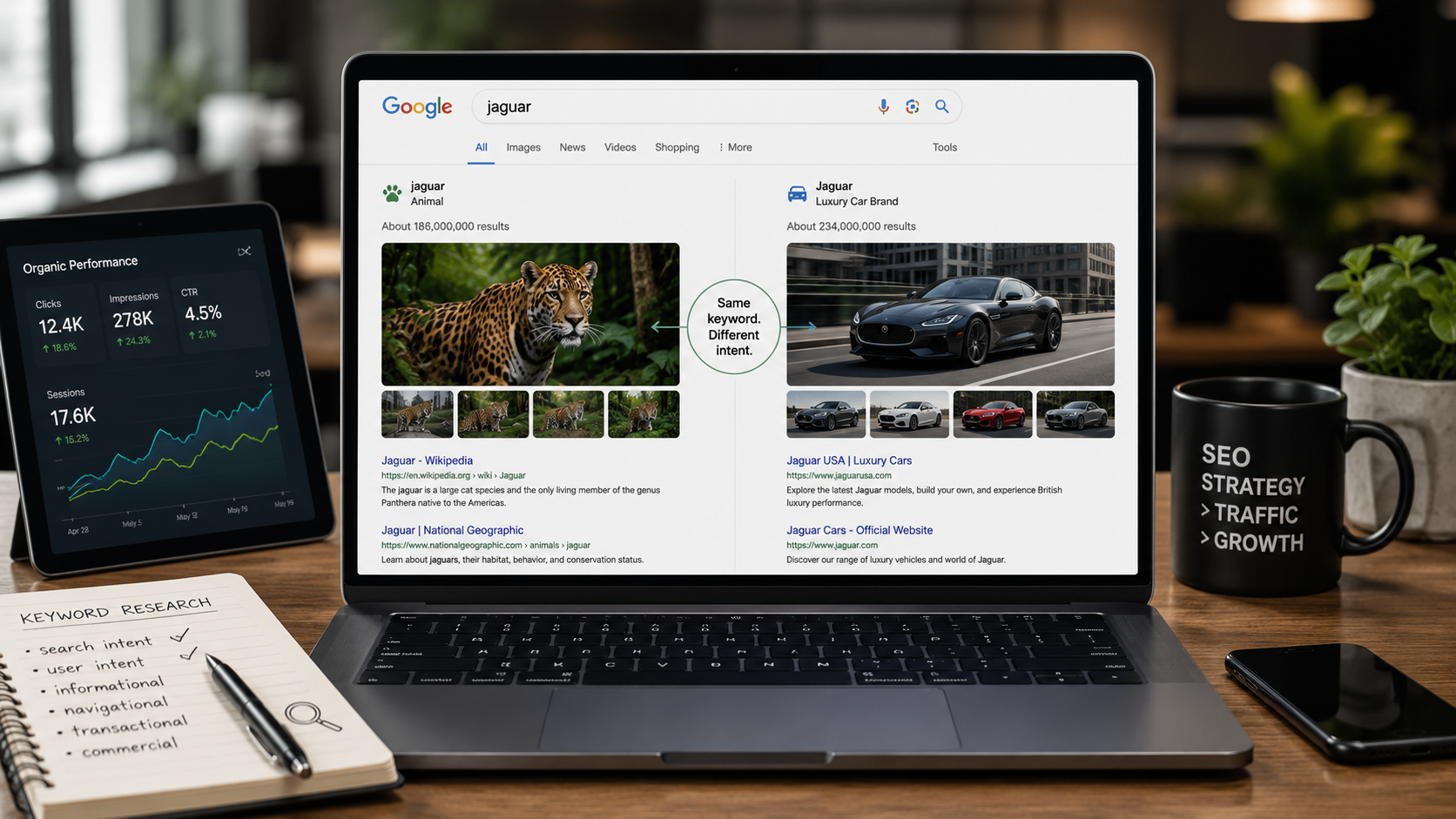
    Two people type “jaguar” into Google. One wants the animal. The other wants the car. Same word, two completely different goals. Search intent is the real question hiding behind the words, and it decides which page Google shows each of them. Get it right and you rank. Get it wrong and no amount of keywords will save you.

    What is search intent?

    Search intent (also called user intent or keyword intent) is the goal behind a search query: the reason someone typed it and what they hope to find. Every Google search is a question or a task, and search engines rank the pages that best satisfy that goal, not just the pages that repeat the keyword.

    You will also see it called audience intent. The label matters less than the idea: behind every query is a person trying to do something specific.

    Think of it like ordering at a restaurant. The words on the menu matter, but the waiter’s job is to bring what you actually want. Google is the waiter. If you ask for a definition and it hands you a checkout page, it did its job badly, and it knows it.

    Why search intent matters for SEO

    Google ranks pages on relevance, and relevance is mostly about intent. When your content matches the goal behind a query, it earns the spot. When it doesn’t, it slips, no matter how strong the page looks on paper.

    Google says this plainly. “Does your content match intent?” sits among the self-assessment questions in its helpful content guidance for creators. Matching intent against the query is treated as a central ranking criterion in most practitioner guides too, including Ahrefs’ search intent guide.

    Miss the intent and you can have the best backlinks in your niche and still not rank. Visitors land, see the wrong kind of page, and bounce straight back to Google. That pattern, called pogo-sticking, tells search engines your page did not answer the question.

    There is a business side too. The right intent brings traffic that converts instead of traffic that just visits. A page that meets the searcher where they are is how you turn rankings into leads and increase organic traffic that actually pays off.

    The 4 types of search intent

    Almost every query falls into one of four types: informational, navigational, commercial, and transactional. Learn to spot them and you can predict what Google wants to show before you write a single word. Most keywords sit cleanly in one type. A few are mixed, which we will cover later.

    Informational intent

    The user wants to learn something or answer a question. These queries lean on modifiers like “how,” “what,” “why,” “when,” “guide,” and “tutorial.” Examples: “what is search intent” (yes, the query that brought you here) or “how does SEO work.”

    Informational is the biggest bucket by far. It is widely cited that around 70% of all searches are informational (Neil Patel), though more recent analysis puts the figure closer to 57% of Google queries (Ahrefs). Either way, it dominates. The ideal format is a blog post or a guide.

    Navigational intent

    The user is looking for a specific site or page. They already know where they want to go and use search as a shortcut. Examples: “yoast login,” “semrush pricing,” or any brand name typed straight into the search bar.

    One practical note: it rarely makes sense to chase navigational queries for a brand you do not own. Someone searching “semrush login” wants Semrush, not your comparison post.

    Commercial intent

    The user is researching before a purchase. They want to buy eventually, but they are still comparing options. Modifiers give it away: “best,” “top,” “review,” “vs,” and “comparison.” Examples: “best SEO tools” or “Semrush vs Ahrefs.”

    These searchers reward pages that help them decide. The ideal format is a comparison, a listicle, or an in-depth review that lays out real trade-offs instead of a sales pitch.

    Transactional intent

    The user is ready to act, usually to buy or sign up. The query signals a decision already made. Modifiers include “buy,” “price,” “cheap,” “discount,” “coupon,” and “near me.” Examples: “buy SEO software” or “SEO agency near me.”

    Serve these searchers a product page, a service page, or a focused landing page. A long explainer here just gets in the way of the thing they came to do.

    Search intent examples (keyword by keyword)

    Intent is easier to see with real keywords. Each one below belongs to a type, and that type dictates the page format Google rewards. If your page format does not match the right-hand column, you will struggle to rank no matter how good the writing is.

    KeywordSearch intentPage type Google rewards
    what is search intentInformationalGuide / blog post
    how to add schema markupInformationalTutorial / how-to
    meta description lengthInformationalGuide with a quick answer
    yoast loginNavigationalSpecific site page
    schemafy blogNavigationalBrand page
    best seo plugins for wordpressCommercialListicle / comparison
    semrush vs ahrefsCommercialHead-to-head comparison
    buy seo softwareTransactionalProduct / pricing page
    seo agency near meTransactionalLocal service / landing page
    wordpress hosting couponTransactionalDeals / pricing page

    Read the table top to bottom and the pattern is clear: the words tell you the goal, and the goal tells you the page.

    How to identify the search intent behind a keyword

    You do not have to guess. The SERP is the source of truth, because Google has already classified the intent for you and ranked the results that prove it. Here are three ways to read it, from most reliable to least.

    Analyze the SERP

    Type the keyword into Google and look at what dominates the first page. This is the most direct signal you have, because Google has already done the classification work (Search Engine Land). If the top 10 are guides and blog posts, the intent is informational. If they are product and pricing pages, it is transactional. If comparison articles rank, it is commercial.

    SERP features are signals too. People Also Ask boxes and featured snippets point to informational intent. Shopping carousels point to transactional. A local pack means Google reads a “near me” goal even if you did not type those words.
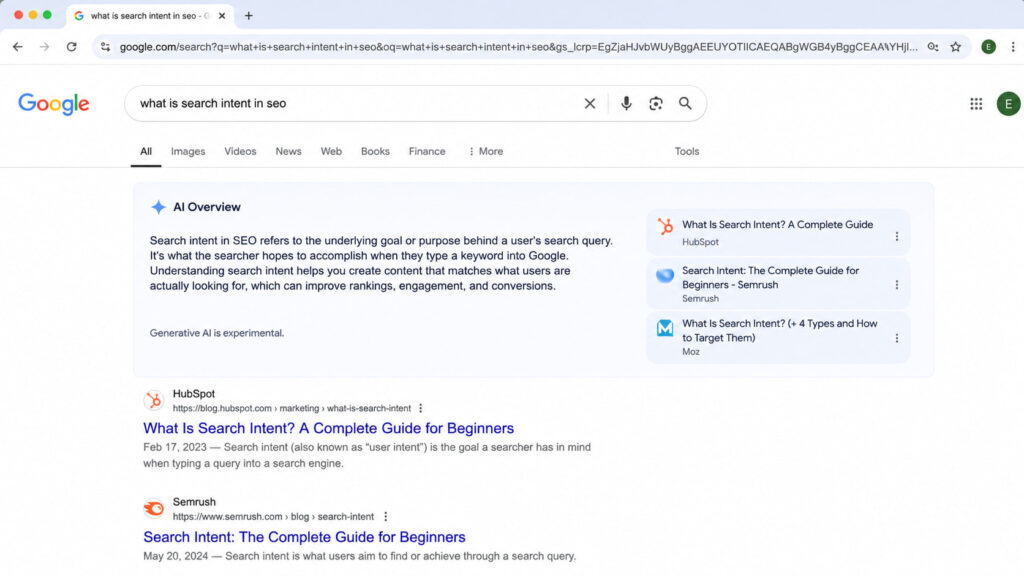
    Google search results showing an AI Overview for “what is search intent in SEO.

    Google’s own SERP is the clearest intent signal: guide-style results and a People Also Ask box mark this as an informational query.

    Read the modifiers in the query

    The extra words around your main keyword reveal the likely intent before you even open Google. Use this as a quick first read, then confirm with the SERP.

    ModifierLikely intent
    how, what, why, guide, tutorialInformational
    best, top, review, vs, comparisonCommercial
    buy, price, cheap, coupon, discount, near meTransactional
    brand name, loginNavigational

    One rule keeps you honest: SERP evidence overrides the modifier (Ahrefs). If the words say one thing but the ranking pages say another, believe the pages.

    Use a keyword tool’s intent labels

    Tools like Ahrefs and Semrush now tag intent for you automatically, which is handy when you are sorting hundreds of keywords at once. The same is true of newer AI SEO tools that add intent scoring. Treat these labels as a starting point, not a verdict. A tool guesses from patterns; the live SERP shows what Google actually decided. Always validate against the real results.

    How to optimize your content for search intent

    Once you know the intent, three moves align your page with it. None of them require a rewrite from scratch.

    Match the content type and format

    Give the searcher the format their intent expects. A guide for informational queries. A comparison for commercial ones. A product or landing page for transactional ones. The single most common mistake in SEO is publishing a blog post for a transactional keyword, then wondering why a page full of product results outranks it. The content type has to match before anything else you do matters.

    Cover the whole topic (content depth)

    Answer the main question, then answer the questions around it. People Also Ask boxes are a free checklist of the subtopics Google associates with your query, so mine them and cover what is missing. Keep your headings clear and scannable so a reader can confirm in seconds that your page solves their search. Depth is not word count. It is coverage of what the searcher actually needs.

    Align title tags and meta descriptions

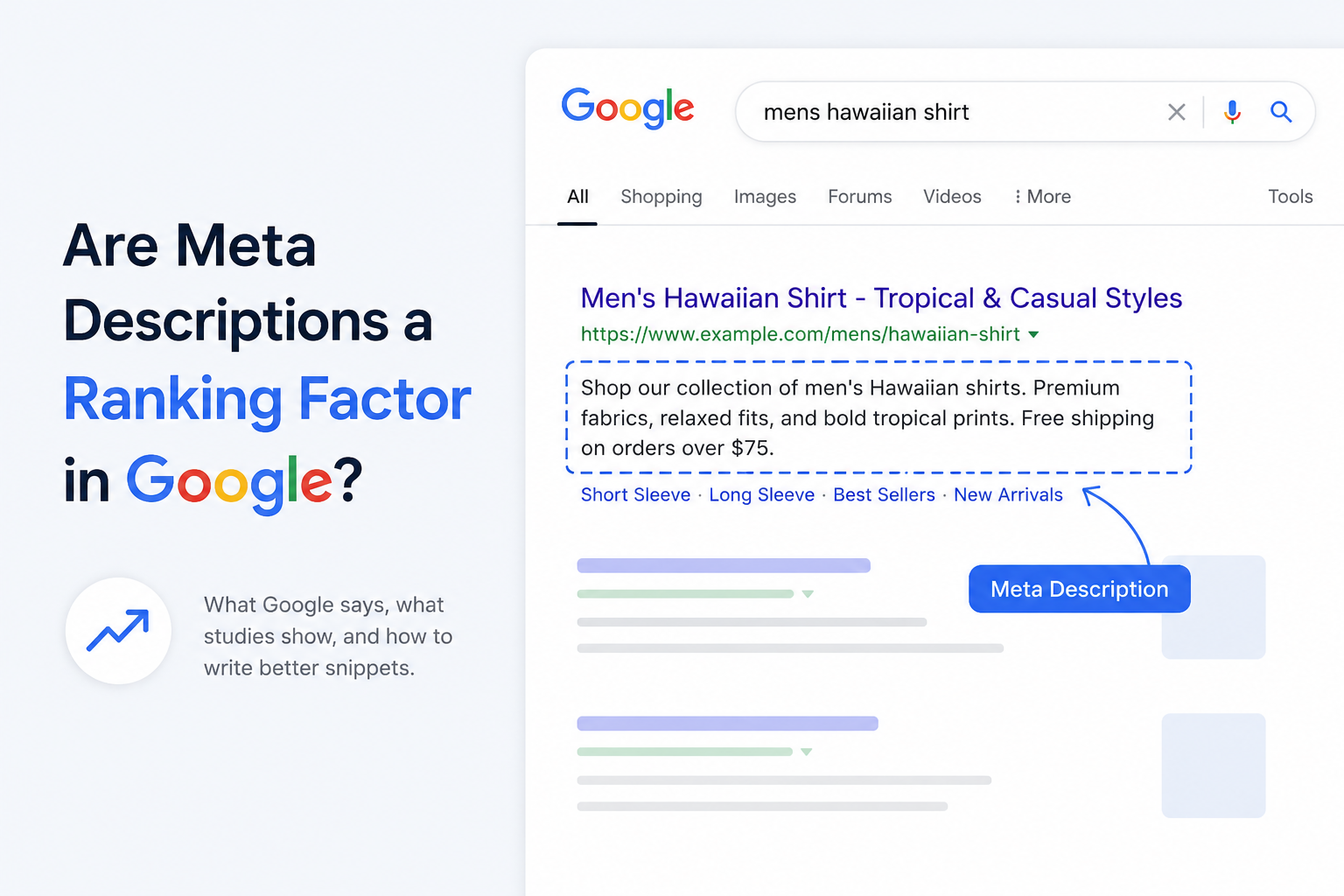
    Your title tag and meta description are the first intent check a searcher runs, right there in the results. They should reflect the goal and promise the outcome, which lifts click-through rate and reinforces relevance. It also helps to see how the snippet looks before you publish. A no-code plugin like Schemafy lets you edit the meta title and description and preview your snippet the way Google shows it, so you can match the wording to intent without touching code. If you are unsure how much these tags move the needle, here is the reality on meta descriptions and CTR and how to add a meta description in WordPress.

    Search intent in the age of AI Overviews and AEO

    Search intent is shifting under our feet. More and more informational queries now get answered inside the SERP itself through AI Overviews, so a growing share of searches end without a click. The old goal, rank first, is no longer the whole game.

    The new goal is to be the source the AI cites. That means writing answer-first: lead with a direct answer, back it with concrete data, and name your entities clearly so a language model can lift and attribute your point. Structured data helps here, which is why schema markup is becoming table stakes for AI search.

    Intent itself is expanding. SE Ranking now lists a sixth type, generative AI intent: queries where the user expects a synthesized answer from an AI engine rather than a list of links (SE Ranking). Optimizing for it has its own name, Answer Engine Optimization, and it overlaps heavily with generative engine optimization. The core skill has not changed. You still start by understanding what the searcher wants. You just have one more surface to satisfy.
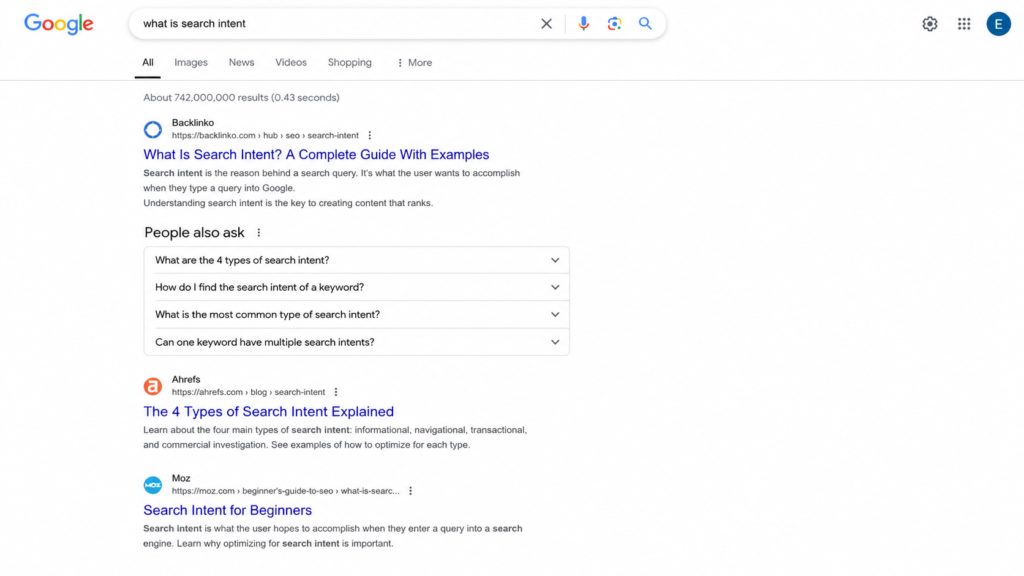
    Google search results for “what is search intent” with a People Also Ask section.

    Informational intent increasingly resolves inside the SERP: an AI Overview answers the query before the user reaches a single organic link.

    Common search intent mistakes to avoid

    Most intent problems come down to the same handful of errors:

    • Forcing transactional keywords into blog posts. If Google ranks product pages, an article will not win the spot.
    • Ignoring the SERP and guessing. Your assumption about intent loses to the pages already ranking. Check first.
    • Mixing multiple intents on one page. Trying to inform and sell in the same breath usually does neither well.
    • Publishing thin content for informational keywords. Informational SERPs reward depth, and a 300-word skim gets buried.
    • Not updating when the SERP shifts intent. Intent changes over time. A keyword that was informational last year may be commercial now, so re-check your winners.

    Get help matching your content to search intent

    Aligning your title tags and meta descriptions with intent is where a lot of pages quietly win or lose their click-through. It is a small edit with an outsized effect on how well your snippet matches what the searcher wants.

    If you would rather not hand-code any of it, a no-code plugin like Schemafy lets you rewrite meta titles and descriptions and preview the snippet the way Google displays it, so you can tune the wording to intent in a few minutes.

    Frequently asked questions

    What are the 4 types of search intent?

    The four types of search intent are informational (learning something), navigational (finding a specific site), commercial (researching before a purchase), and transactional (ready to buy or act). Each maps to a different content format, so matching the right type is key to ranking.

    How do I find the search intent of a keyword?

    The most reliable way is to type the keyword into Google and study the top results. If they are guides, the intent is informational; if they are product pages or listicles, it is transactional or commercial. Query modifiers and keyword-tool intent labels help confirm.

    What is the most common type of search intent?

    Informational intent is the most common, accounting for roughly 70% of all searches. These users want to learn or answer a question, using modifiers like “what,” “how,” and “why.” That is why guides and blog posts dominate informational SERPs.

    Can one keyword have multiple search intents?

    Yes. Some keywords are ambiguous and show mixed results in the SERP, part informational, part commercial. Google hedges by ranking a blend of formats. In those cases, review the SERP and match the dominant intent while covering secondary angles.

    Final thoughts

    Search intent, not the keyword itself, is what decides whether you rank. The page that best satisfies the goal behind the query wins, and everything else you do in SEO is downstream of that one match. Backlinks, word count, and clever titles only pay off once the intent is right.

    So before you write your next piece, open Google, read the SERP for your target keyword, and commit to a single intent type. Match the format, cover the topic, and align your title and meta description to what the searcher actually wants. Then re-check that same SERP in a few months, because intent shifts over time, and the page that keeps matching it is the page that keeps ranking.

    [CTA_DOWNLOAD]
  • What Is Structured Data? A Plain-English Guide to Schema Markup

    What Is Structured Data? A Plain-English Guide to Schema Markup

    Think of structured data like labels on a shipping container. A machine reads the label and knows what is inside without opening the box. It does the same for your web pages: it tells search engines what your content means, not just what it says.

    The term also describes database data, but this guide covers structured data for SEO. Done right, your pages become eligible for rich results, higher click-through, and AI-search citations across every client site you run.

    What is structured data? (quick definition)

    Structured data is a standardized format for labeling the content on a web page so search engines can understand what it means, not just what it says. It uses a shared vocabulary called Schema.org to describe entities like a product, an article, or a business, and it lives in the page’s code where machines read it, invisible to visitors.

    That shared vocabulary is the important part. Schema.org gives every entity type an agreed set of properties, so a search engine reading Product knows to look for a name, a price, and a rating in the same place every time.

    Back to the shipping analogy. The label does not change what is in the box, it just makes the contents readable without unpacking. On one site, that is a nice-to-have. Across 10 or more client sites, it is the difference between listings that qualify to look better in search and listings that stay plain.

    Structured data vs. schema markup vs. rich results

    These three terms get blurred constantly, often in the same sentence. Keeping them straight saves you from promising a client something search engines never guaranteed.

    Structured data is the concept: labeling content in a machine-readable format. Schema markup is the implementation, the actual code you add using the Schema.org vocabulary. Rich results are the output, the enhanced listing Google may show once it reads valid markup. All schema markup is structured data, but not all structured data is schema markup.

    TermWhat it isExample
    Structured dataThe concept of labeling content so machines understand itAny machine-readable data format, including database tables
    Schema markupThe implementation using the Schema.org vocabularyA Product JSON-LD block on a product page
    Rich resultThe enhanced search listing Google may displayA star rating and price shown under a result

    How structured data works

    The flow is short. You add the markup to a page. Search engines crawl and parse it. They use it to understand the entities on the page and how those entities relate to each other. Pages that qualify may then earn rich results.

    There is a bigger payoff behind that. Google uses structured data it finds on the web to understand the content of a page and to gather information about the world, including the people, books, and companies your markup describes. That information feeds the Knowledge Graph, the map of entities Google fills in as your markup confirms who and what your page is about. If you want the full workflow, see our guide on how to use schema markup.

    The three formats: JSON-LD, Microdata, RDFa

    Schema.org markup comes in three formats. JSON-LD is a <script> block placed in the head or body, kept separate from the visible HTML. Microdata and RDFa are inline attributes woven directly into your HTML tags.

    Each has a trade-off. JSON-LD is clean and easy to edit because it sits apart from your layout. Microdata ties the data to the exact HTML element, which some developers like but makes bulk edits fragile. RDFa is the most flexible for combining vocabularies, and also the most verbose. JSON-LD is by far the most common format today, and you can write or check a block in a JSON-LD editor before it goes live.

    Why Google recommends JSON-LD

    Google’s position is explicit. It recommends JSON-LD because it is the easiest solution for site owners to implement and maintain at scale, and less prone to user errors.

    The reason is the separation. Because the JSON-LD block lives apart from your visible content, changing the page layout does not break the data, and updating the data does not touch the layout. You can inject it through a tag manager or a CMS, which is what makes it maintainable across many sites at once.

    Structured data examples (with code)

    Here is what schema markup actually looks like. This is a minimal, valid Article block. Every field is labeled in plain English so you can see what it does.

    {
      "@context": "https://schema.org",
      "@type": "Article",
      "headline": "What Is Structured Data? A Plain-English Guide to Schema Markup",
      "author": {
        "@type": "Person",
        "name": "Jane Doe"
      },
      "datePublished": "2026-07-24",
      "publisher": {
        "@type": "Organization",
        "name": "Example Media"
      }
    }
    

    And here is a Product block with an offer and a rating, the kind of markup that powers e-commerce rich results:

    {
      "@context": "https://schema.org",
      "@type": "Product",
      "name": "Premium Yoga Mat",
      "offers": {
        "@type": "Offer",
        "price": "49.00",
        "priceCurrency": "USD",
        "availability": "https://schema.org/InStock"
      },
      "aggregateRating": {
        "@type": "AggregateRating",
        "ratingValue": "4.7",
        "reviewCount": "312"
      }
    }
    

    You can build either block by hand, or generate one field by field in a schema markup generator. The property names come straight from Schema.org, and Google documents the requirements for each rich result type in its product structured data docs.

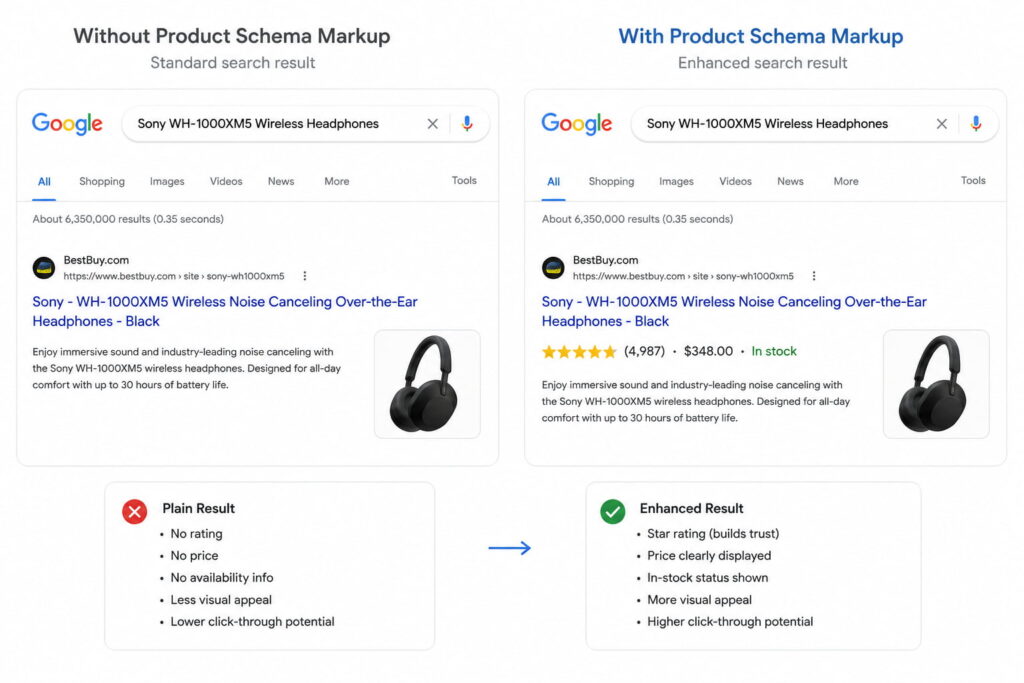
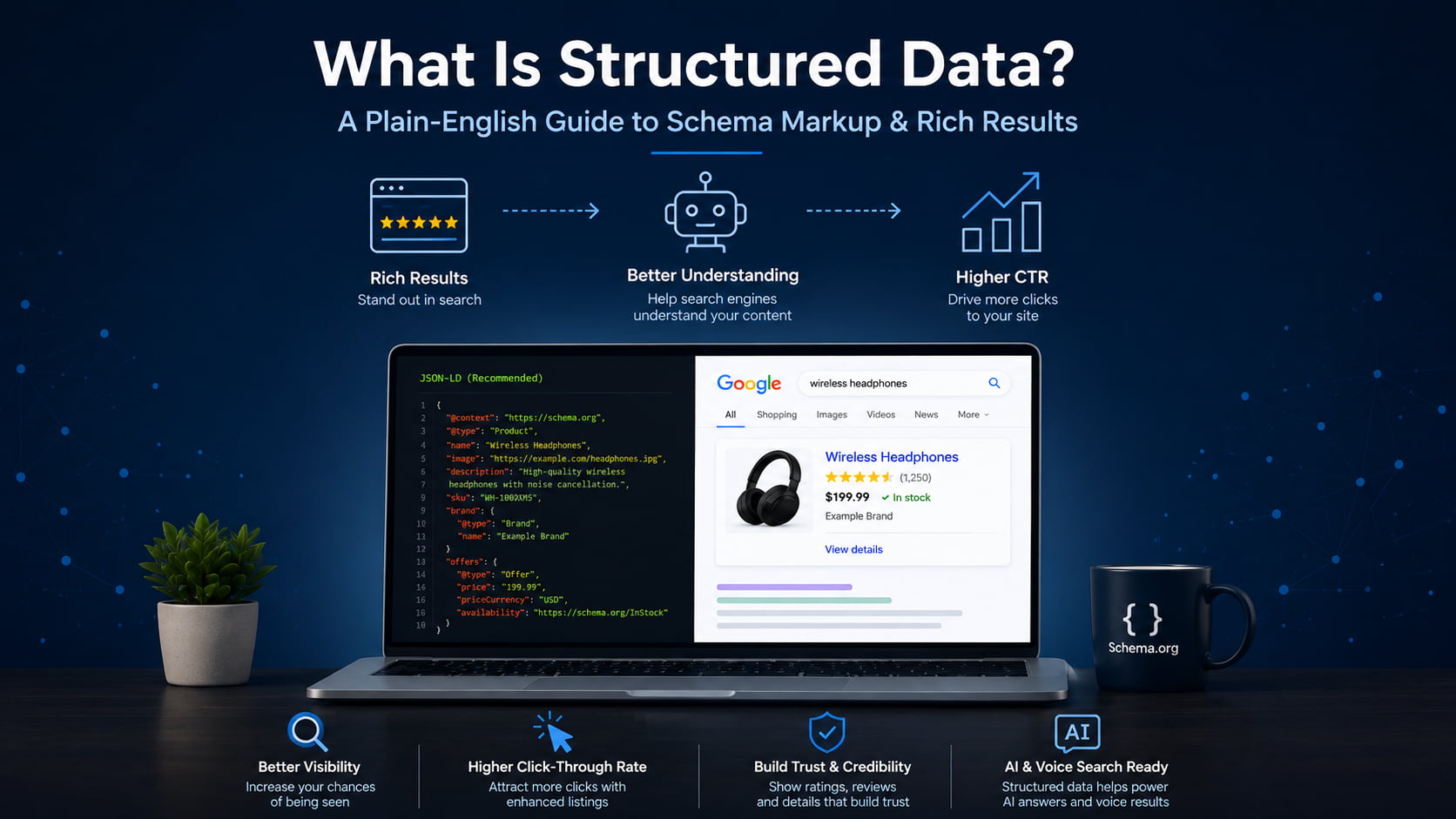
    The payoff shows up in the search result. Without markup, a product listing is a title, a URL, and a description. With valid Product markup, Google can add the star rating, the price, and the stock status directly to the listing, which takes up more space and gives shoppers a reason to click before they even land.

    Google search comparison showing plain and enhanced product results with ratings, price, and stock status.

    Common types of schema markup

    Schema.org defines hundreds of types, but a handful cover most of what site owners and stores actually need. Here are the high-value ones, each with the rich result it can earn.

    Schema typeWhat it labelsRich result it can earn
    ArticleBlog posts and news contentArticle and headline enhancements
    ProductE-commerce items for salePrice, availability, star rating
    LocalBusinessStores and physical locationsBusiness info, hours, map details
    FAQPageQuestion-and-answer blocksExpandable FAQ under the listing
    HowToStep-by-step tutorialsStep-by-step rich result
    Review / AggregateRatingRatings and opinionsStar ratings
    BreadcrumbListSite hierarchy and navigationBreadcrumb trail in the result
    OrganizationCompany or brand identityKnowledge panel and brand details
    EventConcerts, webinars, meetupsEvent date and location card
    RecipeCooking instructionsRecipe card with photo and time
    VideoObjectVideo contentVideo thumbnail and key moments

    Two of these are the easiest wins across a whole site. BreadcrumbList and Organization apply to almost every page, take little effort to set up once, and pay off site-wide. FAQPage markup can surface your questions in the People Also Ask box. If you are rolling schema out across many client sites, starting with the types that apply everywhere gives you the most return per hour.

    Why structured data matters for SEO and AI search

    Here is the honest version. Structured data is not a direct Google ranking factor. Adding a Product block will not, by itself, move you up the results the way meta descriptions are not a direct ranking factor yet still shape performance.

    What it does provide is two things: enhanced listings that earn more clicks, and machine-readable context that helps search engines and AI systems confirm what your page is about. Both are covered below.

    Rich results and higher CTR

    Rich results are enhanced listings: star ratings, FAQ accordions, prices, breadcrumbs, and recipe cards. They occupy more space in the search results and give people more reasons to click, which lifts click-through rate.

    The numbers Google publishes are strong. Rotten Tomatoes added structured data to 100,000 unique pages and measured a 25% higher click-through rate for pages with structured data compared to pages without it. Nestlé found that pages shown as rich results have an 82% higher click-through rate than the same pages without a rich result. Rakuten measured that users spend 1.5 times longer on pages with structured data than on pages without.

    One caveat matters. Eligibility is not a guarantee. Valid markup makes a page eligible for a rich result, but Google decides when to show one. You can preview how a listing might look in a SERP preview tool before you publish.

    Nestlé found that pages shown as rich results have an 82% higher click-through rate than the same pages without one.

    AI Overviews, LLM citations, and entity recognition

    This is the part most older guides miss. Structured data helps Google’s Knowledge Graph and AI systems, including AI Overviews and assistants like ChatGPT, Gemini, Perplexity, and Claude, verify entities and surface your content in AI-generated answers.

    The mechanism is confirmation, not magic. When your markup states clearly that a page is about a specific product, business, or author, it helps machines confirm what the page is about and how its details relate, which makes your content easier to cite accurately. That is the core idea behind Generative Engine Optimization and answer-engine visibility.

    Keep the claims measured. Structured data does not guarantee an AI citation. It gives answer engines cleaner, more reliable context to work with, which is why it sits at the foundation of most answer engine optimization tools and generative engine optimization tools.

    How to add structured data to your website

    Adding structured data is more approachable than the code makes it look. The process is the same for one page or a thousand:

    1. Pick the schema type that matches the page (Product for a product, Article for a post, LocalBusiness for a location).
    2. Generate the JSON-LD for that type, filling in the real values.
    3. Paste the block into the page or push it through your tag manager.
    4. Validate the markup before it goes live.
    5. Request indexing in Search Console so Google recrawls the page.

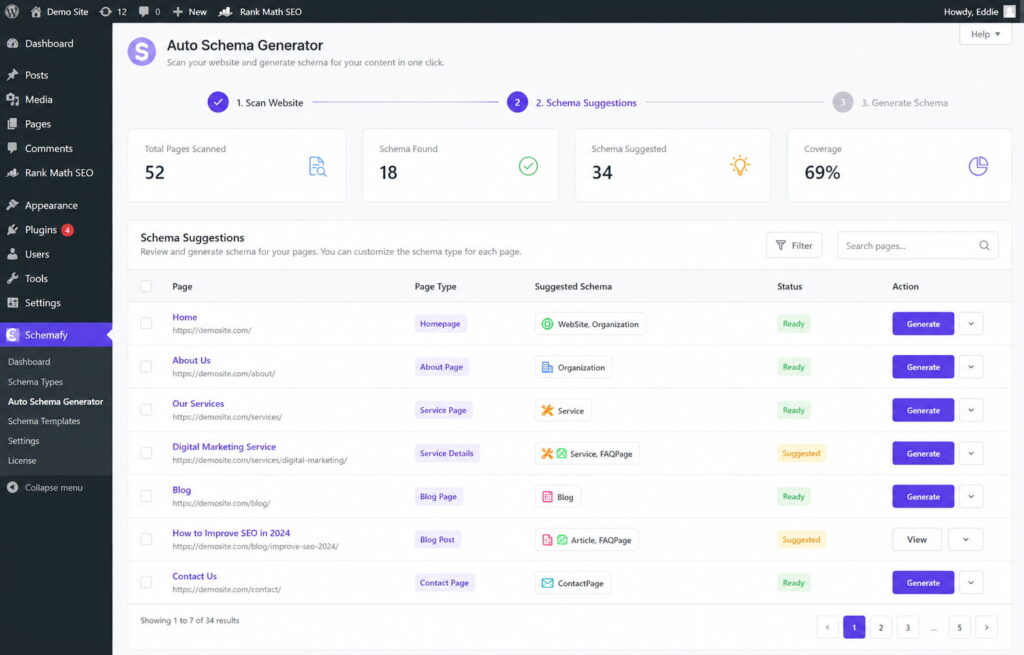
    You can generate the JSON-LD three ways: by hand, with an online generator, or with a WordPress plugin. Plugins are where non-developers stop worrying about code. Tools like Schemafy include an Auto Schema Generator that scans a site and suggests the right types per page, and an AI Schema Generator that produces the JSON-LD for you, so the markup gets created without hand-writing a line of it.

    The step that scales badly is doing this page by page. On a single site it is a Saturday afternoon. Across 10 or more client stores, a per-page approach is why schema projects stall, which is exactly why the at-scale route matters.

    How to test and validate your structured data

    Two canonical tools cover almost everything. Google’s Rich Results Test tells you whether a page is eligible for a rich result. Schema.org’s Schema Markup Validator checks whether your syntax is correct against the vocabulary.

    Understand the difference between the two words they return. “Valid” means the syntax is correct. “Eligible for rich results” means the page also meets Google’s specific requirements for a given rich result type. A page can be perfectly valid and still not be eligible, usually because a required property is missing.

    For monitoring at scale, the Enhancements reports in Google Search Console track your markup across the whole site and flag errors by type. That is the report agencies live in, because it catches a broken schema on page 400 that no one would test by hand.

    Common structured data mistakes to avoid

    Most schema problems come from a short list of avoidable errors:

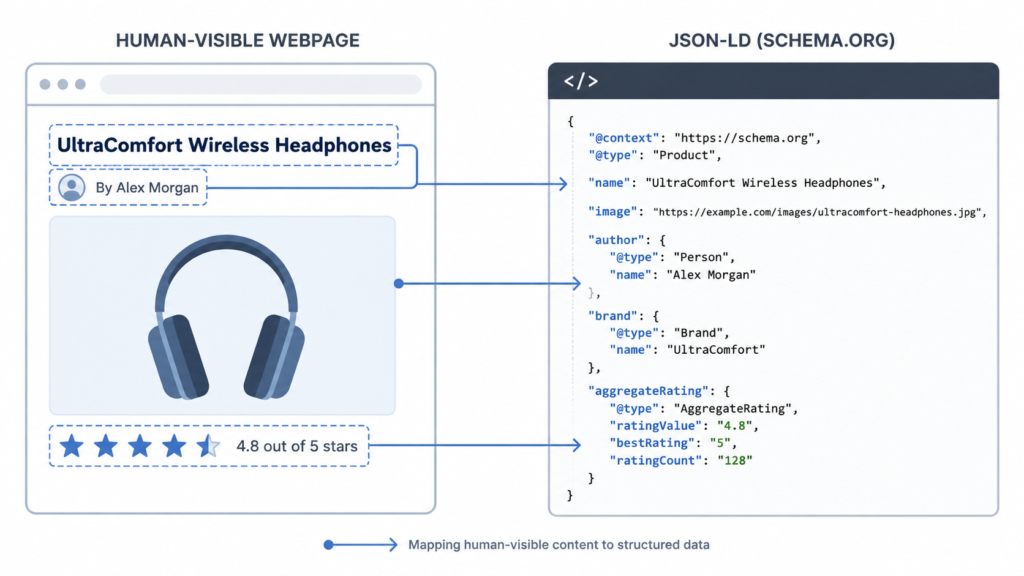
    • Marking up content that is not visible on the page. The markup must describe what the visitor actually sees.
    • Missing or mismatched required properties, so the markup validates loosely but fails eligibility.
    • Fake or spammy reviews. Marking up reviews you did not earn violates Google’s structured data guidelines and can trigger a manual action.
    • Forgetting to update markup when the content changes, so the price or availability in your schema no longer matches the page.
    • Stacking multiple conflicting types on one page, which confuses parsers about what the page is really about.

    That fourth one bites agencies hardest. When you manage many sites, stale markup piles up quietly. Build the habit of revalidating after any content change, and the problem never compounds.

    Get rich-result-ready schema without the code

    For teams that do not want to hand-write and validate JSON-LD across a whole site, a WordPress schema plugin can generate and maintain valid, rich-result-ready structured data automatically. That is the practical route when you are keeping schema correct across 10 or more client stores at once, without turning anyone on the team into a JSON-LD engineer.

    Schemafy scans a site and suggests the right schema type per page, so structured data gets applied across many products without hand-coding.

    Caption: Schemafy scans a site and suggests the right schema type per page, so structured data gets applied across many products without hand-coding.

    Frequently asked questions

    What is structured data in SEO?

    In SEO, structured data is code (usually JSON-LD using the Schema.org vocabulary) added to a page so search engines understand its content and context. It does not directly boost rankings, but it makes pages eligible for rich results and helps them appear in AI-generated answers.

    What is an example of structured data?

    A common example is Product schema, which labels a page’s product name, price, availability, and review rating. When the markup is valid, Google can show those details, like a star rating and price, directly in the search result, making the listing more prominent and clickable.

    What’s the difference between structured data and schema markup?

    Structured data is the general concept of labeling content in a machine-readable format. Schema markup is the specific implementation that uses the Schema.org vocabulary. In short: all schema markup is structured data, but not all structured data uses Schema.org.

    Does structured data help rankings?

    Structured data is not a direct Google ranking factor. It can help indirectly by earning rich results that raise click-through rates, and by helping search engines and AI systems confirm what your page is about, which improves visibility in rich results and AI Overviews.

    What is JSON-LD?

    JSON-LD (JavaScript Object Notation for Linked Data) is a lightweight code format for adding structured data to a web page. It sits in a script block separate from visible content and is Google’s recommended format because it is clean, flexible, and easy to maintain.

    How do I check if my structured data is working?

    Use Google’s Rich Results Test to see if a page is eligible for rich results, and the Schema.org Markup Validator to check syntax. For ongoing monitoring across your whole site, watch the Enhancements reports in Google Search Console.

    Final thoughts

    Structured data stopped being a technical problem and became an operational one. On a single site, it is a nice-to-have. Across 10 or more client sites or stores, it decides whether your listings, and your clients’ listings, are eligible to look better in search and get confirmed by the AI systems that now answer questions directly.

    Start where the return is highest. Pick one high-value type, apply it, validate it, and watch Search Console for the change. Organization and BreadcrumbList apply to almost every page, take little effort to set up once, and pay off site-wide, which makes them the right first move before you touch anything product-specific.

    [CTA_DOWNLOAD]

  • What Is an SEO Slug?

    What Is an SEO Slug?

    Think of a slug like the label on a shipping box. Google and your readers both read the label before they open the box, which is to say, before they ever click. A slug is a short, readable label at the end of a web address. Get it right once and you stop thinking about it. This guide covers what a slug is, why it matters, and how to write and change one safely.

    What Is a Slug in SEO? (Quick Definition)

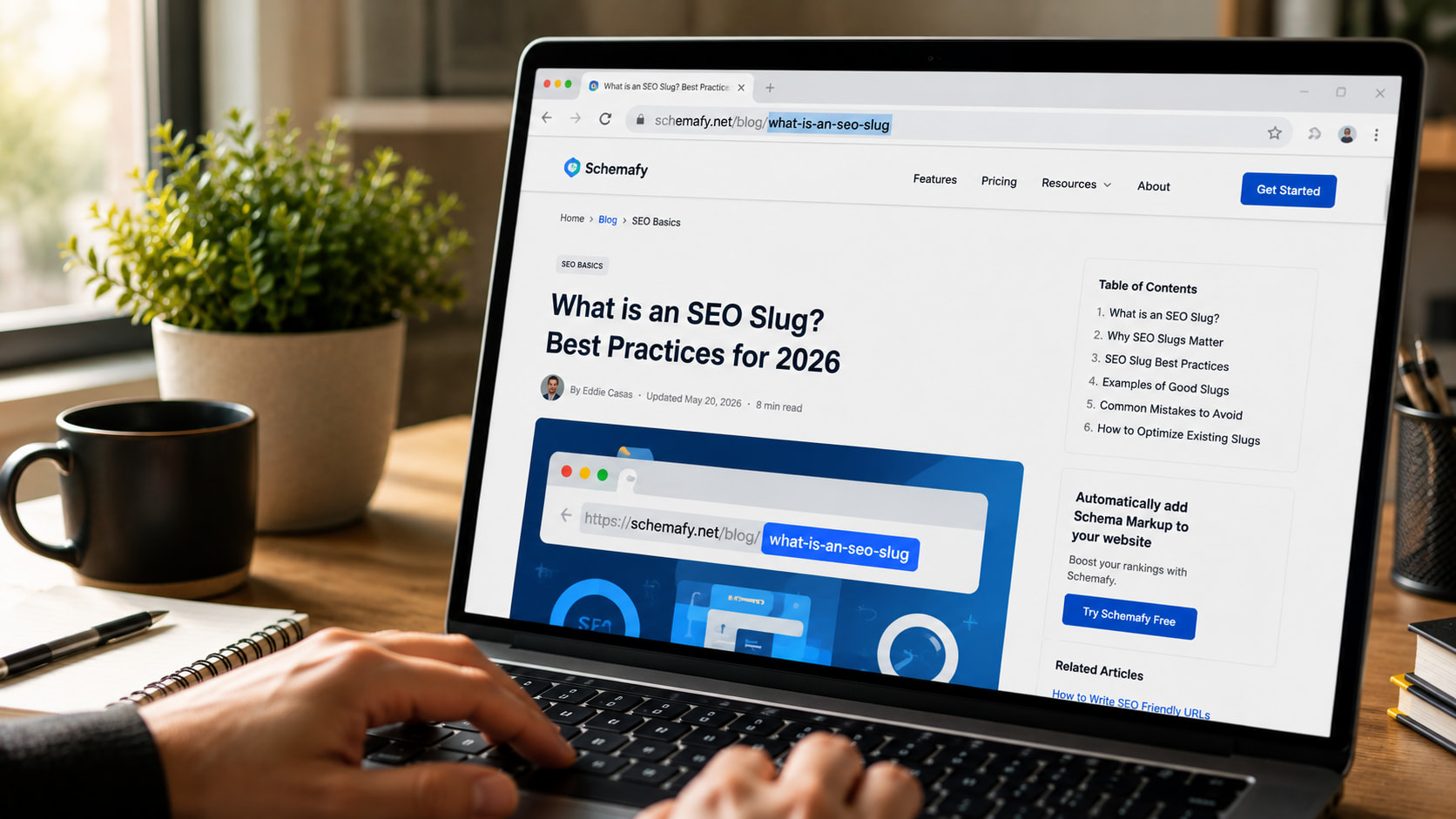
    An SEO slug is the part of a URL that comes after the domain and identifies a specific page. In schemafy.net/what-is-an-seo-slug, the slug is what-is-an-seo-slug. It’s the human-readable label, written in lowercase words separated by hyphens, that tells users and Google what a page is about before they click.

    That label does real work. The domain tells people which site they’re on. The slug tells them which page. A good slug is descriptive enough that you could read it out loud and know roughly what’s on the other end. A bad one is a string of numbers that means nothing to anyone.

    Slug vs. URL vs. Permalink: What’s the Difference?

    These three terms get mixed up constantly, but they name different things.

    TermWhat it isExample
    URLThe full web address of a pagehttps://schemafy.net/blog/what-is-an-seo-slug
    PermalinkThe permanent, full URL of a specific post or pagehttps://schemafy.net/blog/what-is-an-seo-slug
    SlugThe editable end segment that names the pagewhat-is-an-seo-slug

    The URL is the whole address. The permalink is that address treated as permanent, the one you’d share or link to. The slug is just the tail end you can edit. Change the slug and you change the permalink.

    Why SEO Slugs Matter

    The slug helps search engines crawl (read) and index your page, and it gives them a plain-language hint about the topic. Google recommends using simple, descriptive words in your URLs and notes that the words in a URL path can help it understand the page.

    Your slug is also visible. It shows up in search results and in breadcrumb trails, so a clear slug can nudge up your click-through rate. When the URL matches what someone searched for, they trust the result a little more. You can see exactly how a slug reads next to your title and description with a free SERP simulator, the same live preview an SEO plugin like Schemafy shows you before you publish.

    Be honest with yourself about the weight here. On its own, a slug is a minor ranking factor, not magic, much like whether meta descriptions affect ranking. What makes slugs worth your time is the effort-to-payoff ratio. A clean slug takes a minute, needs no code, and helps both readers and search engines. That’s about as easy as on-page wins get.

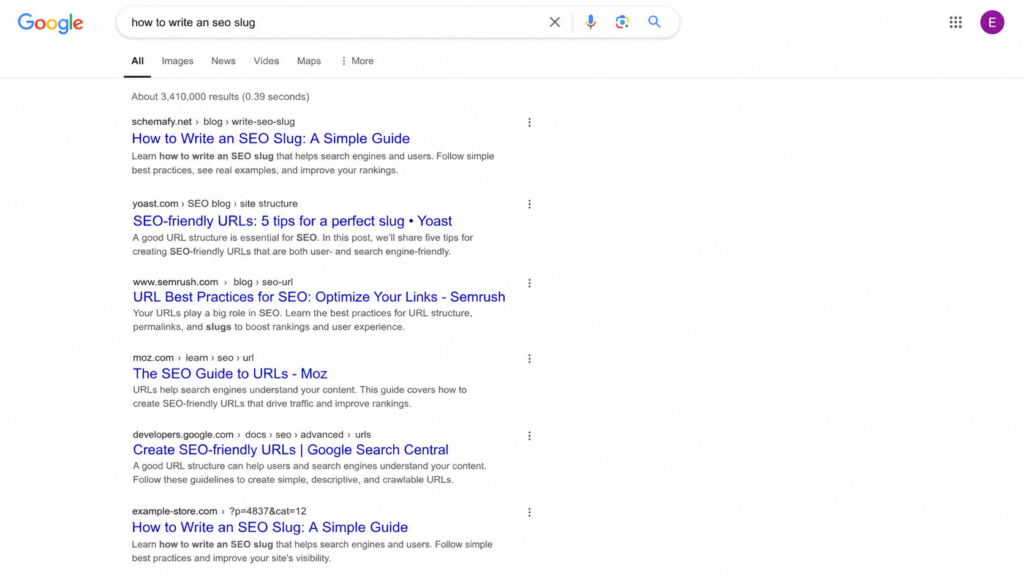
    Google search results showing clean SEO slugs versus an auto-generated URL.

    What Makes a Good SEO Slug: 7 Best Practices

    A good slug follows seven simple rules, and none of them require code. Here they are.

    Keep It Short (3–5 Words)

    The sweet spot is 3 to 5 words, or roughly 50 to 60 characters. Shorter slugs are easier to read, share, and remember, and they keep your keyword from getting buried. Trim the fat: /the-complete-ultimate-guide-to-writing-seo-slugs-in-wordpress/ becomes /seo-slugs/ and loses nothing a searcher cares about.

    Include Your Target Keyword

    Put your main keyword in the slug once, and let it sit there naturally. People are more likely to click a result whose URL matches what they typed, and the match reinforces relevance. One clean use is enough. Repeating the keyword to look “more optimized” is keyword stuffing, and it reads as spam.

    Use Hyphens, Not Underscores

    This one is a real technical rule, not a style preference. Google treats hyphens as word separators, like spaces, but it does not treat underscores the same way. So seo-slug reads as two words, while seo_slug reads as one word, seoslug. As Search Engine Roundtable notes, Google has recommended hyphens over underscores since 2007, and Google’s own style guide on hyphens treats them as the standard separator. Always use hyphens.

    Stick to Lowercase Letters

    Some servers treat Page and page as two different URLs. That can split your signals or create duplicate-content confusion for the same content. Keep every slug lowercase and you sidestep the problem entirely.

    Remove Stop Words

    Words like “a,” “the,” “is,” “in,” “to,” and “and” add length without adding SEO value. Drop them. /how-to-write-a-good-slug/ tightens to /write-good-slug/. The one caveat: keep a stop word if removing it makes the slug confusing to read. Clarity beats brevity when they conflict.

    Skip Dates and Years

    Avoid baking a year into an evergreen slug. A slug like /seo-tips-2025/ looks stale the moment the calendar flips, and fixing it means changing a live URL, which carries risk (more on that below). If the content isn’t tied to a specific year, leave the year out.

    Avoid Special Characters

    Spaces, %, &, and accented letters don’t belong in a slug. They either break or get URL-encoded into ugly strings, so a space turns into %20 and a clean address becomes a mess. Stick to lowercase letters, numbers, and hyphens, and nothing else.

    Good vs. Bad Slug Examples

    The fastest way to internalize the rules is to see bad slugs next to their fixed versions. Each row below breaks one rule, and the good version puts it back.

    Bad slugWhy it’s badGood version
    /the-ultimate-complete-guide-to-seo-slugs-for-beginners/Too long, keyword buried in filler/seo-slugs/
    /seo_slug_guide/Underscores read as one joined word/seo-slug-guide/
    /how-to-write-a-good-slug-for-the-page/Stop words add length, no value/write-good-slug/
    /SEO-Slug-Guide/Uppercase risks duplicate URLs/seo-slug-guide/
    /?p=123Auto-generated ID means nothing/seo-slug/

    The pattern is the same every time. The good versions are short, lowercase, hyphenated, and free of filler. Once you’ve seen a few, you can spot a weak slug on sight.

    How to Change a Slug in WordPress (Safely)

    Changing a slug in WordPress takes about a minute and doesn’t require touching code. Here’s the whole process.

    1. Open the post or page in the WordPress editor.
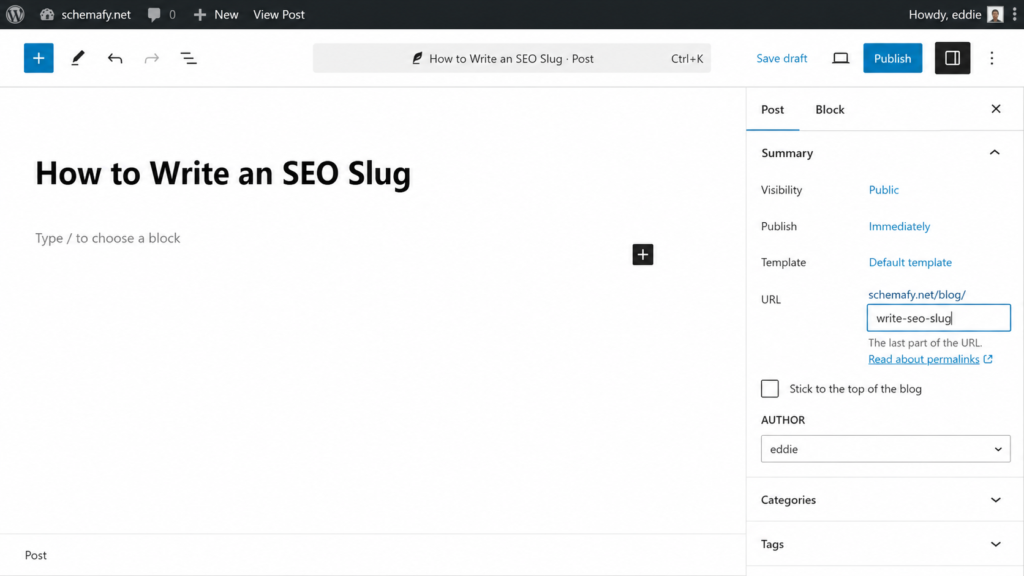
    2. Find the URL or Permalink field, in the sidebar of the block editor, or just under the title in the classic editor.
    3. Click Edit and type your new slug in lowercase, with hyphens.
    4. Update or publish the post to save it.
    5. Set a 301 redirect from the old slug to the new one (see the next section).

    You can edit category and tag slugs too, from Settings, though those change the URLs of your archive pages, so treat them with the same care. If you’re already tidying up on-page details, it’s a good moment to also add a meta description in WordPress for the same page.

     WordPress editor showing how to edit an SEO slug.

    Why You Need a 301 Redirect

    Here’s the catch that trips people up. Changing a live slug breaks the old URL. Every link pointing at the old address, and the ranking power those links built up, was aimed at that exact URL. Break it and you can lose that value, what SEOs call link equity.

    The fix is a 301 redirect, a permanent forward from the old slug to the new one. It hands the old URL’s ranking power to the new page. Most SEO plugins handle this, including Yoast and Rank Math, or you can use a dedicated redirect plugin. Set the redirect the moment you change the slug, not later.

    One caveat: if a page already ranks well with an imperfect slug, sometimes the safest move is to leave it alone. Even Google advises against redirecting URLs just to swap underscores for hyphens on pages that are already performing.

    Common SEO Slug Mistakes to Avoid

    Most slug problems come down to a handful of repeat offenders. Watch for these:

    • Leaving the auto-generated ?p=123 slug WordPress assigns by default.
    • Stuffing the same keyword into the slug two or three times.
    • Letting slugs run long with the full title and every stop word.
    • Changing a live slug without setting a 301 redirect.
    • Baking a year or date into an evergreen slug.

    None of these is hard to avoid once you know it’s there. Clean slugs are one of the small, compounding habits that, alongside better content and links, help you increase organic traffic over time.

    SEO Slug FAQs

    A few quick answers to the questions that come up most often about slugs.

    Does the slug affect SEO ranking?

    Yes, but modestly. A slug helps search engines understand a page’s topic and encourages clicks when it matches a user’s query. It’s a minor ranking signal on its own. A clear, keyword-relevant slug supports rankings, but it won’t outweigh content quality or backlinks.

    Should I change slugs on old, ranking pages?

    Usually no. Changing a slug on a page that already ranks breaks the old URL and can erase its ranking power. If you must change it, set up a 301 redirect from the old slug to the new one to preserve link equity.

    How long should an SEO slug be?

    Aim for 3 to 5 words, or roughly 50 to 60 characters. Short slugs are easier to read, share, and remember, and they keep your target keyword front and center. Remove stop words like “the” and “to” to stay concise.

    Can a slug have numbers in it?

    Yes. Numbers are fine in slugs (for example, /10-seo-tips/). Just avoid auto-generated ID slugs like ?p=123, which mean nothing to users or search engines, and avoid years in evergreen content so the URL doesn’t age.

    Final thoughts

    A clean slug is one of the cheapest wins in on-page SEO. It takes a minute, needs no code, and gives both readers and search engines a plain-language hint about your page before they commit to a click. It won’t outrank great content or strong links on its own, but it’s a small habit that compounds across every page you publish.

    The next step is the part search engines actually lean on to understand a page: structured data and meta tags. Once your URLs read well, that’s where the bigger gains sit. A plugin like Schemafy handles the schema and meta side for WordPress without code, so your pages show up correctly in search once the slug is sorted. If you want to go there next, here’s how schema markup works.

    [CTA_DOWNLOAD]

  • What Is Generative Engine Optimization (GEO)?

    What Is Generative Engine Optimization (GEO)?

    Most people hear “generative engine optimization” and assume it’s SEO wearing a new hat. It isn’t, quite. GEO shares its foundations with SEO, but the way you actually earn visibility is different: you’re not fighting for a rank position anymore. You’re trying to get quoted inside an answer the AI writes for the user.

    Table of contents

    Generative Engine Optimization Definition

    Generative Engine Optimization (GEO) is the practice of shaping your content, entities, and online presence so generative AI engines like ChatGPT, Perplexity, and Google’s AI Overviews cite or mention you when they answer a question. Instead of ranking a list of links, these engines synthesize a single answer from multiple sources, and GEO improves your odds of being one of them.

    A generative engine is any search experience that reads across many pages and writes one summarized answer, rather than handing you ten blue links to sort through yourself (Aggarwal et al., 2024). ChatGPT, Perplexity, Google’s AI Overviews, and Gemini all qualify.

    GEO is not paying to appear, and it’s not a trick to manipulate the model. It’s the work of making your content the clearest, most citable source on a topic so the engine reaches for you.

    Why GEO Matters in 2026

    Search stopped being a page of ten links for a large share of users. ChatGPT reached 900 million weekly active users in February 2026 and crossed a billion monthly app users by June, according to TechCrunch. That’s an audience running everyday queries through a generative engine instead of a results page.

    It’s happening inside Google too. AI Overviews now appear on roughly 48% of Google searches and reach more than two billion users, per industry tracking of Google’s rollout. Nearly half of the queries you already target are being answered by a synthesized block before anyone scrolls to your result.

    Here’s the uncomfortable part for anyone who lives in Search Console. You can rank well and still be absent from the answer the AI writes. If the engine doesn’t cite you, you’re invisible in that channel regardless of your organic position. GEO is how you close that gap.

    AI-generated answer highlighting cited sources in a generative search engine

    How Generative Engines Work: Retrieval, Synthesis, Citation

    You can’t optimize for a system you don’t understand, so it’s worth seeing the pipeline. Most generative engines answer a query in three moves:

    1. Retrieve: the engine pulls candidate content from the live web, knowledge graphs, and its own index, often through retrieval-augmented generation (iPullRank).
    2. Synthesize: it merges and rewrites information from several pages into one coherent answer. It doesn’t copy and paste. It paraphrases and combines.
    3. Cite: it attaches source links to specific claims in that answer, so the user can trace where a point came from.

    Traditional search stops at step one and shows you the retrieved list. Generative engines go all the way to a written answer with a short citation list attached. That last step, citation, is the entire game for content creators, and the next two sections explain what drives it.

    Query Fan-Out

    Generative engines rarely search for your exact phrase. They break one prompt into several parallel sub-queries, definitions, comparisons, reviews, then run them at once and stitch the results together. A single question like “best schema plugin for WooCommerce” might quietly fan out into “what is product schema,” “WooCommerce schema plugins compared,” and “how to fix rich snippet errors.”

    The practical takeaway: cover a topic with breadth, not just your one head keyword. If your page only answers the literal query, it misses the sub-queries where citations are actually won.

    Source Selection and Citation

    A passage gets cited because it directly supports a specific point in the answer, not because its parent page holds a top-ten position. iPullRank’s analysis found that roughly 68% of pages cited in AI Overviews were not in the top 10 organic results.

    That flips a familiar assumption. You don’t need to own position one to be quoted. You need self-contained passages that answer a sub-question cleanly enough to lift straight into the response.

    GEO vs SEO: What’s the Difference?

    GEO doesn’t replace SEO. It extends it. Most of what makes you rankable, crawlable pages, quality content, real authority, is also what makes you citable, so your existing organic traffic strategies are the foundation, not wasted effort (Semrush).

    The difference is what you’re optimizing toward. SEO chases a position in a list of links. GEO chases a mention inside a synthesized answer. The unit of visibility shrinks from the page to the passage.

    DimensionSEOGEO
    GoalRank in the list of linksGet cited in the AI’s answer
    Unit of visibilityThe page or URLThe passage
    Primary surfaceGoogle and Bing results pagesChatGPT, Perplexity, AI Overviews
    Success metricPosition, clicksMentions, citations, referral traffic
    FoundationOn-page, links, technicalSame foundation, plus extractability and entities

    Even a classic on-page concern like meta descriptions still matters here, because the same clarity that helps a human skim a snippet helps an engine decide your passage is worth quoting.

    GEO vs AEO: Are They the Same Thing?

    Not exactly, and the overlap causes most of the confusion. Answer Engine Optimization (AEO) grew up around featured snippets and voice answers, where the goal was to get your content pulled into a direct answer box. GEO is specific to generative engines that write a fresh answer and cite sources (Wikipedia).

    Here’s my take: GEO is the generative subset of AEO, and AEO is the wider umbrella. Fighting over the label is a waste of energy, because the tactics overlap heavily. Make content extractable and authoritative and you serve both.

    The distinction earns its keep in one place. AEO leans toward short, directly answerable questions. GEO matters most on broad topics where the engine has to choose between competitors while synthesizing, and you want to be the one it picks.

    Core GEO Strategies That Actually Work

    These tactics aren’t opinion. They come from the first large-scale study of GEO, the Princeton-led paper that introduced the term and tested content changes across a benchmark of thousands of queries.

    The headline finding: GEO methods can boost visibility by up to 40% in generative engine responses, and the biggest gains came from adding statistics, citing sources, and including quotations. The study built GEO-bench, a benchmark of diverse user queries across multiple domains, precisely so these effects could be measured rather than guessed.

    “GEO can boost visibility by up to 40% in generative engine responses.” Aggarwal et al., KDD 2024

    The four strategies below are where that evidence points.

    Make Content Machine-Readable and Crawlable

    An engine can’t cite what it can’t parse. That means clean HTML, content that isn’t blocked from crawlers, and structured data that labels what each thing on the page actually is, the author, the product, the article type.

    Schema markup won’t rank you inside an LLM on its own, but it removes ambiguity: it tells a machine “this is a Product, this is its brand, this is the review score” instead of leaving it to guess. Adding schema markup for AI search is one of the more concrete levers you control. Several WordPress plugins handle this, Yoast, Rank Math, and Schemafy among them, and tools like Schemafy’s Auto Schema Generator and Smart Schema Builder add JSON-LD without you writing it by hand. If you’d rather work outside a plugin, you can generate JSON-LD with a free tool and validate your schema against Google’s spec before publishing.

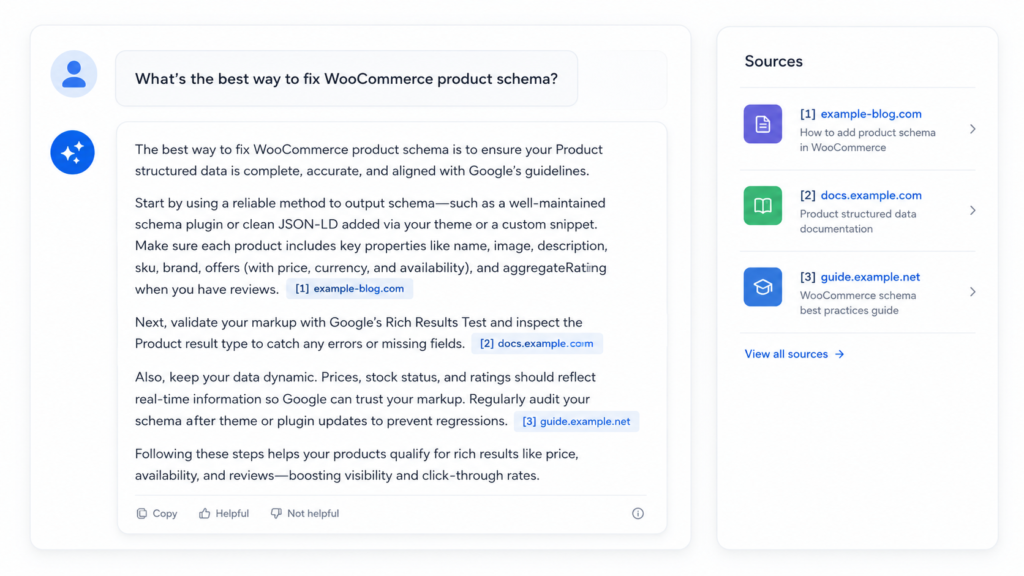
    AI answer with source citations illustrating Generative Engine Optimization (GEO)

    Add Statistics, Sources, and Expert Quotes

    This is where the Princeton data is loudest. Adding statistics, citing external sources, and including expert quotations were the highest-impact changes the study measured, together pushing visibility up to that 40% ceiling.

    The reason is mechanical. A concrete, attributable stat gives the engine something it can lift and cite with confidence. “Traffic went up a lot” is unquotable. “Traffic rose 41% after the change, per this source” is exactly the kind of passage that ends up in an answer.

    Build Entity-Level Authority and Third-Party Validation

    Generative engines lean on entities: recognizable, consistent things like your brand, your authors, and your products. When those entities show up consistently across the web, the model treats you as a known quantity rather than an unfamiliar page.

    You build that signal off your own site as much as on it. Third-party mentions, consistent business and author profiles, and a stable presence on high-quality platforms all reinforce that you’re an entity worth citing. It compounds slowly, which is why it’s hard to fake.

    A concrete example: say you publish under an author who also has a filled-out profile on LinkedIn, a byline on two industry publications, and an author schema block that ties those identities to the same name and URL. To an engine, that’s three consistent signals pointing at one entity instead of an anonymous string of text. When it weighs whether to trust a claim from your page, that consistency is what separates a citable source from a page it skips.

    Structure Content for Synthesis

    Write so a passage can be lifted without its surroundings. Clear headings, one idea per section, and answers that stand on their own make it easy for an engine to grab a clean chunk.

    Extractable formats help here: short definitions, lists, comparison tables, and FAQs all give the synthesizer a tidy unit to quote. If a human can skim the section and get the answer, so can the machine.

    How to Measure GEO Success

    There’s no clean “rank position” to watch, which makes measurement the hardest part of GEO right now. Instead of a single number, you’re tracking a few signals: how often engines mention or cite you, your share of voice against competitors in AI answers, and referral traffic arriving from ChatGPT, Perplexity, and similar sources.

    Be honest about the state of the tooling. It’s young, it varies by engine, and no single dashboard covers all of them well yet. Treat anything that claims total coverage with suspicion.

    A practical baseline costs you nothing. Keep a fixed set of test prompts that matter to your business, run them across the major engines on a regular cadence, and record whether you’re cited and how you’re described versus competitors. It’s manual, but it’s a real signal while the measurement space matures.

    Make it concrete. If you sell WooCommerce SEO services, a test prompt might be “what’s the best way to fix WooCommerce product schema.” Run it in ChatGPT, Perplexity, and Google’s AI Overview once a week, and log three things in a spreadsheet: were you cited at all, which competitors were cited instead, and how the engine summarized the topic. After a month you have a trend line, not a guess, and you can see whether the content changes you made actually moved you into the answer.

    Getting Started With GEO

    You don’t start GEO from scratch. You start from the SEO foundation you already have and extend it, so the crawlable, authoritative pages you’ve built are already doing double duty.

    Pick your highest-value pages and make three passes this week: add concrete statistics and cited sources where you’re making claims, break dense sections into self-contained, extractable answers, and confirm the underlying HTML and structured data are clean so an engine can parse you without friction. None of that requires a new content strategy. It requires making your best existing content easier to quote.

    If you want a first-week checklist, keep it small enough to actually finish:

    1. Choose the five pages that already earn the most search traffic.
    2. On each, add one attributable statistic and one linked source to your main claim.
    3. Rewrite one buried answer into a short, self-contained paragraph an engine could lift.
    4. Check that each page’s schema validates and nothing is blocking crawlers.
    5. Save three test prompts for those topics so you can measure citations later.

    That’s a few hours of work against pages you already own, and it puts the GEO fundamentals in place before you invest in anything more ambitious.

    Frequently Asked Questions

    Is GEO replacing SEO?

    No. GEO extends SEO rather than replacing it. The fundamentals, crawlability, quality content, and real authority, serve both, and most sites will run GEO and SEO together rather than choosing between them.

    Who invented the term GEO?

    The term was introduced in 2023 by a research team led by Princeton (with collaborators from Georgia Tech and IIT Delhi) in the paper “GEO: Generative Engine Optimization,” later presented at the KDD 2024 conference (Aggarwal et al.).

    How long does GEO take to show results?

    It varies. Generative engines re-crawl and re-synthesize continuously, so concrete changes like added statistics, citations, and clean schema can surface within weeks, while entity-level authority builds more slowly. No one can promise a fixed timeline.

    What tools track GEO performance?

    An emerging category of AI-visibility and brand-mention monitoring tools checks whether engines cite you, though the space is new and uneven. Schema and content tools help you prepare pages to be citable, but keeping your content clean is a different job from tracking citations, so expect to combine a few tools rather than rely on one.

    Final thoughts

    GEO isn’t a magical new channel. It’s SEO extended into a world where engines synthesize an answer and choose a few sources to cite, and the winners are the sites that make themselves the easiest, most credible thing to quote. The Princeton research makes the same point in numbers: the tactics that lift visibility are the ones that make your content concrete and attributable, not a new set of tricks. If your SEO foundation is solid, you’re most of the way there already.

    The fastest way in is to take your most important pages and make them genuinely citable this week: concrete stats, clean structure, machine-readable markup. Do that on your best five pages, keep a handful of test prompts to watch, and you’ll have a real read on whether the engines are starting to cite you long before the tooling catches up.