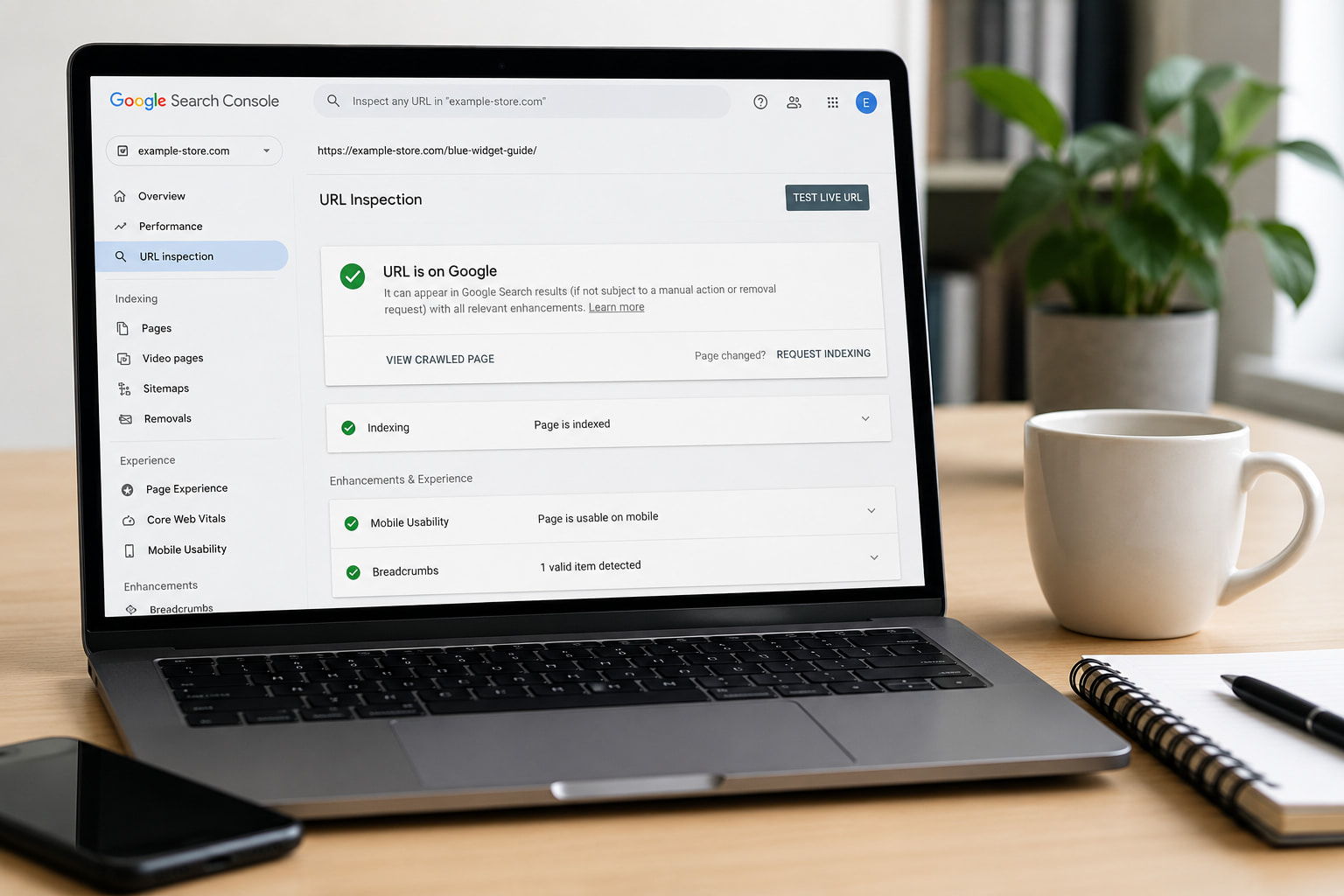
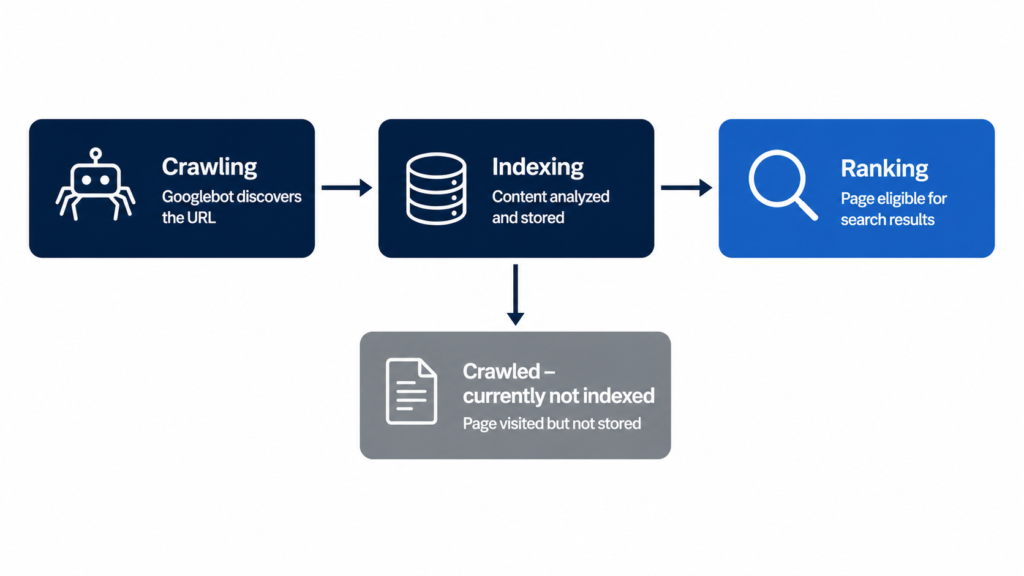
Crawling is how Google discovers your pages; indexing is how it stores them and decides whether to show them in search results. A page can be crawled and still never get indexed, and that gap is exactly where traffic dies. This guide covers the difference in about 2 minutes, then gets to the useful part: diagnosing and unsticking pages that Google visited but refused to index.
Crawling is the discovery process. Bots like Googlebot and Bingbot (also called crawlers or spiders) follow links and read sitemaps to find new or updated URLs. Think of a librarian walking the aisles noting which books exist: nothing is evaluated yet, only discovered.
Google’s own documentation describes this as the first of three stages, crawling, indexing, and serving, and warns that not every page makes it past each stage (source: How Google Search Works).
One more constraint worth a line: crawl budget. On large sites, Google doesn’t crawl everything. If you run thousands of programmatic URLs, some of them simply wait their turn.
What Is Indexing in SEO?
Indexing is what happens after the visit. Google analyzes the crawled content, the text, the title, alt attributes, structured data, then decides whether to store the page in its index.
Treat indexing as a quality filter, not a formality. Only indexed pages can rank. During this stage Google also determines whether a page is a duplicate or the canonical version, and only the canonical is eligible to appear in results (source: How Google Search Works).
Indexing is also where Google processes your structured data and your meta description in WordPress, along with the rendered HTML and the site’s quality signals. Everything the indexer can’t parse cleanly counts against clarity.
Crawling vs Indexing: The Key Differences at a Glance
Here is the whole distinction in one table:
Aspect
Crawling
Indexing
Purpose
Discovering new and updated URLs
Storing and evaluating content
Done by
Crawlers (Googlebot, Bingbot)
Google’s indexing systems
Order
First step
Second step, after crawling
Frequency
Continuous
Re-evaluated after each crawl
What improves it
Internal links, clean sitemaps
Content quality, uniqueness, clarity
Result
URL known to Google
Page eligible to rank
The practical takeaway: crawling problems are architecture problems. Indexing problems are quality problems. Fixing the wrong one wastes your sprint.
“Crawled – Currently Not Indexed”: Why Google Skips Pages
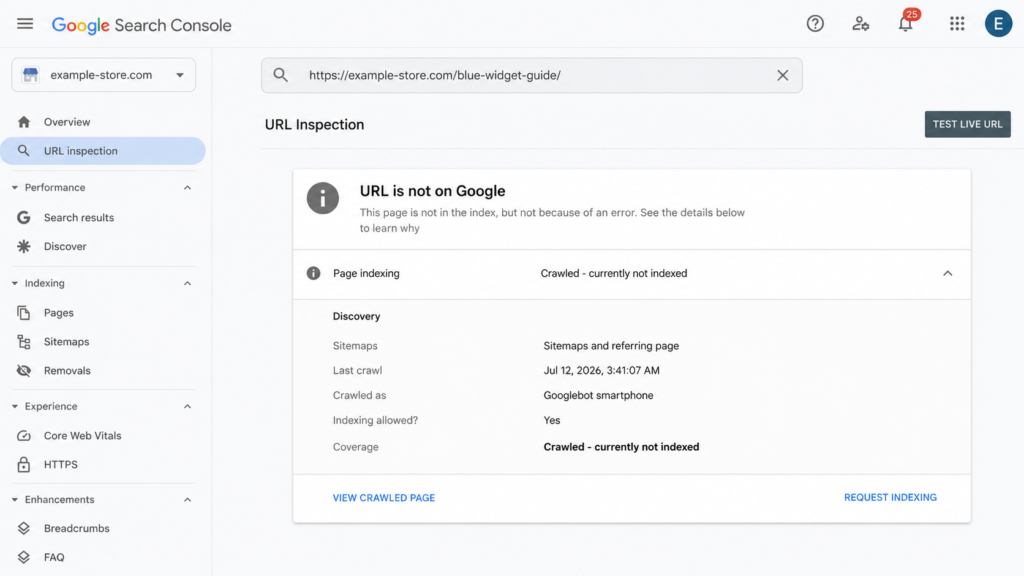
Crawled – currently not indexed is the Google Search Console status behind most “why isn’t my page ranking” questions. It means exactly what it says: Googlebot visited the page, evaluated it, and decided it wasn’t worth a spot in the index. For now.
The status is not permanent and it is not a bug. It’s a documented, massive-scale quality decision, covered in depth by Onely and SEOTesting. Improve the page and Google can re-evaluate it on a future crawl.
The most common causes
Five patterns account for most of these exclusions:
Thin or duplicate content: pages that add nothing the index doesn’t already have.
Barely-edited AI content at scale: the number one trigger in 2026; volume without editing reads as noise.
Orphan pages: no internal links pointing at them, so nothing signals they matter.
Low site-wide quality perception: weak sections drag down Google’s appetite for the rest.
Rendering problems: content that never appears in the rendered HTML can’t be evaluated.
Two more patterns show up in the documented cases: conflicting indexing signals (a canonical tag pointing one way while internal links point another) and pages that were indexed in the past and then quietly dropped when Google re-evaluated them.
None of these are edge cases. They are the standard failure modes documented across the industry guides linked above. Each one has a visible symptom in Search Console, which is why the next step is always the same: inspect the exact URL and read what Google actually saw.
How to check any page in Google Search Console
Paste the full URL into URL Inspection.
Read the verdict: indexed, or one of the “not indexed” statuses.
Click View Crawled Page and compare the rendered HTML against what you see in the browser. Missing content here means a rendering problem, not a quality problem.
Improve the page first, then click Request Indexing (see Google’s guide to asking for a recrawl). Requesting indexing without changing anything does nothing.
How to Get Your Pages Crawled and Indexed Faster
Two levers, and they are different levers. Crawling is fixed with architecture. Indexing is fixed with quality plus clarity. The four fixes below split cleanly along that line.
Match the fix to the status you’re seeing. “Discovered, currently not indexed” and slow first crawls point at the architecture side: links and sitemaps. “Crawled, currently not indexed” points at the quality side: content and clarity. Working the wrong lever is the most common way to lose a month on this.
Fix your internal linking
Internal links from strong pages do two jobs at once: they give crawlers a discovery path and they signal that the linked page matters. “Strong” means pages that already rank or attract links: your homepage, your top guides, your category hubs. A practical rule: no page more than 3 clicks from the homepage, and zero orphans.
Programmatic sites deserve a special warning. Templates generate orphan pages in bulk, and a clean SEO slug won’t rescue a page nothing links to. Breadcrumbs help too: they hand crawlers your architecture on a plate.
Submit and clean your XML sitemap
Your sitemap is a priority list for the crawler, so treat it like one. Only indexable URLs belong in it: no redirects, no 404s, no noindexed pages. Submit it in Search Console.
One tactic worth knowing: a temporary sitemap containing only your stuck URLs. It concentrates crawler attention on exactly the pages you want re-evaluated.
Cut thin and duplicate content
Consolidate near-identical pages: add a canonical tag or merge them outright. Delete pages with no search value at all.
The honest version of this advice: if a page doesn’t deserve to be in Google, Google already decided that for you. The status report is the receipt.
Add structured data so Google understands the page
Schema markup doesn’t force indexing. Nobody can promise that. What it does is remove ambiguity: it tells the indexer exactly what the page is (a Product, an Article, a FAQPage, a LocalBusiness) and makes it eligible for rich results. Google states directly that it “uses structured data that it finds on the web to understand the content of the page” (source: Google Search Central), and its own case studies on that page report results like Rotten Tomatoes measuring a 25% higher click-through rate on pages with structured data, and Nestlé measuring an 82% higher click-through rate on pages showing as rich results.
If you’d rather not hand-write JSON-LD, Schemafy generates it for 16 schema types and verifies the output with Google’s Rich Results Test; the full walkthrough is in our guide on how to use schema markup, and there’s a free schema markup generator if you want to test a page right now.
Do AI Crawlers Work the Same Way? (GPTBot, ClaudeBot & Friends)
AI answer engines run their own crawlers, and they inherit the same two-step problem: first discover the page, then understand what it is.
OpenAI operates 3 separate crawlers, each with its own job: GPTBot for model training, OAI-SearchBot for ChatGPT search, and ChatGPT-User for live fetches during a conversation (source: OpenAI crawler documentation). Anthropic’s ClaudeBot honors robots.txt and is controlled with its own User-agent: ClaudeBot directive (source: Anthropic); Anthropic also runs separate search and user-request bots, and each one needs its own robots.txt line (via Search Engine Journal). Perplexity’s PerplexityBot rounds out the list you’ll see most often in server logs.
The separation matters in practice. You can allow OAI-SearchBot so your pages can show up in ChatGPT’s search answers while disallowing GPTBot to keep your content out of training data, and OpenAI notes that robots.txt changes take roughly 24 hours to propagate to its systems (source: OpenAI crawler documentation). The same logic applies to Anthropic’s three bots: allowing ClaudeBot does nothing for Claude-SearchBot or Claude-User.
There’s no classic Google-style index behind these engines, but there is retrieval, and an ambiguous page gets skipped either way. A page these bots can fetch but can’t classify is in the same position as a page Google crawls but doesn’t index: technically visible, practically invisible. This is the core idea behind generative engine optimization: the same clarity that earns you indexing earns you citations.
The efficient part: the JSON-LD you write for Google is the same signal these engines parse. You build it once and it covers both. Two practical checks: confirm your robots.txt isn’t blocking these user agents by accident, and remember that allowing one bot from a vendor does nothing for its siblings.
Make Every Page Machine-Readable Before Google Decides
Crawling is getting found. Indexing is getting understood and stored. The first is fixed with links and a sitemap; the second, with clear, machine-readable content.
That second half is what Schemafy does: it generates valid schema across your whole site (from a template, with AI, or in bulk), verifies it with Google’s Rich Results Test, and runs alongside Yoast and Rank Math. Can we promise indexing? No. But a page Google can’t understand is a page Google can skip.
[CTA_DOWNLOAD]
FAQs About Crawling and Indexing
What happens first, crawling or indexing?
Crawling always happens first. Googlebot has to discover a URL, through links or your sitemap, before Google can analyze and store it. Indexing is the second step, where Google evaluates the crawled content and decides whether it’s worth adding to its index. No crawl, no index.
Can a page be crawled but not indexed?
Yes, and it’s common. Google Search Console reports it as “Crawled – currently not indexed”: Googlebot visited the page but decided it didn’t add enough value to store. Thin content, duplicates, and weak internal linking are the usual causes. It’s not permanent. Improve the page and Google can re-evaluate it.
How long does it take Google to index a new page?
Anywhere from a few hours to several weeks. Sites with strong authority and frequent updates get crawled and indexed faster. You can speed things up by linking to the new page from important pages, including it in your sitemap, and requesting indexing via URL Inspection in Search Console.
How do I check if my page is indexed?
Paste the full URL into the URL Inspection tool in Google Search Console. It tells you whether the page is indexed and why not if it isn’t. For a quick check without Search Console, search site:yourdomain.com/your-page on Google: if it appears, it’s indexed.
Does schema markup help with indexing?
Schema markup doesn’t force Google to index a page, but it removes ambiguity: it tells the indexer exactly what the page is, a product, an article, a local business. Google confirms it uses structured data to understand pages, and clearly understood pages are eligible for rich results.
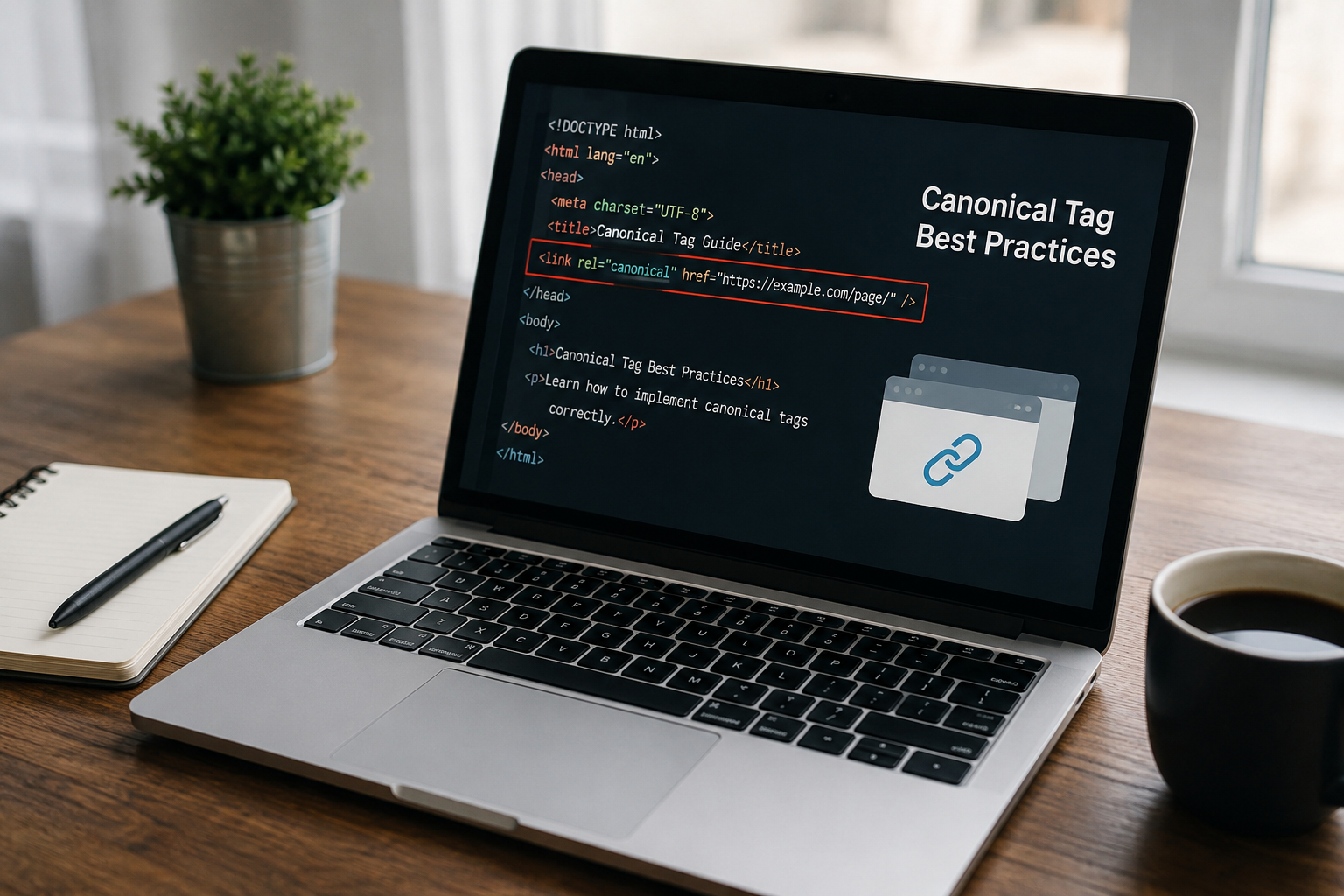
To add a canonical tag in HTML, place a <link rel="canonical"> element inside the <head> of the page, pointing to the absolute, https version of the URL you want indexed. Google only accepts the tag when it sits in the head, and it treats the value as a strong signal, not a command.
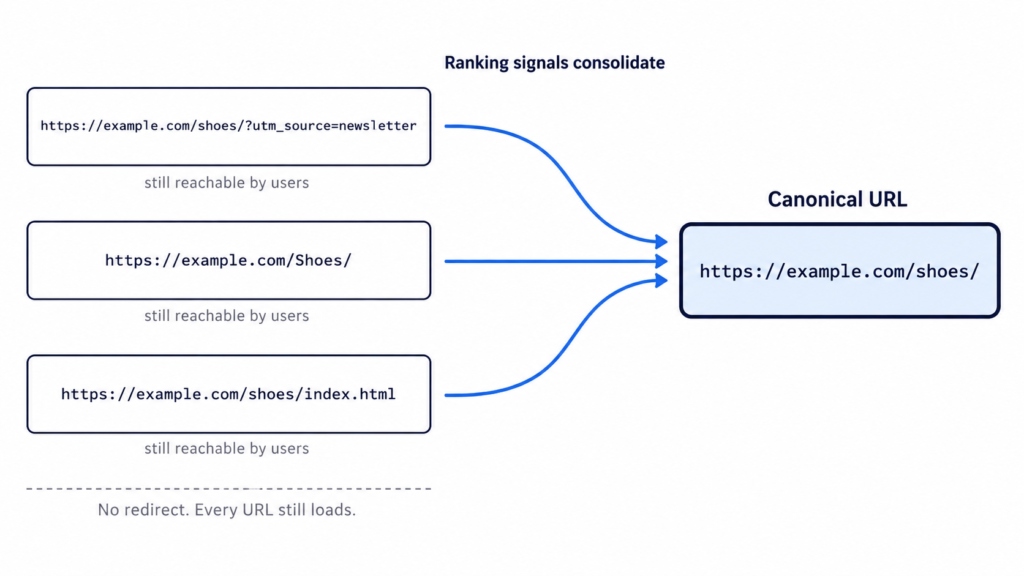
A canonical tag consolidates signals from several duplicate or near-duplicate URLs into one preferred URL. Links, ranking signals and crawl attention get attributed to the version you nominate instead of being split across variants.
The page you didn’t nominate stays reachable. That is the difference between a canonical and a redirect: the user still lands on whatever URL they clicked, and only search engines are told which version to index.
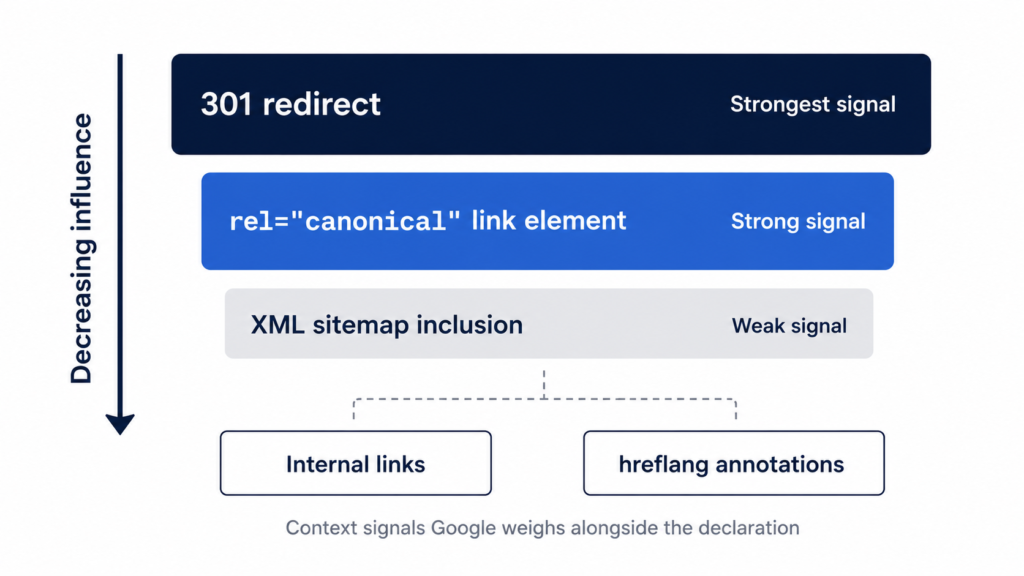
Here is the part most guides skip. Google lists canonicalization methods “in order of how strongly they can influence canonicalization”, and describes rel="canonical" as “a strong signal that the specified URL should become canonical.” A signal, not a directive. Google can and does pick a different URL.
In %currentyear% that choice reaches further than the blue links, because the canonical URL is also the one generative engines tend to cite when they summarize your content.
Three URLs, one set of consolidated signals, and every page still loads for the user.
Canonical tag syntax
The element has three moving parts. Knowing which is which is the difference between pasting a line of code and debugging it six months later when Search Console reports something odd.
<head>
  <!-- element: link, not meta -->
  <link
    rel="canonical"
    href="https://example.com/page/" />
  <!-- rel = the relation type, href = the preferred URL, absolute -->
</head>
Anatomy of the tag
Three parts, and one naming correction worth making up front.
<link> is a link element, not a meta tag. People call it “the canonical meta tag” constantly and it is wrong. It belongs to the same family as your stylesheet and favicon declarations.
rel="canonical" is the relation type, a registered link relation defined in RFC 6596. That is the spec Google points to.
href="…" is the preferred URL, and the only part you change per page.
<link> is a void element, so it takes no closing tag. Writing /> is valid but an XHTML habit rather than a requirement. Both forms parse identically in HTML5.
Absolute vs. relative URLs
Always use an absolute URL with the protocol included.
Then the detail almost nobody covers: the URL has to match the indexable version exactly. Same protocol, same www decision, same trailing slash, same casing as the slug you actually publish.
<!-- ✅ absolute, https, matches the indexable version exactly -->
<link rel="canonical" href="https://example.com/blog/canonical-tags/" />
<!-- ❌ relative: resolves against page context, breaks on staging -->
<link rel="canonical" href="/blog/canonical-tags/" />
A canonical pointing at a URL that redirects or returns a 404 cancels the signal entirely.
How to add a canonical tag in HTML: step by step
Four steps. The fourth one decides whether the first three matter.
Step 1: Choose the canonical version of the URL
Pick the version with the most internal and external links, the most complete content, and existing rankings. When two candidates are close, the one already earning impressions wins.
Get that from data rather than memory. Search Console tells you which URL already receives impressions for the query you care about, and a crawl surfaces the duplicates you forgot existed: parameter variants, uppercase paths, /index.html leftovers, http alongside https, www alongside non-www. It also helps to preview the URL in search results first, since the canonical is the version people actually see.
One default saves you work. Google already prefers HTTPS over HTTP unless something contradicts it: an invalid certificate, insecure dependencies, an HTTPS page redirecting to HTTP, or an HTTPS page canonicalizing to its own HTTP version.
Do not canonicalize toward a page that is substantially different. Google clusters by content similarity, and if the two are not close enough it discards your declaration.
Put it before heavy scripts. A parser that hits malformed markup can close the head early, and everything after that point lands in the body where the tag is worthless.
<!DOCTYPE html>
<html lang="en">
<head>
  <meta charset="utf-8" />
  <title>How to Add a Canonical Tag in HTML</title>
  <meta name="description" content="Where the canonical tag goes and how to verify it." />
  <link rel="canonical" href="https://example.com/blog/canonical-tags/" />
  <!-- heavy scripts go after this line -->
</head>
<body>
  <!-- page content -->
</body>
</html>
On a templated site, the file to edit is the head partial or the layout, not each page. That is also where the rest of your head tags live, so one edit covers every URL the template renders.
Step 3: Add a self-referencing canonical to every indexable page
Best practice is that every indexable page points at itself, not just the ones you know are duplicated. Google lists it as a “do”: include a rel="canonical" link on the canonical page itself.
It protects against duplicates you never created on purpose: tracking parameters, uppercase variants, and scrapers republishing your HTML.
<!-- on https://example.com/blog/canonical-tags/ -->
<link rel="canonical" href="https://example.com/blog/canonical-tags/" />

<!-- the ?utm_source=newsletter variant inherits the exact same value -->
On a templated or programmatic site this is one template change, not a per-URL task. The same partial that emits the tag for 12 pages emits it for 12,000.
Google does not require it. Yoast and effectively every other SEO framework recommend it anyway, and it costs nothing.
Step 4: Keep every other signal pointing the same way
The canonical is one vote among several. Google weighs redirects, internal links, sitemap entries and hreflang alongside it, and it publishes the ranking: redirects are the strongest signal, rel="canonical" is a strong signal, sitemap inclusion is a weak one. The documentation also notes that “these methods can stack and thus become more effective when combined.”
So align them:
Link internally only to the canonical URL.
Include only canonical URLs in the XML sitemap.
Make sure redirects do not land on a different version.
Point hreflang annotations at canonical URLs.
Google is blunt about the failure mode: “Don’t specify different URLs as canonical for the same page using different canonicalization techniques.” When these signals contradict each other, Google resolves the conflict itself and Search Console reports it as “Duplicate, Google chose different canonical than user.”
Google publishes the order. A redirect outranks the tag, and the tag outranks the sitemap.
Canonical tag examples for 5 common scenarios
Five setups that cover most of what you will hit, each with the code and the one rule that matters.
Self-referencing canonical
The default state for every indexable page: the page nominates itself.
<!-- on https://example.com/blog/canonical-tags/ -->
<link rel="canonical" href="https://example.com/blog/canonical-tags/" />
Watch the homepage. The canonical is https://example.com/, not https://example.com/index.html, even when the file behind it literally is index.html.
Duplicate and near-duplicate pages
One product reachable from two category paths, both nominating the clean URL.
<!-- on /shoes/running/model-x/ and on /sale/model-x/ -->
<link rel="canonical" href="https://example.com/products/model-x/" />
Never chain canonicals. If A points to B and B points to C, Google has to guess what you meant.
URLs with tracking or filter parameters
Parameter variants that produce the same page: ?utm_source=, ?sort=price, ?color=blue.
<!-- on /shoes/?sort=price and /shoes/?utm_source=newsletter -->
<link rel="canonical" href="https://example.com/shoes/" />
The nuance almost nobody gives you: if a filtered view has genuinely different content and its own search intent, like “blue running shoes,” it may deserve to be indexable and self-canonical rather than folded into the parent.
Paginated series
Do not canonicalize pages 2, 3 and 4 back to page 1. It is the most repeated mistake in the industry and it tells Google to drop everything past the first page.
<!-- on https://example.com/blog/page/3/ -->
<link rel="canonical" href="https://example.com/blog/page/3/" />
So noindex on the republisher’s copy is the primary play, and the canonical below is the fallback for partners who will not set one.
<!-- on the republished copy, pointing back to your original -->
<link rel="canonical" href="https://example.com/blog/original-post/" />
Plenty of platforms let the republisher do neither. When that happens, an attributed link back to the original is the only lever you have left.
Other ways to declare a canonical URL
The HTML <link> is what Google prefers. Three alternatives exist for pages where you cannot touch the head, and the strength ordering from Step 4 is why they are not equivalent.
HTTP header (for PDFs and non-HTML files)
PDFs, images and other files have no <head>, so the header is the only route.
HTTP/1.1 200 OK
Link: <https://example.com/downloads/white-paper.pdf>; rel="canonical"
The syntax comes from RFC 5988, and Google supports the method for web search results only. Do not assume it carries over to Images or Discover.
Two configurations, in standard Apache and Nginx syntax rather than anything Google publishes:
<Files "white-paper.pdf">
  Header set Link '<https://example.com/downloads/white-paper.pdf>; rel="canonical"'
</Files>
location = /downloads/white-paper.pdf {
  add_header Link '<https://example.com/downloads/white-paper.pdf>; rel="canonical"';
}
XML sitemap
Google classifies sitemap inclusion as “a weak signal that helps the URLs that are included in a sitemap become canonical.” Weak, but it stacks with the <link> rather than competing with it.
Only canonical URLs belong in the sitemap. Listing both the parameter variant and the clean URL is a contradiction Google has to resolve on your behalf.
Server-rendered HTML first, in other words. Either the tag lives in the source and JavaScript leaves it alone, or it is absent from the source and JavaScript owns it. Never both.
The anti-pattern is injecting a canonical over a page that already ships a different one. Two canonicals and Google ignores both. This shows up constantly in React and Next.js builds where the framework emits one value and a client-side SEO component overwrites it with another.
How to add canonical tags in WordPress, Shopify and Webflow
Google notes that on a CMS you may not be able to edit the HTML directly, and should look for the search engine settings screen instead. What that screen is depends on the platform.
WordPress
Yoast, Rank Math and AIOSEO all insert a self-referencing canonical automatically. If you run one of them, the tag already exists. Check before adding anything.
To override it manually, open the post editor, scroll to the SEO panel, and use the Advanced tab. The canonical URL field is there.
On a custom theme with no SEO plugin, hook into wp_head from functions.php and echo the element. That puts it in the same place as adding a meta description in WordPress, which keeps the template as the single source of truth.
Editing the theme header file directly works, but survives exactly until the next theme update. Use a child theme or the hook.
Shopify
Canonicals are generated automatically, and for most stores the defaults are correct.
The known gap is the duplicate created when a product is reachable at /collections/x/products/y as well as /products/y. Fixing it means editing the canonical logic in theme.liquid, and several popular themes already handle the case.
Webflow, Wix and Squarespace
All three expose a canonical field in the per-page SEO settings, so no code is involved. Left blank, it falls back to a self-referencing canonical.
The rule that applies to all of them: if the CMS already injects a canonical, do not add a second one by hand. Two canonicals on one page invalidate each other.
How to verify your canonical tag is working
Four methods, in order of what they can actually prove.
Method
What it checks
What it can’t tell you
View Source
The raw HTML Google receives
Whether JavaScript changes it later
DevTools → Elements
The rendered DOM
Whether Google agrees with the value
URL Inspection (Search Console)
User-declared vs Google-selected canonical
Anything about URLs Google hasn’t processed
Site crawler
Every canonical on the site at once
What Google actually selected
Start with View Source and Ctrl+F for “canonical”. That is the raw HTML Google reads before rendering. Then check the same value in DevTools. If the two disagree, JavaScript is rewriting the tag and you know where the problem lives.
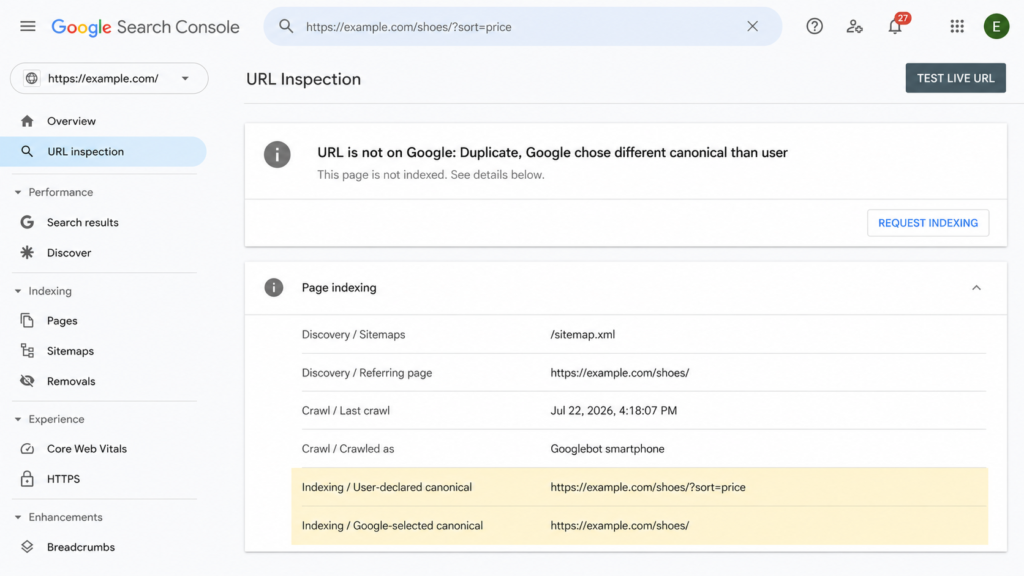
Neither one tells you whether Google listened. For that you need URL Inspection in Search Console, which reports User-declared canonical and Google-selected canonical as two lines. Read them together:
The two match. You are done.
They differ. Google overrode your declaration, so the problem is in the surrounding signals rather than the tag.
Search Console has no data for the URL. It has not been processed yet.
Above a few dozen URLs, run a site crawler and audit every canonical at once. It is the only way to catch chains and mismatches at scale, and the same pass surfaces missing structured data, which is where a plugin like Schemafy enters the picture.
One expectation to set first. After you fix the underlying issue, Google can hold the pages in the same duplicate cluster for up to two weeks. Do not touch the tag again on day three.
[SCREENSHOT: The URL Inspection panel in Google Search Console showing the Page indexing section, with “User-declared canonical” and “Google-selected canonical” listing two different URLs.]
The only screen that tells you whether Google honored the tag or overruled it.
8 canonical tag mistakes that make Google ignore your tag
Two or more canonicals on one page. Google ignores all of them and selects its own. Usually a plugin injects one and someone adds a second by hand.
Canonical outside the <head>. Anywhere in the body and it does nothing.
Relative URL, or the wrong domain or protocol. Relative paths resolve against page context, which breaks the moment a staging environment gets crawled.
Canonical pointing at a redirect, a 404 or a noindex page. You have declared a preference for a URL that cannot be indexed.
Combining noindex with rel="canonical". Contradictory instructions. Google does not recommend noindex “to prevent selection of a canonical page within a single site, because it will completely block the page from Search.”
Canonical chains. A points to B, B points to C. Point everything at the final URL instead.
Canonicalizing pages that are not genuinely equivalent. Google clusters by content similarity, and discards declarations between pages that are too different.
A canonical that contradicts the sitemap and the internal links. Three signals pointing three directions, and Google breaks the tie without you.
Canonical vs. 301 redirect vs. noindex vs. hreflang
Four instructions, four different outcomes for the person clicking the link.
Method
Use it when
What happens to the user
rel="canonical"
Duplicates that must stay reachable
Sees the page they clicked
301 redirect
The old URL should stop existing
Gets sent to the new URL
noindex
Page is useful to users, not to Search
Sees the page, no signals consolidated
hreflang
Same content, different language or region
Sees their language version
The decision comes down to one question: should the duplicate still be reachable? If yes, canonical. If the old URL has no reason to exist, redirect it and stop maintaining two things.
noindex is for pages that earn their keep with users and have no business ranking: thank-you pages, logins, account screens, filtered views with no search demand. It removes the page from Search without consolidating anything, so it is not a canonicalization tool.
Hreflang is a different job entirely. Every language version stays indexed, and the annotations tell Google which one to serve where. One trap worth knowing: a rel="canonical" annotation carrying hreflang, lang, media or type attributes is not used for canonicalization at all. Google ignores those, so keep the two declarations as separate elements.
Get your canonical setup audited
If Search Console keeps selecting a different canonical after you have fixed the tag, stop editing the tag. The problem is almost always the internal linking architecture pointing somewhere your declaration does not.
The practical next step is to audit what the rest of the <head> is telling Google on those same pages, since a canonical that disagrees with your schema markup and sitemap is a signal problem, not a syntax problem. Schemafy is one of the WordPress plugins that shows your schema markup and meta tags in one place.
[CTA_DOWNLOAD]
Frequently asked questions
Where do you put the canonical tag in HTML?
The canonical tag goes inside the <head> section of your HTML document, alongside your title and meta description. Placing it in the <body> makes Google ignore it entirely. On templated sites, add it to the head partial or layout file so it renders on every page.
Does every page need a canonical tag?
Google doesn’t require one, but adding a self-referencing canonical to every indexable page is standard best practice. It protects against duplicates created by tracking parameters, uppercase variants and scrapers. Pages you don’t want indexed should use noindex instead, never both on the same URL.
Can a page have two canonical tags?
No. If Google finds multiple rel="canonical" declarations on one page, it ignores all of them and picks a canonical URL itself. This usually happens when a plugin injects one automatically and someone adds a second manually, or when JavaScript overwrites the server-rendered tag.
Is a canonical tag the same as a 301 redirect?
No. A 301 redirect sends both users and crawlers to a different URL, so the original page becomes inaccessible. A canonical tag only tells search engines which version to index, and users can still reach every version. Use a redirect when the duplicate should no longer exist.
Why is Google ignoring my canonical tag?
Google treats canonical tags as strong signals, not directives, and weighs internal links, redirects and sitemap entries too. If those signals point elsewhere, Google overrides your tag and Search Console reports “Duplicate, Google chose different canonical than user.” Align every signal on one URL to fix it.
Can a canonical tag hurt SEO?
Yes, if it’s misconfigured. Canonicalizing pages that aren’t genuine duplicates, pointing to a 404 or redirected URL, or chaining canonicals can deindex pages that should rank. Audit canonicals whenever traffic drops on a section of the site after a template change.
Most WordPress SEO advice assumes that if you fix everything you control, you win. Clean titles, valid schema, fast pages, sensible internal links. Do that across every client site and the rankings follow.
They often don’t.
Google and the AI systems now summarizing it both weigh something you cannot edit: what the rest of the web says about you.
That is off-page SEO. This guide covers what it actually is, how it differs from on-page and technical work, the six signals that carry weight, the step almost every guide skips, which techniques still work, what gets you penalized, how to measure it, and a 90-day plan you can start this week.
What is off-page SEO?
Off-page SEO is everything that happens away from your own website to build its authority, trust, and relevance: backlinks, brand mentions, reviews, business listings, authorship signals, and community presence. It is the half of SEO you influence but do not directly control.
The most common mistake is treating off-page SEO and link building as the same thing. Links are one signal out of six. Reviews on third-party platforms, mentions with no link attached, directory listings, who your authors are, and where your brand shows up in video and community discussion all feed the same judgment.
You will also see this called off-site SEO or off-page optimization. Same discipline, different labels.
The idea goes back to PageRank, which treated a link as a third-party recommendation rather than a claim the site made about itself. Everything in this article is a descendant of that one assumption: a recommendation you did not write about yourself is worth more than one you did. Semrush’s guide frames it the same way.
Off-page SEO vs. on-page SEO vs. technical SEO
On-page SEO
Technical SEO
Off-page SEO
What it is
What you say about yourself
How easily you can be read
What others say about you
What you control
Full
Full
Influence only
Examples
Content, headings, internal links, meta tags, structured data
Crawlability, speed, indexation, canonicals
Backlinks, brand mentions, reviews, listings, video
How fast it moves
Days to weeks
Days to weeks
Months
That is the whole distinction in one line: on-page is what you say about yourself, technical is how easily you can be read, off-page is what others say about you.
The three do not compete. Off-page authority with no on-page substance sends visitors to a page that cannot convert them, and it gives search engines nothing specific to rank. On-page work with no off-page signal produces a well-built page that nobody vouches for.
Most operators overweight the first two because they are the ones you can finish. You can fix common SEO issues, rewrite URL slugs, and check every title in a SERP preview in an afternoon. Off-page never gets finished, which is exactly why it accumulates into a moat.
Why off-page SEO matters more in AI search
The stakes changed. Off-page signals no longer just decide where you sit in a list of ten blue links. They decide whether ChatGPT, AI Mode, and AI Overviews name you at all. In a generated answer there is no position four to fall back to. You are mentioned or you are absent.
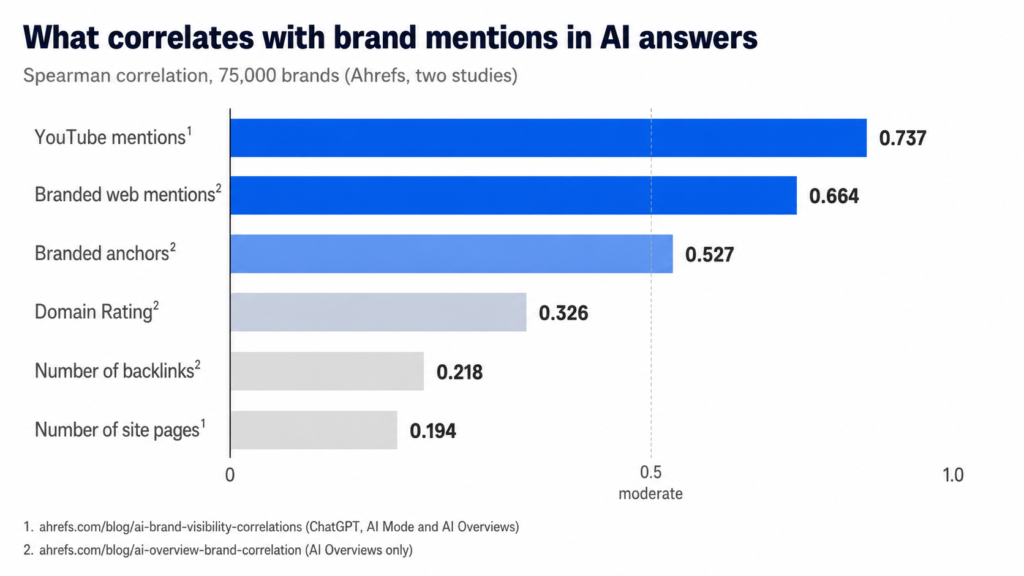
Ahrefs studied 75,000 brands to see which factors track with being mentioned in AI answers. Across ChatGPT, AI Mode, and AI Overviews, YouTube mentions showed the strongest correlation at roughly 0.737, higher than any other factor tested. Branded web mentions came next at 0.66 to 0.71.
Two findings cut against common advice. In the cross-platform study, number of site pages correlated at about 0.194, which is close to nothing. Publishing more is not the lever. And Seer Interactive found the same pattern independently, with domain rating at 0.25 and backlinks at 0.10, so this is not one vendor’s dataset talking.
Now the part most articles quoting these numbers leave out.
Ahrefs published a caveat with both studies. “The usual disclaimer applies: correlation isn’t causation,” the cross-platform study says. “We’ve spotted patterns between search metrics and AI mentions, but that doesn’t mean improving these metrics will automatically boost your AI visibility.” That matters here more than usual, because a brand that is genuinely well known accumulates YouTube mentions, web mentions, and branded searches at the same time, without any of them causing the others. The methodology tightens the point: both studies filtered for domains with a domain rating above 40 and a top keyword doing at least 800 searches a month, which selects for brands that already arrived.
Read the numbers as a description of what visible brands look like, not as a set of dials. The practical takeaway survives either way, and it lines up with what generative engine optimization work has been pointing at: presence across other people’s properties is what these systems draw on.
Caption: Mention-based signals outrank link-based signals in every dataset published so far. Ahrefs cautions that these are correlations, not levers.
The 6 off-page SEO signals that actually count
These are ordered by how much difference they make for a site that still has to earn its authority, not one that already has a household name. A recognized brand can skip most of this list. Everyone else cannot.
1. Backlinks
A backlink is a link from another website to yours. It is the oldest off-page signal and still the most discussed, though no longer the most powerful.
Relevance and quality beat volume, and it is not close. A handful of links from sites that cover your subject will do more than hundreds from unrelated directories. What separates a good link from a bad one:
Topical relevance. The linking page covers a subject adjacent to yours.
Domain authority. The linking site has earned its own credibility.
Real traffic. The specific page linking to you has readers, not just a URL.
Natural anchor text. The visible link text reads like something a human wrote.
Editorial placement. The link sits inside the body content, not in a footer or a sidebar widget.
That fourth point has data behind it now, and it inverts what classic link building teaches. Branded anchors, meaning link text containing your brand name, correlated with AI visibility at 0.628 in AI Mode and 0.527 in AI Overviews. Number of backlinks sat at 0.218. Being linked to by name outperforms being linked to with a keyword you picked.
Three ways to earn links without a PR team: publish original data other people need to cite, offer expert commentary to trade publications covering your sector, and get listed on the resource pages your industry associations already maintain. All three are slow. None of them require buying anything.
2. Brand mentions (linked and unlinked)
A mention with no link still counts. If three industry blogs, a Reddit thread, and a YouTube video name your company, search engines and language models learn two things: that you exist, and what category you belong to.
Unlinked mentions, text written about your brand on other websites, have very little impact on SEO, but a much bigger impact on GEO. LLMs derive their understanding of a brand’s authority from words on the page, from the prevalence of particular words, the co-occurrence of different terms and topics, and the context in which those words are used.
Ryan Law, Director of Content Marketing, Ahrefs
The volume effect is steep. Brands in the top quartile for web mentions averaged 169 AI Overview mentions. The quartile below averaged 14.
The actionable version is unlinked mention reclamation: search for places your brand name appears without a link, then ask for one. Half the time the writer simply forgot. One caveat that trips people up: content on your own domain is not a third-party mention. Writing about yourself does not count, no matter how much of it you publish.
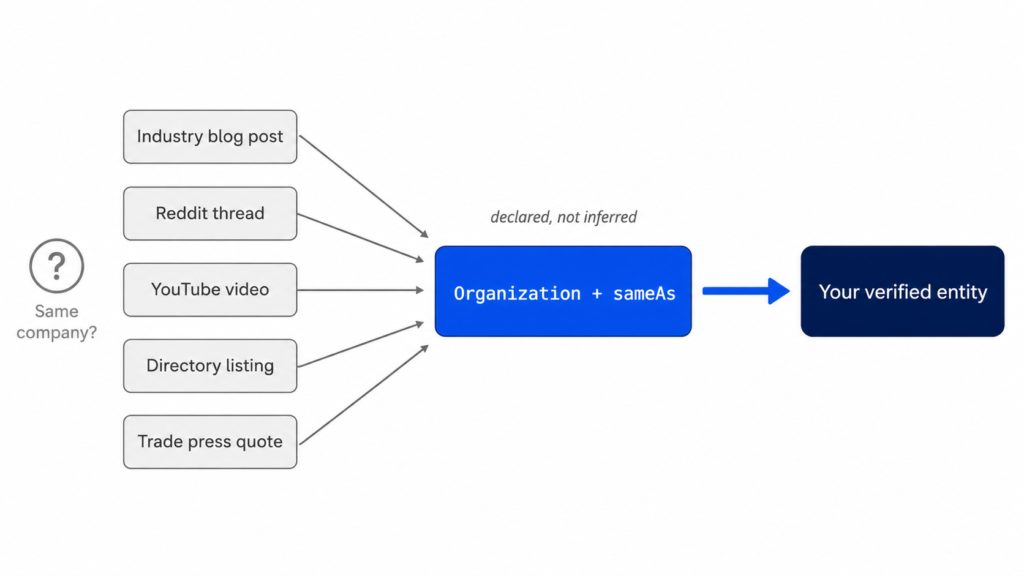
There is a gap in that logic worth noticing. For any of this to accrue to you, something has to establish that the “Acme Analytics” in that Reddit thread is your Acme Analytics. Hold that thought.
3. Reviews and third-party reputation
For most sites in this audience, this means product and vendor reviews on platforms you do not own: software comparison sites, marketplaces, and the community forums where your buyers actually ask each other for recommendations.
Four things matter. Volume, because one review is an anecdote. Average rating, obviously. Velocity, because a steady trickle reads as a real business while forty reviews in one month and silence afterward reads as a campaign. And your response pattern, because how a company answers criticism is itself evidence about the company.
Do not buy reviews. Beyond the platform bans, it fails at the thing you wanted, since purchased reviews cluster in ways that are straightforward to detect.
Google’s search quality guidance points its evaluators toward independent sources when assessing a site rather than the site’s own claims about itself. That is the entire logic of off-page SEO stated as policy.
One distinction to keep straight, because it causes real confusion: reviews collected on your own site are first-party content, and they are what Review and AggregateRating structured data describe. Reputation on third-party platforms is off-page. Marking up the first does not improve the second. They are separate jobs.
4. Business listings and citations
If any of your sites represent a business with a physical location, this one applies. If not, skip it.
A citation is a mention of a business name, address, and phone number in a directory or listing. Consistency matters more than volume here. Mismatched address data across directories is one of the most common problems in this category and one of the easiest to fix, because it is clerical work rather than strategy.
LocalBusiness structured data on the site itself helps tie those external listings back to the business as a single entity, which is the same mechanism the next section covers in full.
5. Author and publisher signals
This is the signal with the most upside and the least attention among operators running many sites.
Search systems increasingly ask who wrote a page, what else that person has published, and whether the organization publishing it is a recognizable entity. Most WordPress installations answer all three questions with “admin.”
The fix is unglamorous and takes an afternoon per site. Give every author a real bio that links to verifiable profiles elsewhere. Keep author identity consistent across the sites where the same person writes, so the profiles resolve to one human rather than five strangers with the same name. Retire the generic account.
Person and Organization structured data are the machine-readable version of the same claim. The bio tells a reader who wrote this. The schema tells a parser the same thing without requiring it to guess.
6. Video, community, and social distribution
Likes are not a ranking factor. Distribution is where the value sits, because distribution produces links, mentions, and branded searches, and those are signals. This is the same distinction that applies to meta descriptions, which are not a ranking factor but still shape whether anyone clicks.
YouTube earns its own paragraph given that 0.737 figure. The likely mechanism is not mysterious. YouTube is among the most-cited domains in AI answers, and its transcripts are also training data. The New York Times reported that OpenAI trained GPT-4 on over a million hours of YouTube transcription. Video sits on both the input and the output side of these systems.
For a small team the realistic version is one video a quarter answering the question you already field on every sales call. Reddit and niche podcasts work on the same principle. Forum spam does not, and it is the fastest way to get a brand name associated with the wrong thing.
The entity layer: connecting off-page signals to your site
Every guide on this subject stops at the moment someone mentions you. That is where the interesting problem starts.
When a search engine or a language model encounters “Acme Analytics” on a site you do not control, it has to decide what that string refers to. Your company. A different company with a similar name. A product. A person. Nothing at all. Until that question resolves, the mention is text on someone else’s page, not authority attached to your business.
Organization structured data with the sameAs property is how you answer it explicitly. sameAs takes a list of URLs that unambiguously identify the same entity: your LinkedIn page, your Crunchbase profile, your Wikipedia entry if you have one, your directory listings, your YouTube channel. You are stating, in a format a parser reads without inference, that all of these are one thing and that thing is you. Person schema does the same job on author pages.
Now the honest part, because this section is where an article like this usually oversells.
Structured data does not create authority. It is not a ranking factor on its own, and adding sameAs to a site nobody mentions accomplishes nothing. What it does is make authority that already exists legible and attributable. It converts something a search engine would otherwise have to infer into something it can read. When the inference is easy anyway, because you are Nike, this changes little. When your brand name is generic, shared, or new, the inference is harder and the declaration does more of the work.
The practical audit takes twenty minutes per site. Does the site declare Organization schema at all? Is sameAs populated with real profiles, or empty? Do author pages carry Person schema, or just a WordPress bio field? For most client sites the answer to all three is no, which makes this the rare off-page problem you can fix without asking anyone else for anything.
Generating those types across a lot of pages without hand-writing JSON-LD is what schema generators are for, Schemafy among them, though a single Organization block on one site is quick enough to write by hand in any schema markup generator. If the underlying concepts are unfamiliar, our guide to structured data covers the vocabulary.
Caption: Off-page work creates the mentions. The entity layer helps make them attributable to you rather than to a similarly named stranger.
Off-page SEO techniques that still work
Ordered by how quickly they pay back for a small team, not by how impressive they sound in a strategy deck.
Unlinked mention reclamation. Search your brand name, filter out your own domain, and email the writers who mentioned you without linking. Highest hit rate of anything on this list.
Broken link building. Find dead links on resource pages in your niche, then offer your equivalent page as the replacement. You are solving the site owner’s problem, which is why it converts.
Expert commentary for trade press. Answer journalist queries in your actual area of competence. One placement in a publication your buyers read beats ten guest posts nobody reads.
Original research or proprietary data. Publish a number nobody else has. This is the only technique that earns links passively for years, and the only one that reliably takes a month of work before it returns anything.
Resource page placement. Industry associations, alumni directories, and tool roundups maintain link lists. Ask to be on them.
Genuine guest contributions. Write for publications you would read. Skip anything that advertises guest post slots, since that market is exactly what Google’s spam policies target.
Creator collaborations. Partner with people who already have your audience’s attention. Their mention carries weight your own channel cannot manufacture.
Real community participation. Answer questions in the forums and subreddits where your buyers gather, under a real name, without pitching. Slowest of all of these, and the hardest to fake.
The first two pay within weeks because they exploit work already done. The last two compound over quarters. Original research sits in between: expensive up front, then it keeps earning. Choosing which of these to run is a search intent question as much as a link-building one, since the goal is to be present where your buyers already look.
5 off-page SEO tactics that can get you penalized
Buying links or using PBNs. Google’s spam policies name link schemes directly. Private blog networks get deindexed in batches, and you lose every link at once.
Low-quality directory farms. Hundreds of listings on sites that exist only to list. They pass no value and establish a pattern that is easy to classify.
Repeated exact-match anchor text. Two hundred links all reading “best project management software” is not a distribution any natural link profile produces. The pattern is the problem, not any single link.
Buying reviews. Platform bans aside, review velocity and language similarity are both measurable, and the penalty tends to arrive as removal of every review you paid for.
Duplicate or inconsistent listings. Less dramatic than the others, but conflicting business data creates ambiguity that suppresses you quietly rather than penalizing you loudly.
One nuance that gets lost: sponsorship is not a violation. Paying for a link becomes a problem when it passes ranking signals without disclosure, which is what rel="sponsored" and rel="nofollow" exist to prevent. Tag the link and the sponsorship is fine.
If you inherit a site with a questionable link history, audit the profile before assuming the worst. The disavow file exists for cases with a manual action or a clear pattern of purchased links, and Google has been consistent that most sites never need it. Reach for it last, not first.
How to measure off-page SEO
Six metrics, each with an obvious home:
Referring domains and month-over-month growth (Ahrefs, Semrush). Growth rate tells you more than the absolute count.
Link profile quality. Relevance and authority of what is pointing at you, not volume.
Branded search volume. The cleanest available proxy for whether awareness is actually rising.
Review volume and average rating across the third-party platforms your buyers check.
Referral traffic (GA4). Which mentions send actual humans.
Mention frequency in AI answers. How often you appear when a model answers a question in your category.
That last one needs a different mental model. In AI search, “position” barely means anything, since a generated answer is not a ranked list you can climb. You measure frequency of mention and share of voice against competitors instead. Answer engine optimization tools and AI visibility trackers exist specifically for this, and the category is young enough that methodologies still differ meaningfully between vendors.
Monthly is the right cadence. Off-page metrics move slowly enough that weekly checks produce noise and anxiety in equal measure. For a client report, three numbers carry the story: referring domains, branded search volume, and AI mention frequency.
A 90-day off-page SEO plan
Days 1 to 30: fix what you own. Roughly 8 to 12 hours. Audit the current backlink profile so you know what you inherited. Fix the entity layer: add Organization schema with a populated sameAs, give author pages Person schema, retire the “admin” byline. Correct listing inconsistencies where a site has a physical location. If you want to hand-write the markup, a JSON-LD editor is enough for a single organization block.
Days 31 to 60: claim what already exists. Roughly 12 to 16 hours. Run unlinked mention reclamation across every mention you can find. Publish one piece of original data, even a small one, drawn from something you already measure. Join one community where your buyers actually spend time and participate without pitching.
Days 61 to 90: build new surface. Roughly 10 to 14 hours. Pitch expert commentary to two trade publications. Record one video answering your most common sales question. Measure against the baseline from day one and adjust.
A word on expectations. Off-page work depends on other publishers, other platforms, and other people choosing to act, which is why it moves slower than anything you can change on your own server. It also compounds, because each mention makes the next one marginally easier to earn. This is a plan of actions, not a promise about a date.
Off-page SEO is a trust problem, not a link problem
On-page SEO is what you claim about yourself. Off-page SEO is what can be verified about you by someone else. The entity layer is what lets a machine match one to the other, and it is the piece almost nobody works on because it does not look like off-page work at all.
Before spending a quarter earning mentions, check whether your sites can even receive credit for them. If a search engine cannot tell that the company being discussed on someone else’s page is the company that owns your domain, those mentions are harder to credit to you.
[CTA_DOWNLOAD]
Off-page SEO FAQs
Is off-page SEO the same as link building?
No. Link building is one part of off-page SEO, but not all of it. Off-page SEO also includes brand mentions, customer reviews, business listings, digital PR, author signals, video presence, and community participation. Anything that builds your reputation outside your own website counts as off-page work.
How long does off-page SEO take to work?
Most sites see measurable movement in three to six months. Off-page SEO depends on other websites, publishers, and customers acting, so it moves slower than on-page changes. Entity-layer fixes are the exception, since those are on your own site and can be shipped in a day.
Can I do off-page SEO myself?
Yes, especially the fundamentals. One person can audit a backlink profile, add Organization and Person schema, fix listing inconsistencies, and set up a mention-reclamation process in about ten to twelve hours. Sustained digital PR and link acquisition are the parts that are hard without dedicated time.
Do social media signals affect SEO?
Not directly. Likes and shares are not ranking factors. But social distribution creates the things that are: links, brand mentions, and branded searches. A post that reaches the right audience can earn coverage, which is what search engines and AI systems actually weigh.
What is the difference between on-page and off-page SEO?
On-page SEO covers what you control on your own site: content, headings, internal links, and page structure. Off-page SEO covers signals that live elsewhere: backlinks, reviews, listings, and brand mentions. On-page is what you claim about yourself; off-page is what others confirm.
How many backlinks do I need to rank?
There is no fixed number. It depends on how competitive your keyword is and how strong your competitors’ link profiles are. For most keywords, a handful of genuinely relevant links plus consistent brand mentions outperforms a large volume of low-quality links.
Does off-page SEO help with ChatGPT and AI Overviews?
Yes, and it may matter more there than in classic search. Ahrefs studied 75,000 brands and found YouTube mentions correlated with AI visibility at roughly 0.737, ahead of every other factor. In a separate study of AI Overviews, backlinks trailed brand mentions 0.218 to 0.664. Ahrefs notes correlation is not causation.
{
  "@context": "https://schema.org",
  "@type": "FAQPage",
  "mainEntity": [
    {
      "@type": "Question",
      "name": "Is off-page SEO the same as link building?",
      "acceptedAnswer": {
        "@type": "Answer",
        "text": "No. Link building is one part of off-page SEO, but not all of it. Off-page SEO also includes brand mentions, customer reviews, business listings, digital PR, author signals, video presence, and community participation. Anything that builds your reputation outside your own website counts as off-page work."
      }
    },
    {
      "@type": "Question",
      "name": "How long does off-page SEO take to work?",
      "acceptedAnswer": {
        "@type": "Answer",
        "text": "Most sites see measurable movement in three to six months. Off-page SEO depends on other websites, publishers, and customers acting, so it moves slower than on-page changes. Entity-layer fixes are the exception, since those are on your own site and can be shipped in a day."
      }
    },
    {
      "@type": "Question",
      "name": "Can I do off-page SEO myself?",
      "acceptedAnswer": {
        "@type": "Answer",
        "text": "Yes, especially the fundamentals. One person can audit a backlink profile, add Organization and Person schema, fix listing inconsistencies, and set up a mention-reclamation process in about ten to twelve hours. Sustained digital PR and link acquisition are the parts that are hard without dedicated time."
      }
    },
    {
      "@type": "Question",
      "name": "Do social media signals affect SEO?",
      "acceptedAnswer": {
        "@type": "Answer",
        "text": "Not directly. Likes and shares are not ranking factors. But social distribution creates the things that are: links, brand mentions, and branded searches. A post that reaches the right audience can earn coverage, which is what search engines and AI systems actually weigh."
      }
    },
    {
      "@type": "Question",
      "name": "What is the difference between on-page and off-page SEO?",
      "acceptedAnswer": {
        "@type": "Answer",
        "text": "On-page SEO covers what you control on your own site: content, headings, internal links, and page structure. Off-page SEO covers signals that live elsewhere: backlinks, reviews, listings, and brand mentions. On-page is what you claim about yourself; off-page is what others confirm."
      }
    },
    {
      "@type": "Question",
      "name": "How many backlinks do I need to rank?",
      "acceptedAnswer": {
        "@type": "Answer",
        "text": "There is no fixed number. It depends on how competitive your keyword is and how strong your competitors' link profiles are. For most keywords, a handful of genuinely relevant links plus consistent brand mentions outperforms a large volume of low-quality links."
      }
    },
    {
      "@type": "Question",
      "name": "Does off-page SEO help with ChatGPT and AI Overviews?",
      "acceptedAnswer": {
        "@type": "Answer",
        "text": "Yes, and it may matter more there than in classic search. Ahrefs studied 75,000 brands and found YouTube mentions correlated with AI visibility at roughly 0.737, ahead of every other factor. In a separate study of AI Overviews, backlinks trailed brand mentions 0.218 to 0.664. Ahrefs notes correlation is not causation."
      }
    }
  ]
}