Blog

  • What Is Search Intent? A Complete Guide With Examples

    What Is Search Intent? A Complete Guide With Examples

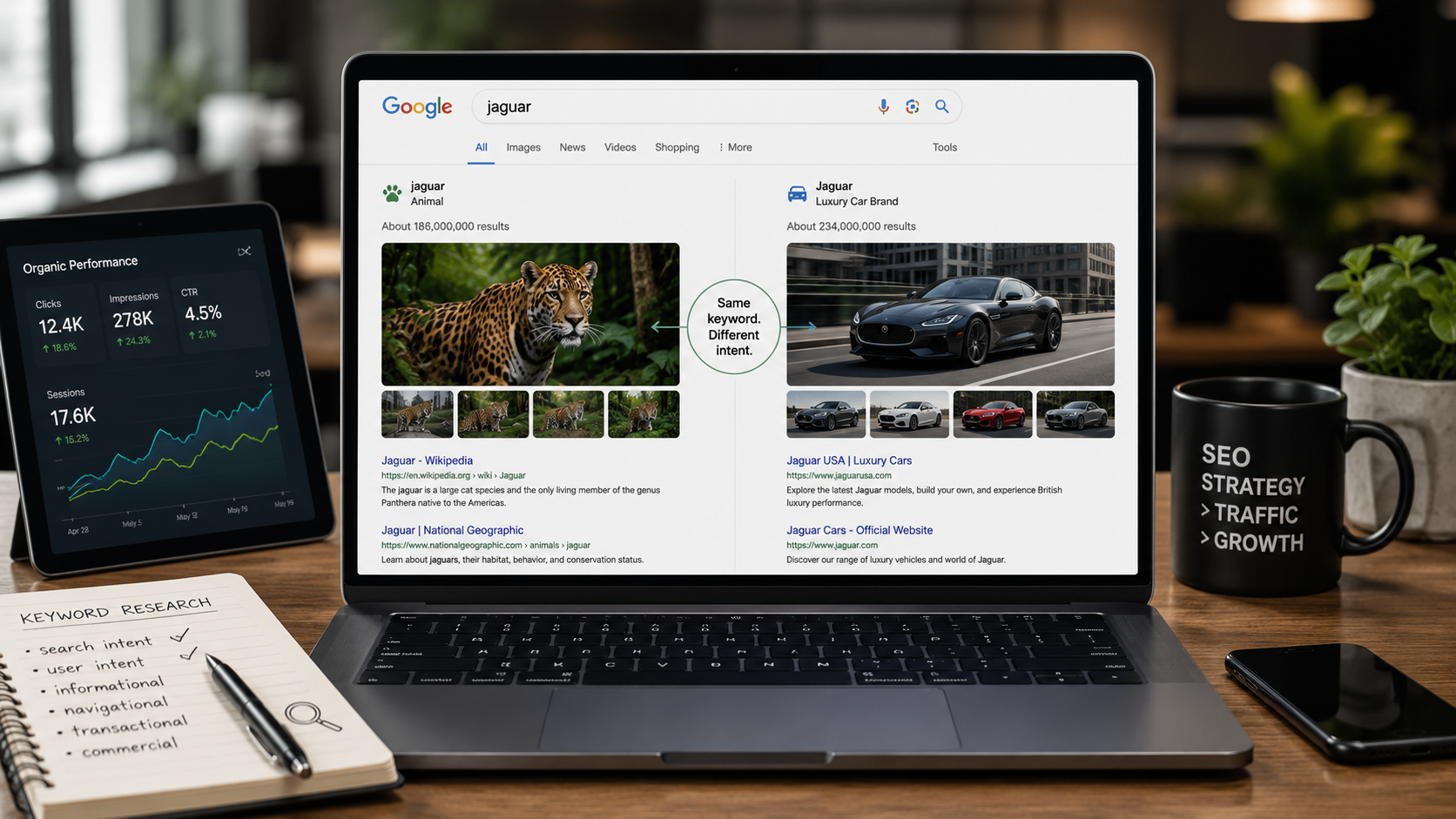
    Two people type “jaguar” into Google. One wants the animal. The other wants the car. Same word, two completely different goals. Search intent is the real question hiding behind the words, and it decides which page Google shows each of them. Get it right and you rank. Get it wrong and no amount of keywords will save you.

    What is search intent?

    Search intent (also called user intent or keyword intent) is the goal behind a search query: the reason someone typed it and what they hope to find. Every Google search is a question or a task, and search engines rank the pages that best satisfy that goal, not just the pages that repeat the keyword.

    You will also see it called audience intent. The label matters less than the idea: behind every query is a person trying to do something specific.

    Think of it like ordering at a restaurant. The words on the menu matter, but the waiter’s job is to bring what you actually want. Google is the waiter. If you ask for a definition and it hands you a checkout page, it did its job badly, and it knows it.

    Why search intent matters for SEO

    Google ranks pages on relevance, and relevance is mostly about intent. When your content matches the goal behind a query, it earns the spot. When it doesn’t, it slips, no matter how strong the page looks on paper.

    Google says this plainly. “Does your content match intent?” sits among the self-assessment questions in its helpful content guidance for creators. Matching intent against the query is treated as a central ranking criterion in most practitioner guides too, including Ahrefs’ search intent guide.

    Miss the intent and you can have the best backlinks in your niche and still not rank. Visitors land, see the wrong kind of page, and bounce straight back to Google. That pattern, called pogo-sticking, tells search engines your page did not answer the question.

    There is a business side too. The right intent brings traffic that converts instead of traffic that just visits. A page that meets the searcher where they are is how you turn rankings into leads and increase organic traffic that actually pays off.

    The 4 types of search intent

    Almost every query falls into one of four types: informational, navigational, commercial, and transactional. Learn to spot them and you can predict what Google wants to show before you write a single word. Most keywords sit cleanly in one type. A few are mixed, which we will cover later.

    Informational intent

    The user wants to learn something or answer a question. These queries lean on modifiers like “how,” “what,” “why,” “when,” “guide,” and “tutorial.” Examples: “what is search intent” (yes, the query that brought you here) or “how does SEO work.”

    Informational is the biggest bucket by far. It is widely cited that around 70% of all searches are informational (Neil Patel), though more recent analysis puts the figure closer to 57% of Google queries (Ahrefs). Either way, it dominates. The ideal format is a blog post or a guide.

    Navigational intent

    The user is looking for a specific site or page. They already know where they want to go and use search as a shortcut. Examples: “yoast login,” “semrush pricing,” or any brand name typed straight into the search bar.

    One practical note: it rarely makes sense to chase navigational queries for a brand you do not own. Someone searching “semrush login” wants Semrush, not your comparison post.

    Commercial intent

    The user is researching before a purchase. They want to buy eventually, but they are still comparing options. Modifiers give it away: “best,” “top,” “review,” “vs,” and “comparison.” Examples: “best SEO tools” or “Semrush vs Ahrefs.”

    These searchers reward pages that help them decide. The ideal format is a comparison, a listicle, or an in-depth review that lays out real trade-offs instead of a sales pitch.

    Transactional intent

    The user is ready to act, usually to buy or sign up. The query signals a decision already made. Modifiers include “buy,” “price,” “cheap,” “discount,” “coupon,” and “near me.” Examples: “buy SEO software” or “SEO agency near me.”

    Serve these searchers a product page, a service page, or a focused landing page. A long explainer here just gets in the way of the thing they came to do.

    Search intent examples (keyword by keyword)

    Intent is easier to see with real keywords. Each one below belongs to a type, and that type dictates the page format Google rewards. If your page format does not match the right-hand column, you will struggle to rank no matter how good the writing is.

    KeywordSearch intentPage type Google rewards
    what is search intentInformationalGuide / blog post
    how to add schema markupInformationalTutorial / how-to
    meta description lengthInformationalGuide with a quick answer
    yoast loginNavigationalSpecific site page
    schemafy blogNavigationalBrand page
    best seo plugins for wordpressCommercialListicle / comparison
    semrush vs ahrefsCommercialHead-to-head comparison
    buy seo softwareTransactionalProduct / pricing page
    seo agency near meTransactionalLocal service / landing page
    wordpress hosting couponTransactionalDeals / pricing page

    Read the table top to bottom and the pattern is clear: the words tell you the goal, and the goal tells you the page.

    How to identify the search intent behind a keyword

    You do not have to guess. The SERP is the source of truth, because Google has already classified the intent for you and ranked the results that prove it. Here are three ways to read it, from most reliable to least.

    Analyze the SERP

    Type the keyword into Google and look at what dominates the first page. This is the most direct signal you have, because Google has already done the classification work (Search Engine Land). If the top 10 are guides and blog posts, the intent is informational. If they are product and pricing pages, it is transactional. If comparison articles rank, it is commercial.

    SERP features are signals too. People Also Ask boxes and featured snippets point to informational intent. Shopping carousels point to transactional. A local pack means Google reads a “near me” goal even if you did not type those words.
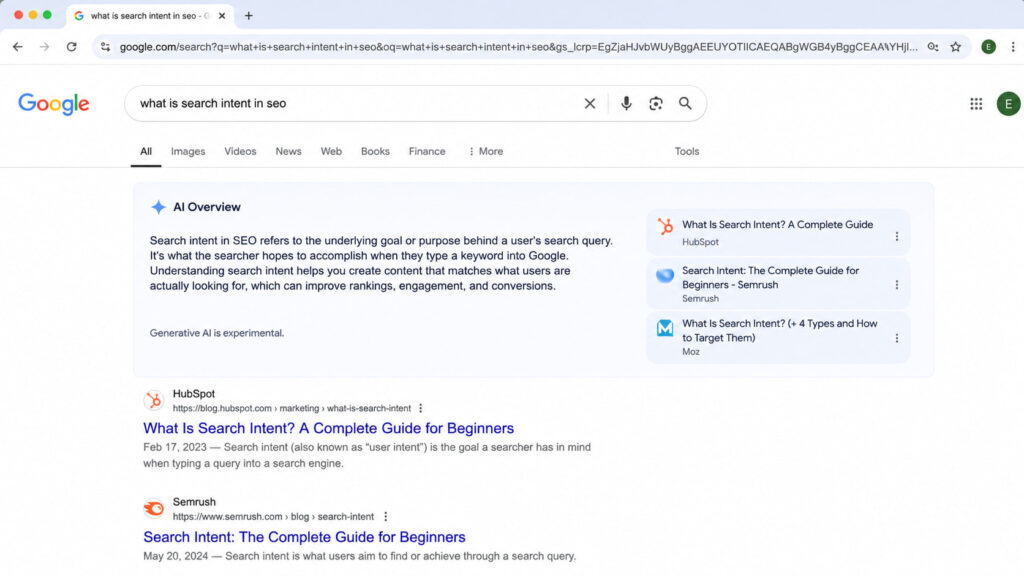
    Google search results showing an AI Overview for “what is search intent in SEO.

    Google’s own SERP is the clearest intent signal: guide-style results and a People Also Ask box mark this as an informational query.

    Read the modifiers in the query

    The extra words around your main keyword reveal the likely intent before you even open Google. Use this as a quick first read, then confirm with the SERP.

    ModifierLikely intent
    how, what, why, guide, tutorialInformational
    best, top, review, vs, comparisonCommercial
    buy, price, cheap, coupon, discount, near meTransactional
    brand name, loginNavigational

    One rule keeps you honest: SERP evidence overrides the modifier (Ahrefs). If the words say one thing but the ranking pages say another, believe the pages.

    Use a keyword tool’s intent labels

    Tools like Ahrefs and Semrush now tag intent for you automatically, which is handy when you are sorting hundreds of keywords at once. The same is true of newer AI SEO tools that add intent scoring. Treat these labels as a starting point, not a verdict. A tool guesses from patterns; the live SERP shows what Google actually decided. Always validate against the real results.

    How to optimize your content for search intent

    Once you know the intent, three moves align your page with it. None of them require a rewrite from scratch.

    Match the content type and format

    Give the searcher the format their intent expects. A guide for informational queries. A comparison for commercial ones. A product or landing page for transactional ones. The single most common mistake in SEO is publishing a blog post for a transactional keyword, then wondering why a page full of product results outranks it. The content type has to match before anything else you do matters.

    Cover the whole topic (content depth)

    Answer the main question, then answer the questions around it. People Also Ask boxes are a free checklist of the subtopics Google associates with your query, so mine them and cover what is missing. Keep your headings clear and scannable so a reader can confirm in seconds that your page solves their search. Depth is not word count. It is coverage of what the searcher actually needs.

    Align title tags and meta descriptions

    Your title tag and meta description are the first intent check a searcher runs, right there in the results. They should reflect the goal and promise the outcome, which lifts click-through rate and reinforces relevance. It also helps to see how the snippet looks before you publish. A no-code plugin like Schemafy lets you edit the meta title and description and preview your snippet the way Google shows it, so you can match the wording to intent without touching code. If you are unsure how much these tags move the needle, here is the reality on meta descriptions and CTR and how to add a meta description in WordPress.

    Search intent in the age of AI Overviews and AEO

    Search intent is shifting under our feet. More and more informational queries now get answered inside the SERP itself through AI Overviews, so a growing share of searches end without a click. The old goal, rank first, is no longer the whole game.

    The new goal is to be the source the AI cites. That means writing answer-first: lead with a direct answer, back it with concrete data, and name your entities clearly so a language model can lift and attribute your point. Structured data helps here, which is why schema markup is becoming table stakes for AI search.

    Intent itself is expanding. SE Ranking now lists a sixth type, generative AI intent: queries where the user expects a synthesized answer from an AI engine rather than a list of links (SE Ranking). Optimizing for it has its own name, Answer Engine Optimization, and it overlaps heavily with generative engine optimization. The core skill has not changed. You still start by understanding what the searcher wants. You just have one more surface to satisfy.
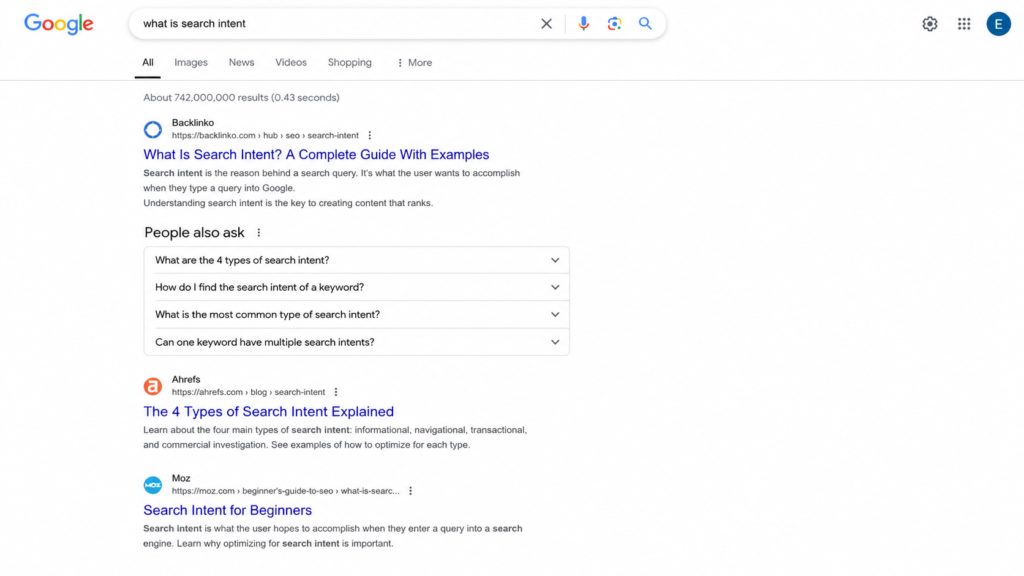
    Google search results for “what is search intent” with a People Also Ask section.

    Informational intent increasingly resolves inside the SERP: an AI Overview answers the query before the user reaches a single organic link.

    Common search intent mistakes to avoid

    Most intent problems come down to the same handful of errors:

    • Forcing transactional keywords into blog posts. If Google ranks product pages, an article will not win the spot.
    • Ignoring the SERP and guessing. Your assumption about intent loses to the pages already ranking. Check first.
    • Mixing multiple intents on one page. Trying to inform and sell in the same breath usually does neither well.
    • Publishing thin content for informational keywords. Informational SERPs reward depth, and a 300-word skim gets buried.
    • Not updating when the SERP shifts intent. Intent changes over time. A keyword that was informational last year may be commercial now, so re-check your winners.

    Get help matching your content to search intent

    Aligning your title tags and meta descriptions with intent is where a lot of pages quietly win or lose their click-through. It is a small edit with an outsized effect on how well your snippet matches what the searcher wants.

    If you would rather not hand-code any of it, a no-code plugin like Schemafy lets you rewrite meta titles and descriptions and preview the snippet the way Google displays it, so you can tune the wording to intent in a few minutes.

    Frequently asked questions

    What are the 4 types of search intent?

    The four types of search intent are informational (learning something), navigational (finding a specific site), commercial (researching before a purchase), and transactional (ready to buy or act). Each maps to a different content format, so matching the right type is key to ranking.

    How do I find the search intent of a keyword?

    The most reliable way is to type the keyword into Google and study the top results. If they are guides, the intent is informational; if they are product pages or listicles, it is transactional or commercial. Query modifiers and keyword-tool intent labels help confirm.

    What is the most common type of search intent?

    Informational intent is the most common, accounting for roughly 70% of all searches. These users want to learn or answer a question, using modifiers like “what,” “how,” and “why.” That is why guides and blog posts dominate informational SERPs.

    Can one keyword have multiple search intents?

    Yes. Some keywords are ambiguous and show mixed results in the SERP, part informational, part commercial. Google hedges by ranking a blend of formats. In those cases, review the SERP and match the dominant intent while covering secondary angles.

    Final thoughts

    Search intent, not the keyword itself, is what decides whether you rank. The page that best satisfies the goal behind the query wins, and everything else you do in SEO is downstream of that one match. Backlinks, word count, and clever titles only pay off once the intent is right.

    So before you write your next piece, open Google, read the SERP for your target keyword, and commit to a single intent type. Match the format, cover the topic, and align your title and meta description to what the searcher actually wants. Then re-check that same SERP in a few months, because intent shifts over time, and the page that keeps matching it is the page that keeps ranking.

    [CTA_DOWNLOAD]
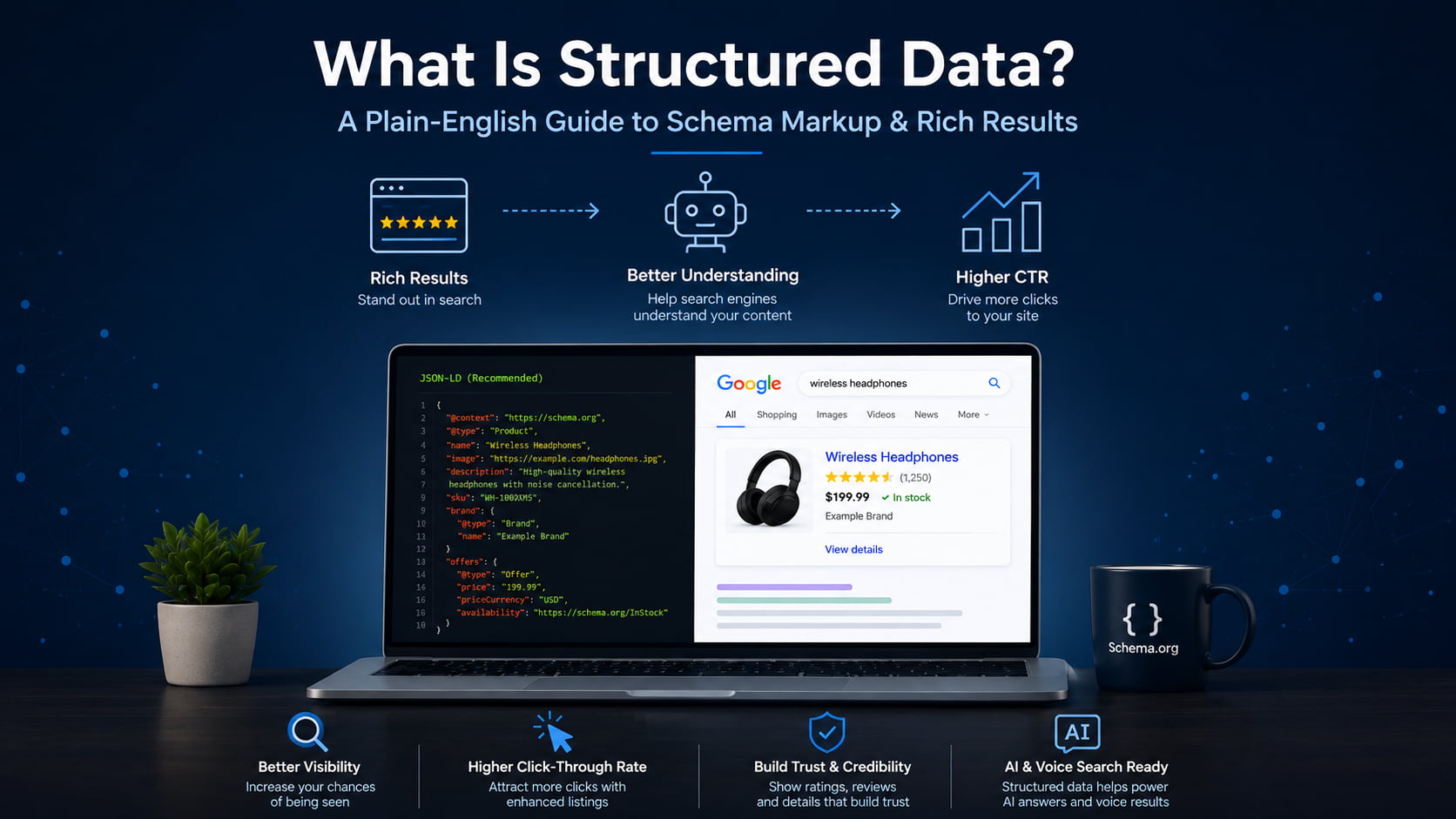
  • What Is Structured Data? A Plain-English Guide to Schema Markup

    What Is Structured Data? A Plain-English Guide to Schema Markup

    Think of structured data like labels on a shipping container. A machine reads the label and knows what is inside without opening the box. It does the same for your web pages: it tells search engines what your content means, not just what it says.

    The term also describes database data, but this guide covers structured data for SEO. Done right, your pages become eligible for rich results, higher click-through, and AI-search citations across every client site you run.

    What is structured data? (quick definition)

    Structured data is a standardized format for labeling the content on a web page so search engines can understand what it means, not just what it says. It uses a shared vocabulary called Schema.org to describe entities like a product, an article, or a business, and it lives in the page’s code where machines read it, invisible to visitors.

    That shared vocabulary is the important part. Schema.org gives every entity type an agreed set of properties, so a search engine reading Product knows to look for a name, a price, and a rating in the same place every time.

    Back to the shipping analogy. The label does not change what is in the box, it just makes the contents readable without unpacking. On one site, that is a nice-to-have. Across 10 or more client sites, it is the difference between listings that qualify to look better in search and listings that stay plain.

    Structured data vs. schema markup vs. rich results

    These three terms get blurred constantly, often in the same sentence. Keeping them straight saves you from promising a client something search engines never guaranteed.

    Structured data is the concept: labeling content in a machine-readable format. Schema markup is the implementation, the actual code you add using the Schema.org vocabulary. Rich results are the output, the enhanced listing Google may show once it reads valid markup. All schema markup is structured data, but not all structured data is schema markup.

    TermWhat it isExample
    Structured dataThe concept of labeling content so machines understand itAny machine-readable data format, including database tables
    Schema markupThe implementation using the Schema.org vocabularyA Product JSON-LD block on a product page
    Rich resultThe enhanced search listing Google may displayA star rating and price shown under a result

    How structured data works

    The flow is short. You add the markup to a page. Search engines crawl and parse it. They use it to understand the entities on the page and how those entities relate to each other. Pages that qualify may then earn rich results.

    There is a bigger payoff behind that. Google uses structured data it finds on the web to understand the content of a page and to gather information about the world, including the people, books, and companies your markup describes. That information feeds the Knowledge Graph, the map of entities Google fills in as your markup confirms who and what your page is about. If you want the full workflow, see our guide on how to use schema markup.

    The three formats: JSON-LD, Microdata, RDFa

    Schema.org markup comes in three formats. JSON-LD is a <script> block placed in the head or body, kept separate from the visible HTML. Microdata and RDFa are inline attributes woven directly into your HTML tags.

    Each has a trade-off. JSON-LD is clean and easy to edit because it sits apart from your layout. Microdata ties the data to the exact HTML element, which some developers like but makes bulk edits fragile. RDFa is the most flexible for combining vocabularies, and also the most verbose. JSON-LD is by far the most common format today, and you can write or check a block in a JSON-LD editor before it goes live.

    Why Google recommends JSON-LD

    Google’s position is explicit. It recommends JSON-LD because it is the easiest solution for site owners to implement and maintain at scale, and less prone to user errors.

    The reason is the separation. Because the JSON-LD block lives apart from your visible content, changing the page layout does not break the data, and updating the data does not touch the layout. You can inject it through a tag manager or a CMS, which is what makes it maintainable across many sites at once.

    Structured data examples (with code)

    Here is what schema markup actually looks like. This is a minimal, valid Article block. Every field is labeled in plain English so you can see what it does.

    {
      "@context": "https://schema.org",
      "@type": "Article",
      "headline": "What Is Structured Data? A Plain-English Guide to Schema Markup",
      "author": {
        "@type": "Person",
        "name": "Jane Doe"
      },
      "datePublished": "2026-07-24",
      "publisher": {
        "@type": "Organization",
        "name": "Example Media"
      }
    }
    

    And here is a Product block with an offer and a rating, the kind of markup that powers e-commerce rich results:

    {
      "@context": "https://schema.org",
      "@type": "Product",
      "name": "Premium Yoga Mat",
      "offers": {
        "@type": "Offer",
        "price": "49.00",
        "priceCurrency": "USD",
        "availability": "https://schema.org/InStock"
      },
      "aggregateRating": {
        "@type": "AggregateRating",
        "ratingValue": "4.7",
        "reviewCount": "312"
      }
    }
    

    You can build either block by hand, or generate one field by field in a schema markup generator. The property names come straight from Schema.org, and Google documents the requirements for each rich result type in its product structured data docs.

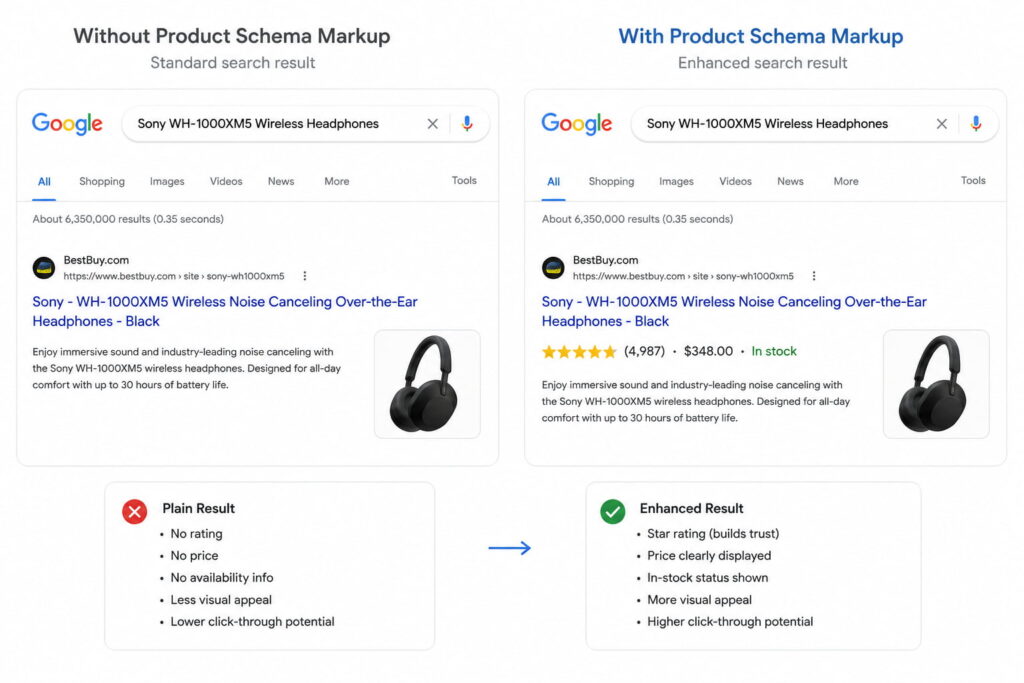
    The payoff shows up in the search result. Without markup, a product listing is a title, a URL, and a description. With valid Product markup, Google can add the star rating, the price, and the stock status directly to the listing, which takes up more space and gives shoppers a reason to click before they even land.

    Google search comparison showing plain and enhanced product results with ratings, price, and stock status.

    Common types of schema markup

    Schema.org defines hundreds of types, but a handful cover most of what site owners and stores actually need. Here are the high-value ones, each with the rich result it can earn.

    Schema typeWhat it labelsRich result it can earn
    ArticleBlog posts and news contentArticle and headline enhancements
    ProductE-commerce items for salePrice, availability, star rating
    LocalBusinessStores and physical locationsBusiness info, hours, map details
    FAQPageQuestion-and-answer blocksExpandable FAQ under the listing
    HowToStep-by-step tutorialsStep-by-step rich result
    Review / AggregateRatingRatings and opinionsStar ratings
    BreadcrumbListSite hierarchy and navigationBreadcrumb trail in the result
    OrganizationCompany or brand identityKnowledge panel and brand details
    EventConcerts, webinars, meetupsEvent date and location card
    RecipeCooking instructionsRecipe card with photo and time
    VideoObjectVideo contentVideo thumbnail and key moments

    Two of these are the easiest wins across a whole site. BreadcrumbList and Organization apply to almost every page, take little effort to set up once, and pay off site-wide. FAQPage markup can surface your questions in the People Also Ask box. If you are rolling schema out across many client sites, starting with the types that apply everywhere gives you the most return per hour.

    Why structured data matters for SEO and AI search

    Here is the honest version. Structured data is not a direct Google ranking factor. Adding a Product block will not, by itself, move you up the results the way meta descriptions are not a direct ranking factor yet still shape performance.

    What it does provide is two things: enhanced listings that earn more clicks, and machine-readable context that helps search engines and AI systems confirm what your page is about. Both are covered below.

    Rich results and higher CTR

    Rich results are enhanced listings: star ratings, FAQ accordions, prices, breadcrumbs, and recipe cards. They occupy more space in the search results and give people more reasons to click, which lifts click-through rate.

    The numbers Google publishes are strong. Rotten Tomatoes added structured data to 100,000 unique pages and measured a 25% higher click-through rate for pages with structured data compared to pages without it. Nestlé found that pages shown as rich results have an 82% higher click-through rate than the same pages without a rich result. Rakuten measured that users spend 1.5 times longer on pages with structured data than on pages without.

    One caveat matters. Eligibility is not a guarantee. Valid markup makes a page eligible for a rich result, but Google decides when to show one. You can preview how a listing might look in a SERP preview tool before you publish.

    Nestlé found that pages shown as rich results have an 82% higher click-through rate than the same pages without one.

    AI Overviews, LLM citations, and entity recognition

    This is the part most older guides miss. Structured data helps Google’s Knowledge Graph and AI systems, including AI Overviews and assistants like ChatGPT, Gemini, Perplexity, and Claude, verify entities and surface your content in AI-generated answers.

    The mechanism is confirmation, not magic. When your markup states clearly that a page is about a specific product, business, or author, it helps machines confirm what the page is about and how its details relate, which makes your content easier to cite accurately. That is the core idea behind Generative Engine Optimization and answer-engine visibility.

    Keep the claims measured. Structured data does not guarantee an AI citation. It gives answer engines cleaner, more reliable context to work with, which is why it sits at the foundation of most answer engine optimization tools and generative engine optimization tools.

    How to add structured data to your website

    Adding structured data is more approachable than the code makes it look. The process is the same for one page or a thousand:

    1. Pick the schema type that matches the page (Product for a product, Article for a post, LocalBusiness for a location).
    2. Generate the JSON-LD for that type, filling in the real values.
    3. Paste the block into the page or push it through your tag manager.
    4. Validate the markup before it goes live.
    5. Request indexing in Search Console so Google recrawls the page.

    You can generate the JSON-LD three ways: by hand, with an online generator, or with a WordPress plugin. Plugins are where non-developers stop worrying about code. Tools like Schemafy include an Auto Schema Generator that scans a site and suggests the right types per page, and an AI Schema Generator that produces the JSON-LD for you, so the markup gets created without hand-writing a line of it.

    The step that scales badly is doing this page by page. On a single site it is a Saturday afternoon. Across 10 or more client stores, a per-page approach is why schema projects stall, which is exactly why the at-scale route matters.

    How to test and validate your structured data

    Two canonical tools cover almost everything. Google’s Rich Results Test tells you whether a page is eligible for a rich result. Schema.org’s Schema Markup Validator checks whether your syntax is correct against the vocabulary.

    Understand the difference between the two words they return. “Valid” means the syntax is correct. “Eligible for rich results” means the page also meets Google’s specific requirements for a given rich result type. A page can be perfectly valid and still not be eligible, usually because a required property is missing.

    For monitoring at scale, the Enhancements reports in Google Search Console track your markup across the whole site and flag errors by type. That is the report agencies live in, because it catches a broken schema on page 400 that no one would test by hand.

    Common structured data mistakes to avoid

    Most schema problems come from a short list of avoidable errors:

    • Marking up content that is not visible on the page. The markup must describe what the visitor actually sees.
    • Missing or mismatched required properties, so the markup validates loosely but fails eligibility.
    • Fake or spammy reviews. Marking up reviews you did not earn violates Google’s structured data guidelines and can trigger a manual action.
    • Forgetting to update markup when the content changes, so the price or availability in your schema no longer matches the page.
    • Stacking multiple conflicting types on one page, which confuses parsers about what the page is really about.

    That fourth one bites agencies hardest. When you manage many sites, stale markup piles up quietly. Build the habit of revalidating after any content change, and the problem never compounds.

    Get rich-result-ready schema without the code

    For teams that do not want to hand-write and validate JSON-LD across a whole site, a WordPress schema plugin can generate and maintain valid, rich-result-ready structured data automatically. That is the practical route when you are keeping schema correct across 10 or more client stores at once, without turning anyone on the team into a JSON-LD engineer.

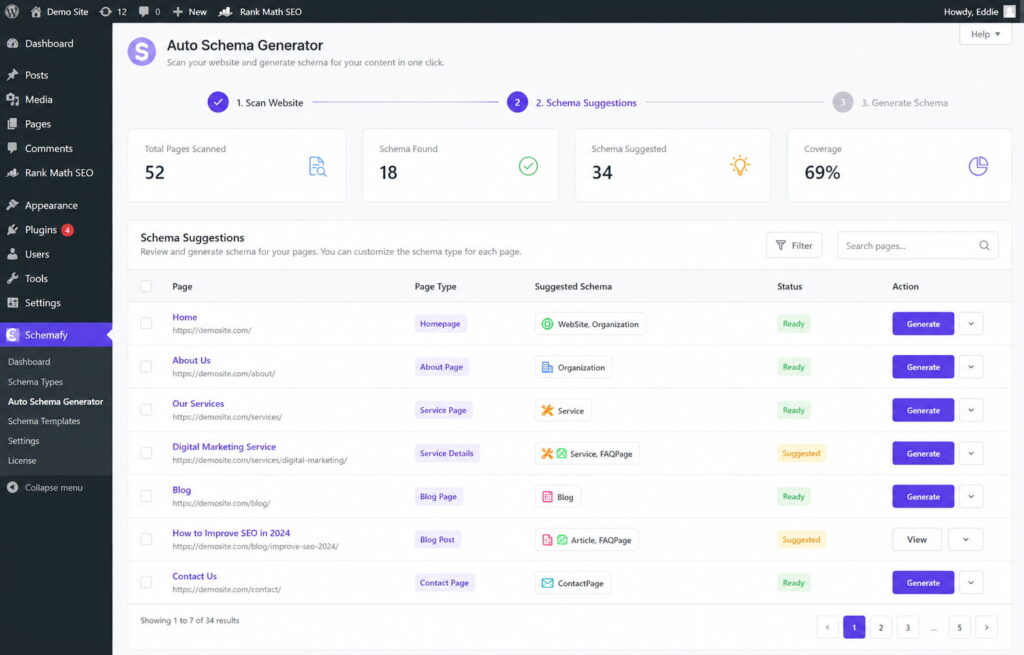
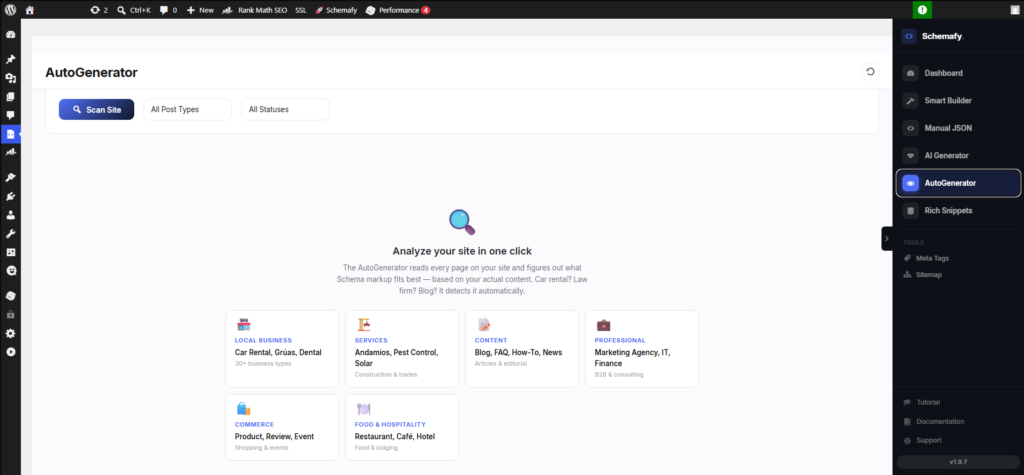
    Schemafy scans a site and suggests the right schema type per page, so structured data gets applied across many products without hand-coding.

    Caption: Schemafy scans a site and suggests the right schema type per page, so structured data gets applied across many products without hand-coding.

    Frequently asked questions

    What is structured data in SEO?

    In SEO, structured data is code (usually JSON-LD using the Schema.org vocabulary) added to a page so search engines understand its content and context. It does not directly boost rankings, but it makes pages eligible for rich results and helps them appear in AI-generated answers.

    What is an example of structured data?

    A common example is Product schema, which labels a page’s product name, price, availability, and review rating. When the markup is valid, Google can show those details, like a star rating and price, directly in the search result, making the listing more prominent and clickable.

    What’s the difference between structured data and schema markup?

    Structured data is the general concept of labeling content in a machine-readable format. Schema markup is the specific implementation that uses the Schema.org vocabulary. In short: all schema markup is structured data, but not all structured data uses Schema.org.

    Does structured data help rankings?

    Structured data is not a direct Google ranking factor. It can help indirectly by earning rich results that raise click-through rates, and by helping search engines and AI systems confirm what your page is about, which improves visibility in rich results and AI Overviews.

    What is JSON-LD?

    JSON-LD (JavaScript Object Notation for Linked Data) is a lightweight code format for adding structured data to a web page. It sits in a script block separate from visible content and is Google’s recommended format because it is clean, flexible, and easy to maintain.

    How do I check if my structured data is working?

    Use Google’s Rich Results Test to see if a page is eligible for rich results, and the Schema.org Markup Validator to check syntax. For ongoing monitoring across your whole site, watch the Enhancements reports in Google Search Console.

    Final thoughts

    Structured data stopped being a technical problem and became an operational one. On a single site, it is a nice-to-have. Across 10 or more client sites or stores, it decides whether your listings, and your clients’ listings, are eligible to look better in search and get confirmed by the AI systems that now answer questions directly.

    Start where the return is highest. Pick one high-value type, apply it, validate it, and watch Search Console for the change. Organization and BreadcrumbList apply to almost every page, take little effort to set up once, and pay off site-wide, which makes them the right first move before you touch anything product-specific.

    [CTA_DOWNLOAD]
  • What Is an SEO Slug?

    What Is an SEO Slug?

    Think of a slug like the label on a shipping box. Google and your readers both read the label before they open the box, which is to say, before they ever click. A slug is a short, readable label at the end of a web address. Get it right once and you stop thinking about it. This guide covers what a slug is, why it matters, and how to write and change one safely.

    What Is a Slug in SEO? (Quick Definition)

    An SEO slug is the part of a URL that comes after the domain and identifies a specific page. In schemafy.net/what-is-an-seo-slug, the slug is what-is-an-seo-slug. It’s the human-readable label, written in lowercase words separated by hyphens, that tells users and Google what a page is about before they click.

    That label does real work. The domain tells people which site they’re on. The slug tells them which page. A good slug is descriptive enough that you could read it out loud and know roughly what’s on the other end. A bad one is a string of numbers that means nothing to anyone.

    Slug vs. URL vs. Permalink: What’s the Difference?

    These three terms get mixed up constantly, but they name different things.

    TermWhat it isExample
    URLThe full web address of a pagehttps://schemafy.net/blog/what-is-an-seo-slug
    PermalinkThe permanent, full URL of a specific post or pagehttps://schemafy.net/blog/what-is-an-seo-slug
    SlugThe editable end segment that names the pagewhat-is-an-seo-slug

    The URL is the whole address. The permalink is that address treated as permanent, the one you’d share or link to. The slug is just the tail end you can edit. Change the slug and you change the permalink.

    Why SEO Slugs Matter

    The slug helps search engines crawl (read) and index your page, and it gives them a plain-language hint about the topic. Google recommends using simple, descriptive words in your URLs and notes that the words in a URL path can help it understand the page.

    Your slug is also visible. It shows up in search results and in breadcrumb trails, so a clear slug can nudge up your click-through rate. When the URL matches what someone searched for, they trust the result a little more. You can see exactly how a slug reads next to your title and description with a free SERP simulator, the same live preview an SEO plugin like Schemafy shows you before you publish.

    Be honest with yourself about the weight here. On its own, a slug is a minor ranking factor, not magic, much like whether meta descriptions affect ranking. What makes slugs worth your time is the effort-to-payoff ratio. A clean slug takes a minute, needs no code, and helps both readers and search engines. That’s about as easy as on-page wins get.

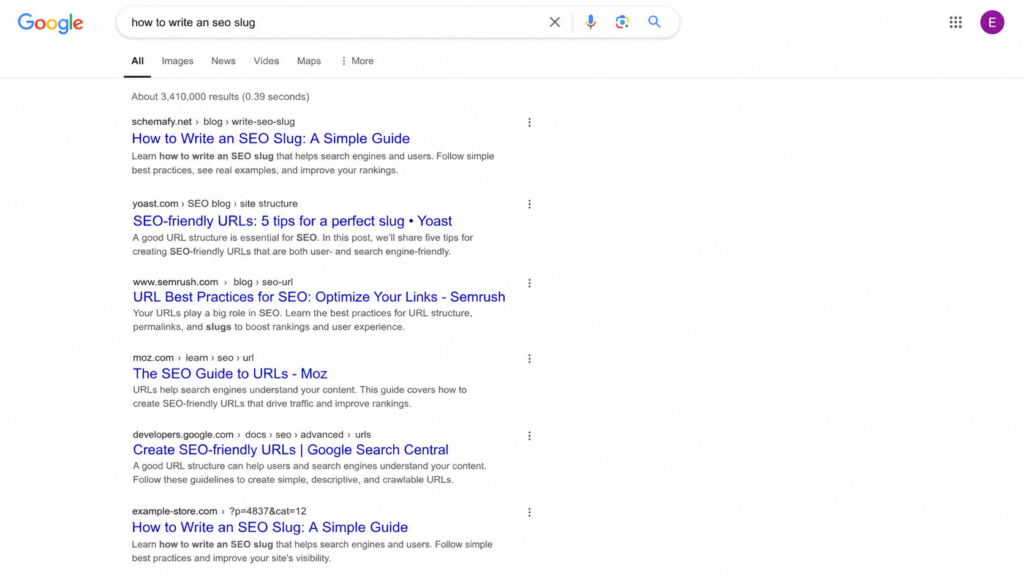
    Google search results showing clean SEO slugs versus an auto-generated URL.

    What Makes a Good SEO Slug: 7 Best Practices

    A good slug follows seven simple rules, and none of them require code. Here they are.

    Keep It Short (3–5 Words)

    The sweet spot is 3 to 5 words, or roughly 50 to 60 characters. Shorter slugs are easier to read, share, and remember, and they keep your keyword from getting buried. Trim the fat: /the-complete-ultimate-guide-to-writing-seo-slugs-in-wordpress/ becomes /seo-slugs/ and loses nothing a searcher cares about.

    Include Your Target Keyword

    Put your main keyword in the slug once, and let it sit there naturally. People are more likely to click a result whose URL matches what they typed, and the match reinforces relevance. One clean use is enough. Repeating the keyword to look “more optimized” is keyword stuffing, and it reads as spam.

    Use Hyphens, Not Underscores

    This one is a real technical rule, not a style preference. Google treats hyphens as word separators, like spaces, but it does not treat underscores the same way. So seo-slug reads as two words, while seo_slug reads as one word, seoslug. As Search Engine Roundtable notes, Google has recommended hyphens over underscores since 2007, and Google’s own style guide on hyphens treats them as the standard separator. Always use hyphens.

    Stick to Lowercase Letters

    Some servers treat Page and page as two different URLs. That can split your signals or create duplicate-content confusion for the same content. Keep every slug lowercase and you sidestep the problem entirely.

    Remove Stop Words

    Words like “a,” “the,” “is,” “in,” “to,” and “and” add length without adding SEO value. Drop them. /how-to-write-a-good-slug/ tightens to /write-good-slug/. The one caveat: keep a stop word if removing it makes the slug confusing to read. Clarity beats brevity when they conflict.

    Skip Dates and Years

    Avoid baking a year into an evergreen slug. A slug like /seo-tips-2025/ looks stale the moment the calendar flips, and fixing it means changing a live URL, which carries risk (more on that below). If the content isn’t tied to a specific year, leave the year out.

    Avoid Special Characters

    Spaces, %, &, and accented letters don’t belong in a slug. They either break or get URL-encoded into ugly strings, so a space turns into %20 and a clean address becomes a mess. Stick to lowercase letters, numbers, and hyphens, and nothing else.

    Good vs. Bad Slug Examples

    The fastest way to internalize the rules is to see bad slugs next to their fixed versions. Each row below breaks one rule, and the good version puts it back.

    Bad slugWhy it’s badGood version
    /the-ultimate-complete-guide-to-seo-slugs-for-beginners/Too long, keyword buried in filler/seo-slugs/
    /seo_slug_guide/Underscores read as one joined word/seo-slug-guide/
    /how-to-write-a-good-slug-for-the-page/Stop words add length, no value/write-good-slug/
    /SEO-Slug-Guide/Uppercase risks duplicate URLs/seo-slug-guide/
    /?p=123Auto-generated ID means nothing/seo-slug/

    The pattern is the same every time. The good versions are short, lowercase, hyphenated, and free of filler. Once you’ve seen a few, you can spot a weak slug on sight.

    How to Change a Slug in WordPress (Safely)

    Changing a slug in WordPress takes about a minute and doesn’t require touching code. Here’s the whole process.

    1. Open the post or page in the WordPress editor.
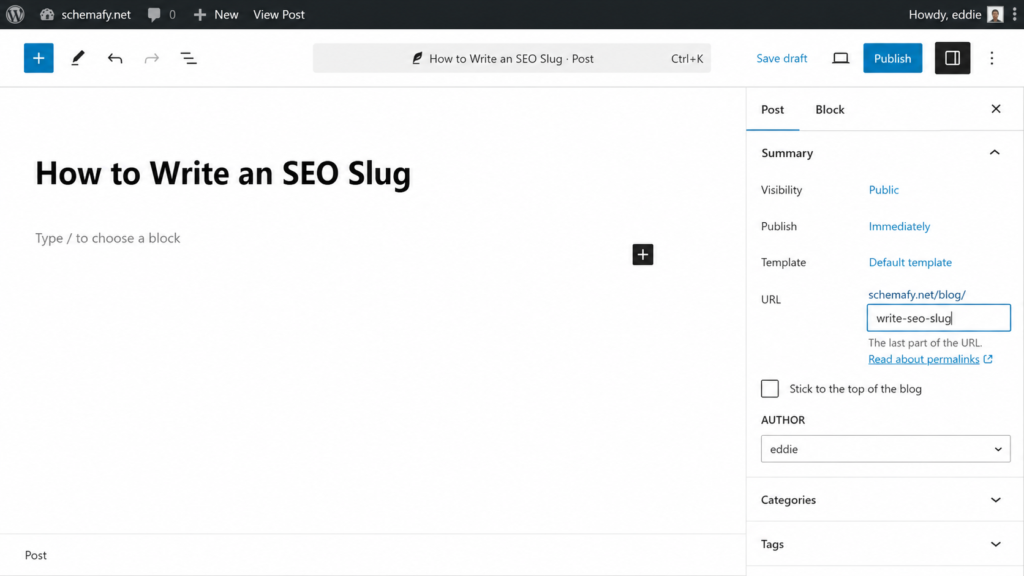
    2. Find the URL or Permalink field, in the sidebar of the block editor, or just under the title in the classic editor.
    3. Click Edit and type your new slug in lowercase, with hyphens.
    4. Update or publish the post to save it.
    5. Set a 301 redirect from the old slug to the new one (see the next section).

    You can edit category and tag slugs too, from Settings, though those change the URLs of your archive pages, so treat them with the same care. If you’re already tidying up on-page details, it’s a good moment to also add a meta description in WordPress for the same page.

     WordPress editor showing how to edit an SEO slug.

    Why You Need a 301 Redirect

    Here’s the catch that trips people up. Changing a live slug breaks the old URL. Every link pointing at the old address, and the ranking power those links built up, was aimed at that exact URL. Break it and you can lose that value, what SEOs call link equity.

    The fix is a 301 redirect, a permanent forward from the old slug to the new one. It hands the old URL’s ranking power to the new page. Most SEO plugins handle this, including Yoast and Rank Math, or you can use a dedicated redirect plugin. Set the redirect the moment you change the slug, not later.

    One caveat: if a page already ranks well with an imperfect slug, sometimes the safest move is to leave it alone. Even Google advises against redirecting URLs just to swap underscores for hyphens on pages that are already performing.

    Common SEO Slug Mistakes to Avoid

    Most slug problems come down to a handful of repeat offenders. Watch for these:

    • Leaving the auto-generated ?p=123 slug WordPress assigns by default.
    • Stuffing the same keyword into the slug two or three times.
    • Letting slugs run long with the full title and every stop word.
    • Changing a live slug without setting a 301 redirect.
    • Baking a year or date into an evergreen slug.

    None of these is hard to avoid once you know it’s there. Clean slugs are one of the small, compounding habits that, alongside better content and links, help you increase organic traffic over time.

    SEO Slug FAQs

    A few quick answers to the questions that come up most often about slugs.

    Does the slug affect SEO ranking?

    Yes, but modestly. A slug helps search engines understand a page’s topic and encourages clicks when it matches a user’s query. It’s a minor ranking signal on its own. A clear, keyword-relevant slug supports rankings, but it won’t outweigh content quality or backlinks.

    Should I change slugs on old, ranking pages?

    Usually no. Changing a slug on a page that already ranks breaks the old URL and can erase its ranking power. If you must change it, set up a 301 redirect from the old slug to the new one to preserve link equity.

    How long should an SEO slug be?

    Aim for 3 to 5 words, or roughly 50 to 60 characters. Short slugs are easier to read, share, and remember, and they keep your target keyword front and center. Remove stop words like “the” and “to” to stay concise.

    Can a slug have numbers in it?

    Yes. Numbers are fine in slugs (for example, /10-seo-tips/). Just avoid auto-generated ID slugs like ?p=123, which mean nothing to users or search engines, and avoid years in evergreen content so the URL doesn’t age.

    Final thoughts

    A clean slug is one of the cheapest wins in on-page SEO. It takes a minute, needs no code, and gives both readers and search engines a plain-language hint about your page before they commit to a click. It won’t outrank great content or strong links on its own, but it’s a small habit that compounds across every page you publish.

    The next step is the part search engines actually lean on to understand a page: structured data and meta tags. Once your URLs read well, that’s where the bigger gains sit. A plugin like Schemafy handles the schema and meta side for WordPress without code, so your pages show up correctly in search once the slug is sorted. If you want to go there next, here’s how schema markup works.

    [CTA_DOWNLOAD]
  • FAQ Schema Markup: The Complete Guide (JSON-LD + Code)

    FAQ Schema Markup: The Complete Guide (JSON-LD + Code)

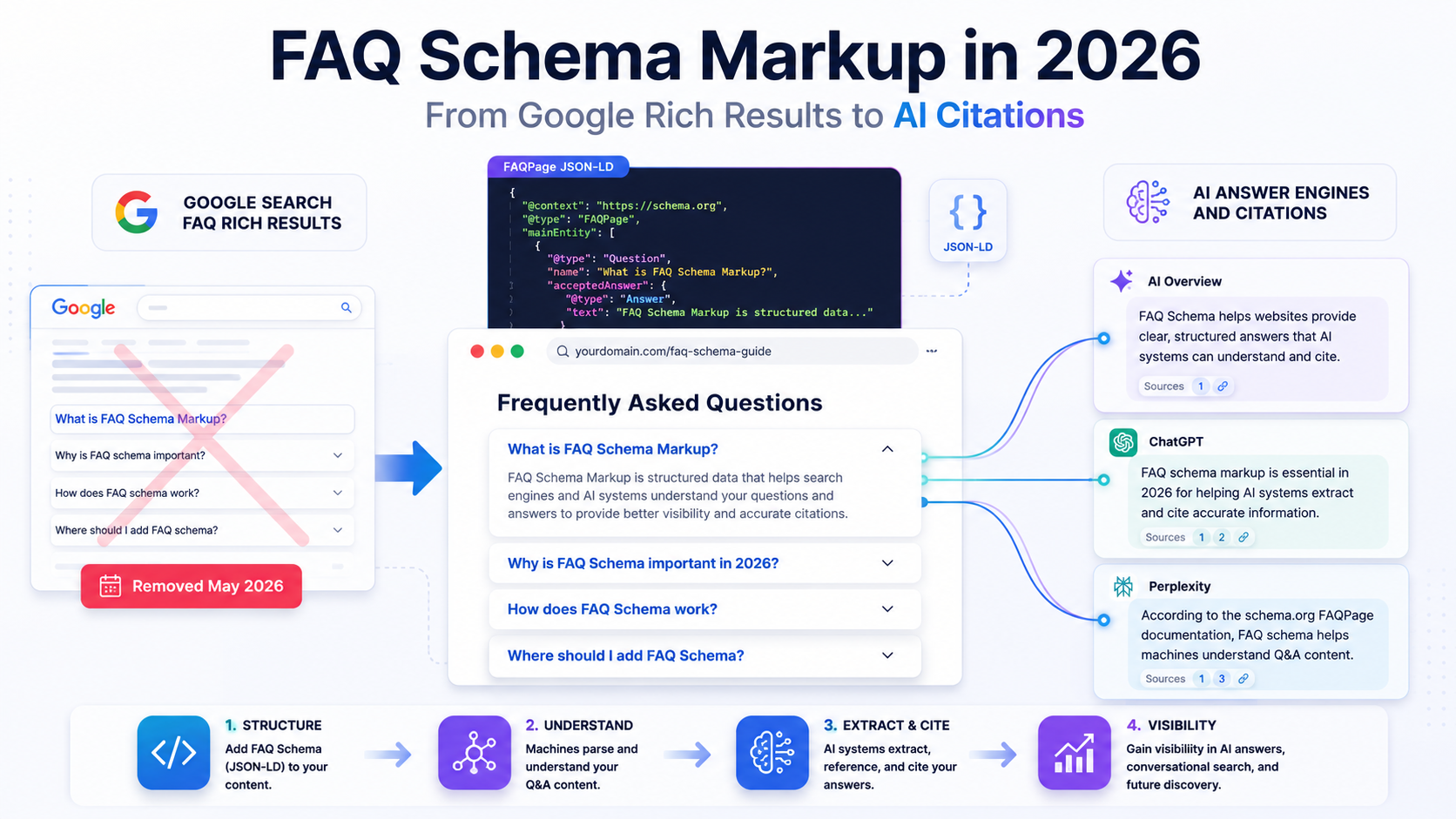
    Most guides still tell you FAQ schema earns those dropdown questions under your result in Google. As of May 2026, it doesn’t. Google removed FAQ rich results from Search entirely. But the markup matters more than ever now, for a different reason: it is how machines and AI answer engines read your questions and answers. This guide covers what FAQ schema is, whether it still earns its keep, the JSON-LD to copy, and how to add and validate it.

    What Is FAQ Schema Markup?

    FAQ schema markup is structured data, in the FAQPage format from Schema.org, that labels a list of questions and their answers so search engines and AI systems can read them as discrete Q&A pairs. You add it as JSON-LD in the page’s code. It doesn’t change what visitors see.

    That last point trips people up. FAQ schema doesn’t rewrite your content or redesign your page. It sits in a <script> tag and tells a machine “this string is a question, and this string is its answer.” Nothing more.

    It is also not a ranking factor. Google has never treated FAQ markup as a signal that lifts your position. What it does is remove ambiguity about what your content means, which is exactly what both search crawlers and AI answer engines need.

    JSON-LD is the format to use. It has been Google’s recommended way to add structured data since 2015, and it is a W3C recommendation, so you are not betting on a proprietary syntax. FAQ (FAQPage) is one of the schema types you can generate with a plugin instead of hand-coding, the same operational shift covered in how to use schema markup more broadly. That matters once you have more than a page or two to mark up.

    FAQPage vs QAPage: Which One Do You Need?

    These two types look similar and get mixed up constantly. The difference is who writes the answers.

    Use FAQPage when your site publishes both the question and the single, authoritative answer. Think a support page, a product FAQ, a policy explainer. Use QAPage when users can submit their own answers to a question, like a forum thread or a community Q&A. Google is explicit: if there is one answer and users can’t add alternatives, it is FAQPage.

    TypeUse it whenWho writes the answersExample
    FAQPageOne authoritative answer per questionYou (the site)Product FAQ, support page, policy page
    QAPageUsers can submit alternative answersYour usersForum thread, community Q&A

    Pick wrong and your markup describes something the page isn’t, which is one of the fastest ways to get structured data ignored.

    Does FAQ Schema Still Work in 2026?

    Yes and no, and the distinction is the whole point of this section.

    The rich result is gone. According to Google’s own documentation, as of May 7, 2026, FAQ rich results no longer appear in Google Search. Google is dropping the FAQ search appearance, the rich result report, and support in the Rich Results Test in June 2026, with the Search Console API following in August 2026.

    As of May 7, 2026, FAQ rich results are no longer appearing in Google Search. Support in the Rich Results Test is being dropped in June 2026. Source: Google Search Central documentation

    So if your reason for adding FAQ schema was the expandable questions under your listing, that reason expired. Don’t build a page around a feature that no longer renders.

    The markup itself still does real work. The FAQPage format turns a wall of text into clean question-answer pairs that machines can lift without guessing. That is valuable to a different audience than it used to be.

    Why Rich Results Shrank (and Who Still Gets Them)

    The decline started well before 2026. In August 2023, Google announced that FAQ rich results would only show for well-known, authoritative government and health websites. Every other site lost the feature that month.

    The impact was immediate. After the change, roughly 82.96% of sites with FAQ schema stopped earning FAQ results, up from 46.06% in February of that year, per Search Engine Land. A separate study measured a 37% drop in FAQs appearing in results.

    So who still gets the dropdowns today? Nobody. The 2023 change narrowed eligibility to gov and health sites; the May 2026 change removed the appearance entirely. There is no tier of site that earns the classic FAQ rich result anymore.

    The Real Payoff Now: AI Overviews, ChatGPT & Perplexity

    Here is where the value moved. AI answer engines read structured Q&A pairs and reuse them.

    When Google AI Overviews, ChatGPT, or Perplexity assemble an answer, pre-formatted question-answer pairs are easy to extract and attribute. Your FAQPage markup hands them the exact text you want associated with each question, instead of making them infer it from prose. Google now publishes a dedicated guide to optimizing for generative AI search, which tells you where its own priorities sit.

    Practitioners tracking answer engine visibility report that FAQ-structured content gets pulled into AI answers more often than the same content left unstructured, a pattern the AEO and GEO literature keeps returning to. Treat the specific percentages floating around with caution, but the direction is consistent. If you care about being cited in AI answers, this is the discipline: it is part of generative engine optimization, and clean FAQ markup is one of its cheapest inputs.

    The goal changed from “earn the dropdown” to “be the source the machine quotes.” FAQ schema still serves that goal.

    How to Add FAQ Schema Markup (Step by Step)

    The process is four steps whether you hand-code the JSON-LD or generate it. Write the FAQ, produce the markup, place it on the page, then validate.

    1. Write a real, visible FAQ on the page.
    2. Generate the FAQPage JSON-LD.
    3. Paste it into the page’s code.
    4. Validate the syntax and monitor it after edits.

    You have two honest options at step 2: write the JSON-LD by hand (the code is below) or generate it. If you have one page, hand-coding is fine. If you have dozens or hundreds, generating and maintaining it is the only sane path.

    Step 1: Write a Real, Visible FAQ First

    Google’s guidelines are strict on one thing: every question and answer in your markup must be visible to the user on the page. The answer can sit behind an expandable accordion, but it has to be reachable. You cannot mark up content that only exists in the JSON-LD block.

    That rule is not bureaucratic. The markup is supposed to describe the page, so write the FAQ as real page content first. Use questions people actually ask, and answer each one directly in one or two sentences.

    Get the human-readable version right before you touch any code. The markup mirrors it.

    Step 2: Generate the JSON-LD

    Hand-writing FAQPage markup for one page takes a few minutes. Doing it for 400 product pages does not scale, and every manual edit is a chance to desync the markup from the visible text.

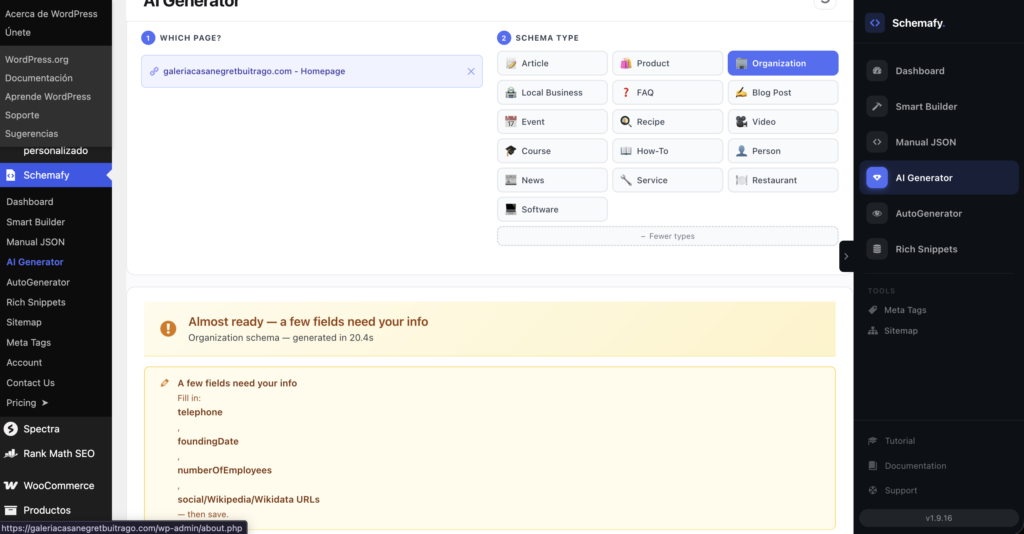
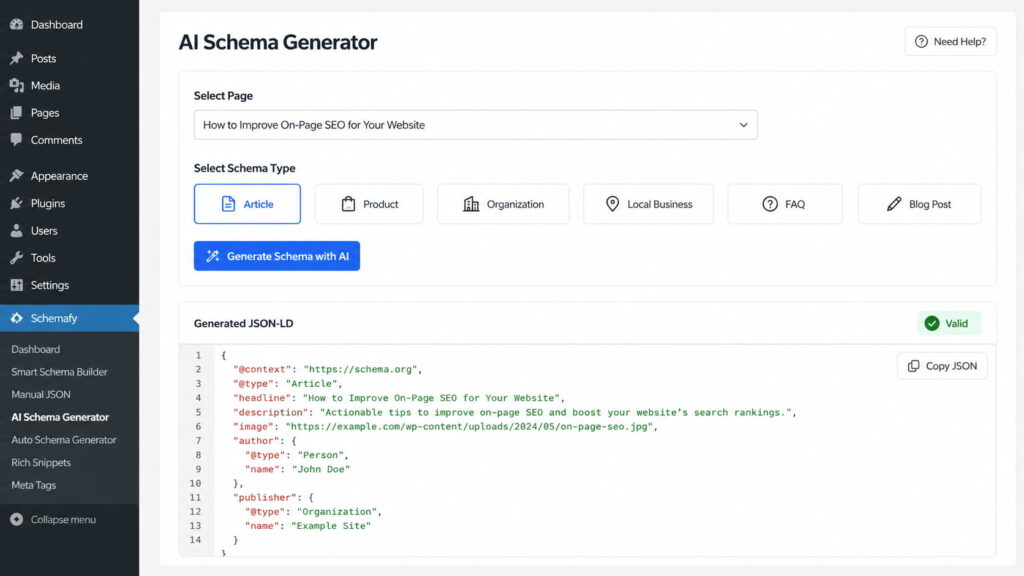
    To generate it for a single page in WordPress, open WP Admin → Schemafy → AI Schema Generator, search for the page or paste its URL, choose FAQ under Schema Type, and click Generate Schema with AI. Open Review technical JSON-LD to read the output, check the validation indicator, and click Save to Website. If the draft isn’t right, Regenerate.

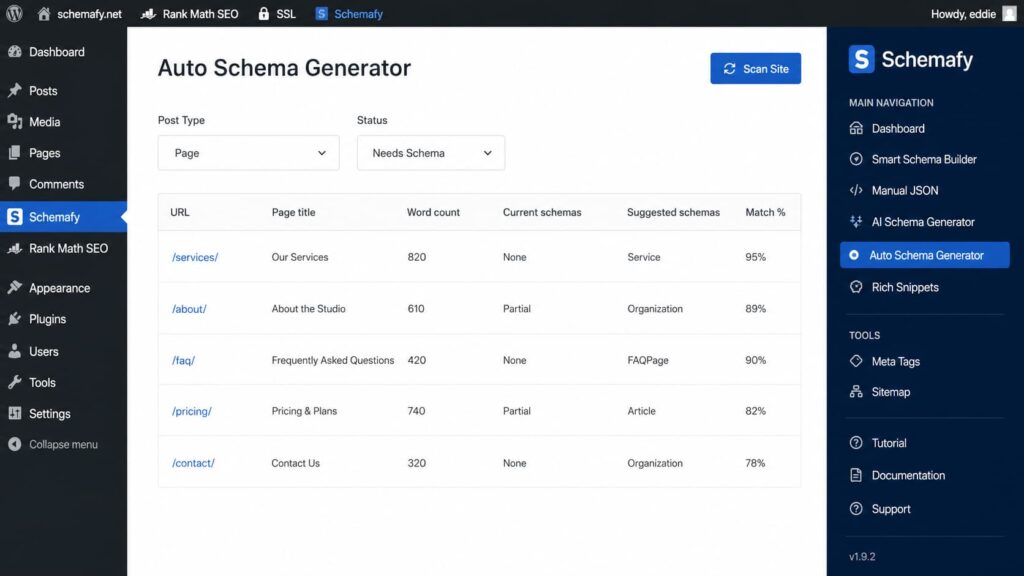
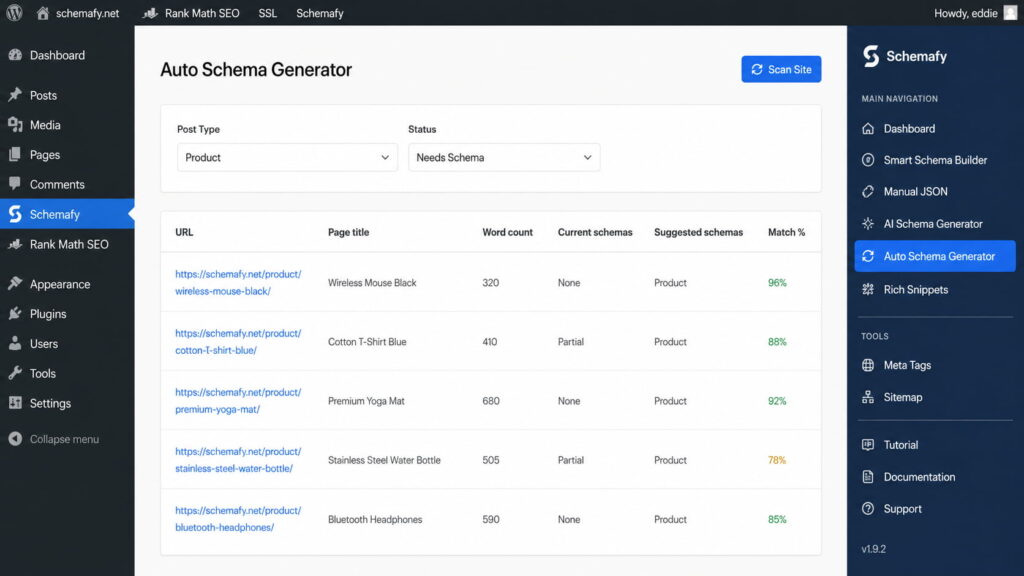
    To do it across a whole site, open WP Admin → Schemafy → Auto Schema Generator and click Scan Site. Filter Post Type and set Status to Needs Schema, then review the suggested schemas and match percentages before applying in bulk. This is how you mark up hundreds of pages without opening each one.

    WordPress FAQ schema markup generator showing FAQPage JSON-LD creation and validation inside the Schemafy plugin.

    Schemafy generating FAQPage JSON-LD for a single page from the AI Schema Generator, with the output validated before it goes live.

    If you prefer to fill fields yourself, Open Schemafy and navigate to Smart Builder. Select the FAQ schema template, enter each question and answer into the corresponding FAQ fields, and review the generated FAQPage JSON-LD output. Before publishing, verify that all questions, answers, and schema properties match the current Schemafy interface and your page content, then save the schema. You can also generate a block in the browser with a standalone schema markup generator if you just want the code.

    Step 3: Paste It Into Your Page

    The JSON-LD goes inside a <script type="application/ld+json"> tag. Google accepts it in either the <head> or the <body>, so placement is flexible.

    In WordPress, a schema plugin applies the markup to the page for you, so you never edit the theme. To paste your own block instead, Open Schemafy and navigate to Manual JSON. Paste your FAQPage JSON-LD markup into the JSON editor, select the page or URL where the schema should be applied, and review the configuration before saving. Confirm that all field names, menu paths, and save actions match the current Schemafy interface before publishing the schema.

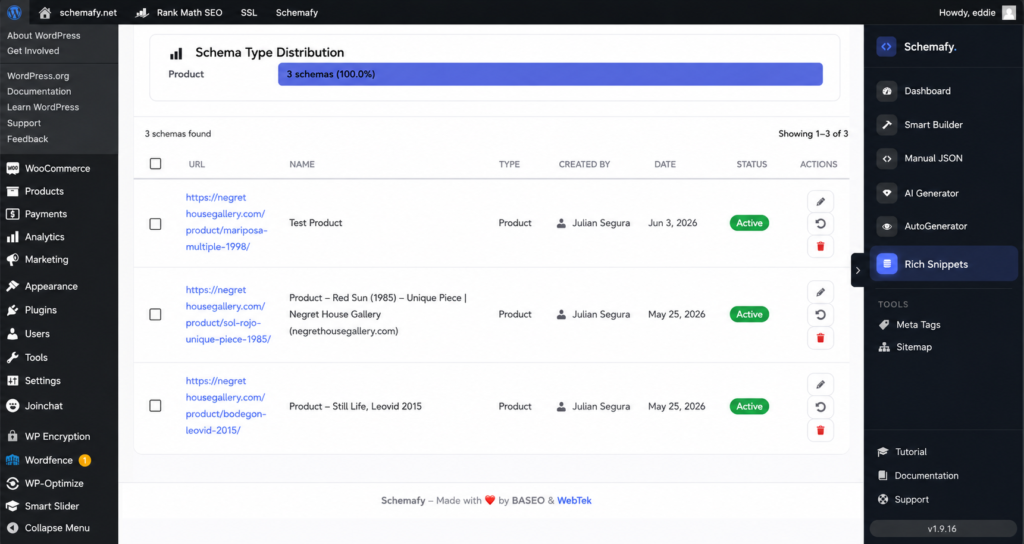
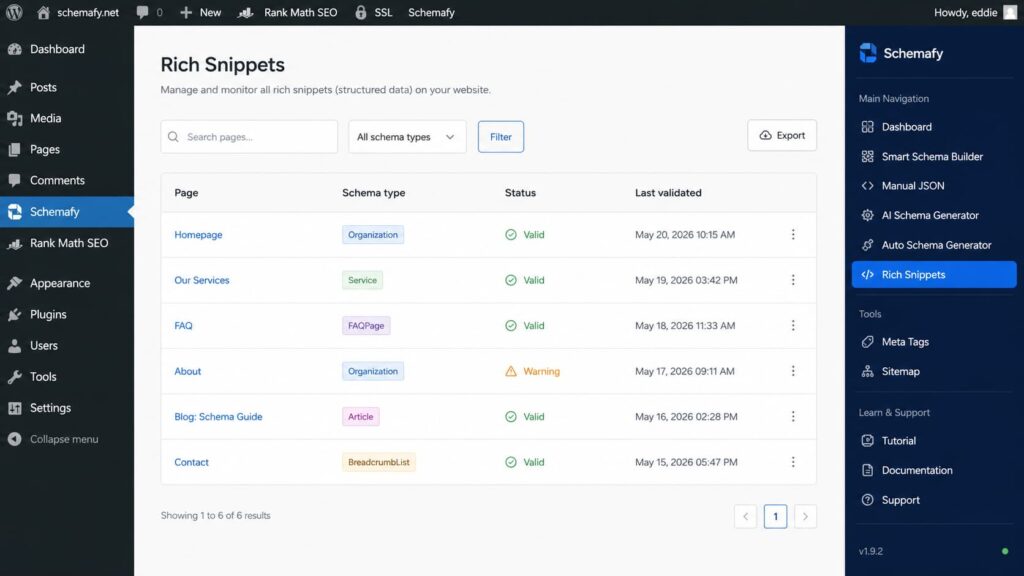
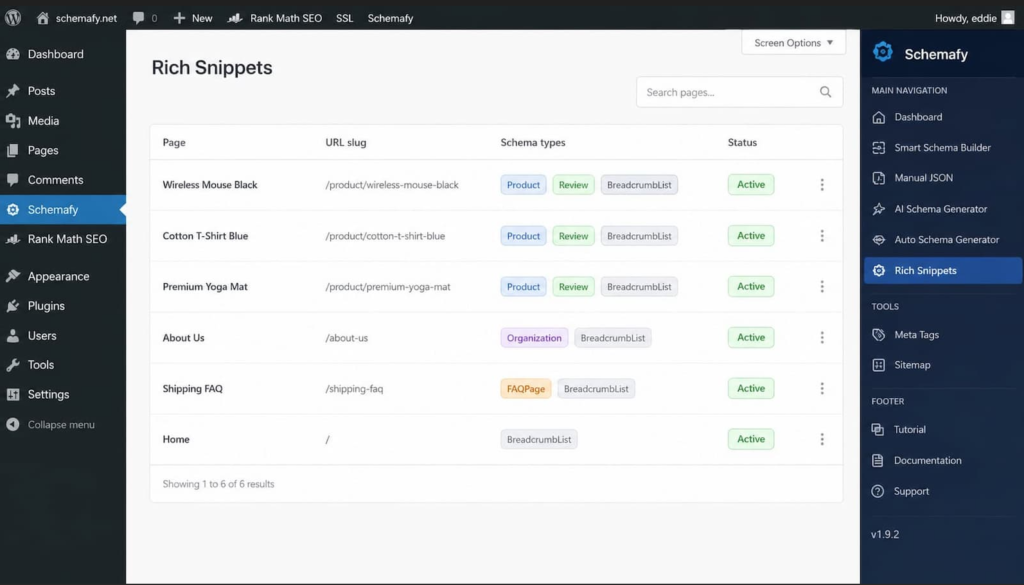
    Once schemas are live, you can view and edit everything applied across the site from the Rich Snippets screen, which keeps you from losing track of which page has which markup.

    Step 4: Validate and Monitor

    Validate the syntax before you publish. A single missing bracket or misnamed property makes the whole block unreadable to a crawler.

    One honest caveat about tooling: Google is retiring the FAQ report and FAQ support in its Rich Results Test during 2026, so don’t rely on that specific tool to confirm FAQ markup going forward. Use a general JSON-LD validator instead. A JSON-LD editor and validator checks your block against the Schema.org and Google structured data specs in real time.

    Then monitor. The most common way FAQ markup breaks is drift: someone edits the visible answer and the JSON-LD keeps the old text. Recheck after any content change so the markup still matches what a visitor reads.

    FAQ Schema JSON-LD Code (Copy-Paste)

    Here is a minimal, valid FAQPage block based on Google’s official example. Replace the questions and answers with your own, keep the structure, and paste it into your page.

    Basic FAQPage Example

    <script type="application/ld+json">
    {
      "@context": "https://schema.org",
      "@type": "FAQPage",
      "mainEntity": [{
        "@type": "Question",
        "name": "Does FAQ schema still earn rich results in Google?",
        "acceptedAnswer": {
          "@type": "Answer",
          "text": "No. As of May 2026, Google no longer shows FAQ rich results in Search. The FAQPage markup still helps search engines and AI systems understand your questions and answers."
        }
      }, {
        "@type": "Question",
        "name": "Which JSON-LD format should I use for FAQs?",
        "acceptedAnswer": {
          "@type": "Answer",
          "text": "Use the FAQPage type with a mainEntity array of Question items, each containing a name and an acceptedAnswer of type Answer with a text property."
        }
      }]
    }
    </script>
    

    The required properties are small in number. FAQPage needs mainEntity, an array of Question items. Each Question needs a name (the full question text) and an acceptedAnswer. Each Answer needs a text property with the full answer. Everything else is optional.

    WordPress, Webflow & Next.js/React

    The JSON-LD is identical across platforms. Only the placement differs.

    On WordPress, a schema plugin like the Schemafy plugin injects the block for you, so you don’t paste anything into the theme or risk an update wiping it out.

    On Webflow, paste the <script> block into the page’s custom code (Page settings → Custom code, before </body>) or into an Embed element on the page.

    On Next.js or React, render the <script type="application/ld+json"> tag in the head. In the App Router you can return it from a component or the metadata export; in the Pages Router use next/head or next/script. Serialize the object to a JSON string with JSON.stringify and set it as the script’s content rather than as children, so it isn’t escaped.

    [SCREENSHOT: The Schemafy Rich Snippets management screen showing a list of applied schemas with a FAQPage entry attached to a WordPress page.]

    Schemafy Rich Snippets screen showing active FAQPage schema markup.

    A FAQPage schema applied to a WordPress page, managed alongside every other schema from the Rich Snippets screen.

    Google’s FAQ Schema Guidelines & Character Limits

    Google’s FAQ documentation sets a short list of required properties. Get these right and your markup is technically valid.

    TypeRequired propertyWhat it holds
    FAQPagemainEntityAn array of Question items (at least one)
    QuestionnameacceptedAnswerThe full question text, and its answer
    AnswertextThe full answer text

    Inside the Answer text, Google supports a limited set of HTML tags: <h1> through <h6><br><ol><ul><li><a><p><div><b><strong><i>, and <em>. Any other tags are ignored, so don’t put custom markup or scripts in an answer.

    The content rules matter as much as the syntax. Every question and answer must be visible on the page. Use one answer per question, or switch to QAPage. Don’t use FAQPage for advertising copy. And if the same FAQ appears on many pages, mark up only one instance for the whole site, per Google’s structured data guidelines.

    On character limits: Google does not define one in the FAQPage spec. There is no maximum length for a question or an answer. The real constraint is that the markup must contain the complete text of each question and answer, and that text must match what is visible on the page. Concise answers are still a good idea, since a tight one or two sentences is easier for an AI engine to quote cleanly, but that is best practice, not a hard rule.

    Common FAQ Schema Mistakes to Avoid

    Most FAQ markup problems come down to a handful of repeat offenders. Google’s guidelines rule out several of these directly.

    • Marking up content that isn’t visible on the page. The JSON-LD has to describe text a visitor can actually see.
    • Using FAQPage where QAPage belongs, on pages where users submit their own answers.
    • Using FAQ markup for promotional or advertising copy rather than genuine questions.
    • Duplicating the same FAQ block across many URLs. Mark up one instance for the site.
    • Letting the JSON-LD drift out of sync with the visible question and answer text after an edit.
    • Building the page around the old dropdown rich result that no longer exists.

    The drift problem gets worse with scale. If you maintain FAQ markup across hundreds of pages by hand, some copy will fall out of sync eventually. Generating and managing it from one place, then reviewing coverage from the Auto Schema Generator and Rich Snippets screens, keeps markup and visible text aligned without a manual audit.

    FAQ Schema Best Practices for 2026

    The best practices follow directly from where the value now sits.

    Write real, concise, visible questions and answers, one clear idea per answer. Keep the markup identical to the visible text after every edit. Generate and maintain FAQPage at scale instead of typing it, using the Auto Schema Generator for bulk coverage and the AI Schema Generator for individual pages. Validate the syntax before publishing.

    Then think one step further than search. When you write each answer, picture an AI engine lifting that single question-answer pair into a response. If the answer stands on its own in two sentences, it travels well. If it only makes sense in the surrounding paragraph, tighten it.

    That mindset, clean pairs that survive being quoted out of context, is what separates FAQ markup that still earns attention in 2026 from markup that just sits in the page unused.

    Schemafy’s Auto Schema Generator flagging pages that need schema and suggesting FAQPage across a whole site in one scan.

    Ready to Win AI Citations With Structured Data?

    The dropdown rich result is gone, so the job changed. The work now is making sure search engines and AI answer engines can read your questions and answers as clean, quotable pairs, which comes down to correct FAQPage markup that mirrors your visible content.

    Write a real FAQ, mark it up properly, validate the syntax, and then generate and maintain the FAQPage (and the other schema types your pages need) instead of hand-coding each one.

    [CTA_DOWNLOAD]
    Frequently Asked Questions

    Does FAQ schema help SEO?

    FAQ schema is not a ranking factor, and as of May 2026 it no longer produces a rich result in Google Search. It still helps search engines and AI systems understand your questions and answers as structured pairs, per Google’s documentation.

    Is FAQ schema still worth it in 2026?

    Yes, but for structural clarity and AI-search citation rather than for the old expandable questions. If you want your Q&A content to be readable and quotable by AI answer engines, FAQPage markup is a cheap, low-risk input.

    What’s the difference between FAQPage and QAPage?

    FAQPage is for one authoritative answer per question, written by the site. QAPage is for pages where users can submit their own answers, like a forum or community thread.

    How many FAQs should I add per page?

    Google doesn’t set a number. Include only the questions that are genuinely relevant to the page, keep every one visible to the reader, and keep the answers concise. Padding a page with questions no one asks helps no one.

    Where do I put FAQ schema code?

    Inside a <script type="application/ld+json"> tag, in either the <head> or the <body> of the page. On WordPress, a schema plugin injects it for you so you don’t edit the theme.

  • Schema Markup Generator: How to Create and Apply JSON-LD in WordPress

    Schema Markup Generator: How to Create and Apply JSON-LD in WordPress

    A schema markup generator is like a label printer. Schema markup is the set of labels that tell search engines what is inside your page. Printing one label is easy: pick a type, fill a form, copy the code. Most guides stop there and let you believe the job is done. The real work starts after you copy that snippet, when you have to stick the label on every box by hand.

    What is a schema markup generator?

    A schema markup generator is a tool that turns page details you enter, such as product, article, FAQ, or business information, into valid JSON-LD structured data. Search engines and AI systems read that code to understand your page, and it can make the page eligible for a rich result like a star rating or an FAQ dropdown.

    The problem it solves is real. Writing JSON-LD by hand is slow and easy to get wrong, and a single misplaced comma or wrong property name can break your eligibility for rich results. A generator removes that risk. You describe the page, it writes the syntax.

    Here is what a generator does not solve on its own. It produces the code, but it does not put the code on your site. You are left with a valid block of JSON-LD in your clipboard and no automated way to apply it. On a five-page site that is fine. On a store with hundreds of products, that gap is the whole problem.

    How a schema generator creates JSON-LD

    The mechanism is simple, and you never touch code to run it. You pick a type (Article, Product, FAQPage), fill in the fields the type asks for, and the generator assembles a <script type="application/ld+json"> block from your answers. Our complete guide to using schema markup walks through what each type expects.

    Here is what a generator hands back for a simple Organization type:

    {
      "@context": "https://schema.org",
      "@type": "Organization",
      "name": "Acme Coffee Roasters",
      "url": "https://acmecoffee.com",
      "logo": "https://acmecoffee.com/logo.png",
      "sameAs": [
        "https://www.instagram.com/acmecoffee",
        "https://www.linkedin.com/company/acmecoffee"
      ]
    }
    

    That block lives inside a script tag, separate from the HTML your visitors see. You can add it or remove it without touching your layout, which makes it safe to test. Google recommends JSON-LD for exactly this reason: it is the easiest format to implement and maintain, and it keeps structured data cleanly separated from your page markup (per Google Search Central).

    JSON-LD vs. Microdata vs. RDFa: which format to generate

    There are three ways to write structured data. They are not equal in practice.

    FormatWhere the code livesGoogle-recommended
    JSON-LDIn a <script> tag, separate from HTMLYes
    MicrodataInline, mixed into your HTML tagsSupported, not preferred
    RDFaInline, mixed into your HTML tagsSupported, not preferred

    Generate JSON-LD. That is the whole recommendation. Microdata and RDFa wrap themselves around your visible HTML, so editing a page risks breaking the markup, and every template change is a chance to introduce an error. JSON-LD sits in one clean block you can swap in and out. Google says the same thing.

    Which schema types a good generator should support

    A good generator does not try to cover all 800-plus types in the schema.org vocabulary. It covers the types Google actually uses for rich results, because those are the ones that change how your page looks in search. Google validates rich results for a limited set of types, not the entire vocabulary (Google Search Console Help).

    Schemafy’s generators (the Smart Schema Builder, the Auto Schema Generator, and the AI Schema Generator) cover the 16 canonical Schema.org types that matter for WordPress content: Article, Product, Organization, LocalBusiness, Person, Event, Recipe, Review, FAQPage, WebPage, Course, HowTo, JobPosting, Service, VideoObject, and BreadcrumbList.

    The hard part is knowing which type your page needs. This table maps the common cases:

    If your page is…Use this schema type
    A blog post or news articleArticle
    A store productProduct
    A company or brand pageOrganization
    A store or restaurant with a locationLocalBusiness
    A Q&A or help sectionFAQPage
    A step-by-step tutorialHowTo
    A product or service ratingReview
    A webinar or conferenceEvent

    The schema types that actually earn rich results

    Not every type changes your search listing. A handful do most of the work: Product, FAQPage, Review and AggregateRating, LocalBusiness, Article, HowTo, and Event. These are the ones that trigger visible rich results, the star ratings and FAQ dropdowns that pull the eye.

    Schema is not a direct ranking factor, but the sites that rank well tend to use structured data consistently, and the visible rich results move click-through rate. Google’s own case studies show the size of the effect: Rotten Tomatoes measured a 25% higher click-through rate across 100,000 pages with structured data, and Food Network saw a 35% increase in visits after adding search features to about 80% of its pages (Google Search Central).

    You can generate any of these types with a free schema markup generator and preview how the result looks before you commit.

    How to use a schema markup generator, step by step

    The workflow is the same across almost every tool. Seven steps take you from a blank form to a monitored rich result.

    1. Pick the schema type that matches your page.
    2. Fill in the fields the generator asks for.
    3. Generate the JSON-LD.
    4. Copy the code.
    5. Add it to your page’s HTML.
    6. Test it in Google’s Rich Results Test.
    7. Monitor rich results in Search Console.

    Steps 1 through 4 are where a generator earns its keep. Inside WordPress, Schemafy runs that flow with no JSON-LD to write and no code to paste into a template. You pick a type, fill a form, and the plugin holds the output for you instead of dropping it into your clipboard.

    Generating schema with a visual builder

    For the standard types, the Smart Schema Builder is the fastest path. You choose a template (Article, Product, FAQPage), fill in the fields in a plain form, and get valid JSON-LD back. There is no JSON-LD to write and nothing to hand-code.

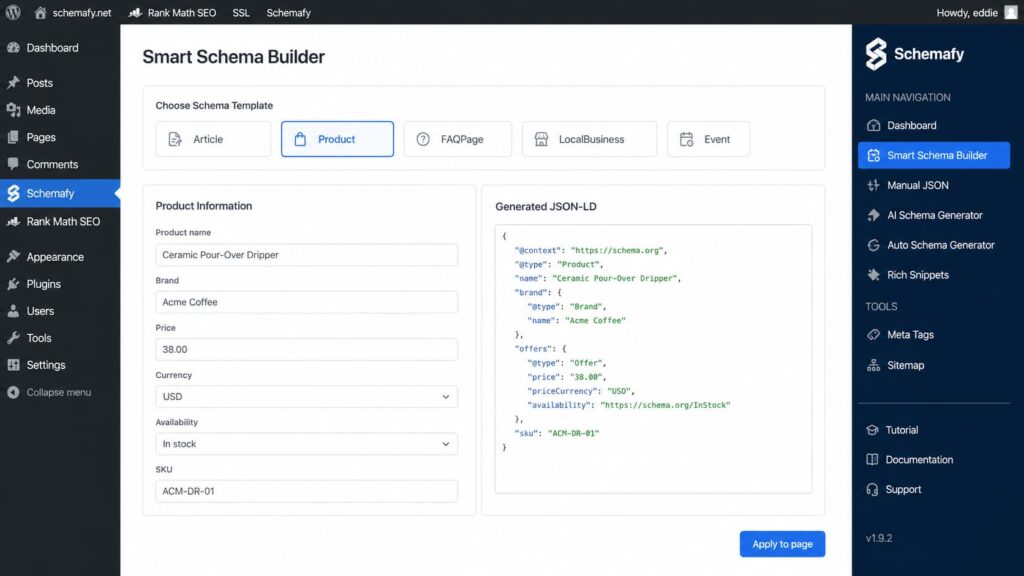
    [WORKFLOW: open the Smart Schema Builder, choose a template (Article / Product / FAQPage), fill in the form fields, and generate valid JSON-LD, then apply it to the selected page. Verify exact menu paths and field labels against the current UI before publishing.]

    Schemafy's Smart Schema Builder generates valid Product JSON-LD from a plain form, no code required.

    Generating complex schema with AI

    Some types are nested or awkward, and you may not know which fields they require. For those, the AI Schema Generator reads your page content and builds the right type for you. You connect your own ChatGPT or Claude API key, and the plugin uses it to draft the schema from what is already on the page.

    Open WP Admin → Schemafy → AI Schema Generator, select the page or paste its URL, choose a schema type, and click Generate Schema with AI. Review the generated fields and the validation status, then click Save to Website. The output is still valid JSON-LD; the AI just assembles it so you do not have to guess the required properties. For custom edge cases you can also refine the code in the JSON-LD editor with real-time validation.

    The part most schema generators skip: applying the markup

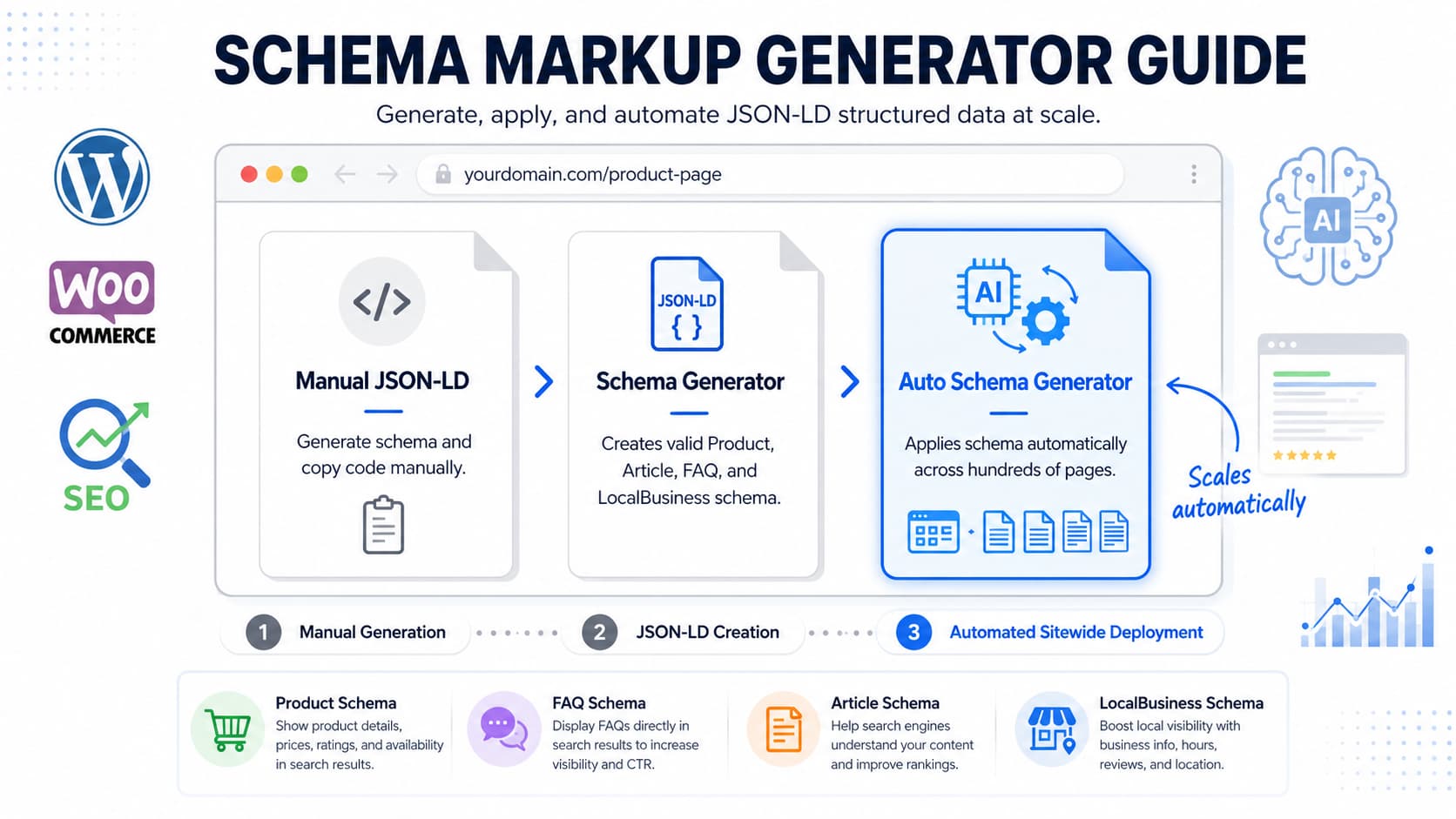
    Here is the honest split that no standalone generator will tell you. Generating the snippet is about 20% of the work. Applying it and keeping it in sync is the other 80%, and that is the part a web-based generator leaves entirely to you.

    Think about what you actually hold after you click “generate.” A valid block of code in your clipboard. Now paste it into 300 pages. There is no button for that on a standalone tool. The generator’s job ends at the copy, and yours begins.

    That gap is where most schema efforts quietly die. The two sections below show why the manual route breaks down and what applying schema automatically looks like instead.

    Why pasting JSON-LD into every page doesn’t scale

    Copy-paste works until it doesn’t, and the wall arrives fast. Pasting schema by hand into 800 WooCommerce products or 1,200 programmatic URLs is not a task you finish. It is a task you abandon halfway through.

    The bigger problem is drift. The moment you change a price, rename a product, or update a title, the snippet you pasted last month is wrong. Nobody goes back to fix 800 hand-pasted blocks. So the schema rots: still present, quietly inaccurate, and Google’s guidelines say markup that does not match your visible content can cost you eligibility. Without a tool that applies and updates the markup for you, hand-pasting is a maintenance debt you take on the day you start.

    Generating and applying schema automatically in WordPress

    This is the step a standalone generator cannot do. Schemafy’s Auto Schema Generator scans your site, detects schema opportunities by post type and status, and applies the markup without you pasting code into a single page.

    The flow is direct. Open WP Admin → Schemafy → Auto Schema Generator, click Scan Site, then filter Post Type to Product and Status to Needs Schema. The plugin lists every page that is missing schema with a suggested type and a match percentage, and you apply the markup across them from that screen instead of one product at a time. Because the WordPress schema plugin works with WooCommerce out of the box, your product pages are covered automatically as you add them.

    Schemafy's Auto Schema Generator flags every product missing schema and applies the markup in bulk, no page-by-page pasting.

    Generate and apply schema across every WordPress page without pasting code. Install Schemafy free →

    How to test and validate your schema markup

    Generating and applying schema is not the last step. You confirm it works. Paste the code or the live URL into Google’s Rich Results Test to see which rich result features the page qualifies for, and into the Schema Markup Validator for a general check against the schema.org vocabulary.

    Read the results carefully. A valid item in the Rich Results Test does not guarantee Google will show the rich result, but an invalid item guarantees it won’t (Google Search Central). Fix any warnings, then track rich result impressions in Search Console over the following weeks to confirm the markup is doing its job. Schemafy validates against Google’s Rich Results specification in real time as you build, so most errors get caught before they ever reach the test, and you can refine anything unusual in the JSON-LD editor with real-time validation.

    Free schema generator tools compared

    Most schema generators do the first job well: they produce clean JSON-LD from a form. They differ on the second job, whether they also apply that markup to your site or leave you at the clipboard.

    ToolSchema typesOutput formatGenerates vs. also appliesPlatform
    TechnicalSEO.comCommon Google typesJSON-LDGenerates onlyWeb (any site)
    Google Structured Data Markup HelperLimited setJSON-LD or MicrodataGenerates onlyWeb (any site)
    RankRanger / Merkle generatorCommon Google typesJSON-LDGenerates onlyWeb (any site)
    JSON-LD.com17 typesJSON-LDGenerates onlyWeb (any site)
    Schemafy16 canonical typesJSON-LDGenerates and appliesWordPress plugin

    The standalone tools are genuinely good at generating valid markup, and for a handful of pages any of them will do. The difference is the “applies” column. Every web-based generator hands you code and stops; Schemafy generates the JSON-LD and then applies it across your WordPress pages, which is the part that matters once you are past a dozen URLs.

    Does schema markup help SEO and AI search?

    This is the question everyone asks, so here is the direct answer. Schema markup is not a direct ranking factor, and it hasn’t been one since Google said so in 2018 (Google Search Central). Adding schema will not, by itself, move you up the results page. If that is the promise a tool is selling, it is selling the wrong thing, the same way meta descriptions are not a direct ranking factor yet still shape your click-through rate.

    What schema does is help search engines and AI systems understand your content, and it makes you eligible for rich results that lift clicks. Google’s Nestlé case study found 82% higher click-through rate on pages that earned a rich result versus pages that did not (Google Search Central). The same structured data that feeds rich results also feeds AI answers: clean schema helps AI Overviews, ChatGPT, and Perplexity read and cite your page, which is the core of generative engine optimization. Structured data is one of the most reliable ways to grow organic traffic without chasing rankings directly.

    Final thoughts

    Generating schema stopped being the hard part years ago. Any decent generator writes valid JSON-LD from a form in seconds. The real problem is applying that markup across every page and keeping it accurate when your content changes, and that is an operational job, not a code one.

    The fastest first step is to audit which pages are missing schema, then automate the application instead of pasting code by hand. That is the difference between schema you set up once and schema that quietly stays correct.

    Audit what is missing, then automate the markup. Get Schemafy free on WordPress.org →

    Frequently asked questions

    Is a schema markup generator free?

    Yes. Most schema markup generators, including Schemafy’s, are free to use and require no signup. You enter your page details, pick a schema type, and get valid JSON-LD to copy. Paid tools add automation, like applying and updating that schema across hundreds of pages without manual work.

    How do I generate schema markup for my website?

    Pick the schema type that matches your page (Product, Article, FAQ, LocalBusiness), fill in the fields in a generator, and copy the JSON-LD it outputs. Paste that code into your page’s HTML, then test it in Google’s Rich Results Test to confirm it is valid before publishing.

    What is JSON-LD schema?

    JSON-LD is the JSON-based format Google recommends for structured data. It lives in a script tag, separate from your visible HTML, so you can add or remove it without touching your design. A generator writes valid JSON-LD for you, avoiding the syntax errors that break rich result eligibility.

    Which schema type should I use?

    Match the type to the page: Product for store items, Article for blog posts, FAQPage for Q&A sections, LocalBusiness for a physical location, Review for ratings. Using the wrong type, or missing required fields, blocks rich results. A good generator only shows the fields each type needs.

    How do I add schema markup to WordPress?

    You can paste JSON-LD manually into each page, but that does not scale past a handful of pages. A WordPress schema plugin generates and applies the markup for you, detecting schema opportunities across your posts and products and keeping the code in sync when content changes.

    Is schema markup a Google ranking factor?

    No, schema markup is not

  • The 12 Best Answer Engine Optimization Tools in 2026

    The 12 Best Answer Engine Optimization Tools in 2026

    An answer engine optimization (AEO) tool is software that monitors, improves, and measures how often your brand is cited in AI-generated answers on engines like ChatGPT, Perplexity, Gemini, and Google AI Overviews. It is the AEO software category that has exploded as AI search visibility became a real acquisition channel.

    Here is the problem: there are dozens of these tools now, and most do only one part of the job. Run an agency across 10 or more WordPress or WooCommerce client sites and the wrong pick means paying for a dashboard that shows what is broken without fixing it. This guide sorts the field into three layers, hands you a comparison table you can act on, and names the tool that fits each layer. We tested them across monitoring, content, and technical schema work.

    Marketing professional reviewing AI search citations and analytics.

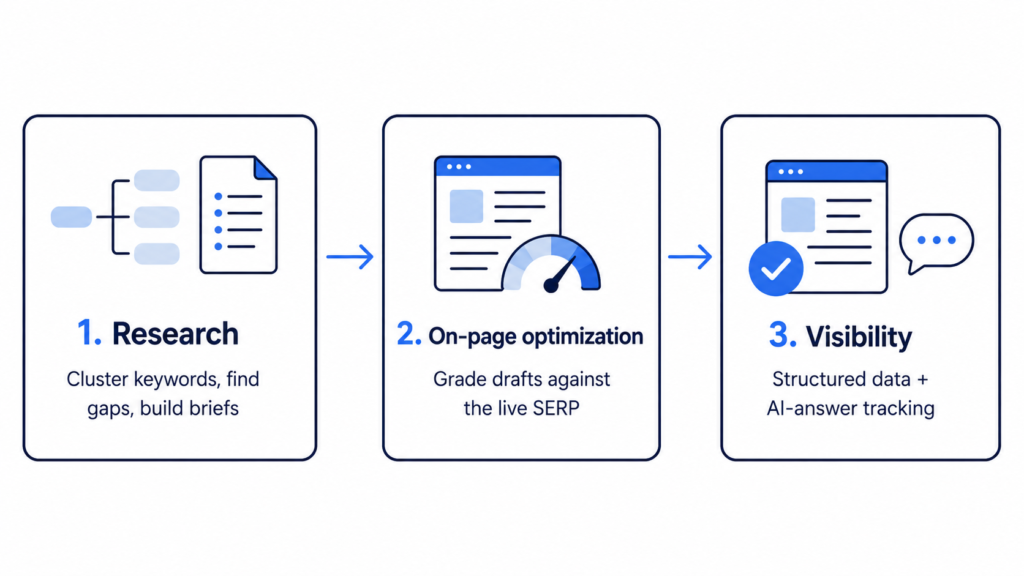
    The AEO stack has three layers. Most buyers only shop the first two.

    In this guide:

    What Answer Engine Optimization Tools Actually Do

    A good AEO tool does five things. It monitors your brand across multiple engines, not just ChatGPT. It tracks visibility at the level of individual prompts, so you know which questions surface you and which surface a competitor. It benchmarks you against those competitors. It traces citations back to the source pages the model pulled from. And, the part most tools skip, it gives you something to act on instead of just a score.

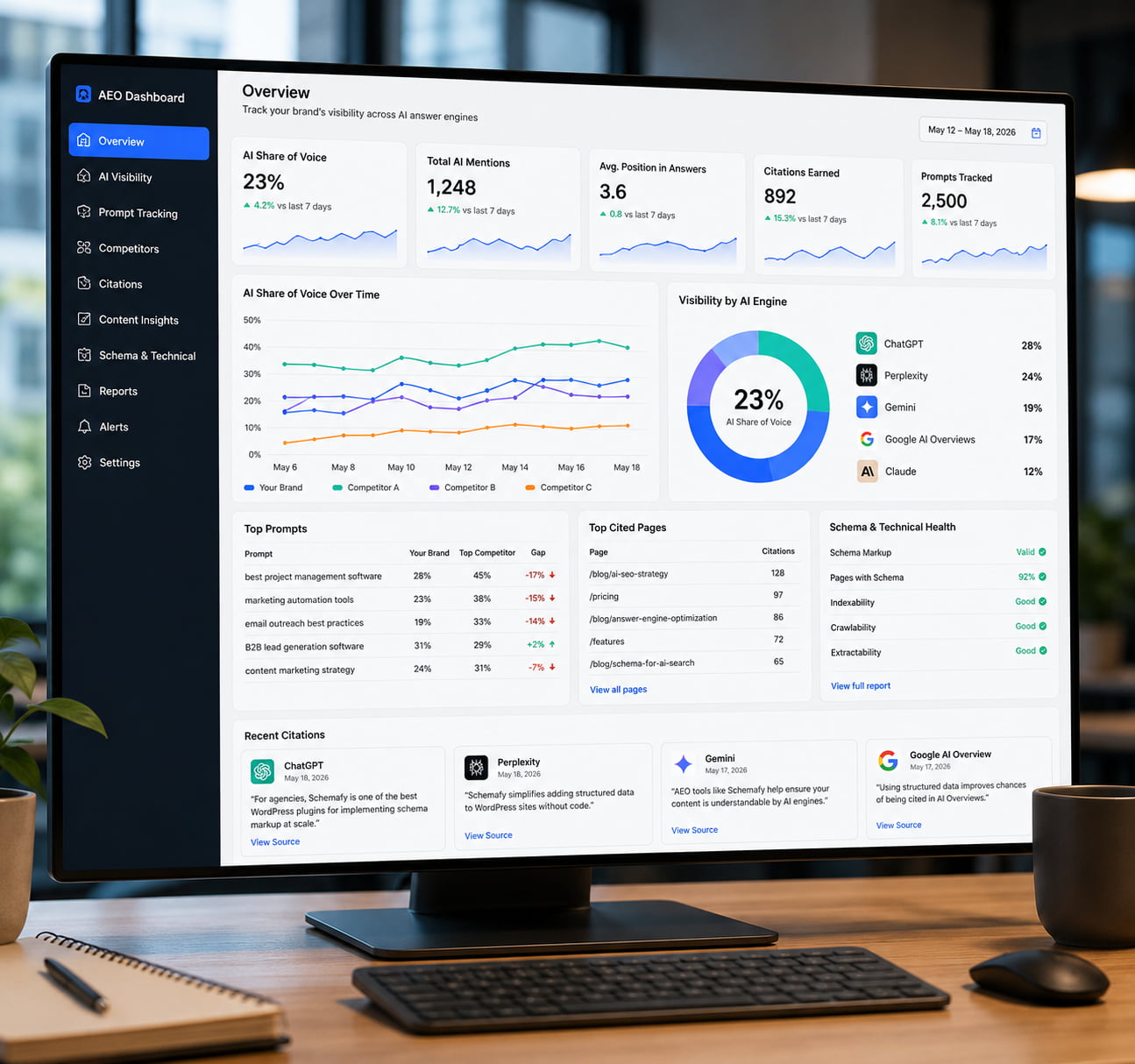
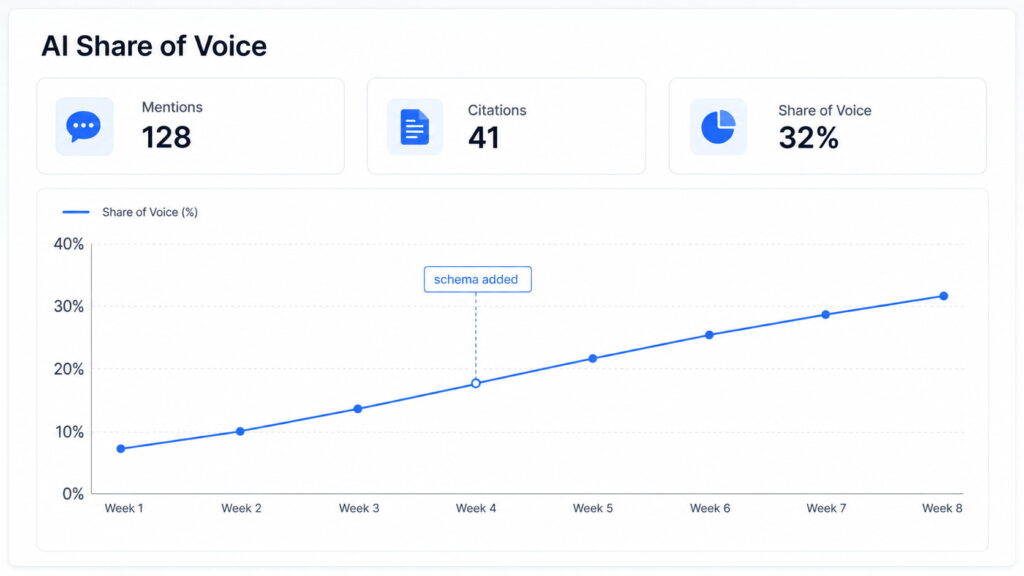
    The metric that ties this together is AI Share of Voice (SoV). The formula is simple: the number of AI responses that mention your brand divided by the total AI responses across your tracked prompt set, times 100 (via AirOps). If you appear in 23 of 100 strategic queries and a competitor appears in 41, your SoV is 23% against their 41%. That gap is the number your client will ask about.

    This is where AEO splits from traditional SEO. SEO optimizes to win a ranked link and the click; AEO optimizes to be cited inside the answer itself, which the reader may never click through. The two stack rather than compete, since the same work that helps you increase organic traffic also feeds AI answers. It is close enough to generative engine optimization that vendors like Profound and Conductor use the terms almost interchangeably.

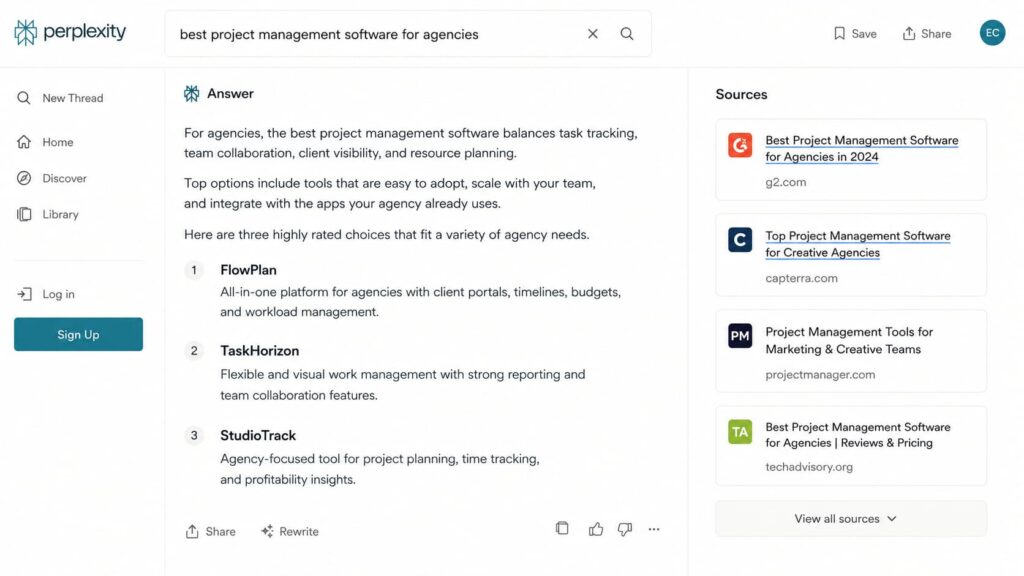
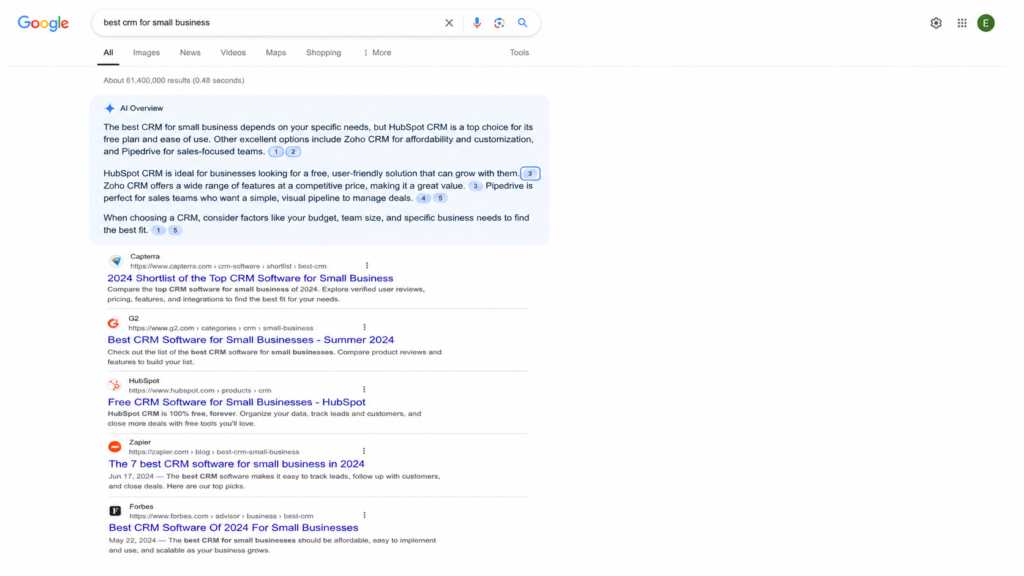
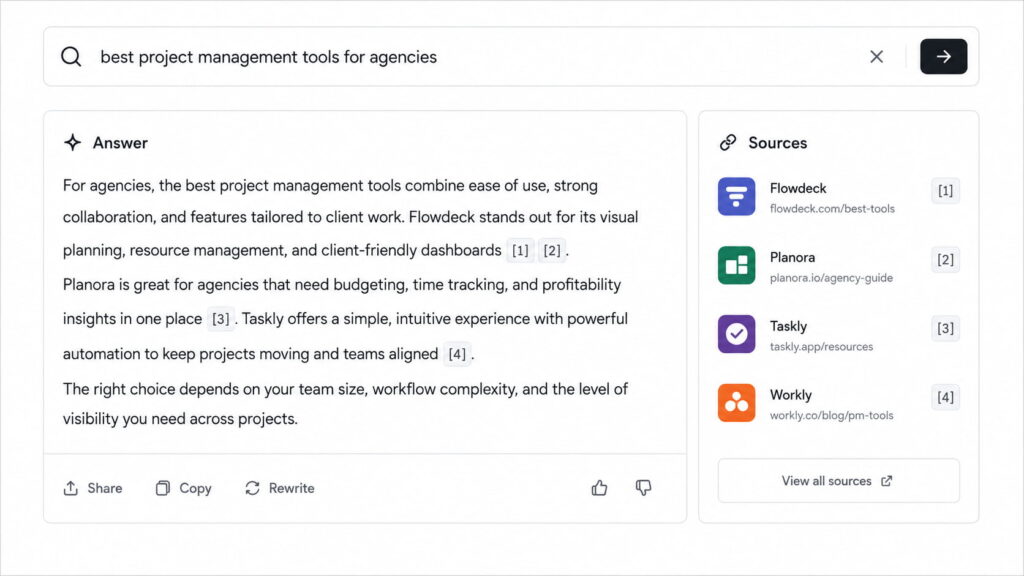
    AI answer engine results page showing project management software recommendations and cited sources.

    An answer engine cites a handful of sources. AEO tools measure whether one of them is you.

    The 3 Types of AEO Tools (and Why It Matters Before You Buy)

    Buying an AEO tool without understanding the categories is how you end up paying for capability you do not need. Most tools specialize in one of three layers. Almost every listicle you will read compares only the first two and treats the third as an afterthought, which is exactly backwards for a lot of buyers.

    1. AI Visibility & Monitoring Tools

    These tools monitor where and how often your brand appears or gets cited in AI answers. Otterly.AI, Peec AI, AthenaHQ, Scrunch, and Meltwater’s GenAI Lens all live here. Choose one when you need diagnosis and a competitive benchmark before you spend on optimization. The limitation is baked into the category: they tell you what is happening, not how to fix it.

    2. Content Optimization & Generation Tools

    These tools structure or generate content so answer engines can interpret and cite it: 30-to-60-word direct answers, question-form headings, FAQ blocks, conversational phrasing, and even the meta descriptions that frame how a result reads. Writesonic, Frase, Surfer SEO, and Omnibound sit in this layer. Reach for one when you already know your gaps and need to produce the pages that close them.

    3. Technical AEO & Schema Tools

    This is the layer the other listicles skip. These tools make sure your site is actually accessible and interpretable by AI systems: structured data and schema markup, indexability, extractability. Answer engines cite sources they can read, trust, and parse cleanly, and schema markup is what tells the engine what each thing on your page actually is. Get this wrong and your monitoring and content work both return less. Schemafy lives here, as does Screaming Frog in a partial, crawl-focused way. If you want the deeper mechanics, we cover using schema markup for AI search separately. This is the foundation the first two layers stand on.

    How We Evaluated These Tools

    We weighted five criteria. Engine coverage came first: at minimum a tool should track ChatGPT, Perplexity, Claude, Gemini, and Google AI Overviews, and five is the floor, not the ceiling. Then prompt-level tracking depth, because a brand-level score without the underlying queries is a vanity number. Then the quality of the recommendations, meaning whether the tool tells you what to do or only what is wrong. Then price against value. Then ease of implementation, which matters more when you are rolling a tool out across many client sites. Throughout, we favored tools that hand you an action over tools that hand you a dashboard.

    The 12 Best AEO Tools in 2026

    These are grouped by what each is best for, not ranked one through twelve, because the best tool depends on your stage and the layer you are missing. We take the same by-use-case approach in our roundup of AI SEO software if you want the broader picture. Each entry follows the same shape: what it is, the layer it belongs to, the engines it covers, starting price, who it fits, and one honest limitation.

    Best for AI Visibility Monitoring: Otterly.AI

    Otterly.AI is a Layer 1 monitoring tool that tracks how your brand is referenced across ChatGPT, Perplexity, Gemini, Microsoft Copilot, and Google’s AI Overviews. It reports share of voice and shows the competitor gap on each tracked prompt. Pricing runs from a Lite plan at $29 per month up to Standard at $189 per month for 100 prompts and Premium at $989 per month for 1,000 prompts, so it scales from solo diagnosis to agency-scale tracking. Best for teams that need a clean read on where they stand before investing in optimization. The limitation: it is diagnosis, not optimization, so pair it with something that acts on the findings.

    Best Enterprise Platform: Profound

    Profound is a Layer 1-to-2 platform used by teams at companies like Ramp, DocuSign, and Figma. It goes past counting mentions to analyze how AI platforms describe and position your brand, surfacing the “narrative gaps” where a competitor gets better framing than you do. Pricing starts at $99 per month, but that Starter tier tracks a single engine (ChatGPT); the broader multi-engine view most brands actually want starts around $399 per month, and full enterprise deployments are custom-quoted (via Rankability). Best for enterprise teams with budget and a need for scale and security. The limitation is the price and the learning curve.

    Best All-in-One (Monitor + Optimize): Writesonic / MaxAEO

    Writesonic spans Layers 1 and 2. It shows your AI visibility, explains why you are missing citations, and then helps you fix the content and authority gaps behind those misses, with plans from $49 to $499 per month (per Writesonic). MaxAEO takes a similar all-in-one path, folding monitoring and optimization into one flow with citation tracing, sentiment, and competitor tracking. Best for teams that want measurement and action in a single workflow instead of stitching two tools together. The limitation: an all-in-one rarely goes as deep as a specialist tool in any single layer.

    Best for Unified SEO + AEO: Conductor

    Conductor is a Layer 1-to-2 enterprise platform that unifies traditional SEO and AEO in one place, tracking AI Overview appearances and share of voice alongside conventional rankings inside a compliance-ready (SOC 2 Type II) environment. Best for enterprise teams that do not want a silo between their SEO and AEO reporting. Pricing is custom enterprise, typically north of $800 per month and often quoted annually in the five figures. The limitation: it is overkill for a small business or a lean agency.

    Best Free AEO Tool: HubSpot AEO Grader / Otterly.AI

    HubSpot’s AEO Grader is genuinely free, runs without an account, and scores your content’s AI readiness in a single check, which makes it a strong starting point. HubSpot’s continuous AEO monitoring runs about $50 per month if you want ongoing tracking. Otterly.AI’s free tier gives a basic visibility snapshot across a couple of engines. Best for testing the water before you spend. The limitation: engine coverage and features are capped on the free options, so continuous optimization still needs a paid plan.

    Best Technical / Schema Tool: Schemafy

    If answer engines only cite sources they can read and trust, then structured data is what makes your content machine-readable, and it is the foundation the other two layers stand on. Schemafy is a Layer 3, WordPress-native schema tool. It generates and automates schema markup (JSON-LD) so AI systems can parse what your pages are: its Auto Schema Generator scans a site and suggests schema per page, the AI Schema Generator connects your own ChatGPT or Claude API key to build more complex types, the Smart Schema Builder handles template-based types, and Manual JSON covers custom edge cases. It validates output against Google’s Rich Results specification and covers the types that matter most for AEO, including FAQPage, HowTo, Article, and Organization. Best for agencies that want to attack the root cause of low citation rates, not just measure them. The honest limitation: this is the foundation layer, so you pair it with a monitoring tool to close the loop.

    WordPress Schemafy plugin Auto Schema Generator showing pages that need schema markup, with suggested schema types and match scores.

    Schemafy’s Auto Schema Generator flags pages missing schema and suggests the right type for each one.

    Best Budget Tracker: AIclicks

    AIclicks is a Layer 1, AI-native tracking platform that covers six LLMs (ChatGPT, Perplexity, Gemini, Claude, Copilot, and Grok) in one unified dashboard, with prompt cluster mapping to group related queries. Its Starter tier lands at $39 per month, which makes broad multi-engine tracking accessible to mid-market teams that would balk at a $400 platform. Best for mid-market operators who need wide coverage on a tight budget. The limitation: it is focused on tracking, so it stays in the monitoring layer.

    Best for B2B Content: Omnibound

    Omnibound is a Layer 2 tool built around buyer-centric content creation with attribution back to pipeline, which is the pitch B2B teams actually care about. Pricing is custom and not publicly listed, so plan on a sales conversation. Best for B2B teams that need to tie AEO effort to revenue rather than to a visibility score. The limitation: the B2B focus makes it a narrower fit if you run e-commerce or local client sites.

    AEO Tools Comparison Table (Price, Engines, Best For)

    Here is the field side by side. Category maps to the three-layer framework above.

    ToolCategoryAI Engines CoveredStarting PriceBest For
    Otterly.AILayer 1 (Monitoring)ChatGPT, Perplexity, Gemini, Copilot, AI Overviews$29/moVisibility monitoring
    Peec AILayer 1 (Monitoring)ChatGPT, Gemini, Claude, Perplexity~€89/moVisibility + sentiment
    AIclicksLayer 1 (Monitoring)ChatGPT, Perplexity, Gemini, Claude, Copilot, Grok$39/moBudget multi-LLM tracking
    ProfoundLayer 1–2ChatGPT ($99); 3 engines at $399+$99/moEnterprise narrative gaps
    WritesonicLayer 1–2ChatGPT, Perplexity, Gemini, Google AI Overviews$49/moAll-in-one monitor + fix
    MaxAEOLayer 1–2ChatGPT, Perplexity, Gemini, CopilotCustomUnified monitor + optimize
    ConductorLayer 1–2AI Overviews + major LLMsCustom ($800+/mo)Unified SEO + AEO (enterprise)
    HubSpot AEO GraderLayer 1ChatGPT, Perplexity, GeminiFreeFree AI-readiness check
    OmniboundLayer 2 (Content)Major answer enginesCustomB2B content + pipeline
    SchemafyLayer 3 (Technical / Schema)Feeds all engines via structured dataFree on WordPress.orgSchema markup foundation

    Prices verified as of 2026 and subject to change. “Custom” means the vendor quotes per deployment.

    Free vs. Paid AEO Tools: What You Actually Give Up

    A free AEO tool gives you a snapshot: whether AI mentions your brand at all, usually across one to three engines, with no continuous tracking and no real recommendations. It is a diagnosis, not a program. Paid tools add the parts that make AEO an ongoing practice.

    Here is what the free tier costs you in practice:

    • Continuous tracking instead of a one-time snapshot.
    • Competitive intelligence on the prompts where rivals out-cite you.
    • Coverage of five or more engines rather than one to three.
    • Actionable recommendations rather than a bare score.

    Entry-level paid plans start around $29 to $49 per month (Otterly.AI’s Lite tier, Writesonic’s base). The mid-tier band of roughly $100 to $500 per month is the best balance for a growing team, buying continuous tracking and real optimization without an enterprise contract. The practical move: start free to diagnose, then move to paid once you need continuous optimization rather than a one-time reading.

    How to Choose the Right AEO Tool for Your Stage

    Do not buy on feature count. Buy on your stage and the layer you are missing. Here is what a sensible stack looks like at three budgets.

    Startup (Under $200/mo)

    Pair a monitoring tool with a free or low tier (Otterly.AI) with a technical foundation (Schemafy) and a free checker (HubSpot’s AEO Grader). The goal at this stage is to diagnose where you stand and fix the technical base before you spend on anything heavier. You will burn very little budget and still cover two of the three layers.

    Growth ($200–$800/mo)

    Move to a monitor-plus-optimize platform (Writesonic or MaxAEO, or Profound’s mid plan), add content optimization, and keep schema automated underneath. The goal is to close the loop: measure, fix, re-measure. This is the band where AEO turns from a report into a repeatable process.

    Enterprise ($800+/mo)

    Run Conductor or Semrush Enterprise for unified SEO and AEO reporting, add custom reporting for stakeholders, and layer Profound on top for narrative-gap analysis. The goal here is scale, governance, and a single source of truth across teams that would otherwise silo their SEO and AEO work.

    The Layer Most AEO Tools Skip: Structured Data

    Almost every comparison you will find stacks up monitoring tools and content tools and stops there. The gap is that answer engines cannot cite what they cannot interpret with confidence. Structured data (schema markup) tells the engine explicitly what your content is: this is an FAQ, this is a product, this is the author, this is the organization. That machine-readability feeds both extractability and the trust signals that LLMs reward.

    The numbers back the emphasis. Industry analyses report that content with proper schema markup is roughly 2.5 times more likely to appear in AI-generated answers, and pages with complete structured data around 3.2 times more likely to be cited in AI Overviews (via Digital Estate Media). Treat those as directional, not gospel: schema amplifies a page that already ranks, it does not rescue one that does not. A top-three page with no schema still beats a buried page with perfect markup.

    The tactics that make content answer-ready are consistent across the sources:

    • Answer the core question directly in 30 to 60 words near the top.
    • Write headings as the questions people actually ask.
    • Add FAQ schema to question-and-answer blocks.
    • Keep paragraphs short so the extraction is clean.
    • Cite credible, verifiable sources.
    • Refresh content so the engines see it as current.

    The most impactful schema types for AEO are FAQPage, HowTo, Article, and Organization, and the mechanics of using schema markup for AI search reward getting these right. Monitoring your AI visibility without fixing this layer is measuring a problem you are not solving. This is the layer where Schemafy fits, and where a free tool like a schema markup generator, a way to validate your JSON-LD, or a SERP preview to check how a result renders each earns its place in the stack.

    Screenshot of the Schemafy WordPress plugin showing the Rich Snippets dashboard, with a table of applied schemas, validation statuses, and last validation dates across site pages.

    Valid, machine-readable schema is what lets an answer engine trust and cite the page.

    Frequently Asked Questions

    What is an answer engine optimization tool?

    An answer engine optimization (AEO) tool is software that monitors, improves, and measures how often your brand is cited in AI-generated answers on engines like ChatGPT, Perplexity, Gemini, and Google AI Overviews. The best tools cover monitoring, content optimization, and technical structured-data readiness.

    Are AEO tools worth it?

    Yes, if AI search sends or influences your buyers. AEO tools reveal whether ChatGPT, Perplexity, and Gemini cite you or your competitors, and show what to fix. Start with a free grader to diagnose, then invest in paid tools once you need continuous tracking and optimization.

    What is the best free AEO tool?

    The HubSpot AEO Grader is a strong free option for assessing your content’s AI readiness, and Otterly.AI’s free tier gives a basic visibility snapshot across a few engines. Free tools are best for diagnosis; ongoing optimization typically requires a paid plan.

    How much do AEO tools cost?

    Most SaaS AEO tools cost between $39 and $199 per month, with entry plans around $49 to $100. Mid-tier platforms run $100 to $500 per month, and enterprise solutions often start at $10,000 or more per year with custom pricing. Free tiers exist for basic monitoring.

    Do I need an AEO tool if I already do SEO?

    Yes. SEO optimizes for ranked links and clicks; AEO optimizes to be cited inside AI answers, which use different signals like extractability, structured data, and trust. Your SEO stack won’t track AI Share of Voice or citations, so a dedicated AEO tool fills a real gap.

    Which AI engines should an AEO tool track?

    At minimum, an AEO tool should track ChatGPT, Perplexity, Claude, Gemini, and Google AI Overviews. Five engines is the baseline; broader coverage is better as newer answer engines gain search share. Prioritize tools that also show prompt-level and competitor data.

    Start With the Foundation, Then Layer On Tools

    The three-layer framework is the whole point: monitor where you stand, optimize the content, and above all make sure the technical base is machine-readable. The “right” AEO tool is not the one with the longest feature list. It is the one that fills the layer you are actually missing, and for most teams the neglected layer is structured data. A monitoring dashboard on top of unreadable pages just measures the problem more precisely.

    If you run 10 or more client sites, the fastest first move is fixing the foundation so everything you monitor and optimize afterward actually gets cited. Start there.

    [CTA_DOWNLOAD]

  • AI SEO Software: The Best Tools of 2026 (Tested by Use Case)

    AI SEO Software: The Best Tools of 2026 (Tested by Use Case)

    Most “best AI SEO software” lists rank 15 tools in a flat line and call it a day. That framing is wrong. There is no single best tool. There is a best tool for the job in front of you, and in 2026 one of those jobs (getting cited inside AI answers) barely existed two years ago. This guide sorts the field by use case, not by star rating.

    Marketing professional viewing Google search results and an AI-generated answer on dual monitors.

    The modern AI SEO stack spans two search worlds: the classic Google SERP and the answers that LLMs generate.

    What is AI SEO software?

    AI SEO software is any tool that uses machine learning or large language models to speed up SEO work: keyword and topic research, on-page content optimization, and tracking whether your brand shows up in AI answers from ChatGPT, Perplexity, and Google’s AI results. The best tools cover both classic search and AI search.

    That definition hides three different products wearing one label. The first is a classic suite with AI features bolted on. The second is an AI-native content optimizer built around a grading engine. The third is the newest category: AI-visibility trackers that watch whether you get cited in generated answers. That third category barely existed two years ago, and it is where most of the new tooling is being built.

    Your real problem is not a shortage of options. More than 40 tools now claim the “AI SEO” label. The job is matching the tool to the work you actually do.

    AI SEO vs. traditional SEO tools: what actually changed

    The old stack was three boxes: a keyword tool, a rank tracker, and a crawler. You read the data and made the changes yourself.

    AI SEO software collapses parts of that loop. LLMs cluster keywords and draft briefs. Grading engines score your draft against the live SERP in real time. And a fourth box appeared that did not exist in the old stack: AI-visibility tracking, which measures whether generative engines mention you at all.

    One thing both worlds share is structured data basics. Google and generative engines both parse schema to understand what a page is about, which is why it sits underneath almost every tool on this list.

    How AI SEO software works

    Strip away the marketing and AI SEO software operates in three layers.

    The first layer is research. LLMs cluster hundreds of keywords into topics, surface content gaps, and turn a blank page into a brief in minutes instead of an afternoon.

    The second layer is on-page optimization. Tools grade your draft against the top-ranking pages for a query, scoring term coverage and topical completeness so you can see what a competitive page includes before you publish.

    The third layer is output and visibility. Structured data makes your content machine-readable, and AI-visibility trackers watch whether ChatGPT, Perplexity, and Google’s AI experiences actually cite you. Google’s own guidance on performing well in AI experiences points to the same fundamentals: clear, well-structured, genuinely useful content.

    One caveat worth stating plainly. “AI” in this market ranges from a genuine LLM workflow to a thin wrapper around an API. Judge a tool by what it measures and what it does, not by how many times the word “AI” appears on its pricing page.

    Diagram showing the three layers of AI SEO software: Research, On-page Optimization, and Visibility, connected in a workflow from keyword clustering to AI search tracking.

    AI SEO software works across three layers: research, on-page optimization, and visibility in both classic and AI search.

    How we evaluated these tools

    We did not test all 40-plus tools, and we are not pretending otherwise. We grouped the field by use case and picked representative leaders in each, judged on what the tool actually does rather than how it markets itself.

    Here is the standard each tool had to clear:

    • Solves a clear, single use case rather than claiming to do everything.
    • Does real work, not a thin wrapper that renames an LLM prompt.
    • Has verifiable public features and pricing (no “contact us for the magic”).
    • Fits into a real content or WordPress workflow.
    • Is honest about AI-visibility claims instead of overstating what it can measure.

    Prices were verified in 2026 and change often, so treat every figure as a starting point, not a quote. Where a tool only sells custom plans, we say so instead of inventing a number.

    Best AI SEO software by use case

    The point of this section is simple: each subsection below is a different job, not a spot on a leaderboard. A solo content operator and a 40-client agency should walk away with different shortlists.

    Read for the job that matches yours. The [pricing table](#ai-seo-software-pricing-compared) further down gives you the at-a-glance version once you know which categories you care about.

    Use caseRecommended starting pointWhy
    All-in-one suiteSemrush OneResearch, tracking, and AI visibility under one login
    Content optimizationSurfer or RankabilityGrade drafts against the live SERP
    AI visibility / GEOProfound, Peec AI, or FraseTrack brand citations inside AI answers
    Agentic automationAirOpsAutonomous content workflows at scale
    WordPress foundationA structured-data layerMake content readable to Google and AI engines

    Best all-in-one platform: Semrush One

    If you want one tool of record, Semrush One is the default. It bundles keyword research, rank tracking, and site audit with the newer AI Visibility Toolkit, which tracks how your brand shows up across ChatGPT, Perplexity, and Google AI Mode.

    The math tells you who it is for. Semrush One Starter runs $199/mo (5 sites, 500 daily tracked keywords, 50 AI prompts per day), and the AI Visibility Toolkit is a $99/mo add-on covering one domain and 25 prompts (source: Semrush AI pricing). That is the most you will pay in this guide, and for a solo writer who only needs content grading, it is overkill.

    Buy Semrush One when a team or agency needs a single source of truth and will actually use the breadth. Skip it when you need one slice of the work and resent paying for the other nine.

    Best for content optimization: Surfer & Rankability

    Two tools own the “make this draft rank” job, and they approach it differently.

    Surfer SEO is built around its Content Editor, which grades a draft against the live SERP using NLP term coverage. It is the strongest option for optimizing a page at a time, and the editor alone justifies the cost for many teams. You can sanity-check how a title and description will read with a SERP snippet preview before you ship.

    Rankability leans the other way, toward topical coverage and clustering rather than keyword density, and it wraps the research-to-report loop that agencies live in (source: Rankability vs Surfer). Rankability starts at $99/mo; Surfer’s paid plans start in the low hundreds per month.

    Choose Surfer if your main job is producing and optimizing pages. Choose Rankability if you also need clustering and client-ready reporting in the same tool.

    Best for AI visibility / GEO tracking

    This is the category that did not exist in the old stack. AI visibility (also called AEO or generative engine optimization) tracks whether your brand is mentioned or cited in AI answers, usually with prompt-level share of voice against named competitors.

    Three tools lead. Profound is the enterprise category leader, with a ChatGPT-only Starter plan at $99/mo. Peec AI is the mid-market pick, starting around €75/mo for 25 prompts and monitoring ChatGPT, Perplexity, Claude, Gemini, and Google AI Overviews (source: Surmado AI visibility comparison). Frase adds prompt-level share of voice with the actual answer text shown.

    These trackers tell you whether you are cited. They do not make you more citable. That part is upstream, in how parseable your content is. Structured data is a big lever here: a schema layer like Schemafy on WordPress, backed by a free schema markup generator, makes your pages easier for generative engines to read and quote. It is a complement to a visibility tracker, not a substitute for one.

    AI visibility tools measure whether you appear in blocks like Google’s AI Overview, where a single citation can outweigh a page-one ranking.

    Best agentic / done-for-you automation

    Agentic SEO is the 2026 buzzword. The idea: agents that plan, draft, optimize, and publish with far less human input than a traditional tool.

    AirOps is the clearest example that ships real work. It uses a modular “Power Steps” system to build content workflows, can bulk-automate updates to 100-plus articles in one run, and publishes directly to Webflow, Shopify, WordPress, or Strapi (source: Whatagraph AI SEO tools).

    Be skeptical about the “done-for-you” framing. Bulk generation is genuinely useful for refreshes and templated pages. It is also the fastest way to publish a hundred mediocre pages if no one is steering. What these tools automate is production. What they cannot automate is the judgment about whether the production is worth doing, which is the subject of a section further down.

    Best for agencies managing multiple clients

    Agencies have a different problem: bulk operations, multi-site management, white-label reporting, and proving value across a dozen or more accounts.

    Semrush One fits the multi-site and reporting need, and Rankability ships the client-ready reports plus AI-visibility view that renew retainers. Surfer covers one important slice, page optimization, but leaves ranking diagnosis and reporting to other tools.

    There is also a quiet maintenance job hiding in every WordPress client roster: keeping structured data consistent across dozens of sites. It is unglamorous, it rarely makes the pitch deck, and it is exactly the kind of work that compounds. Handling it once per site (including the meta descriptions across a WordPress site) beats rediscovering the gap during a client’s rankings panic.

    AI SEO software pricing compared

    Prices scale with scope. Content-only tools are cheapest, AI-visibility trackers sit in the middle, and an all-in-one suite plus a visibility add-on is the priciest path. All figures are 2026 starting prices and change often; add-ons stack on top of suite costs.

    ToolBest forStarting priceAI / GEO features
    Semrush OneAll-in-one suite$199/mo (Starter)AI Visibility tracking across ChatGPT, Perplexity, Gemini, and Google AI experiences. Includes SEO, content, keyword research, and competitive intelligence in one platform.
    Surfer SEOContent optimization$99/mo (Essential)Content Editor, NLP-driven optimization, topical coverage analysis, content scoring, and AI visibility support through content optimization workflows.
    RankabilityContent + agency workflow$99/moContent optimization, topical authority analysis, SERP-based recommendations, and AI search visibility tracking for agencies and publishers.
    ProfoundAI visibility (enterprise)Custom pricingEnterprise-grade brand monitoring and share-of-voice tracking across AI answer engines, citation analysis, and AI search intelligence.
    Peec AIAI visibility (mid-market)€89/mo ($95/mo)Includes 50 tracked prompts. Monitors ChatGPT, Perplexity, and Gemini on the starter plan. Tracks AI visibility, citations, competitors, and AI search performance. Claude tracking is Enterprise-only.
    AirOpsAgentic / done-for-youCustom pricingAutonomous content workflows, programmatic SEO, AI-powered content operations, and bulk generation of hundreds of optimized pages and articles.
    SchemafyStructured-data layer (WordPress)Free pluginAuto Schema Generator, AI Schema Generator, JSON-LD automation, and schema deployment directly inside WordPress.

    The takeaway: no one buys all seven. Most stacks pair one primary tool with the structured-data foundation underneath it, then add a visibility tracker only when AI search becomes a real channel.

    What AI SEO software can’t do (the human layer)

    Here is the part the tool reviews skip. Software scores; it does not decide.

    Strategy is the first thing it cannot do. Which topics to bet on, which markets to enter, which content to kill: a grading engine can rank a draft, but it cannot tell you whether the draft should exist. That call is yours.

    Editorial judgment is the second. Real experience, expert review, and genuine trust signals are what Google’s helpful, people-first content guidance rewards, and none of them come out of an autocomplete box.

    Then there is the trap. Automating pages without adding value is not a shortcut; it is a policy violation. In Google’s words, “using automation, including AI, to generate content with the primary purpose of manipulating ranking in search results is a violation of our spam policies” (source: Google Search Central).

    Using automation, including AI, to generate content with the primary purpose of manipulating ranking in search results is a violation of our spam policies.

    Information architecture, real relationships that earn links, and business tradeoffs round out the list. The tools accelerate execution. The strategy that drives sustainable organic growth is still a human job.

    How to choose the right AI SEO tool for your stack

    Skip the feature-list arms race. Choose by the job in front of you and the size of your operation.

    1. Optimizing pages as a solo operator or small team: start with Surfer or Rankability.
    2. Chasing AI-search visibility: add Profound, Peec AI, or Frase, depending on budget.
    3. Running a team that needs one source of truth: Semrush One earns the suite price.
    4. Automating production at scale: evaluate an agentic tool like AirOps, with a human editor in the loop.
    5. Building on WordPress: add a structured-data layer before you buy another dashboard.

    The most common mistake is over-buying: paying for an all-in-one suite to use 2026 of it. The second most common is skipping the cheap foundation. On WordPress, structured data is the low-cost base most stacks ignore. A schema plugin like Schemafy handles that layer so both Google and AI engines can read your content correctly, which makes every tool above it more effective.

    Ready to put AI SEO software to work?

    There is no single best AI SEO software, and anyone selling you one is selling a leaderboard, not a decision. The best tool is the one that matches the job in front of you, and in 2026 AI-search visibility is now part of that job rather than a side quest.

    Before you add another dashboard, make sure the foundation is solid: clean, valid structured data on your WordPress content, so both Google and AI engines can actually read you. Get that right, and every optimizer, tracker, and agent you layer on top has something worth working with.

    Frequently asked questions

    Does AI SEO software replace SEO agencies or teams?

    No. AI SEO software automates repetitive tasks like research, drafting, content grading, and reporting. It does not replace strategy, editorial judgment, or the relationships that earn links and coverage. Teams that use it well spend the time they save on the human work the software cannot do.

    How much does AI SEO software cost?

    It ranges from free (a WordPress schema plugin) to roughly $75 to $199-plus per month per category, with AI-visibility trackers often billed as add-ons that stack on top of a suite. See the [pricing table](#ai-seo-software-pricing-compared) above for 2026 starting prices by tool and use case.

    Can AI SEO software rank content on its own?

    No. It improves your odds by optimizing structure, coverage, and readability, but no tool guarantees rankings, and Google promises no outcomes. Relevance and quality still decide. If a tool promises “#1 in 30 days,” treat that as a reason to walk away, not a feature. It also helps to know what actually moves rankings.

    What’s the difference between AI SEO and GEO/AEO tools?

    AI SEO is the broad category covering research, optimization, and tracking across all search. GEO and AEO are a subset focused specifically on visibility and citations inside generative engines like ChatGPT and Perplexity. Structured data helps both. For a deeper look, see our guide to generative engine optimization.

    Is AI-generated content penalized by Google?

    No, not for being AI. As Google puts it, its “focus is on the quality of content, rather than how content is produced” (source: Google Search Central). Low-value content made to game rankings violates spam policy regardless of how it was created. Structured data aids understanding; it does not trick Google.

  • The Best Generative Engine Optimization Tools in 2026

    The Best Generative Engine Optimization Tools in 2026

    One of your clients emails: “Why don’t we show up when I ask ChatGPT for a recommendation?” Now multiply that across 10 or more sites you manage. Generative engine optimization (GEO) is the work of getting your content cited inside AI answers from ChatGPT, Gemini, AI Overviews, Perplexity, Copilot, and Claude. It matters because roughly 60% of searches now end without a click to any external site (Semrush, 2025). This guide sorts the tools by job, not by a flat ranking.

    In this guide:

    • [What Are Generative Engine Optimization Tools?](#what-are-generative-engine-optimization-tools)
    • [How We Categorized the Tools](#how-we-categorized-the-tools)
    • [Category 1: AI Visibility & Mention Tracking Tools](#category-1-ai-visibility–mention-tracking-tools)
    • [Category 2: GEO Content Creation Tools](#category-2-geo-content-creation-tools)
    • [Category 3: Structured Data & Technical GEO Tools](#category-3-structured-data–technical-geo-tools)
    • [Free GEO Tools Worth Trying](#free-geo-tools-worth-trying)
    • [How to Choose the Right GEO Tool for Your Stack](#how-to-choose-the-right-geo-tool-for-your-stack)
    • [GEO Tools Comparison Table](#geo-tools-comparison-table)
    • [Build Your AI Search Foundation with Schemafy](#build-your-ai-search-foundation-with-schemafy)
    • [Frequently Asked Questions](#frequently-asked-questions)
    Marketing professional reviewing AI-generated search answers and analytics data on dual monitors in a modern office workspace.

    Caption: For an agency, GEO is a portfolio problem: every client site needs to be readable, trackable, and citable by AI engines.

    What Are Generative Engine Optimization Tools?

    Generative engine optimization tools help your brand get mentioned and cited inside AI-generated answers. They monitor how large language models like ChatGPT, Gemini, and Perplexity reference you, guide content so it is easier to quote, and structure your pages so AI engines can read and trust them.

    That covers three distinct jobs. The first is measurement: tracking your share of voice and citations across AI engines and AI Overviews. The second is creation: shaping content so an LLM is more likely to pull it into an answer. The third is the technical layer: the structured data that tells an engine what your page actually says.

    Here is the one-line difference between the two disciplines. SEO optimizes for algorithmic page ranking. GEO optimizes for being synthesized into the answer itself. If you want the longer version, we cover it in our primer on generative engine optimization.

    How We Categorized the Tools

    Most GEO listicles stop at one category: mention trackers. They tell you whether an AI cites you, then rank a dozen of them by price. That leaves out the layer that decides whether an AI can read your content in the first place.

    So we split the market into three:

    1. Measure tools track your visibility inside AI answers.
    2. Create tools help you produce content an LLM wants to cite.
    3. Structure tools build the technical layer, the schema markup and structured data AI engines consume.

    For an agency running 10 or more client sites, knowing which category your problem lives in is what stops you from paying for the wrong tool.

    Category 1: AI Visibility & Mention Tracking Tools

    These tools answer one question: is the AI citing me, and for which prompts? They run large sets of prompts across engines and report where your brand shows up, how often, and in what tone.

    AI-powered search interface displaying an answer about project management tools for agencies, with inline citation references and a sources panel on the right.

    Caption: AI answer engines cite a handful of sources per response, so tracking whether you are one of them is the core job of Category 1.

    Profound

    Profound is built for enterprise teams that need real interaction data across the full field of AI engines. It captures how your brand appears across 10 or more engines, including ChatGPT, Claude, Perplexity, Gemini, Copilot, and Google AI Overviews, and was named a Leader in G2’s Winter 2026 AEO category (Profound).

    Best for: large in-house teams and enterprises. Key features: cross-engine mention tracking, sentiment, and the specific prompts that trigger your brand. Pricing: custom, enterprise-tier.

    SE Ranking

    SE Ranking is the most complete pick because it folds AI visibility into a full-stack SEO platform instead of selling it as a standalone. You can map AI citations back to the same keyword rankings and backlinks you already track, which is exactly what an agency wants when it reports to a client.

    Best for: teams that want SEO and GEO in one tool. Key features: AI visibility across six engines (AI Overviews, AI Mode, ChatGPT, Gemini, Perplexity), tied to rank tracking and backlinks. Pricing: from $52/mo, with AI tracking included in the Pro plan (around $95/mo).

    Semrush AI Toolkit

    Semrush tracks brand mentions across ChatGPT, Google AI Mode, AI Overviews, Gemini, and Perplexity, drawing on a database of more than 289 million prompts (Semrush). If your agency already lives inside Semrush, the toolkit slots into a workflow your team knows.

    Best for: teams already on Semrush. Key features: mention tracking, share of voice, and sentiment across five engines. Pricing: $99/mo per domain, added on top of a Semrush plan.

    Otterly (budget pick)

    Otterly.ai is the entry-level option. It tracks citations and URLs across ChatGPT, Gemini, and Perplexity without the depth or price of an enterprise platform, which makes it a clean starting point.

    Best for: solopreneurs and small businesses starting out in GEO. Pricing: from $29/mo. This is the budget pick on the list.

    Category 2: GEO Content Creation Tools

    These tools help you write content an AI is more likely to pull into an answer. They sit closer to your editorial workflow than to your analytics.

    Writesonic

    Writesonic combines AI-assisted writing, SERP research, and optimization workflows aimed at raising the odds your content gets cited or included in an AI response. For an agency producing volume across many client sites, that consolidation matters.

    Best for: content teams working at scale. Pricing: from $16/mo, with team plans starting around $99/mo.

    Surfer / MarketMuse

    Surfer optimizes content against target keywords, competitors, and brand voice, so a draft ships with the on-page signals already in place. MarketMuse takes the planning angle: it identifies the topic areas where you can realistically build authority. Read together, one tunes the page and the other picks the battles, and both pair well with getting your meta descriptions right.

    Best for: on-page optimization (Surfer) and topical authority planning (MarketMuse). Pricing: Surfer from $89/mo; MarketMuse offers a free tier plus custom plans.

    Category 3: Structured Data & Technical GEO Tools

    Here is the gap the rest of the market skips. Tracking tools tell you whether you appear in AI answers. They do nothing about why you appear, or why you don’t.

    LLMs lean on structured data because it lowers the cost of interpreting meaning and reduces the risk of hallucinating what a page is about. Plain prose forces the model to guess. Schema markup hands it the answer in a format built for machines. That is the job of this category, and it is where a WordPress schema plugin like Schemafy operates.

    Schemafy

    Schemafy is a WordPress plugin that generates and manages the schema markup, the JSON-LD, that AI engines read when they decide what your page is about. Instead of hand-writing markup for hundreds of pages, you scan a site and apply structured data at scale.

    Best for: sites that want their content to be readable and citable by AI engines through clean JSON-LD. Key features: schema generation for the types that matter for AI search (Article, Product, FAQPage, Organization, HowTo, LocalBusiness), JSON-LD validation, and coverage across many pages at once.

    The workflow is direct. Open Schemafy → Auto Schema Generator, click Scan Site, and filter by post type to find pages missing schema. Then open Schemafy → AI Schema Generator, select a page and a type such as Article or Product, click Generate Schema with AI, and click Save to Website. If you prefer to check the output by hand, you can validate your JSON-LD before it ships. For the wider picture, see our guide on how to use schema markup for SEO and AI search.

    AI Schema Generator dashboard in a WordPress-style plugin showing schema type selection, JSON-LD code output, and a valid schema status badge.

    Caption: Schemafy generates and validates JSON-LD per page, so structured data ships across a whole site without hand-coding each one.

    Why Schema Markup Is the Foundation of GEO

    This is not a vendor claim. In April 2025, Google stated that structured data gives an advantage in search results, and in March 2025 Fabrice Canel of Microsoft Bing confirmed that schema markup helps Copilot’s LLMs understand content (Search Engine Land).

    The logic is simple. Without schema, an engine infers your page’s meaning from context, and inference is where errors and hallucinations creep in. With schema, you state it outright: this is a product, this is its price, this is the author, this is the FAQ. JSON-LD is the format recommended by Google and defined by Schema.org, which means it is the same language both classic search and AI engines already parse.

    That order matters. A tracker that reports you are invisible in AI answers cannot fix the reason you are invisible. The structured layer comes first. Measurement comes after there is something structured to measure.

    “Structured data gives an advantage in search results.” Google, April 2025. Microsoft’s Fabrice Canel confirmed the same month that schema helps Copilot’s LLMs understand content.

    Free GEO Tools Worth Trying

    Before you commit budget, audit where you stand. A few tools cost nothing and give you a baseline:

    • HubSpot AI Search Grader grades how your brand shows up in AI answers.
    • Mangools AI Search Grader runs a lightweight visibility check across engines.
    • Schemafy’s free schema markup generator builds valid JSON-LD without code.
    • A SERP preview tool shows how your title and description render before you publish.

    Treat these as your first pass. They tell you whether you have a visibility problem, a content problem, or a structure problem, which points you at the right paid category next.

    How to Choose the Right GEO Tool for Your Stack

    Match the tool to the bottleneck, not to the hype.

    If you already run a full SEO stack and just need to see your AI footprint, add a visibility layer. SE Ranking suits teams that want it inside their existing rank tracking; Semrush suits teams already in that ecosystem.

    If your bottleneck is production, and you cannot ship citable content fast enough across client sites, the answer is a creation tool like Writesonic or Surfer.

    If you appear rarely or inconsistently in AI answers, the problem is usually upstream: the engine cannot read your pages cleanly. Fix the technical layer with schema first. That same discipline underpins how you increase organic traffic in classic search, so the work pays off twice.

    The practical rule: measure, but first make sure there is something structured to measure.

    GEO Tools Comparison Table

    ToolCategoryBest ForAI Engines CoveredStarting Price
    ProfoundTrackingEnterprise teams10+ (ChatGPT, Claude, Perplexity, Gemini, Copilot, AI Overviews)Custom
    SE RankingTracking + SEOSEO and GEO in one6 (AI Overviews, AI Mode, ChatGPT, Gemini, Perplexity)From $52/mo
    Semrush AI ToolkitTrackingTeams on Semrush5 (ChatGPT, AI Mode, AI Overviews, Gemini, Perplexity)$99/mo per domain
    Otterly.aiTracking (budget)SolopreneursChatGPT, Gemini, PerplexityFrom $29/mo
    WritesonicContent creationContent teams at scaleChatGPT, Perplexity (research)From $16/mo
    SurferContent creationOn-page optimizationContent layerFrom $89/mo
    MarketMuseContent creationTopical authorityContent layerFree tier; custom
    SchemafyStructured dataCitable content via JSON-LDEngine-agnostic (all read schema)Freemium
    AI Search GraderFree auditA first visibility checkChatGPT and othersFree
    AI Share of Voice analytics dashboard showing an upward trend over eight weeks, with metrics for mentions, citations, and share of voice.

    Caption: Visibility trackers show the score. The structured data layer is what actually moves it.

    Build Your AI Search Foundation with Schemafy

    The trackers on this list tell you the score. They cannot change it. Winning share of answer means building the structured data layer that AI engines read and cite, and that is the part Schemafy handles: clean JSON-LD across your pages, generated and validated without hand-coding each one.

    If your content is not showing up in AI answers, start where the engines actually read: your structured data. Audit what your pages are missing, generate the schema, and give every AI engine a page it can quote with confidence.

    [CTA_DOWNLOAD]
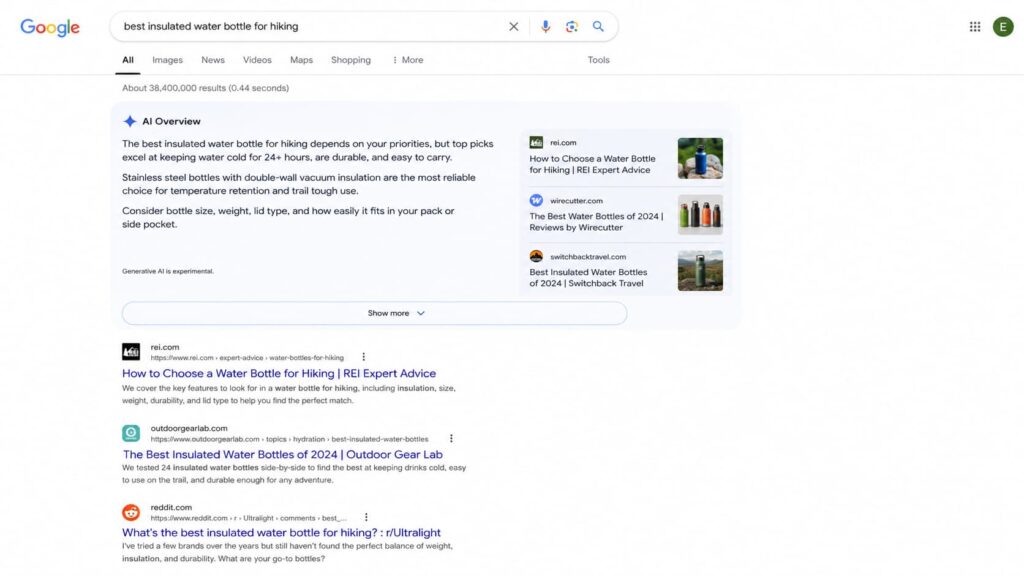
    Frequently Asked Questions

    What is the best generative engine optimization tool?

    There’s no single best GEO tool. It depends on the job. For AI visibility tracking, SE Ranking and Profound lead; for content, Writesonic; for the technical structured-data foundation that makes content citable by AI, Schemafy. Most teams combine one tracker with a schema layer.

    Do I need a separate tool for GEO or is SEO enough?

    SEO and GEO work together, but SEO tools alone don’t show whether AI engines cite you. GEO tools track brand mentions across ChatGPT, Gemini, and Perplexity, and help structure content so LLMs can trust and quote it. You need both.

    Are there free generative engine optimization tools?

    Yes. Free GEO tools like AI Search Grader and HubSpot’s AEO Grader evaluate how your brand appears in AI answers, and free schema generators create basic JSON-LD. They’re good for auditing, but paid tools add continuous tracking and scale.

    Does schema markup help with generative engine optimization?

    Yes. AI engines prioritize structured data because it reduces the work of interpreting meaning and lowers hallucination risk. Google (2025) confirmed structured data gives an advantage, and Microsoft confirmed schema helps Copilot’s LLMs understand content, making pages easier to cite.

    How do GEO tools measure AI visibility?

    GEO tools run large sets of prompts across AI engines and track whether your brand is mentioned, cited, or linked. They report share of voice, sentiment, and which prompts trigger your brand, some drawing on databases of hundreds of millions of prompts.

  • AI SEO: How to Get Your Store Found in AI Search 2026

    AI SEO: How to Get Your Store Found in AI Search 2026

    Search used to work like a hallway of doors. You ranked, someone knocked on your door, they walked in. Now search often works like a librarian who reads the answer out loud and, sometimes, says where it came from. AI SEO is the work of getting that librarian to name you. This guide covers what AI SEO is, how AI search actually works, the two meanings of “AI for SEO,” and a checklist you can start this week.

    What is AI SEO?

    AI SEO is the practice of making your content discoverable, extractable, and trusted across AI-powered search experiences like Google AI Overviews and ChatGPT. It builds on classic SEO fundamentals, useful content, clean technical structure, clear entities, and authority, but optimizes them so an AI system can quote your page, not just rank it.

    That is a different meaning from the old one. A few years ago “AI SEO” mostly meant using machine learning tools to speed up keyword research. That still exists. But the phrase now points at something bigger: staying visible when the search result is an answer, not a list.

    The good news is that you are not starting over. Google’s own guidance is that you should keep prioritizing foundational SEO best practices, a clear technical structure and unique, valuable content, because those are the foundation for visibility in AI search (via Google Search Central). AI SEO is those fundamentals, aimed at a reader that happens to be a language model.

    AI SEO vs. traditional SEO: what actually changed

    The mechanics did not vanish. The target moved.

    DimensionTraditional SEOAI SEO
    What you optimize forKeywords and rankingsEntities, context, and extractable answers
    The result pageTen blue linksOne synthesized answer drawn from several sources
    The winPosition #1 and the clickBeing the source the AI cites

    Read the right column as an addition, not a replacement. You still want to rank. But in AI search, ranking is the price of entry, and getting cited is the goal (Search Engine Land).

    AI SEO vs. GEO vs. AEO: clearing up the acronyms

    You will see three labels for nearly the same thing. GEO (Generative Engine Optimization, getting cited in generative answers) and AEO (Answer Engine Optimization, showing up in direct answers) are both practical subsets of AI SEO. The underlying tactics barely differ: clear content, structured data, and authority. If you want the deeper version of the citation side, we cover Generative Engine Optimization (GEO) separately. Do not let the alphabet soup convince you there are three new jobs. There is one job with three names.

    How AI search works (and why it changes optimization)

    Here is the flow in plain terms. An AI search engine reads the intent behind a query, pulls from several sources at once, and synthesizes one answer. It favors sources with clear, well-defined entities and visible authority over pages that simply repeat the keyword.

    You see this on Google AI Overviews and AI Mode, and in assistants like ChatGPT and Perplexity, which answer directly and cite a handful of links instead of returning a long list.

    The optimization consequence is blunt: if your content is not easy to extract, you can rank and still get skipped. The click math shows why this matters. A behavioral study of real Google searches found people clicked a traditional result only 8% of the time when an AI Overview was present, compared with 15% when it was not, and zero-click searches rose from 54% to 72% on triggered queries (Pew via Search Engine Journal). When the answer is on the page, being the quoted source is often the only visibility left.

     An AI Overview answers the query inline and cites a few sources, pushing the classic organic results down the page

    Two sides of “AI for SEO”: doing SEO with AI vs. optimizing for AI

    The phrase “AI for SEO” hides two very different jobs. One is using AI to do your SEO work faster. The other is optimizing your site so AI systems pick it. Most guides only cover the first. You need both, and the second is where the new advantage lives.

    Using AI to speed up your SEO workflow

    AI is a genuine time-saver on the production side. Common, safe uses include:

    • Keyword research and clustering.
    • Drafting content outlines.
    • Writing first-pass meta titles and descriptions.
    • Analyzing competitor pages.
    • Spotting content decay across an aging site.

    One rule keeps this from backfiring: language models invent facts and cite sources that do not exist. Google does not penalize AI-generated content by default, it penalizes unhelpful content however it was made (Google Search Central). So fact-check everything before it ships. AI amplifies a strong foundation. It does not fix a weak one.

    Optimizing your site so AI engines cite you

    This is the side competitors skim. To become a source an AI wants to quote, focus on a short list: write self-contained answers that make sense on their own, use a logical heading structure, define your entities clearly (products, brand, author), and build authority (E-E-A-T, the experience, expertise, authoritativeness, and trust signals Google weighs).

    Then remove the guesswork for the machine. That last step is structured data, and several WordPress plugins add it, Schemafy among them. It is the bridge from “good content” to “content a machine can parse without ambiguity.”

    Why structured data is the foundation of AI SEO

    Structured data (also called schema markup, written as JSON-LD) is a set of labels that tell a machine what each part of your page means: this is a product, this is its price, this is a review, this is the author. It helps Google understand the page and can make it eligible for rich results (Google Search Central).

    One honest caveat up front. Google states plainly that there is no special schema markup you need to add to appear in AI features like AI Overviews and AI Mode (Google Search Central). Schema is not a magic switch for AI citations, and anyone who tells you otherwise is selling something.

    So why call it a foundation? Because the correlation is hard to ignore, and the mechanism is sound.

    Industry studies in 2026 report that roughly 65% of pages cited by Google’s AI Mode and about 71% of pages cited by ChatGPT include structured data. Correlation, not a Google requirement, but a strong signal.

    The mechanism behind that pattern: schema removes ambiguity. A machine reading raw HTML has to guess what your price, rating, and product name are. A machine reading JSON-LD does not guess. That same markup also earns rich results, which hold click-through rates up even as AI answers spread. If you want the full walkthrough, see our guide on how to use schema markup.

    The schema types that matter most for ecommerce

    If you run a store, a few schema types carry most of the weight:

    • Product: name, brand, SKU, GTIN, and images, so the machine knows exactly what you sell.
    • Review and its AggregateRating property: the star ratings and sentiment AI systems use to gauge trust.
    • FAQ (FAQPage): question-and-answer blocks that map cleanly to how AI answers.
    • Breadcrumbs (BreadcrumbList): the navigation path that shows site hierarchy.

    You do not have to hand-write these. Schemafy generates several of them, Product, Review, FAQPage, and BreadcrumbList, on WordPress and WooCommerce sites without touching code. You can also spin up JSON-LD manually with a free schema markup generator if you only need a page or two.

    An AI SEO checklist you can act on this week

    You will not run a month-long audit, so here is the tight version. Work top to bottom.

    1. Audit the structured data your pages already output.
    2. Add Product, Review, and FAQ schema where it fits.
    3. Write self-contained answers of 40 to 55 words under clear headings.
    4. Structure every page with a logical H1-to-H3 hierarchy.
    5. Strengthen entity and author information, who wrote this and why to trust it.
    6. Earn mentions from sites the AI models already trust.
    7. Track when your pages show up in AI Overviews and ChatGPT answers.
    8. Validate your JSON-LD so it has no blocking errors.

    None of this promises a #1 spot in thirty days. It does make you the kind of source AI systems can read, trust, and quote. For the traffic side of the same work, see our playbook on how to increase organic traffic.

    AI SEO mistakes that quietly kill visibility

    Most AI SEO damage is self-inflicted and invisible until traffic dips. The common ones:

    • Publishing AI content without fact-checking. Fix: verify every stat and source before it goes live.
    • Broken or duplicate schema. Fix: validate your markup and keep one clean schema per page instead of three conflicting ones.
    • Keyword stuffing instead of entities. Fix: write for concepts and clear meaning, not repetition.
    • Ignoring extractability. Fix: lead sections with a direct, self-contained answer.
    • Treating AI SEO as a replacement for technical SEO. Fix: it is a complement. Weak fundamentals sink both.

    How Schemafy fits into your AI SEO stack

    Keeping JSON-LD correct across a growing WordPress site is tedious and easy to get wrong, which is exactly where the mistakes above come from. Schemafy generates schema markup like Product, Review, FAQPage, and BreadcrumbList on WordPress and WooCommerce sites with no code, and its Rich Snippets screen lets you see and manage every schema you have applied in one place. The AI SEO payoff is simple: cleaner, machine-readable pages that AI systems can extract without guessing.

    Schemafy's Rich Snippets screen shows every schema type applied across a WooCommerce store in one view.

    Frequently asked questions about AI SEO

    Short answers to the questions people ask most.

    Does AI SEO really work?

    Yes, when it builds on solid fundamentals. AI amplifies strong content but will not fix a weak site. Pages built for AI search do get cited more often: industry studies find the majority of pages quoted by AI Mode and ChatGPT include structured data, though that is correlation, not a guarantee.

    Is AI-generated content bad for SEO?

    No. Google does not penalize AI-generated content itself, it penalizes unhelpful, spammy content however it is made. AI drafts work for SEO when they are fact-checked, edited for accuracy, and genuinely useful. Publishing unverified AI output risks errors that damage credibility and rankings.

    What is the difference between AI SEO and GEO?

    GEO (Generative Engine Optimization) is a subset of AI SEO focused on earning citations in generative answers like ChatGPT and Google AI Overviews. AI SEO is the broader practice of staying discoverable and trusted across all AI-powered search. The underlying tactics overlap almost entirely.

    How do I get my products cited by ChatGPT?

    Make your product data machine-readable. Add Product, Review, and FAQ schema so an AI can read price, availability, and ratings without guessing, and write clear, self-contained product descriptions. Structured data is the highest-impact first step, since a large share of ChatGPT-cited pages include it.

    Do I need schema markup for AI search?

    Not strictly. Google says there is no special schema required to appear in AI Overviews or AI Mode. But structured data correlates with being cited and earns rich results, so it is one of the highest-impact things you can do, even if it is not a formal requirement.

    Final thoughts

    AI SEO is not a new discipline bolted onto the old one. It is the same fundamentals, aimed at a reader that now summarizes instead of listing, where being extractable and citable matters as much as ranking.

    The fastest first step is to see what structured data your pages emit today, then fill the gaps on your most important products and pages.

  • How to Create an llms.txt File: A Step-by-Step Guide

    How to Create an llms.txt File: A Step-by-Step Guide

    An llms.txt file is a plain markdown file at the root of your site that hands large language models a curated, concise map of your most important content. This guide is for agency owners and site operators who want a valid one live today, not another theory piece on AI search.

    By the end you will have the exact format, a copy-paste example, a place to upload it, and a way to test that it works. If you manage 10 or more client sites, learn the format once and you can standardize it across all of them.

    The standard was proposed by Jeremy Howard of Answer.AI in 2024 (the original proposal). It is young, but the format is fixed, so there is no guesswork involved.

    Illustration of a browser address bar displaying “yourdomain.com/llms.txt” connected to three website files—robots.txt, sitemap.xml, and a highlighted llms.txt—linked to an AI assistant icon, showing how AI systems access website information through structured files.

    Caption: llms.txt lives at your domain root alongside robots.txt and sitemap.xml, but it serves AI a curated summary instead of crawl rules or a full URL index.

    What is an llms.txt file?

    An llms.txt file is a markdown document hosted at yourdomain.com/llms.txt that gives language models concise background on your site plus links to the pages that matter. Instead of forcing an AI to parse heavy HTML full of navigation, ads, and JavaScript, you hand it a clean, LLM-friendly summary of your best content.

    The goal is AI discoverability: helping models find, interpret, and cite the right pages when someone asks about your business. It is not a way to block crawlers. That job belongs to robots.txt. llms.txt does the opposite. It invites AI in and points it at what you want read.

    The format and rules come from the official specification at llmstxt.org, which is the source of truth for everything below.

    llms.txt vs. llms-full.txt

    llms.txt is the curated index: a short summary plus links with brief descriptions pointing to your key pages. llms-full.txt goes further and concatenates the full content of those pages into one markdown file, so an AI can load everything in a single pass.

    Use llms.txt for large sites where a curated map is enough. Reach for llms-full.txt on documentation, where you want the entire text sitting in one place for an assistant to read directly.

    llms.txt vs. robots.txt vs. sitemap.xml

    These three files all sit at the root, but each solves a different problem. robots.txt controls access and tells crawlers what they may or may not fetch. sitemap.xml lists every URL for search-engine indexing. llms.txt is a semantic layer that prioritizes and describes your best content for AI to consume. It complements the other two. It does not replace them.

    FileWhat it controlsWho it is for
    robots.txtAccess and crawling rulesSearch and other crawlers
    sitemap.xmlA full list of indexable URLsSearch engines
    llms.txtA curated, described set of your best contentLLMs and AI assistants

    What to include in an llms.txt file (the format)

    An llms.txt file uses standard markdown and follows a specific order. That order is what makes the file both human-readable and machine-parseable, and it is what a generator or a plugin will produce for you. Before you write one, it helps to know each section and why it exists. Here is the exact llms.txt format defined by the spec.

    The required and optional sections

    The specification defines the following sections, in this order:

    1. # Project/Site Name (H1): the name of the site or project. This is the only required field in the entire file.
    2. A > blockquote: a short summary of the site with the key information a model needs to understand the rest of the file.
    3. Zero or more markdown sections: plain paragraphs or lists (no headings) that add detail or context notes.
    4. ## Section headings (H2): each contains a markdown list of links in the format [name](url): description, grouping your best pages.
    5. An ## Optional section: a special H2 whose links can be skipped when a shorter context is needed.

    The ## Optional heading carries special meaning: everything under it is safe for a model to drop if it is working with a tight context window. Everything else is treated as core.

    What to leave out

    Curate hard. Leave out legal pages like privacy, terms, and cookie policies, which an AI will never cite. Drop outdated blog posts and anything thin or off-brand. When two pages cover the same thing, link only the best version, not the duplicates.

    The rule: prioritize canonical pages and lead with the documentation you most want AI to quote. A short, sharp file beats a long one that buries your best pages under filler.

    How to create an llms.txt file: 3 methods

    There are three ways to create the file, depending on your technical comfort and the size of the site. Pick the one that matches how you work.

    Method 1: Write it manually

    Writing the file by hand gives you the most control and the highest quality, because you choose exactly which pages represent the client. For a small or medium site, do this:

    1. Open a plain-text editor and create a file named llms.txt.
    2. Write a single H1 with the site or project name.
    3. Add a > blockquote summarizing the business in one or two concrete sentences.
    4. Group your best links under ## Section headings, each as - [Title](URL): short description.
    5. Add an ## Optional section for secondary links a model can skip.
    6. Save the file as llms.txt.

    Start with the 10 to 20 URLs you most want AI to cite. You can always add more later, but a tight first version is easier to maintain than a bloated one.

    Method 2: Use an llms.txt generator

    The fastest route is a generator. The flow is the same across tools: you paste your domain, the tool crawls the site, it produces an llms.txt (and often an llms-full.txt) that follows the spec, and you download the result.

    Firecrawl offers a well-known web generator, LLMrefs provides another, and several SEO plugins include a generator inside their existing interface. Whichever you use, always review and clean the output. Generators tend to over-include, pulling in pages you would never hand to an AI, so treat the result as a first draft you prune around canonical content.

    ToolBest forOutput
    FirecrawlAny websitellms.txt + llms-full.txt
    LLMrefsAny websitellms.txt
    SEO plugin generatorsWordPress sitesllms.txt (and often llms-full.txt)

    Method 3: Use a WordPress plugin

    If your clients run WordPress, a plugin is the cleanest option at scale. Tools like Website LLMs.txt, the LLMs.txt and LLMs-Full.txt Generator, and AIOSEO generate the file and serve it from your site root automatically.

    The advantage over a one-off generator is maintenance. These plugins regenerate the file when your content changes, so a new page or an updated post flows into llms.txt without you touching it. For an agency standardizing across many sites, that automatic refresh is what makes the file worth keeping.

    llms.txt example you can copy

    Here is a complete, valid file you can copy and adapt. It follows the spec exactly, using a fictional SaaS business so you can drop in any client.

    # Northstar Analytics
    
    > Northstar Analytics is a privacy-first web analytics platform for WooCommerce stores. This file indexes our product docs, setup guides, and API reference.
    
    Northstar is a WordPress plugin, not a standalone dashboard. The API is read-only. For billing questions, use the support docs, not the API reference.
    
    ## Docs
    
    - [Getting started](https://northstar.com/docs/start.md): Install and connect Northstar in five minutes
    - [Configuration](https://northstar.com/docs/config.md): Every setting explained, with defaults
    - [API reference](https://northstar.com/docs/api.md): Full endpoint and authentication reference
    
    ## Optional
    
    - [Changelog](https://northstar.com/changelog.md): Release history since v1.0
    - [Brand assets](https://northstar.com/brand.md): Logos and usage guidelines
    

    To adapt it, change the H1 to the client’s name, rewrite the blockquote to describe their business in one specific sentence, and swap the links for their canonical pages. Keep every description short and informative, and reserve ## Optional for anything an assistant can safely ignore.

    Where to upload your llms.txt file

    Upload the file to the root of your domain so it resolves at https://yourdomain.com/llms.txt, the same location as robots.txt. It must be publicly accessible and served as plain text or markdown, not as a rendered HTML page.

    You have three common ways to get it there. Use your hosting File Manager to drop the file into the site’s root or public folder. Use an FTP client like FileZilla to upload it to the same root directory. Or, on WordPress, let a plugin place and serve it for you.

    Across a mixed stack of client sites, the plugin route is the one that scales, since it handles placement and updates without a manual upload per site.

    How to test that your llms.txt file works

    Testing is the step most guides skip, and it is the one that tells you whether the file does anything. Run these four checks:

    1. Visit yourdomain.com/llms.txt in a browser and confirm it loads as plain text, not a styled HTML page.
    2. Validate the markdown: the H1 is the first line, and every link resolves.
    3. Test comprehension by pasting the file into ChatGPT, Claude, or Perplexity, or asking each about your site, to see whether it interprets your content correctly.
    4. Check your server logs to see whether AI crawlers are actually requesting the file.

    If the models answer thinly or wrongly, your descriptions or link choices need work. If nothing requests the file, that is useful signal too, and it leads to the next question.

    Desktop web browser displaying a raw llms.txt file at yourdomain.com/llms.txt, showing plain-text markdown content for Northstar Analytics with documentation links rendered in a standard browser tab on a white background.

    Caption: A correctly served llms.txt loads as raw plain-text markdown at your domain root, not as a styled web page. This is the first check to run per site.

    Does llms.txt actually work in 2026?

    Here is the honest answer, since plenty of guides inflate this. Adoption is real but small: roughly 10% of domains have an llms.txt file, and the number is growing (SE Ranking’s analysis of 300,000 domains). Google has publicly confirmed it does not use llms.txt for crawling, indexing, or training, with John Mueller comparing it to the old keywords meta tag (Search Engine Roundtable). No major AI company has published that it formally weights the file either.

    The fair framing: llms.txt is a low-risk, low-cost signal, much like schema.org markup in 2014. Back then structured data was not mandatory and not universally honored, but early adopters were ahead when it became expected. llms.txt sits in that same window now.

    So it is worth creating, especially on documentation-heavy and SaaS clients, but do not expect miracles or a ranking bump. Treat it as a cheap hedge, decided client by client, not a growth lever, and keep the rest of your AI search optimization doing the heavy lifting.

    Level up: pair llms.txt with structured data

    An llms.txt file tells AI what to read. Structured data, meaning schema markup for AI search in JSON-LD, tells AI what your content means. Together they maximize how well AI engines understand and cite your pages: one hands over the map, the other labels what is on it.

    Writing JSON-LD by hand across 10 or more client sites does not scale. Schemafy, a WordPress schema plugin, automates that markup so you can generate JSON-LD schema and deploy structured data for AEO without writing code, then validate your structured data before it ships.

    WordPress admin dashboard showing the Schemafy Auto Schema Generator plugin with product schema recommendations, filter options, and a table listing product pages, word counts, suggested Product schema types, and match percentages.

    Caption: A schema plugin can auto-detect and generate JSON-LD across a WordPress site, so structured data ships at scale while your llms.txt handles the curated index.

    Frequently asked questions

    A few quick answers to the questions that come up most when teams roll out llms.txt.

    Is llms.txt required?

    No. llms.txt is a voluntary, proposed standard, not required by any search engine or AI provider. As of 2026, only about 10% of domains have one. But because it is low-effort and low-risk, many sites add it early as a signal for AI discoverability, similar to how schema markup was adopted.

    Does Google use llms.txt?

    No. Google has publicly confirmed it does not read or rely on llms.txt for crawling, indexing, or AI training. The file is aimed at LLM-based tools like ChatGPT, Claude, and Perplexity at inference time, not at Google Search. Use robots.txt and sitemaps for traditional SEO, and remember that on-page signals still matter more than any single file, such as whether meta descriptions are a ranking factor.

    Where do I put the llms.txt file?

    Place it in your site’s root directory so it is reachable at https://yourdomain.com/llms.txt, the same location as robots.txt. Upload it via your hosting File Manager, an FTP client like FileZilla, or a WordPress plugin that serves it automatically.

    What’s the difference between llms.txt and llms-full.txt?

    llms.txt is a curated index of links with short descriptions pointing to your key pages. llms-full.txt concatenates the full content of those pages into one markdown file, so an AI can load everything at once. Use llms.txt for large sites, llms-full.txt for documentation.

    How often should I update llms.txt?

    Update it whenever you publish, remove, or significantly change priority pages. Many WordPress plugins regenerate it automatically on content changes. For manual files, review it quarterly and after any major site restructure to keep the links accurate.