Author: Alice Vanegas

  • How to Add FAQ Schema in WordPress: The Complete Implementation Guide

    How to Add FAQ Schema in WordPress: The Complete Implementation Guide

    FAQ Schema is one of the most effective ways to turn your WordPress content into enhanced, high-visibility search results.

    By helping Google understand your questions and answers more clearly, FAQ Schema makes your pages eligible for rich results that expand your SERP presence and improve click-through rates.

    For any site competing in today’s search landscape, implementing FAQ Schema isn’t just a technical upgrade, it’s a practical step toward stronger visibility and better alignment with user intent.

    What Is FAQ Schema?

    FAQ Schema: A type of structured data markup.

    Purpose: Helps search engines identify questions and answers on your page.

    Uses JSON-LD format, which is:

    • Machine-readable.
    • Compatible with Google.

    Outcome: Makes your content eligible for rich results in search results.

    BEFORE                                                                            
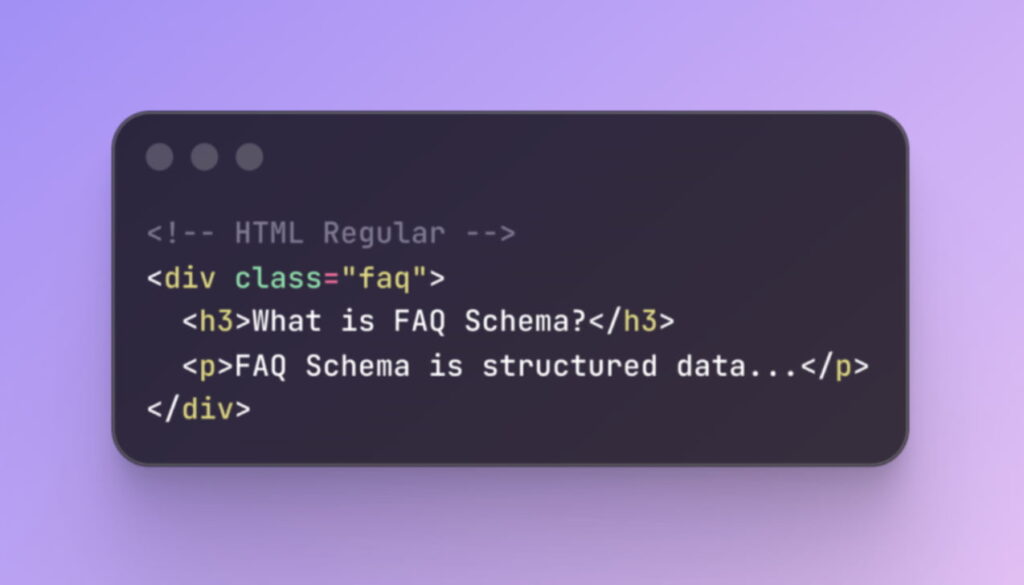
    BEFORE FAQ Schema                                                                   

    AFTER

    After FAQ Schema WordPress

    Why FAQ Schema Matters for SEO Impact

    Visibility Boost: FAQ schema enables rich results that take up more space in search results.

    Trust Signal: Positions your content as an authoritative resource.

    SEO Benefits:

    • Longer dwell times as users explore multiple questions.
    • Lower bounce rates from users finding immediate answers.
    • Increased chances of earning featured snippets.

    Technical Standards and Requirements

    • Follow Google’s Guidelines: Ensure compliance with strict technical specifications.
    • JSON-LD Format:
    • Offers clean separation between content and markup.
    • Simplifies maintenance and improves compatibility.
    • Placement: Lives within script tags, invisible to users but visible to search engines.

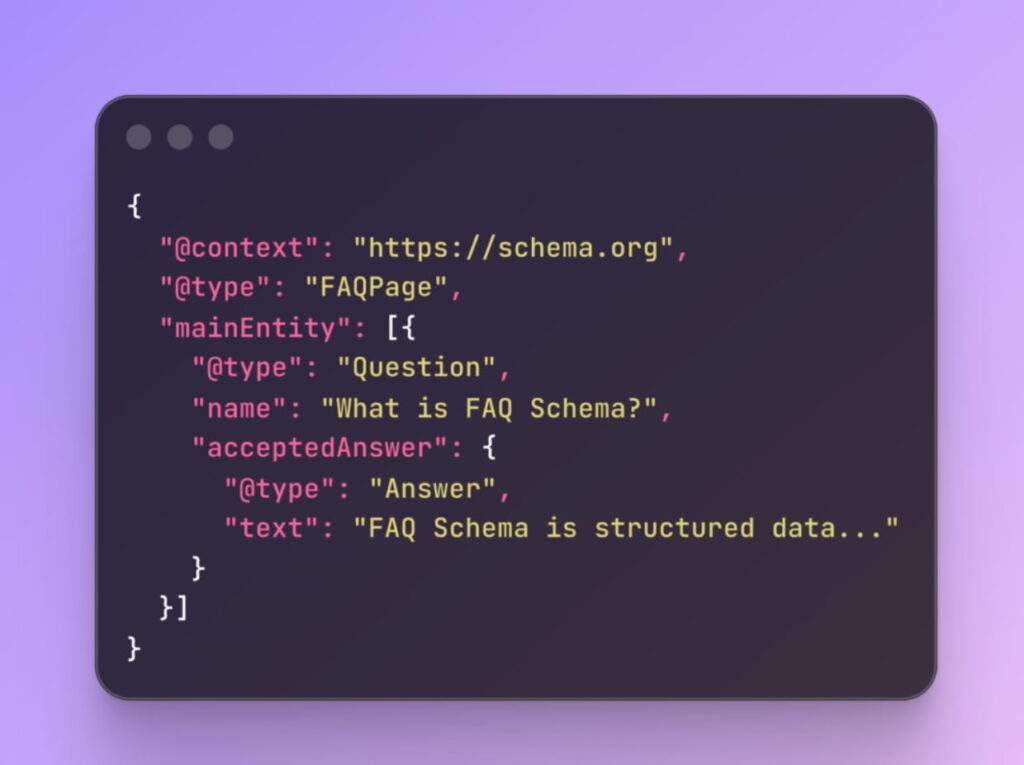
    JSON-LD Structure and Syntax

    The canonical FAQ schema structure follows a predictable pattern that balances simplicity with semantic richness:
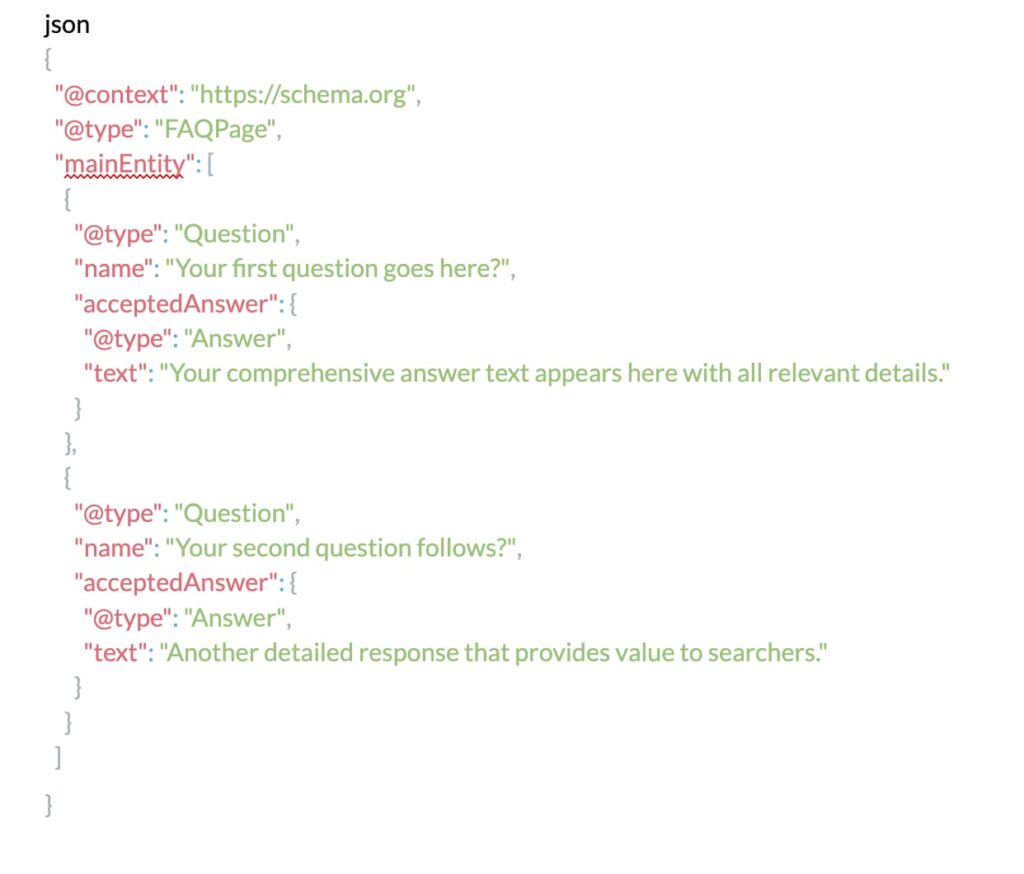
    JSON-LD Structure and Syntax

    Google’s FAQ Guidelines

    • Google’s quality guidelines for FAQ schema implementation demand strict compliance with several non-negotiable requirements:
    • Content Authenticity: Questions must reflect real user queries.
    • Answer Completeness: Provide full answers without requiring users to click for more.
    • Prohibited Content:
    • No advertising, explicit, or violent material.
    • Questions should be genuine inquiries.
    • Page Relevance: FAQ schema must be on pages where Q&A is the primary content.

    Google's FAQ Guidelines

    Schema Validation Requirements

    • Precision Required: Even minor syntax errors can invalidate your markup.
    • Use Google’s Structured Data Parser to validate.
    • Your schema will either pass or fail—no middle ground.

    Practical Implementation in WordPress

    • Plugin Implementation (e.g., Yoast SEO, Rank Math):
    • Simple, convenient.
    • Handles technical aspects automatically.
    • Manual Implementation:
    • Offers complete control over customization.
    • Requires editing templates or custom functions.
    • Custom Fields (e.g., ACF):
    • Dynamic FAQ content management.
    • Separate content from presentation.

    Method 1: Plugin Implementation

    The WordPress ecosystem provides several robust plugins specifically designed for FAQ schema implementation, with Yoast SEO, Rank Math, and Schema Pro leading the market.

    These solutions abstract the technical complexity while maintaining compliance with Google’s evolving requirements.

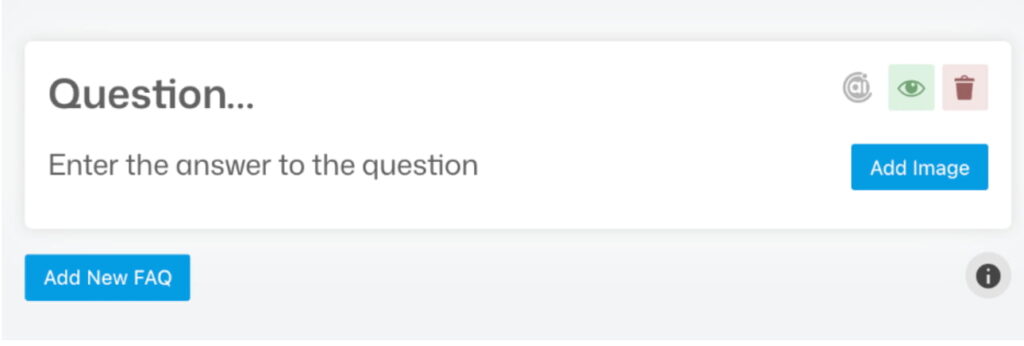
    Yoast SEO FAQ Block Implementation:

    Navigate to your WordPress post or page editor and locate the Yoast FAQ block within the block inserter. This specialized block automatically generates compliant JSON-LD markup as you add questions and answers. The visual editor maintains perfect synchronization between your visible content and the underlying schema, eliminating the risk of mismatches that could trigger Google penalties.

    The configuration process follows an intuitive workflow: add your question in the designated field, craft your comprehensive answer in the text area below, and repeat for additional FAQs. Yoast handles all technical requirements automatically, including proper character escaping, JSON-LD formatting, and schema validation.
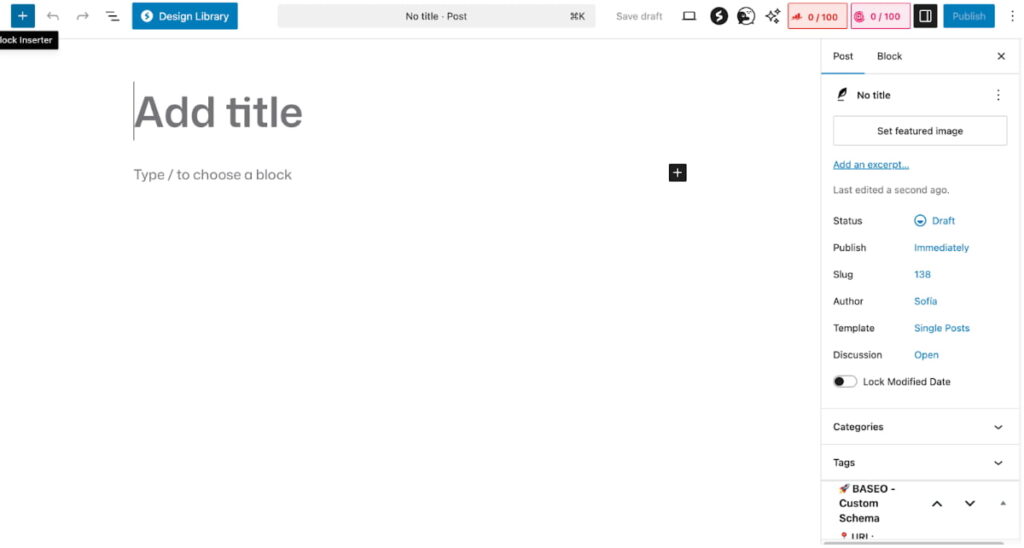
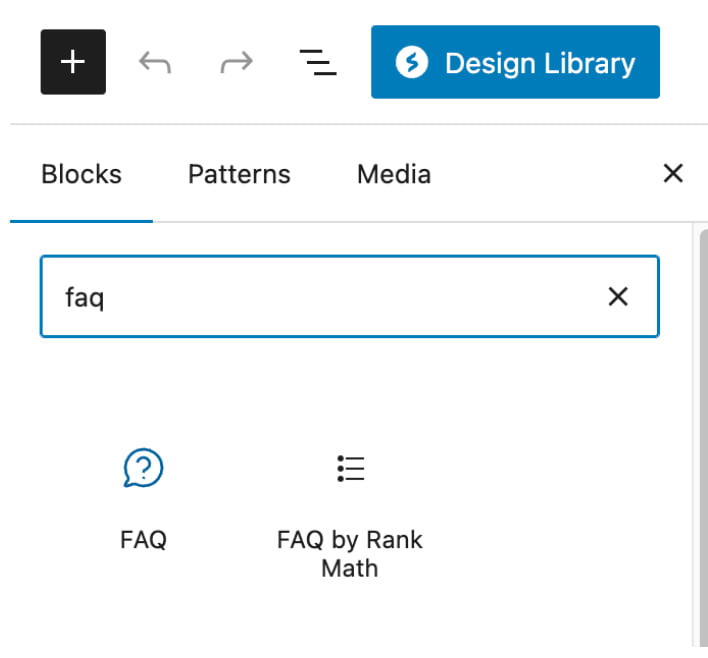
    Yoast SEO FAQ Block Implementation:

    Yoast SEO FAQ Block Implementation FAQ

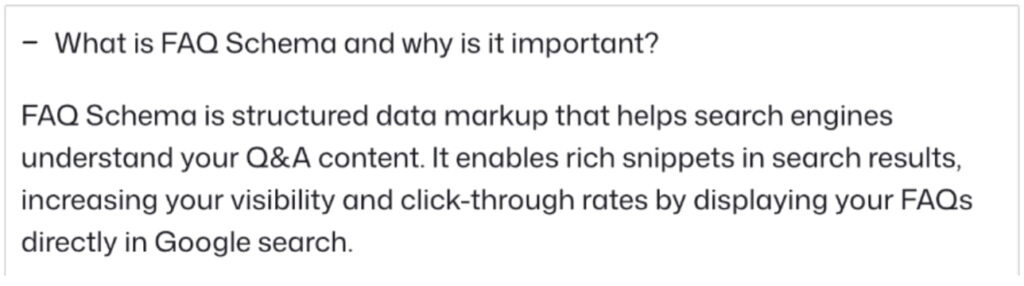
    Question FAQ Schema

    What is FAQ Schema

    Rank Math FAQ Schema Module:

    Rank Math approaches FAQ schema through its modular architecture, requiring initial activation of the Schema module from the dashboard. Once enabled, the FAQ schema option appears within the Schema tab of your post editor, presenting a streamlined interface for structured data creation.

    The plugin’s strength lies in its flexibility, you can implement FAQ schema on existing content without restructuring your page layout. Simply map your existing questions and answers to the schema fields, and Rank Math generates the necessary JSON-LD in your page header.

    Method 2: Manual JSON-LD Implementation

    For WordPress users seeking maximum control or working with custom themes that don’t play well with plugins, manual implementation offers unlimited flexibility. This approach requires adding JSON-LD directly to your WordPress templates or through custom functions.

    Functions.php Integration:
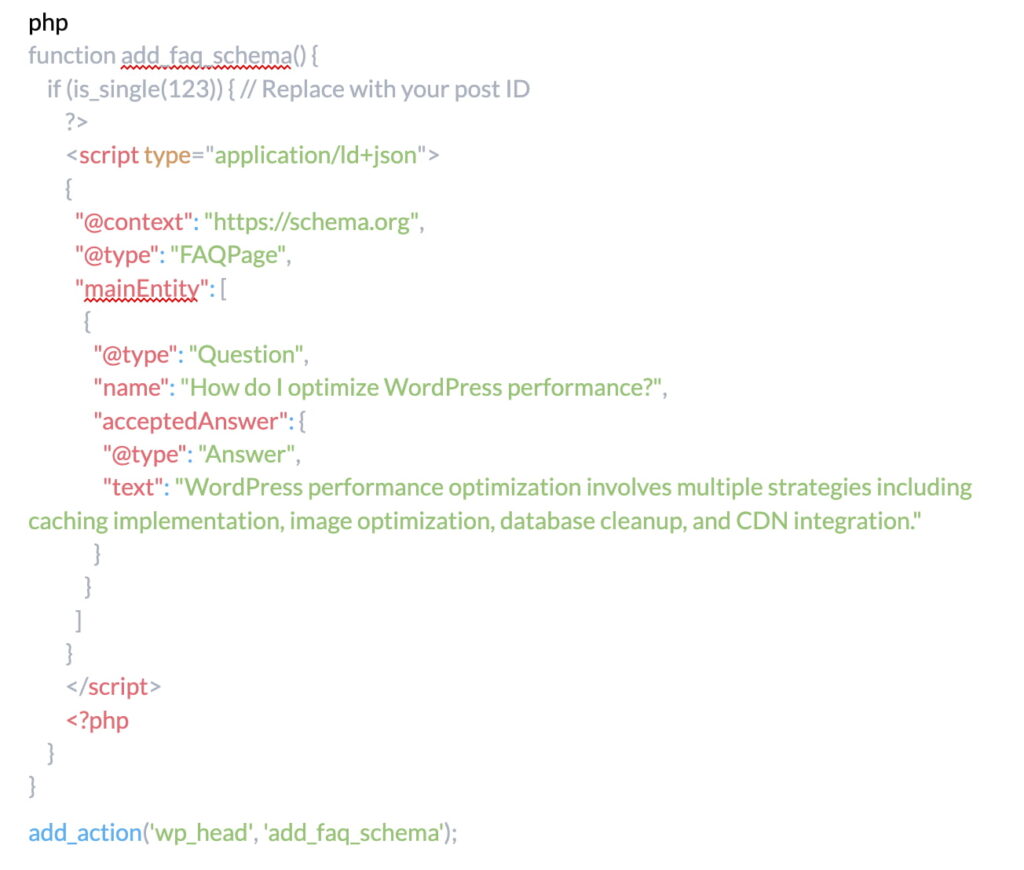
    Functions.php Integration:

    This method provides granular control over schema placement and conditional logic, enabling sophisticated implementations like dynamic FAQ generation from custom fields or database queries.

    Method 3: Custom Fields Integration

    Advanced WordPress deployments often leverage Advanced Custom Fields (ACF) or similar solutions to manage FAQ content dynamically. This approach separates content management from presentation, enabling non-technical users to maintain FAQ schemas without touching code.

    Create a repeater field in ACF containing question and answer subfields, then loop through these fields in your template to generate both visible HTML and JSON-LD markup simultaneously. This single-source-of-truth approach eliminates synchronization issues while maintaining complete flexibility over presentation.

    Tools for Testing and Optimization

    The implementation of FAQ schema without proper validation resembles navigation without a compass, you might reach your destination, but the journey involves unnecessary risk and uncertainty.

    Google provides sophisticated testing tools that transform guesswork into precision, ensuring your markup meets all technical requirements before deployment.

    Google’s Rich Results Test

    The Rich Results Test serves as your primary validation gateway, offering real-time analysis of your FAQ schema implementation. Simply input your URL or paste your code directly, and Google’s parser evaluates your markup against current guidelines.

    The tool provides granular feedback, identifying specific issues that could prevent rich results from appearing.

    Beyond basic validation, the Rich Results Test previews how your FAQ snippets might appear in search results, though actual display remains at Google’s discretion.

    This preview functionality proves invaluable for optimizing answer length and formatting to maximize visual impact within SERP constraints.

    Schema.org Validator

    While Google’s tool focuses on rich results eligibility, the Schema.org Validator provides comprehensive markup validation against the complete schema vocabulary.

    This broader perspective helps identify structural issues that might not immediately impact Google display but could affect other search engines or future compatibility.

    Google Search Console Integration

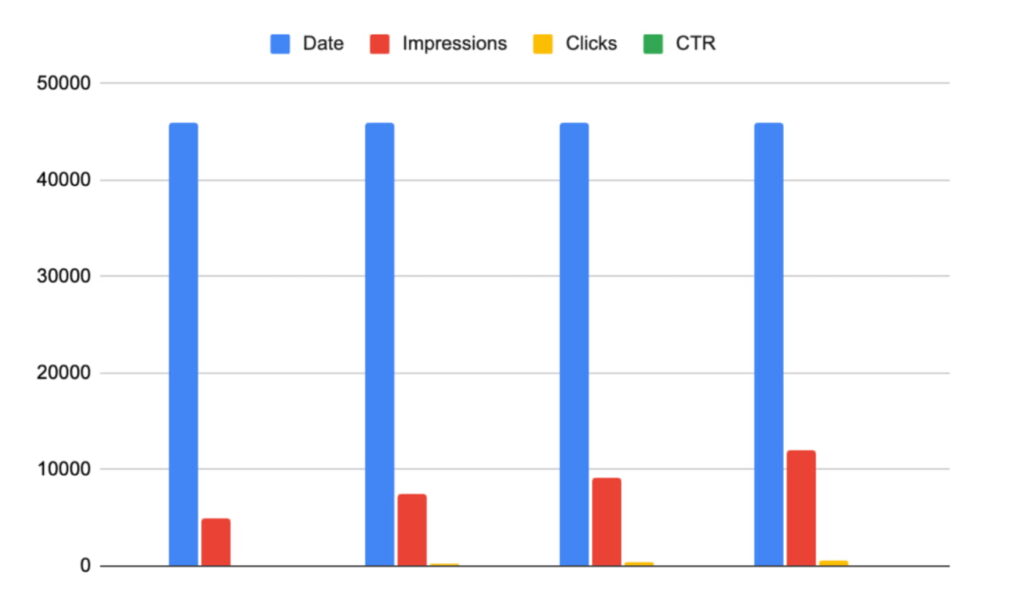
    Post-implementation monitoring through Google Search Console reveals the true performance of your FAQ schema. The Enhancement reports specifically track FAQ rich results, displaying impression counts, click-through rates, and any detected issues.

    This data enables iterative optimization based on actual performance rather than theoretical best practices.

    Performance Metrics Table:

    MetricBefore FAQ SchemaAfter FAQ SchemaImprovement
    Impressions12,50018,750+50%
    CTR2.3%3.8%+65%
    Average Position8.26.7+18%
    Rich Results04,200New Channel

    Performance Metrics Table

    Mobile-Friendly Test Considerations

    Given Google’s mobile-first indexing, validating FAQ schema display on mobile devices becomes critical. The Mobile-Friendly Test evaluates not just technical markup but also user experience factors like text readability and tap target sizing within expanded FAQ results.

    Best Practices and Common Pitfalls

    The landscape of FAQ schema implementation is littered with well-intentioned mistakes that sabotage rich results eligibility.

    Understanding these pitfalls and their solutions separates successful implementations from the vast majority that never achieve their intended visibility gains.

    Content Quality Standards

    The temptation to manufacture questions for schema benefits often backfires spectacularly. Google’s natural language processing algorithms excel at detecting artificial FAQ constructions, particularly those that merely restate page headings as questions.

    Authentic FAQs emerge from genuine user queries, customer support tickets, and search query analysis, not creative writing exercises.

    Technical Implementation Standards

    Nesting errors represent the most common technical failure in FAQ schema implementation. Each Question must contain exactly one acceptedAnswer, and each Answer must be properly enclosed within its parent Question.

    Orphaned answers or questions without responses invalidate the entire schema block.

    Character encoding mistakes plague implementations that fail to properly escape special characters. Quotation marks within answer text require backslash escaping (“), while ampersands need HTML entity encoding (&).

    International characters demand UTF-8 encoding throughout the implementation chain, from database storage through JSON-LD output.

    Strategic Deployment Decisions

    Not every page benefits from FAQ schema implementation. E-commerce category pages, blog archives, and navigation pages typically lack the focused question-answer format that justifies FAQ markup.

    Forcing FAQ schema onto inappropriate page types dilutes its effectiveness and may trigger manual actions from Google’s quality team.

    The relationship between FAQ schema and other structured data types requires careful orchestration. When implementing multiple schema types on a single page, such as combining FAQ with Article or Product schema, ensure proper nesting and avoid conflicting signals.

    FAQ schema should complement, not compete with, your primary schema strategy.

    Maintenance and Updates

    Establish a quarterly review cycle encompassing content relevance, technical validation, and performance analysis. Update answers to reflect current information, remove questions that no longer resonate with your audience, and add new FAQs based on emerging search trends and user feedback.

    Frequently Asked Questions

    How many FAQ items should I include in my schema markup?

    While Google doesn’t enforce strict limits, practical testing reveals diminishing returns beyond 10-15 questions per page. Focus on quality over quantity, five highly relevant, comprehensive FAQs outperform twenty generic questions.

    Monitor your Search Console data to identify which questions drive engagement and refine accordingly.

    Can I use FAQ schema on e-commerce product pages?

    Yes, but with important caveats. Product-specific questions about features, compatibility, or usage instructions qualify for FAQ schema.

    However, reviews, shipping information, or promotional content masquerading as FAQs violate Google’s guidelines. Ensure your product page FAQs provide genuine informational value rather than sales messaging.

    Will FAQ schema guarantee rich results in Google?

    No structured data implementation guarantees rich results display. Google evaluates multiple factors including domain authority, content quality, search relevance, and user engagement metrics.

    FAQ schema creates eligibility for rich results but doesn’t ensure their appearance. Focus on comprehensive implementation while maintaining realistic expectations.

    How long does it take for FAQ rich results to appear after implementation?

    Initial crawling and indexing typically occur within 2-7 days for frequently updated sites, though rich results may take 2-4 weeks to appear consistently.

    New domains or those with limited crawl budgets might experience longer delays. Use Google Search Console’s URL Inspection tool to request indexing and accelerate the process.

    Can I implement FAQ schema without showing the questions on my page?

    Absolutely not. Google requires complete parity between visible content and schema markup. Hidden FAQs, even if marked up correctly in schema, violate Google’s guidelines and risk manual penalties.

    Your FAQ content must be prominently displayed and easily accessible to users.

    Should I use FAQ schema if I already have a featured snippet?

    FAQ schema and featured snippets serve complementary rather than competing purposes. While featured snippets typically display a single answer prominently, FAQ rich results can appear below, providing additional visibility.

    Some queries trigger both features simultaneously, maximizing your SERP presence.

    What happens if my FAQ schema contains errors?

    Schema errors prevent rich results from appearing but don’t directly impact your organic rankings. However, invalid markup wastes crawl budget and might signal quality issues to search engines.

    Use validation tools before deployment and monitor Search Console for error reports to maintain schema health.

    Can I use HTML formatting within FAQ answer text?

    Basic HTML formatting like paragraph tags, lists, and links can be included within answer text, but exercise restraint. Excessive formatting, especially promotional elements like buttons or styled divs, may disqualify your schema from rich results.

    Stick to semantic HTML that enhances readability without compromising schema integrity.

    Conclusion

    Adding FAQ Schema to your WordPress site is one of the fastest, highest-impact ways to increase visibility in Google without producing new content.

    With JSON-LD, plugins like Yoast or Rank Math, and consistent validation in Search Console, you can turn simple questions and answers into rich results that expand your SERP presence and significantly improve click-through rates.

    The implementation doesn’t require advanced technical skills, just make sure your FAQs are real, helpful, and visible on the page, and that your markup matches the on-page content.

    Once your schema is live, monitor its performance, update outdated answers, and apply it strategically to pages where it can genuinely support user intent and conversions.

    In short: FAQ Schema doesn’t replace your SEO efforts, it amplifies them. It helps Google understand your content more clearly, enhances user experience, and gives your pages more room to shine in competitive search results.

    Summary of Key Takeaways

    • FAQ schema transforms standard questions and answers into rich, expandable search results that can double or triple your SERP real estate
    • JSON-LD format provides the cleanest, most maintainable approach to FAQ schema implementation in WordPress
    • Both plugin solutions (Yoast, Rank Math) and manual implementation offer viable paths, with the choice depending on technical expertise and customization needs
    • Validation through Google’s Rich Results Test and ongoing monitoring via Search Console are non-negotiable requirements for successful implementation
    • Content authenticity matters more than technical perfection, genuine FAQs based on real user queries outperform manufactured questions
    • Regular audits and updates ensure continued compliance with evolving Google guidelines and maintain rich results eligibility
    • FAQ schema complements other SEO strategies rather than replacing them, working best as part of a comprehensive optimization approach

    Next Steps

    Your path to FAQ schema mastery begins with a single question: which of your pages would benefit most from enhanced visibility? Start with your highest-traffic content that naturally incorporates questions and answers, support pages, resource guides, or detailed service descriptions.

    Implement FAQ schema on one page, validate thoroughly, and monitor performance for two weeks before expanding to additional content.

    The tools and knowledge now rest in your hands. Transform your WordPress site from a passive information repository into an active participant in Google’s rich results ecosystem. The questions your audience asks deserve prominence in search results, FAQ schema ensures they receive it.

  • How Long Should a Meta Description Be? (2026 Guide)

    How Long Should a Meta Description Be? (2026 Guide)

    When you’re trying to improve your website’s visibility in search results, meta descriptions might seem like small details, but they play a surprisingly powerful role in whether people actually click through to your site.

    Think of your meta description as your website’s elevator pitch in search results, you have just a few seconds to convince someone that your page has exactly what they’re looking for.

    Common meta description problems include:

    • Your description gets cut off in Google results
    • Your message is too short and wastes valuable space
    • Google rewrites your description completely
    • You’re unsure what length actually works

    In this guide, you’ll learn:

    • The ideal meta description length in 2026
    • How Google decides what snippet to show
    • How to write descriptions that improve CTR
    • Common mistakes that reduce search performance

    What Is a Meta Description?

    A meta description is a short snippet of HTML code that summarizes what a webpage is about. You can think of it as a preview that lives in the background of your page, visitors don’t see it when they’re actually on your site, but search engines pull this information to display in their results. 

    Why It Matters for SEO

    Here’s an important distinction: meta descriptions aren’t a direct ranking factor. Google has been clear about this, the text in your meta description won’t make your page rank higher or lower in search results.

    However, meta descriptions have a strong indirect impact on SEO because they influence click-through rate (CTR).

    When a meta description is clear and compelling:

    • More users click on your result
    • Higher CTR signals relevance to search engines
    • Your content appears more valuable to Google
    • Over time, this can support stronger rankings

    Where It Appears in Google Search Results

    Each Google search result typically includes three main elements:

    1. Page title (blue clickable text)
    2. URL
    3. Meta description (gray text below the title)

    The meta description usually spans two to three lines and expands on the promise made in the page title.

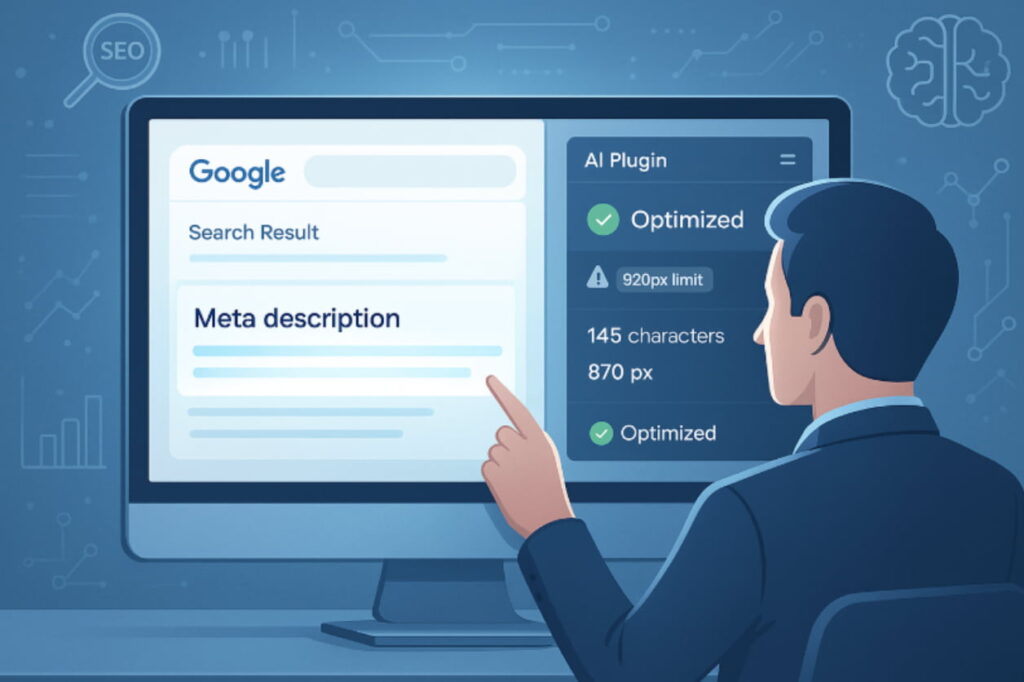
    Where It Appears in Google Search Results

    Its Role in Click-Through Rate (CTR)

    Imagine two search results with identical rankings and similar titles, but one has a well-crafted meta description while the other displays a generic snippet.

    The result with the better description will typically receive significantly more clicks, studies show that well-optimized meta descriptions can increase CTR by up to 5.8% compared to poorly optimized competitors.

    This happens because people are scanning search results quickly, looking for signals that a page will satisfy their needs. Your meta description provides context and reassurance, it answers the implicit question in every searcher’s mind: “Is this worth my time?”

    The Ideal Meta Description Length in 2026

    Now we arrive at the heart of the matter: how long should your meta descriptions actually be? The answer is more nuanced than you might expect, and understanding the technical constraints alongside practical considerations will help you optimize effectively.

    Recommended Character and Pixel Limits

    DeviceCharacter Limit (approx.)Pixel Limit (approx.)Description
    Desktop155-160 characters920 pixelsRecommended length for optimal display on desktop
    Mobile155-160 characters~920 pixelsMobile devices may show slightly more characters, but still within the same pixel width
    Important120 characters (start of the description)~650 pixelsFocus your most important message here to ensure it’s visible across all devices

    In practical terms, you want to aim for approximately 155-160 characters, but more precisely, you should stay within about 920 pixels of width.

    Research from Ahrefs confirms that this length ensures proper display across devices while maximizing the space available to communicate your message. Desktop and mobile displays have slightly different constraints, with mobile sometimes allowing a bit more space since the text wraps across more lines. 

    How Google Decides What to Display

    CriteriaDescription
    Provided Meta DescriptionIf relevant to the search query, it’s likely to be displayed in full.
    Text Pulled from Page ContentIf the provided meta description doesn’t match the search query, Google may rewrite it using content from the page that matches better.
    Frequency of RewritingGoogle rewrites meta descriptions approximately 63% of the time, based on query relevance and available content.

    Google decides what description to show based on the search query.

    For example:

    • If your meta description matches the search query → Google usually displays it.
    • If it doesn’t match well → Google may pull text directly from the page instead.
    • Google aims to show the snippet most helpful to the searcher.

    Research from Ahrefs shows Google rewrites meta descriptions about 63% of the time.

    Why There’s No “Perfect” Length for Every Page

    Page TypeIdeal Meta DescriptionReason
    HomepageBroader description highlighting the brand’s core value propositionCommunicates the brand’s general value for all users
    Product PageMore specific description emphasizing product features and benefitsNeeds to highlight key features and benefits of the product
    Blog PostDetailed and specific description summarizing what the user will learnUsers are looking for answers to specific questions
    Landing PageConcise, action-oriented description, like “Buy Now” or “Get a Free Consultation”Needs to drive immediate action

    The ideal meta description length can vary depending on the page type.

    For example:

    • Landing pages use concise, action-focused messaging
    • Homepages use broader descriptions highlighting the brand’s value
    • Product pages emphasize product features and benefits
    • Blog posts summarize what the reader will learn

    What Happens If It’s Too Long or Too Short?

    Truncated Meta Descriptions: Why They Hurt CTR

    Meta Description LengthIssueImpact
    Too Long (Truncated)Text gets cut off with ellipsis “…”Missing key information, potentially harms CTR (click-through rate)
    Too ShortMissed opportunities to include valuable contextFails to convince searchers to click, limits keyword inclusion and competitive edge

    Truncation can damage how professional your result appears in search results.

    Common problems include:

    • Key information getting cut off
    • Important calls-to-action disappearing
    • Sentences ending abruptly
    • Descriptions appearing incomplete or unprofessional

    These issues can reduce trust and lower click-through rates.

    Rich Results Test Search Console Help

    The impact on click-through rates is significant, studies show that well-optimized meta descriptions can increase CTR by up to 5.8% compared to poorly written or truncated descriptions.

    Short Meta Descriptions: Missed SEO Opportunities

    When you only use 80 or 90 characters when you could comfortably fit 150, you’re leaving opportunities on the table. Search results are competitive, and every piece of available space is a chance to communicate value and persuade people to choose your result.

    Example:
    Too short:
    “Find eco-friendly kitchen storage options.”
    Optimized: “Find eco-friendly kitchen storage from bamboo to glass and stainless steel. Shop our best-selling collection and reduce plastic waste today.”

    The optimized version mentions specific benefits, product variety, and creates urgency, all within the character limit.

    How to Write the Perfect Meta Description

    Focus on Intent and Relevance

    ElementDescriptionOptimization Tip
    Focus on IntentUnderstand why someone is searching and align your description to meet their needsEnsure the description immediately shows how your page fulfills their search
    Include Primary KeywordUse the target keyword naturally within the descriptionAvoid keyword stuffing; use synonyms for variety
    Clear Value PropositionExplain what makes your page unique or beneficialHighlight specific benefits, outcomes, or features
    Call to ActionUse action-driven language to encourage user interaction (e.g., “Shop Now,” “Learn More”)Use strong verbs that push the user to take action immediately

    Start by thinking about the questions or problems your target audience has. If you’re writing about meal planning, your audience probably feels overwhelmed by weekly cooking, wants to save time, or is trying to eat healthier.

    Weak: “This article talks about meal planning tips”
    Strong: “Learn a simple meal planning system that saves 5+ hours weekly and reduces grocery costs by 30%”

    The strong version addresses underlying needs and desired outcomes.

    Include the Main Keyword Naturally

    Keywords in meta descriptions serve two important purposes:

    • Google bolds matching search terms in the snippet
    • This makes your result more visible in search results
    • Keywords reinforce what your page is about
    • They help users quickly see that your page matches their search

    The key: Include keywords naturally. Keyword stuffing makes your description read like it was written by a robot.

    Stuffed: “Best pizza NYC, NYC pizza delivery, order pizza in NYC for the best NYC pizza”
    Natural: “Our project management software helps small teams collaborate effectively without the complexity of enterprise tools”

    Free AI Meta Description Generator

    As explained in Google’s guidance on improving snippets, using descriptive and accurate meta descriptions helps users identify relevant results quickly. This visual emphasis makes your result more noticeable and signals strong relevance to the searcher’s query. 

    Examples of Good Meta Descriptions

    IndustryMeta Description ExampleWhy It Works
    E-commerce (Running Shoes)“Find lightweight running shoes engineered for marathon training and daily runs. Free shipping on orders over $75, 60-day comfort guarantee.”Addresses product features, benefits, and offers incentives
    Software (Project Management Tool)“Streamline team collaboration with our intuitive project management platform. Track tasks, share files, and hit deadlines faster, no training required. Start your 14-day free trial today.”Addresses pain points (time, missing deadlines), clear CTA
    Recipe Blog“Make restaurant-quality homemade pasta in 30 minutes with this foolproof recipe. Step-by-step photos, ingredient substitutions, and tips from a professional chef.”Promises a specific outcome (restaurant quality), addresses time concerns, builds credibility
    Local Service (Plumbing)“Emergency plumber serving [City] 24/7. Same-day repairs for leaks, clogs, and water heaters. Licensed, insured, and backed by 500+ five-star reviews. Call now for free estimates.”Communicates availability, services, credibility, and a CTA

    Best Practices for Meta Descriptions in 2026

    Maintain Consistency Across Pages

    While each meta description should be unique, maintaining a consistent approach creates a cohesive brand experience. For instance:

    • Product pages: Lead with benefit statements, include metrics, end with CTA
    • Blog posts: Specify content format and reading time
    • Service pages: Mention credentials, service area, and availability

    This consistency helps visitors recognize your results in search listings over time, building familiarity that can increase click-through rates.

    Align Meta Tags with Page Content

    Your meta description must accurately reflect what’s on your page. Google’s official documentation emphasizes that descriptions should accurately summarize page content rather than being lists of keywords or duplicate text.

    Misalignment creates two problems:

    1. Visitors lose trust and bounce when they don’t find what you promised
    2. Search engines notice high bounce rates and interpret this as poor relevance

    Think of your meta description as a promise. If you mention “detailed comparison charts” but only have paragraph descriptions, you’ve broken that promise.

    Google’s own documentation with examples demonstrates that descriptions should accurately summarize page content rather than being lists of keywords, duplicate text across pages, or vague statements that don’t describe the actual content. 

    Use Active Language 

    Strong verbs make meta descriptions more engaging.

    Examples include:

    • Discover
    • Learn
    • Get
    • Find
    • Start
    • Save time
    • Boost productivity
    • Increase revenue

    Common Mistakes to Avoid

    Common Mistakes to Avoid

    Keyword Stuffing or Repetition

    When people learn that keywords get bolded in search results, there’s temptation to include the keyword multiple times. This backfires spectacularly.

    Stuffed: “Best pizza NYC, NYC pizza delivery, order pizza in NYC for the best NYC pizza experience”
    Natural: “Get authentic New York pizza delivered to your door. Fresh, wood-fired pies from our family recipe since 1985”

    Search engines understand natural language and semantic relationships. Focus on writing for humans first.

    Duplicate Meta Descriptions Across Pages

    Using the same meta description for multiple pages is one of the most common yet most damaging mistakes in SEO. According to Ahrefs’ technical SEO study of over 1 million domains, duplicate meta descriptions are among the most frequently occurring technical issues that undermine site optimization efforts. 

    Problem:
    Using the same meta description across multiple pages.

    Why this hurts SEO:

    • Google cannot easily distinguish between pages
    • Ranking signals become diluted
    • Search engines may ignore your description entirely

    Solution:

    • Write a unique description for every important page
    • Emphasize what makes each page different

    Overpromising Content Not Found on the Page

    In the competition for clicks, there’s temptation to make content sound more comprehensive than it actually is. A meta description that promises “Everything you need to know about machine learning, from beginner to expert” better deliver exactly that.

    Why this hurts SEO:

    • Users leave the page quickly
    • Search engines detect poor relevance
    • Rankings can decline over time

    Solution:

    • Match the description with the real content
    • Be specific about what users will find
    • Avoid exaggerated promises

    Using Generic Descriptions

    Vague descriptions like “Learn more about our products” or “Click here for more information” waste valuable space and don’t give searchers a reason to click.

    Always be specific about what makes your page unique and valuable.

    Tools That Can Help You Optimize

    While you can manually write and check meta descriptions, optimization tools make the process significantly faster and more accurate, especially if you’re managing a large site.

    What to Look For in a Meta Description Tool

    Essential features:

    • Real-time character and pixel counters – Shows exactly how your description will display in search results
    • Visual indicators – Color-coded warnings when you’re approaching or exceeding limits
    • Bulk analysis – Identifies missing, duplicate, or problematic descriptions across your entire site
    • Preview functionality – See how descriptions will appear on desktop and mobile

    Advanced features:

    • AI-powered suggestions – Generates optimized description options based on your page content
    • Performance tracking – Shows click-through rates and identifies underperforming descriptions
    • Keyword analysis – Ensures natural keyword inclusion without stuffing
    • Competitor analysis – See what similar pages are using for inspiration

    Popular SEO Plugins and Tools

    Most major SEO plugins include meta description optimization:

    • Yoast SEO (WordPress)
    • Rank Math (WordPress)
    • All in One SEO (WordPress)
    • SEOPress (WordPress)
    • Shopify SEO apps (for e-commerce)

    These tools typically provide character counters, previews, and basic optimization suggestions.

    Our Meta Description Optimization Plugin

    Our plugin is specifically designed to take the guesswork out of meta description optimization. Here’s what makes it different:

    Intelligent length checking:

    • Calculates exact pixel width using Google’s actual font and rendering specifications
    • Shows precisely which words would get cut off if you exceed limits
    • Provides real-time feedback as you type with color-coded indicators

    AI-powered recommendations:

    • Analyzes your page content to generate multiple optimized description options
    • Considers your target keywords, industry norms, and what drives clicks in your specific niche
    • Learns from your site’s performance over time to refine suggestions

    Bulk optimization:

    • Review and update meta descriptions for dozens of pages in a single session
    • Filter by page type, missing descriptions, length issues, or duplicates
    • Accept AI suggestions or customize them to match your brand voice

    Performance monitoring:

    • Integrates with your analytics to track click-through rates
    • Identifies underperforming descriptions and suggests improvements
    • Allows A/B testing of different description variations

    Seamless integration:

    • Works directly within WordPress, Shopify, Wix, Squarespace, and other major platforms
    • No switching between tools, optimize right where you create content
    • Centralized dashboard for managing multiple sites

    Whether you’re managing a small business website or an enterprise site with thousands of pages, the right optimization tool can save hours of manual work while ensuring your meta descriptions consistently meet professional standards.

    FAQs About Meta Description Length

    Let’s address some of the most common questions that people have when they’re working to optimize their meta descriptions. These answers should help clarify any remaining confusion and give you confidence in your approach.

    What’s the ideal meta description length?

    The most reliable guideline is 150-160 characters (approximately 920 pixels). This range ensures full display on both desktop and mobile without truncation.

    However, the ideal length for your specific situation might vary. If your most important message can be communicated effectively in 130-140 characters, there’s no requirement to pad it out.

    Critical tip: Front-load your most important information. Assume only the first 120 characters are guaranteed to display across all devices.

    Does Google always use the one I write?

    No. Google rewrites meta descriptions for 30-70% of search results, depending on the query. Google makes substitutions when it believes it can provide a more relevant snippet by pulling text directly from your page content.

    You can improve the likelihood that Google uses your description by:

    • Making sure it genuinely represents your content
    • Addressing primary search intent for target keywords
    • Writing well without being overly promotional or vague

    How can I test if my meta description is too long?

    The most reliable method is using an optimization tool that calculates pixel width using Google’s actual font specifications. Character count alone isn’t sufficient because different letters take up different amounts of space (W vs i, for example).

    You can also manually test by searching Google for your page, but this has limitations because Google might not use your written description or might display it differently for different queries.

    Should I write meta descriptions for every page?

    Yes, for all important pages. Focus on:

    1. Homepage and main landing pages
    2. Top 10-20 highest-traffic pages
    3. All product/service pages
    4. Important blog posts and pillar content

    For less critical pages (tags, archives), you can allow Google to auto-generate descriptions, though custom ones are always better.

    How often should I update my meta descriptions?

    Review and update your meta descriptions when:

    • You update the page content
    • Click-through rates are lower than expected
    • Your target keywords or strategy changes
    • At least annually as part of SEO maintenance

    Conclusion

    Meta descriptions occupy a unique position in SEO, they don’t directly influence rankings, yet they significantly impact whether people actually click through to your site. Getting them right requires balancing technical constraints with strategic messaging.

    Key Takeaways

    Keep meta descriptions between 150-160 characters (approximately 920 pixels)
    Front-load your most important message within the first 120 characters
    Write unique descriptions for every important page
    Match search intent and accurately represent your content
    Include keywords naturally without stuffing
    Use specific value propositions rather than generic statements
    Avoid common mistakes: truncation, duplication, overpromising, keyword stuffing

    Start Optimizing Today

    The difference between a poorly optimized meta description and a great one can mean hundreds or thousands of additional visitors to your site each month. While the process might seem tedious, the right approach, combining strategic thinking with efficient tools makes it manageable even for large sites.

    Start with your most important pages, apply the principles in this guide, and you’ll see better click-through rates and more qualified traffic reaching your site.

    Ready to streamline your meta description optimization? Try our plugin and see how much easier it is to create perfectly optimized descriptions that drive real results.