Every SEO audit template repeats the same rule: keep every page within 3 clicks of the homepage. The rule is real. The way most guides apply it is not.
Depth has a measurable cost: the deeper a page sits, the less often bots crawl it and the later it gets indexed. But “everything at 3 clicks” is not the fix. Flattening the right pages is. Here’s how to tell the difference.
Table of contents
- What is crawl depth?
- Why crawl depth matters for SEO
- What is a good crawl depth?
- How to measure crawl depth on your site
- How to reduce crawl depth: 7 fixes that flatten your architecture
- Final thoughts
- Frequently asked questions
What is crawl depth?
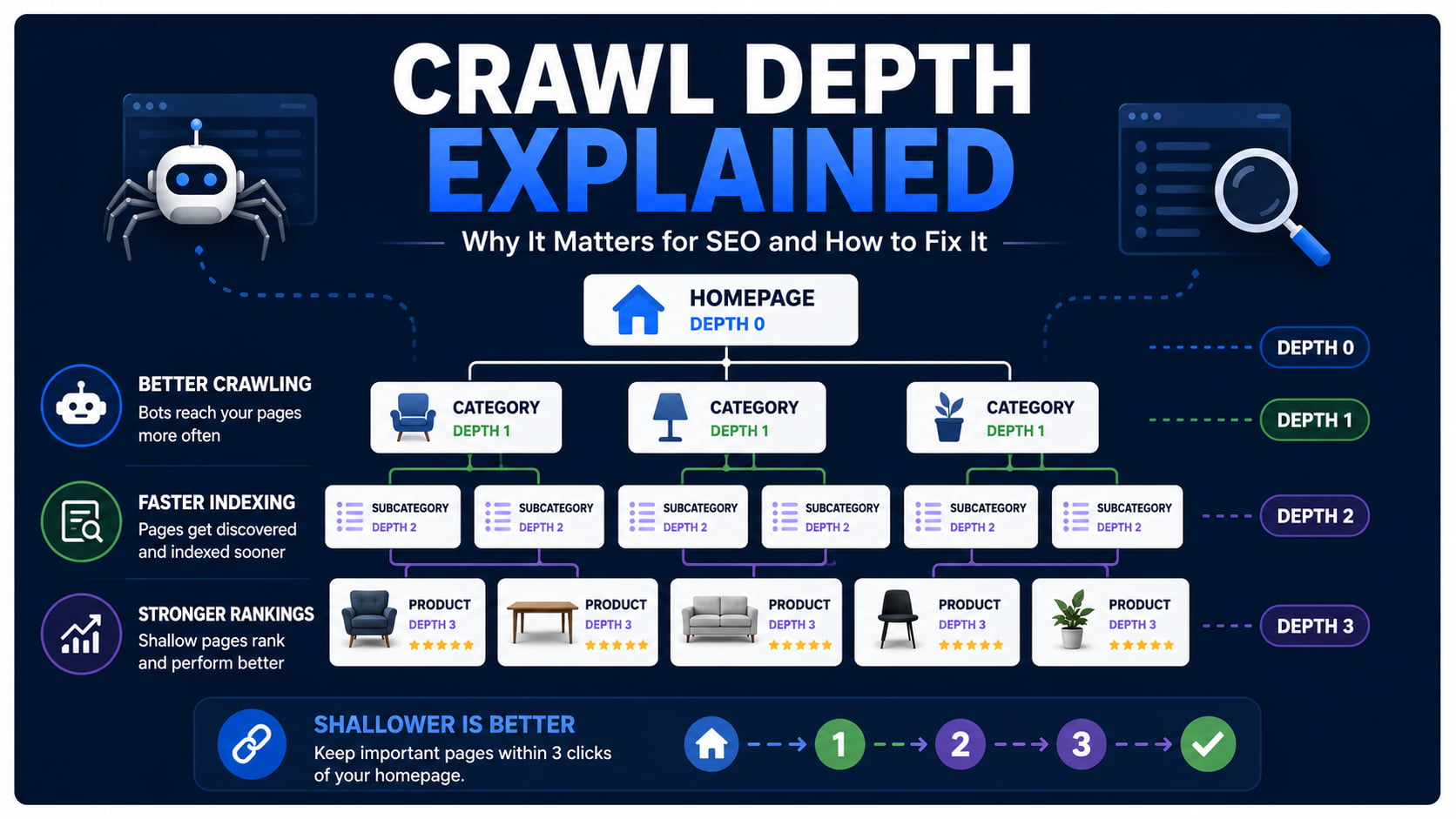
Crawl depth is the number of clicks it takes a search engine bot to reach a page from your homepage. The homepage is depth 0, pages linked from it are depth 1, and so on. The deeper the page, the less often bots crawl it.
Picture a typical client store. The homepage links to a category page (depth 1), the category links to a subcategory (depth 2), and the subcategory finally links to a product (depth 3). That product needed three hops of discovery before any bot could even know it exists. Add a color variant or a paginated product grid, and you’re at depth 4 before anyone has done anything wrong.
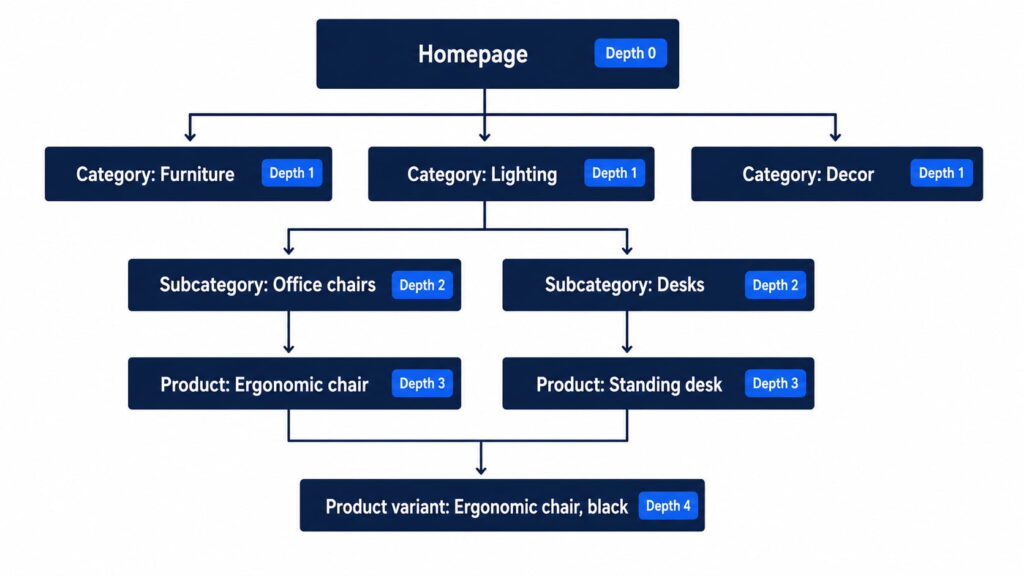
A typical store hierarchy puts products at depth 3 before a single filter or pagination link is added.
Crawl depth vs click depth vs page depth
You’ll see three terms used as if they were one. The difference is perspective, not math.
| Term | Perspective | Who uses it |
|---|---|---|
| Click depth | The user: minimum clicks to reach a page from the homepage | UX teams, most SEO tools |
| Crawl depth | The bot: link hops a crawler follows from its entry point | Log-file tools, crawl documentation |
| Page depth | Umbrella term for either | Casual usage in audits |
In practice, tools like Screaming Frog and Sitebulb measure click depth and label it “Crawl Depth” in their reports. Operationally, the distinction changes almost nothing: you flatten architecture the same way regardless. Knowing it exists mainly saves you from confusion when a report from your team or a client’s previous agency uses the terms differently.
Why crawl depth matters for SEO
Depth hits three things in a chain: crawl frequency, then indexing speed, then rankings and traffic. Each extra level weakens the first link, and the rest follow.
It’s also a UX problem wearing an SEO costume. If a bot needs five clicks to find a page, so does a human. Buried pages don’t just get crawled less. They get visited less, linked less, and bought from less.
How depth eats your crawl budget
Googlebot enters through your homepage and sitemap, then discovers everything else by following links. Google describes its crawl capacity as crawl budget: a combination of how much it can crawl (rate limit) and how much it wants to (demand). Deep URLs are last in that queue. The budget often runs out before the crawler gets to them.
Before you panic: Google’s own guidance says crawl budget concerns sites with 1 million+ pages that change weekly, or 10,000+ pages that change daily, or sites where much of the inventory sits in “Discovered – currently not indexed”. Most client stores are under those thresholds. Their real problem is discovery: pages so deep that Googlebot rarely reaches them at all.
If budget itself is your bottleneck, that’s a separate job. We cover it in our guide to optimizing crawl budget.
Deep pages get crawled less, indexed later, and ranked worse
Botify’s log-file analyses show that Googlebot’s crawl rate drops mechanically with each level of depth (Botify). The pattern is consistent: depth 1–2 pages absorb most of the crawl activity, and everything below gets a fraction of it.
Even the shallow layers don’t get full coverage. Across 413 million pages and 6 billion Googlebot requests, Botify measured crawl ratios between 31% and 73% of indexable pages crawled in a 30-day window, depending on site type. Deep pages compete for whatever is left of that.
The consequence chain is predictable. Less crawl means Google takes weeks to see your content updates. Slow discovery means pages pile up in “Crawled – currently not indexed”.
None of this makes depth a direct ranking factor. It doesn’t need to be: a page Google rarely visits and slowly indexes underperforms either way. The mechanics of that pipeline are worth understanding, and we break them down in crawling vs indexing.
Crawl depth and AI crawlers: the %currentyear% wrinkle
Here’s the part the classic guides skip. AI crawlers like GPTBot, ClaudeBot, and PerplexityBot discover content the same way Googlebot does: by following links. They just do it with far less capacity.
The gap is not subtle. A Botify analysis of 7 billion+ log files found 18.2 billion Google crawl events against 887 million from OpenAI’s bots in the most recent measured month, roughly 4% of Google’s volume, even after OpenAI tripled its crawling since August 2025 (Botify × Chris Long, 2026). A crawler operating at 4% of Googlebot’s scale reaches far less of your deep inventory. Depth punishes you twice.
The response is the same discipline, applied harder: keep the content you want cited in AI answers at shallow levels, and expose it through discovery files that skip the click chain entirely, like your XML sitemap and the emerging llms.txt convention. Once a bot arrives, structured data helps AI systems understand what the page actually is, which is where a schema plugin like Schemafy earns its place in the stack. If AI visibility is on your roadmap, start with generative engine optimization and the answer engine optimization tools that measure it.
What is a good crawl depth?
Keep your important pages within 3 clicks of the homepage. Google has never published an official depth limit; the 3-click threshold is practitioner consensus, built on the observation that crawl activity drops sharply with each level. Important pages means the ones that earn traffic or revenue, not every URL you own.
That last sentence is the whole trick. “Important” is the load-bearing word, and it’s the one most audits ignore. A 3,000-URL store does not need 3,000 URLs at depth 3.
When deep pages are actually fine
Some pages can sit at depth 4+ without costing you anything: old blog archives, legal pages, seasonal content in the off-season, and product variants that carry a canonical tag pointing at the main product.
The operational rule for a portfolio of client stores: rank each site’s URLs by traffic and conversion potential, then flatten only the top of that list. Money pages (services, top categories, best-selling products) belong at depth 1–3. The rest can stay deep, and nobody, bot or human, will miss them. Trying to flatten everything across 10+ stores burns hours you don’t have on pages that don’t pay.
How to measure crawl depth on your site
Crawl the site with a desktop crawler. In Screaming Frog, every URL gets a Crawl Depth value, and the Site Structure view shows the distribution of URLs per level. Sitebulb draws the same picture as a crawl map. One caveat so nobody asks: Schemafy is not a crawler; this step runs on the tools above.
Then validate against reality in Google Search Console: Crawl Stats shows how Googlebot actually spends its visits, and the indexing report tells you whether deep pages are landing in “Discovered – currently not indexed”. If they are, depth is no longer a theory. It’s your diagnosis, and it usually travels with other fixable SEO issues.
The practical move: export URLs per depth level, cross them with traffic or revenue data, and flag every money page sitting at level 4+. That crossed list is your work queue.
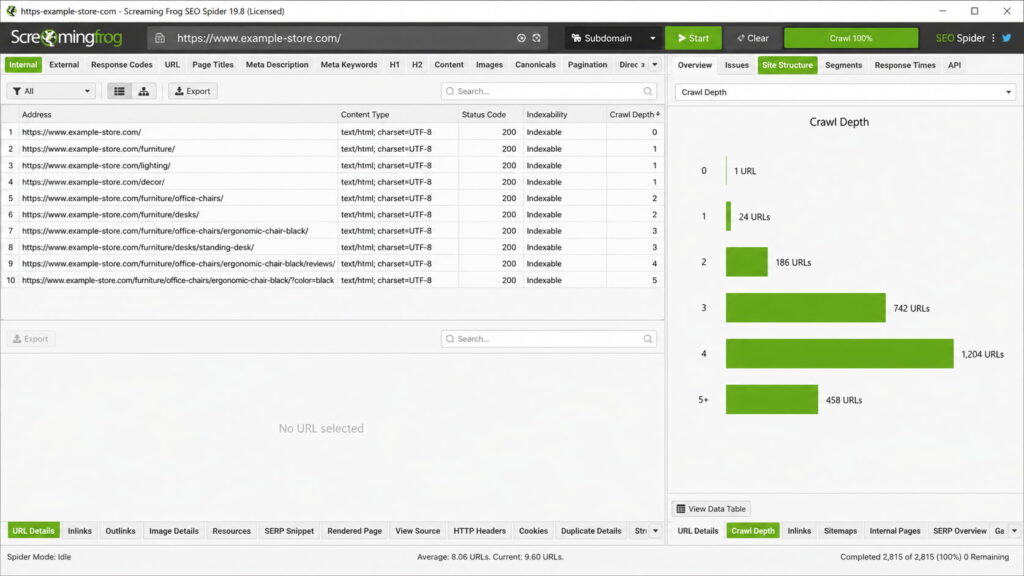
The depth distribution is the first export to pull: anything money-page-shaped at level 4+ is a discovery problem, not a content problem.
How to reduce crawl depth: 7 fixes that flatten your architecture
Flattening architecture is mostly linking work. Here are the seven fixes, in the order most stores should apply them:
- Link key pages from the homepage.
- Add hub or category pages that group related content.
- Fix internal links from your highest-authority pages.
- Add breadcrumbs across the site.
- Flatten long pagination chains.
- Fix orphan pages.
- Keep your XML sitemap fresh.
Fixes 1 and 2 are pure discovery shortcuts: a homepage link makes any page depth 1, and a well-built hub pulls a whole cluster up a level. Fix 7 is the safety net: a fresh sitemap gives crawlers a second door, though it never replaces internal links. The three fixes that move depth the most get their own sections below.
Fix internal linking from high-authority pages
This is the fix with the most impact on the list. Identify the pages with the most authority (backlinks and traffic; on client stores that’s almost always the homepage plus two or three categories) and link from them to the deep pages you want lifted. The math is immediate: one link from a depth 1 page makes any target depth 2.
The mechanisms are boring and effective: related-product and related-post modules, plus contextual links inside evergreen content that already ranks. Internal linking is step one of most site-wide improvements anyway, and it slots into the broader sequence in improving SEO on your website.
Use breadcrumbs (and BreadcrumbList schema)
Breadcrumbs do two jobs at once. Every page gets an upward link path (home → category → product), which gives crawlers alternative routes through the site and cuts effective depth across thousands of pages with one template change. And users get visible hierarchy, which matters on a 1,000-product store.
Add BreadcrumbList schema and Google can show the breadcrumb trail in the search result instead of a raw URL. BreadcrumbList is one of the schema types a plugin like Schemafy generates and applies in WordPress, so this fix rarely requires touching code. Implement it once per theme, and it pays across every client store running that theme.
Tame pagination, filters, and orphan pages
These are the three classic depth generators.
Long pagination first: page 14 of a blog archive sits at enormous depth by construction. Use “load more” patterns with crawlable links, or route discovery through category archives instead of endless page chains.
Faceted filters are the WooCommerce special: color × size × price combinations can mint near-infinite URL chains. Contain them with noindex or robots rules based on which facets deserve to rank. There is no absolute recipe here; the right call depends on whether the facet has real search intent behind it.
Orphan pages are the terminal case: no internal links pointing in means infinite depth for practical purposes. Detect them by crossing your crawl export against your sitemap. Anything in the sitemap that the crawler never found is orphaned.
Final thoughts
The 3-click rule survives because it’s half right. Depth genuinely suppresses crawling and indexing, and Botify’s data and Google’s own docs back that up. But the rule applies to your important pages, not your whole site. Flattening everything is effort spent on URLs nobody searches for; ranking pages by value and lifting only the top is the version of the rule that scales across a client portfolio.
The next step takes one afternoon: crawl your highest-revenue store today, export URLs by depth, cross with traffic, and flatten whatever money pages you find at level 4+. Then repeat on store number two.
[CTA_DOWNLOAD]
Frequently asked questions
What is crawl depth in SEO?
Crawl depth is the number of clicks it takes a search engine bot to reach a page starting from your homepage. The homepage sits at depth 0, pages linked directly from it are depth 1, and so on. Deeper pages get crawled less often and indexed more slowly.
What is a good crawl depth?
Keep your important pages within 3 clicks of the homepage. Google has never published an official limit, but crawl frequency drops sharply with each level of depth. Pages that drive traffic or revenue belong at depth 1–3; archives and low-priority pages can sit deeper without much harm.
Does crawl depth affect rankings?
Not directly, but the chain is real: deep pages are crawled less often, indexed later, and refreshed more slowly, which suppresses their organic visibility. Log-file analyses of large sites by Botify show pages at depth 4 and beyond receive a fraction of the crawl activity that depth 1–2 pages get.
What is the difference between crawl depth and click depth?
Click depth counts the minimum clicks a user needs to reach a page from the homepage. Crawl depth is the same distance from a bot’s perspective as it follows links. In practice, most SEO tools measure click depth and label it crawl depth, so the terms overlap.
How do I check the crawl depth of my website?
Crawl your site with a tool like Screaming Frog or Sitebulb and check the crawl depth column or visualization. Then cross-check Google Search Console’s Crawl Stats and the “Discovered – currently not indexed” report to see whether deep pages are actually being missed by Googlebot.
How do I reduce crawl depth?
Link important pages from your homepage or top-level category pages, add breadcrumbs, fix orphan pages, and flatten long pagination. Internal links from your highest-authority pages do the most work: each new link path can pull a buried page several levels closer to the homepage.
Leave a Reply