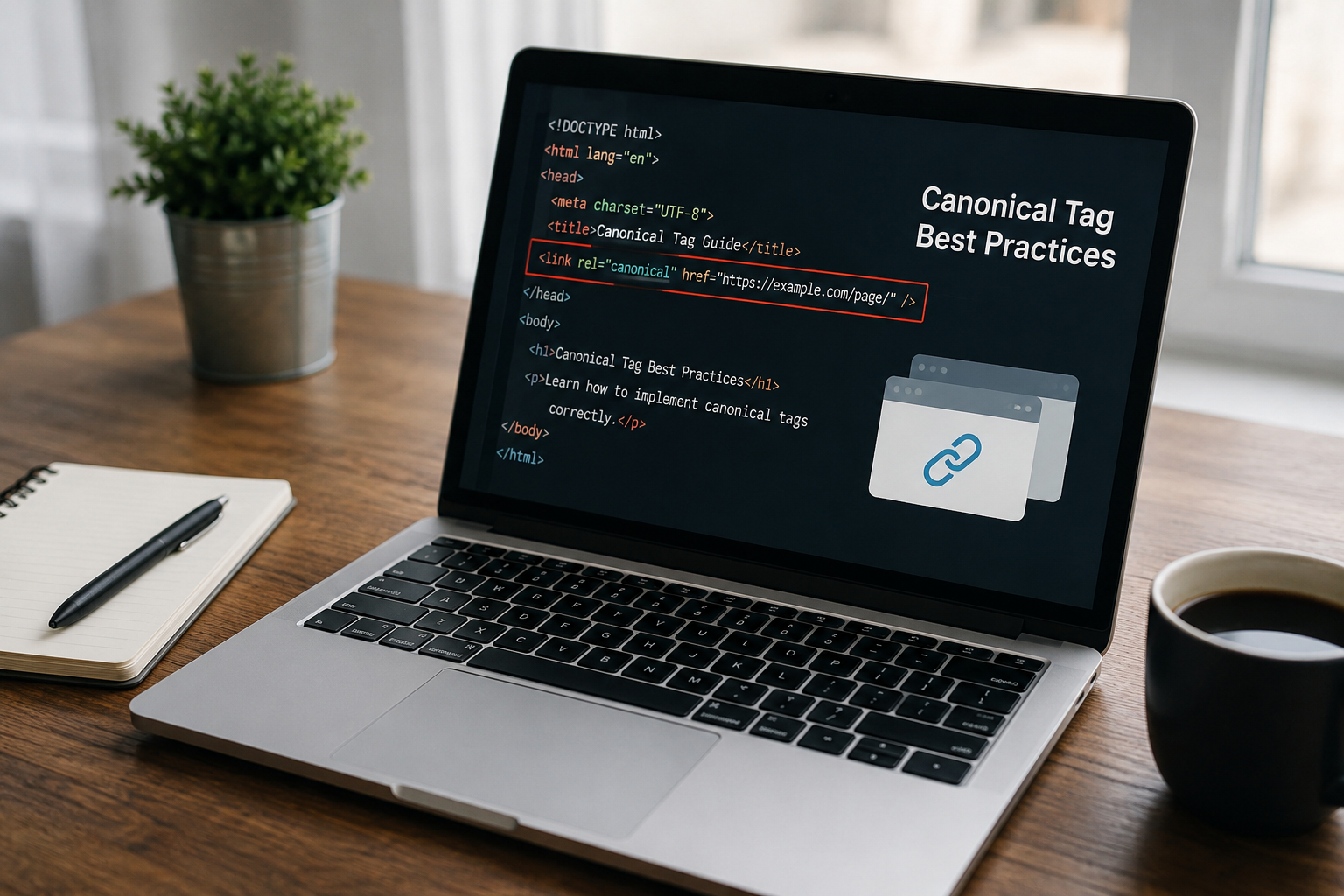
To add a canonical tag in HTML, place a <link rel="canonical"> element inside the <head> of the page, pointing to the absolute, https version of the URL you want indexed. Google only accepts the tag when it sits in the head, and it treats the value as a strong signal, not a command.
<link rel="canonical" href="https://example.com/page/" />The rest of this guide covers syntax rules, examples for each scenario, CMS steps and how to confirm Google is actually honoring it.
In this guide
- What a canonical tag does (in one paragraph)
- Canonical tag syntax
- How to add a canonical tag in HTML: step by step
- Canonical tag examples for 5 common scenarios
- Other ways to declare a canonical URL
- How to add canonical tags in WordPress, Shopify and Webflow
- How to verify your canonical tag is working
- 8 canonical tag mistakes that make Google ignore your tag
- Canonical vs. 301 redirect vs. noindex vs. hreflang
What a canonical tag does (in one paragraph)
A canonical tag consolidates signals from several duplicate or near-duplicate URLs into one preferred URL. Links, ranking signals and crawl attention get attributed to the version you nominate instead of being split across variants.
The page you didn’t nominate stays reachable. That is the difference between a canonical and a redirect: the user still lands on whatever URL they clicked, and only search engines are told which version to index.
Here is the part most guides skip. Google lists canonicalization methods “in order of how strongly they can influence canonicalization”, and describes rel="canonical" as “a strong signal that the specified URL should become canonical.” A signal, not a directive. Google can and does pick a different URL.
In %currentyear% that choice reaches further than the blue links, because the canonical URL is also the one generative engines tend to cite when they summarize your content.
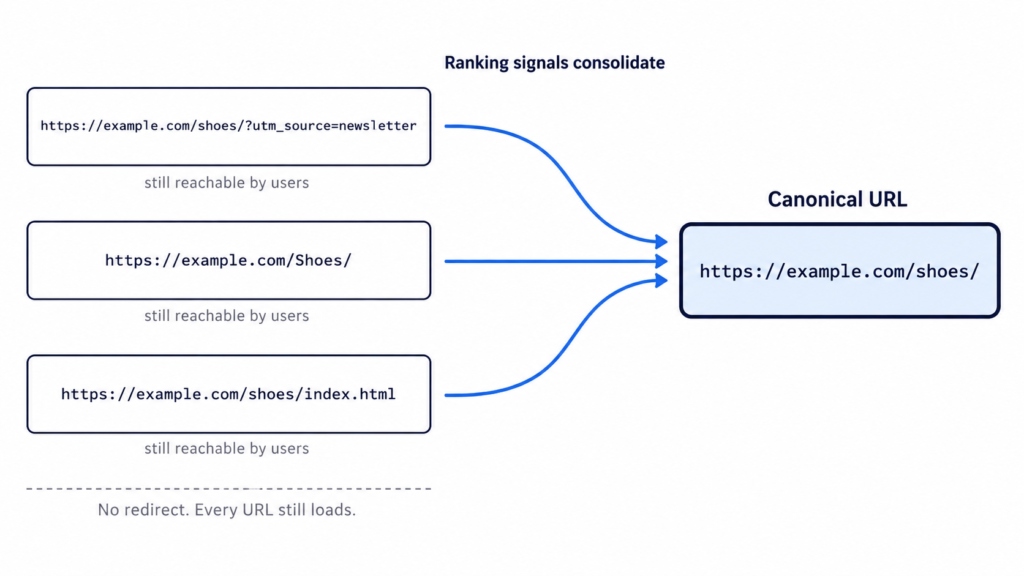
Three URLs, one set of consolidated signals, and every page still loads for the user.
Canonical tag syntax
The element has three moving parts. Knowing which is which is the difference between pasting a line of code and debugging it six months later when Search Console reports something odd.
<head>
  <!-- element: link, not meta -->
  <link
    rel="canonical"
    href="https://example.com/page/" />
  <!-- rel = the relation type, href = the preferred URL, absolute -->
</head>
Anatomy of the tag
Three parts, and one naming correction worth making up front.
<link>is a link element, not a meta tag. People call it “the canonical meta tag” constantly and it is wrong. It belongs to the same family as your stylesheet and favicon declarations.rel="canonical"is the relation type, a registered link relation defined in RFC 6596. That is the spec Google points to.href="…"is the preferred URL, and the only part you change per page.
<link> is a void element, so it takes no closing tag. Writing /> is valid but an XHTML habit rather than a requirement. Both forms parse identically in HTML5.
Absolute vs. relative URLs
Always use an absolute URL with the protocol included.
The usual explanation for this rule is wrong, and the correct one is more useful. Google’s documentation is explicit: “Even though relative paths are supported by Google, they can cause problems in the long run (for example, if you unintentionally allow your testing site to be crawled) and thus we don’t recommend them.” The tag does not get ignored. It gets resolved against whatever context the page is served from, so on a crawlable staging environment it points at the wrong domain entirely. A <base> element in the head compounds this, because it changes what the relative path resolves against.
Then the detail almost nobody covers: the URL has to match the indexable version exactly. Same protocol, same www decision, same trailing slash, same casing as the slug you actually publish.
<!-- ✅ absolute, https, matches the indexable version exactly -->
<link rel="canonical" href="https://example.com/blog/canonical-tags/" />
<!-- ❌ relative: resolves against page context, breaks on staging -->
<link rel="canonical" href="/blog/canonical-tags/" />
A canonical pointing at a URL that redirects or returns a 404 cancels the signal entirely.
How to add a canonical tag in HTML: step by step
Four steps. The fourth one decides whether the first three matter.
Step 1: Choose the canonical version of the URL
Pick the version with the most internal and external links, the most complete content, and existing rankings. When two candidates are close, the one already earning impressions wins.
Get that from data rather than memory. Search Console tells you which URL already receives impressions for the query you care about, and a crawl surfaces the duplicates you forgot existed: parameter variants, uppercase paths, /index.html leftovers, http alongside https, www alongside non-www. It also helps to preview the URL in search results first, since the canonical is the version people actually see.
One default saves you work. Google already prefers HTTPS over HTTP unless something contradicts it: an invalid certificate, insecure dependencies, an HTTPS page redirecting to HTTP, or an HTTPS page canonicalizing to its own HTTP version.
Do not canonicalize toward a page that is substantially different. Google clusters by content similarity, and if the two are not close enough it discards your declaration.
Step 2: Paste the tag inside the <head>
Placement is not a style preference. Google states that “the rel="canonical" link element is only accepted if it appears in the <head> section of the HTML”. In the <body> it does nothing at all.
Put it before heavy scripts. A parser that hits malformed markup can close the head early, and everything after that point lands in the body where the tag is worthless.
<!DOCTYPE html>
<html lang="en">
<head>
  <meta charset="utf-8" />
  <title>How to Add a Canonical Tag in HTML</title>
  <meta name="description" content="Where the canonical tag goes and how to verify it." />
  <link rel="canonical" href="https://example.com/blog/canonical-tags/" />
  <!-- heavy scripts go after this line -->
</head>
<body>
  <!-- page content -->
</body>
</html>
On a templated site, the file to edit is the head partial or the layout, not each page. That is also where the rest of your head tags live, so one edit covers every URL the template renders.
Step 3: Add a self-referencing canonical to every indexable page
Best practice is that every indexable page points at itself, not just the ones you know are duplicated. Google lists it as a “do”: include a rel="canonical" link on the canonical page itself.
It protects against duplicates you never created on purpose: tracking parameters, uppercase variants, and scrapers republishing your HTML.
<!-- on https://example.com/blog/canonical-tags/ -->
<link rel="canonical" href="https://example.com/blog/canonical-tags/" />

<!-- the ?utm_source=newsletter variant inherits the exact same value -->
On a templated or programmatic site this is one template change, not a per-URL task. The same partial that emits the tag for 12 pages emits it for 12,000.
Google does not require it. Yoast and effectively every other SEO framework recommend it anyway, and it costs nothing.
Step 4: Keep every other signal pointing the same way
The canonical is one vote among several. Google weighs redirects, internal links, sitemap entries and hreflang alongside it, and it publishes the ranking: redirects are the strongest signal, rel="canonical" is a strong signal, sitemap inclusion is a weak one. The documentation also notes that “these methods can stack and thus become more effective when combined.”
So align them:
- Link internally only to the canonical URL.
- Include only canonical URLs in the XML sitemap.
- Make sure redirects do not land on a different version.
- Point hreflang annotations at canonical URLs.
Google is blunt about the failure mode: “Don’t specify different URLs as canonical for the same page using different canonicalization techniques.” When these signals contradict each other, Google resolves the conflict itself and Search Console reports it as “Duplicate, Google chose different canonical than user.”
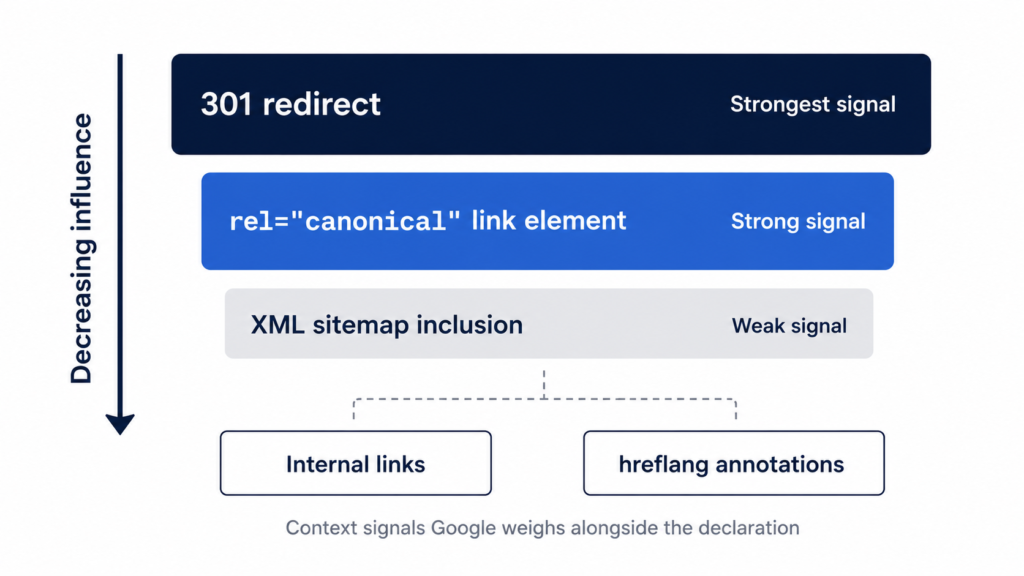
Google publishes the order. A redirect outranks the tag, and the tag outranks the sitemap.
Canonical tag examples for 5 common scenarios
Five setups that cover most of what you will hit, each with the code and the one rule that matters.
Self-referencing canonical
The default state for every indexable page: the page nominates itself.
<!-- on https://example.com/blog/canonical-tags/ -->
<link rel="canonical" href="https://example.com/blog/canonical-tags/" />
Watch the homepage. The canonical is https://example.com/, not https://example.com/index.html, even when the file behind it literally is index.html.
Duplicate and near-duplicate pages
One product reachable from two category paths, both nominating the clean URL.
<!-- on /shoes/running/model-x/ and on /sale/model-x/ -->
<link rel="canonical" href="https://example.com/products/model-x/" />
Never chain canonicals. If A points to B and B points to C, Google has to guess what you meant.
URLs with tracking or filter parameters
Parameter variants that produce the same page: ?utm_source=, ?sort=price, ?color=blue.
<!-- on /shoes/?sort=price and /shoes/?utm_source=newsletter -->
<link rel="canonical" href="https://example.com/shoes/" />
The nuance almost nobody gives you: if a filtered view has genuinely different content and its own search intent, like “blue running shoes,” it may deserve to be indexable and self-canonical rather than folded into the parent.
Paginated series
Do not canonicalize pages 2, 3 and 4 back to page 1. It is the most repeated mistake in the industry and it tells Google to drop everything past the first page.
<!-- on https://example.com/blog/page/3/ -->
<link rel="canonical" href="https://example.com/blog/page/3/" />
Each paginated page carries a self-referencing canonical. Google retired rel="next" and rel="prev" as indexing signals in March 2019, having quietly stopped using them years earlier. Internal linking is what holds a series together now.
Cross-domain and syndicated content
Your post republished on Medium, a partner site or a press outlet. Google’s position here changed and most guides have not caught up: the cross-domain canonical is no longer the recommendation. “The canonical link element is not recommended for those who want to avoid duplication by syndication partners, because the pages are often very different. The most effective solution is for partners to block indexing of your content.”
So noindex on the republisher’s copy is the primary play, and the canonical below is the fallback for partners who will not set one.
<!-- on the republished copy, pointing back to your original -->
<link rel="canonical" href="https://example.com/blog/original-post/" />
Plenty of platforms let the republisher do neither. When that happens, an attributed link back to the original is the only lever you have left.
Other ways to declare a canonical URL
The HTML <link> is what Google prefers. Three alternatives exist for pages where you cannot touch the head, and the strength ordering from Step 4 is why they are not equivalent.
HTTP header (for PDFs and non-HTML files)
PDFs, images and other files have no <head>, so the header is the only route.
HTTP/1.1 200 OK
Link: <https://example.com/downloads/white-paper.pdf>; rel="canonical"
The syntax comes from RFC 5988, and Google supports the method for web search results only. Do not assume it carries over to Images or Discover.
Two configurations, in standard Apache and Nginx syntax rather than anything Google publishes:
<Files "white-paper.pdf">
  Header set Link '<https://example.com/downloads/white-paper.pdf>; rel="canonical"'
</Files>
location = /downloads/white-paper.pdf {
  add_header Link '<https://example.com/downloads/white-paper.pdf>; rel="canonical"';
}
XML sitemap
Google classifies sitemap inclusion as “a weak signal that helps the URLs that are included in a sitemap become canonical.” Weak, but it stacks with the <link> rather than competing with it.
Only canonical URLs belong in the sitemap. Listing both the parameter variant and the clean URL is a contradiction Google has to resolve on your behalf.
Setting the canonical with JavaScript
Google’s guidance here is more specific than most summaries of it: “The best way to do this is to specify the canonical URL in the HTML source code and make sure that JavaScript doesn’t change the canonical link element. If you can’t set the canonical URL in the HTML source code, leave it out and only set it with JavaScript.”
Server-rendered HTML first, in other words. Either the tag lives in the source and JavaScript leaves it alone, or it is absent from the source and JavaScript owns it. Never both.
The anti-pattern is injecting a canonical over a page that already ships a different one. Two canonicals and Google ignores both. This shows up constantly in React and Next.js builds where the framework emits one value and a client-side SEO component overwrites it with another.
How to add canonical tags in WordPress, Shopify and Webflow
Google notes that on a CMS you may not be able to edit the HTML directly, and should look for the search engine settings screen instead. What that screen is depends on the platform.
WordPress
- Yoast, Rank Math and AIOSEO all insert a self-referencing canonical automatically. If you run one of them, the tag already exists. Check before adding anything.
- To override it manually, open the post editor, scroll to the SEO panel, and use the Advanced tab. The canonical URL field is there.
- On a custom theme with no SEO plugin, hook into
wp_headfromfunctions.phpand echo the element. That puts it in the same place as adding a meta description in WordPress, which keeps the template as the single source of truth. - Editing the theme header file directly works, but survives exactly until the next theme update. Use a child theme or the hook.
Shopify
- Canonicals are generated automatically, and for most stores the defaults are correct.
- The known gap is the duplicate created when a product is reachable at
/collections/x/products/yas well as/products/y. Fixing it means editing the canonical logic intheme.liquid, and several popular themes already handle the case.
Webflow, Wix and Squarespace
- All three expose a canonical field in the per-page SEO settings, so no code is involved. Left blank, it falls back to a self-referencing canonical.
The rule that applies to all of them: if the CMS already injects a canonical, do not add a second one by hand. Two canonicals on one page invalidate each other.
How to verify your canonical tag is working
Four methods, in order of what they can actually prove.
| Method | What it checks | What it can’t tell you |
|---|---|---|
| View Source | The raw HTML Google receives | Whether JavaScript changes it later |
| DevTools → Elements | The rendered DOM | Whether Google agrees with the value |
| URL Inspection (Search Console) | User-declared vs Google-selected canonical | Anything about URLs Google hasn’t processed |
| Site crawler | Every canonical on the site at once | What Google actually selected |
Start with View Source and Ctrl+F for “canonical”. That is the raw HTML Google reads before rendering. Then check the same value in DevTools. If the two disagree, JavaScript is rewriting the tag and you know where the problem lives.
Neither one tells you whether Google listened. For that you need URL Inspection in Search Console, which reports User-declared canonical and Google-selected canonical as two lines. Read them together:
- The two match. You are done.
- They differ. Google overrode your declaration, so the problem is in the surrounding signals rather than the tag.
- Search Console has no data for the URL. It has not been processed yet.
That override is expected behavior, not a bug. Google states that “even if you explicitly designate a canonical page, Google might choose a different canonical for various reasons, such as the quality of the content.” Same posture that makes Google rewrite meta descriptions when it thinks it can do better.
Above a few dozen URLs, run a site crawler and audit every canonical at once. It is the only way to catch chains and mismatches at scale, and the same pass surfaces missing structured data, which is where a plugin like Schemafy enters the picture.
One expectation to set first. After you fix the underlying issue, Google can hold the pages in the same duplicate cluster for up to two weeks. Do not touch the tag again on day three.
[SCREENSHOT: The URL Inspection panel in Google Search Console showing the Page indexing section, with “User-declared canonical” and “Google-selected canonical” listing two different URLs.]
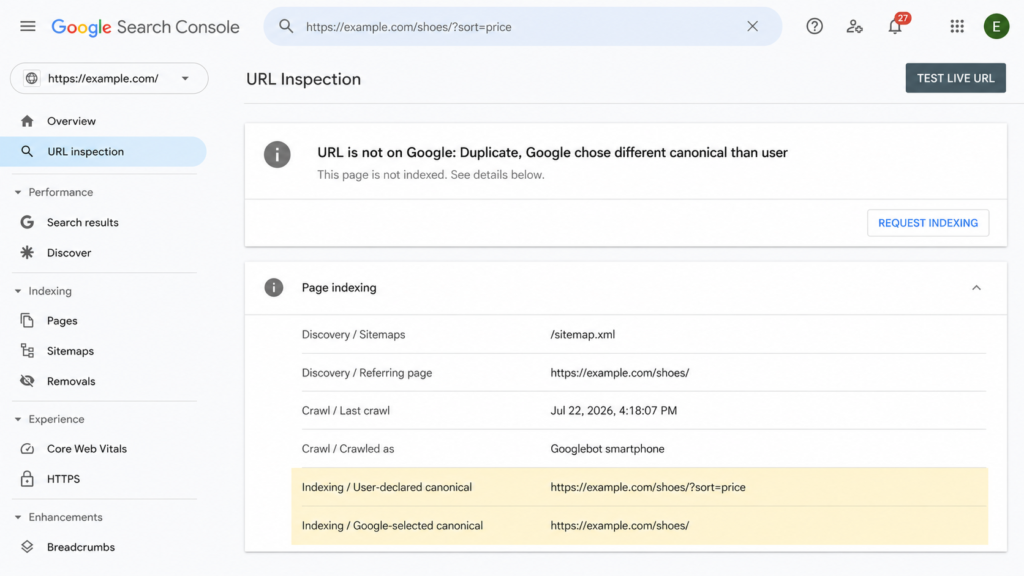
The only screen that tells you whether Google honored the tag or overruled it.
8 canonical tag mistakes that make Google ignore your tag
- Two or more canonicals on one page. Google ignores all of them and selects its own. Usually a plugin injects one and someone adds a second by hand.
- Canonical outside the
<head>. Anywhere in the body and it does nothing. - Relative URL, or the wrong domain or protocol. Relative paths resolve against page context, which breaks the moment a staging environment gets crawled.
- Canonical pointing at a redirect, a 404 or a
noindexpage. You have declared a preference for a URL that cannot be indexed. - Combining
noindexwithrel="canonical". Contradictory instructions. Google does not recommendnoindex“to prevent selection of a canonical page within a single site, because it will completely block the page from Search.” - Canonical chains. A points to B, B points to C. Point everything at the final URL instead.
- Canonicalizing pages that are not genuinely equivalent. Google clusters by content similarity, and discards declarations between pages that are too different.
- A canonical that contradicts the sitemap and the internal links. Three signals pointing three directions, and Google breaks the tie without you.
If Search Console reports “Duplicate, Google chose different canonical than user,” the cause is almost always number 7 or number 8. The canonicalization troubleshooting documentation covers the rest, from misconfigured servers to canonicals injected by a compromised site, and it pairs well with the other SEO issues that quietly cost you indexation.
Canonical vs. 301 redirect vs. noindex vs. hreflang
Four instructions, four different outcomes for the person clicking the link.
| Method | Use it when | What happens to the user |
|---|---|---|
rel="canonical" | Duplicates that must stay reachable | Sees the page they clicked |
| 301 redirect | The old URL should stop existing | Gets sent to the new URL |
noindex | Page is useful to users, not to Search | Sees the page, no signals consolidated |
hreflang | Same content, different language or region | Sees their language version |
The decision comes down to one question: should the duplicate still be reachable? If yes, canonical. If the old URL has no reason to exist, redirect it and stop maintaining two things.
noindex is for pages that earn their keep with users and have no business ranking: thank-you pages, logins, account screens, filtered views with no search demand. It removes the page from Search without consolidating anything, so it is not a canonicalization tool.
Hreflang is a different job entirely. Every language version stays indexed, and the annotations tell Google which one to serve where. One trap worth knowing: a rel="canonical" annotation carrying hreflang, lang, media or type attributes is not used for canonicalization at all. Google ignores those, so keep the two declarations as separate elements.
Get your canonical setup audited
If Search Console keeps selecting a different canonical after you have fixed the tag, stop editing the tag. The problem is almost always the internal linking architecture pointing somewhere your declaration does not.
The practical next step is to audit what the rest of the <head> is telling Google on those same pages, since a canonical that disagrees with your schema markup and sitemap is a signal problem, not a syntax problem. Schemafy is one of the WordPress plugins that shows your schema markup and meta tags in one place.
[CTA_DOWNLOAD]
Frequently asked questions
Where do you put the canonical tag in HTML?
The canonical tag goes inside the <head> section of your HTML document, alongside your title and meta description. Placing it in the <body> makes Google ignore it entirely. On templated sites, add it to the head partial or layout file so it renders on every page.
Does every page need a canonical tag?
Google doesn’t require one, but adding a self-referencing canonical to every indexable page is standard best practice. It protects against duplicates created by tracking parameters, uppercase variants and scrapers. Pages you don’t want indexed should use noindex instead, never both on the same URL.
Can a page have two canonical tags?
No. If Google finds multiple rel="canonical" declarations on one page, it ignores all of them and picks a canonical URL itself. This usually happens when a plugin injects one automatically and someone adds a second manually, or when JavaScript overwrites the server-rendered tag.
Is a canonical tag the same as a 301 redirect?
No. A 301 redirect sends both users and crawlers to a different URL, so the original page becomes inaccessible. A canonical tag only tells search engines which version to index, and users can still reach every version. Use a redirect when the duplicate should no longer exist.
Why is Google ignoring my canonical tag?
Google treats canonical tags as strong signals, not directives, and weighs internal links, redirects and sitemap entries too. If those signals point elsewhere, Google overrides your tag and Search Console reports “Duplicate, Google chose different canonical than user.” Align every signal on one URL to fix it.
Can a canonical tag hurt SEO?
Yes, if it’s misconfigured. Canonicalizing pages that aren’t genuine duplicates, pointing to a 404 or redirected URL, or chaining canonicals can deindex pages that should rank. Audit canonicals whenever traffic drops on a section of the site after a template change.
Leave a Reply