Search used to work like a hallway of doors. You ranked, someone knocked on your door, they walked in. Now search often works like a librarian who reads the answer out loud and, sometimes, says where it came from. AI SEO is the work of getting that librarian to name you. This guide covers what AI SEO is, how AI search actually works, the two meanings of “AI for SEO,” and a checklist you can start this week.
AI SEO is the practice of making your content discoverable, extractable, and trusted across AI-powered search experiences like Google AI Overviews and ChatGPT. It builds on classic SEO fundamentals, useful content, clean technical structure, clear entities, and authority, but optimizes them so an AI system can quote your page, not just rank it.
That is a different meaning from the old one. A few years ago “AI SEO” mostly meant using machine learning tools to speed up keyword research. That still exists. But the phrase now points at something bigger: staying visible when the search result is an answer, not a list.
The good news is that you are not starting over. Google’s own guidance is that you should keep prioritizing foundational SEO best practices, a clear technical structure and unique, valuable content, because those are the foundation for visibility in AI search (via Google Search Central). AI SEO is those fundamentals, aimed at a reader that happens to be a language model.
AI SEO vs. traditional SEO: what actually changed
The mechanics did not vanish. The target moved.
Dimension
Traditional SEO
AI SEO
What you optimize for
Keywords and rankings
Entities, context, and extractable answers
The result page
Ten blue links
One synthesized answer drawn from several sources
The win
Position #1 and the click
Being the source the AI cites
Read the right column as an addition, not a replacement. You still want to rank. But in AI search, ranking is the price of entry, and getting cited is the goal (Search Engine Land).
AI SEO vs. GEO vs. AEO: clearing up the acronyms
You will see three labels for nearly the same thing. GEO (Generative Engine Optimization, getting cited in generative answers) and AEO (Answer Engine Optimization, showing up in direct answers) are both practical subsets of AI SEO. The underlying tactics barely differ: clear content, structured data, and authority. If you want the deeper version of the citation side, we cover Generative Engine Optimization (GEO) separately. Do not let the alphabet soup convince you there are three new jobs. There is one job with three names.
How AI search works (and why it changes optimization)
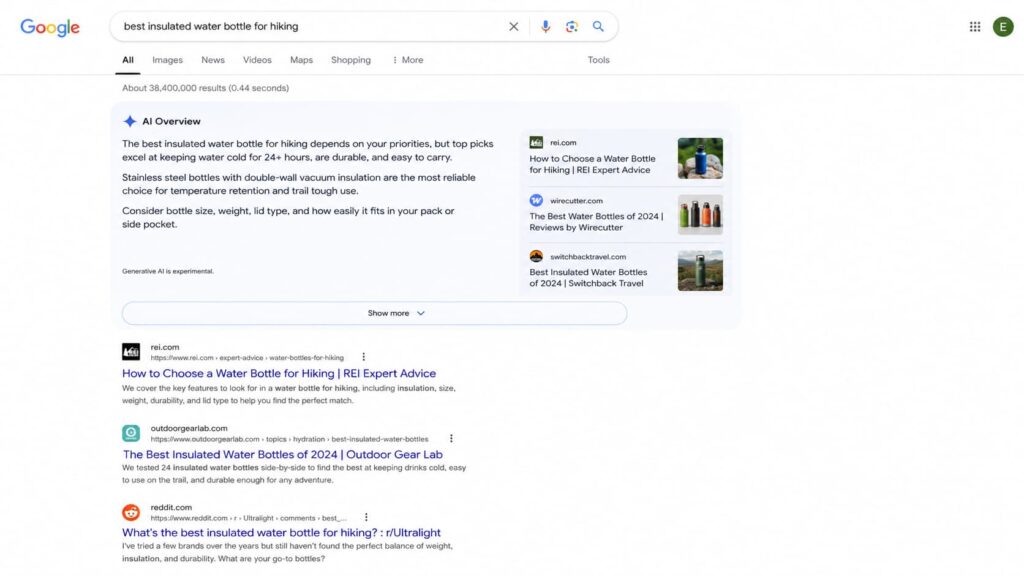
Here is the flow in plain terms. An AI search engine reads the intent behind a query, pulls from several sources at once, and synthesizes one answer. It favors sources with clear, well-defined entities and visible authority over pages that simply repeat the keyword.
You see this on Google AI Overviews and AI Mode, and in assistants like ChatGPT and Perplexity, which answer directly and cite a handful of links instead of returning a long list.
The optimization consequence is blunt: if your content is not easy to extract, you can rank and still get skipped. The click math shows why this matters. A behavioral study of real Google searches found people clicked a traditional result only 8% of the time when an AI Overview was present, compared with 15% when it was not, and zero-click searches rose from 54% to 72% on triggered queries (Pew via Search Engine Journal). When the answer is on the page, being the quoted source is often the only visibility left.
Two sides of “AI for SEO”: doing SEO with AI vs. optimizing for AI
The phrase “AI for SEO” hides two very different jobs. One is using AI to do your SEO work faster. The other is optimizing your site so AI systems pick it. Most guides only cover the first. You need both, and the second is where the new advantage lives.
Using AI to speed up your SEO workflow
AI is a genuine time-saver on the production side. Common, safe uses include:
Keyword research and clustering.
Drafting content outlines.
Writing first-pass meta titles and descriptions.
Analyzing competitor pages.
Spotting content decay across an aging site.
One rule keeps this from backfiring: language models invent facts and cite sources that do not exist. Google does not penalize AI-generated content by default, it penalizes unhelpful content however it was made (Google Search Central). So fact-check everything before it ships. AI amplifies a strong foundation. It does not fix a weak one.
Optimizing your site so AI engines cite you
This is the side competitors skim. To become a source an AI wants to quote, focus on a short list: write self-contained answers that make sense on their own, use a logical heading structure, define your entities clearly (products, brand, author), and build authority (E-E-A-T, the experience, expertise, authoritativeness, and trust signals Google weighs).
Then remove the guesswork for the machine. That last step is structured data, and several WordPress plugins add it, Schemafy among them. It is the bridge from “good content” to “content a machine can parse without ambiguity.”
Why structured data is the foundation of AI SEO
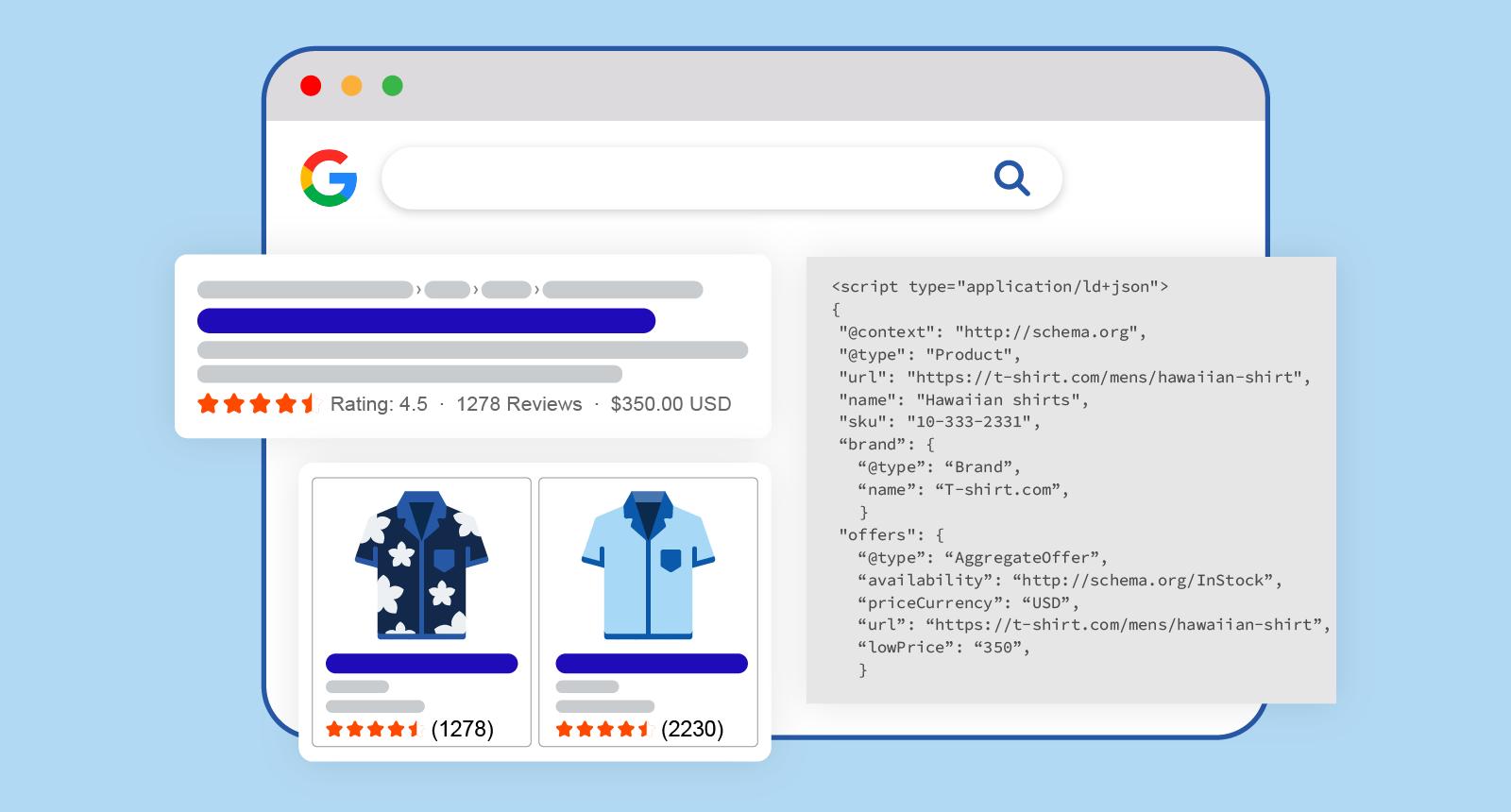
Structured data (also called schema markup, written as JSON-LD) is a set of labels that tell a machine what each part of your page means: this is a product, this is its price, this is a review, this is the author. It helps Google understand the page and can make it eligible for rich results (Google Search Central).
One honest caveat up front. Google states plainly that there is no special schema markup you need to add to appear in AI features like AI Overviews and AI Mode (Google Search Central). Schema is not a magic switch for AI citations, and anyone who tells you otherwise is selling something.
So why call it a foundation? Because the correlation is hard to ignore, and the mechanism is sound.
Industry studies in 2026 report that roughly 65% of pages cited by Google’s AI Mode and about 71% of pages cited by ChatGPT include structured data. Correlation, not a Google requirement, but a strong signal.
The mechanism behind that pattern: schema removes ambiguity. A machine reading raw HTML has to guess what your price, rating, and product name are. A machine reading JSON-LD does not guess. That same markup also earns rich results, which hold click-through rates up even as AI answers spread. If you want the full walkthrough, see our guide on how to use schema markup.
The schema types that matter most for ecommerce
If you run a store, a few schema types carry most of the weight:
Product: name, brand, SKU, GTIN, and images, so the machine knows exactly what you sell.
Review and its AggregateRating property: the star ratings and sentiment AI systems use to gauge trust.
FAQ (FAQPage): question-and-answer blocks that map cleanly to how AI answers.
Breadcrumbs (BreadcrumbList): the navigation path that shows site hierarchy.
You do not have to hand-write these. Schemafy generates several of them, Product, Review, FAQPage, and BreadcrumbList, on WordPress and WooCommerce sites without touching code. You can also spin up JSON-LD manually with a free schema markup generator if you only need a page or two.
An AI SEO checklist you can act on this week
You will not run a month-long audit, so here is the tight version. Work top to bottom.
Audit the structured data your pages already output.
Add Product, Review, and FAQ schema where it fits.
Write self-contained answers of 40 to 55 words under clear headings.
Structure every page with a logical H1-to-H3 hierarchy.
Strengthen entity and author information, who wrote this and why to trust it.
Earn mentions from sites the AI models already trust.
Track when your pages show up in AI Overviews and ChatGPT answers.
Validate your JSON-LD so it has no blocking errors.
None of this promises a #1 spot in thirty days. It does make you the kind of source AI systems can read, trust, and quote. For the traffic side of the same work, see our playbook on how to increase organic traffic.
AI SEO mistakes that quietly kill visibility
Most AI SEO damage is self-inflicted and invisible until traffic dips. The common ones:
Publishing AI content without fact-checking. Fix: verify every stat and source before it goes live.
Broken or duplicate schema. Fix: validate your markup and keep one clean schema per page instead of three conflicting ones.
Keyword stuffing instead of entities. Fix: write for concepts and clear meaning, not repetition.
Ignoring extractability. Fix: lead sections with a direct, self-contained answer.
Treating AI SEO as a replacement for technical SEO. Fix: it is a complement. Weak fundamentals sink both.
How Schemafy fits into your AI SEO stack
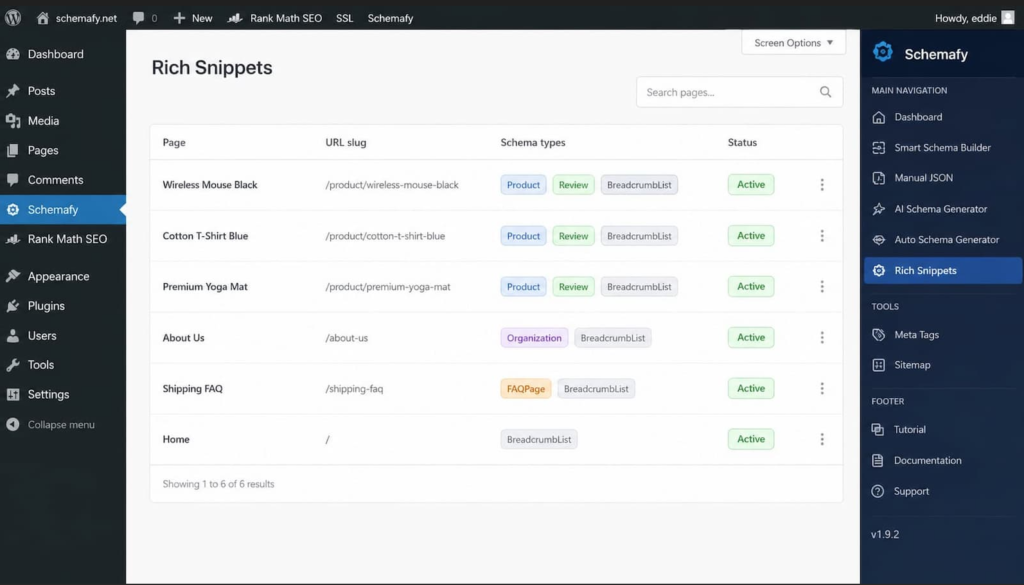
Keeping JSON-LD correct across a growing WordPress site is tedious and easy to get wrong, which is exactly where the mistakes above come from. Schemafy generates schema markup like Product, Review, FAQPage, and BreadcrumbList on WordPress and WooCommerce sites with no code, and its Rich Snippets screen lets you see and manage every schema you have applied in one place. The AI SEO payoff is simple: cleaner, machine-readable pages that AI systems can extract without guessing.
Frequently asked questions about AI SEO
Short answers to the questions people ask most.
Does AI SEO really work?
Yes, when it builds on solid fundamentals. AI amplifies strong content but will not fix a weak site. Pages built for AI search do get cited more often: industry studies find the majority of pages quoted by AI Mode and ChatGPT include structured data, though that is correlation, not a guarantee.
Is AI-generated content bad for SEO?
No. Google does not penalize AI-generated content itself, it penalizes unhelpful, spammy content however it is made. AI drafts work for SEO when they are fact-checked, edited for accuracy, and genuinely useful. Publishing unverified AI output risks errors that damage credibility and rankings.
What is the difference between AI SEO and GEO?
GEO (Generative Engine Optimization) is a subset of AI SEO focused on earning citations in generative answers like ChatGPT and Google AI Overviews. AI SEO is the broader practice of staying discoverable and trusted across all AI-powered search. The underlying tactics overlap almost entirely.
How do I get my products cited by ChatGPT?
Make your product data machine-readable. Add Product, Review, and FAQ schema so an AI can read price, availability, and ratings without guessing, and write clear, self-contained product descriptions. Structured data is the highest-impact first step, since a large share of ChatGPT-cited pages include it.
Do I need schema markup for AI search?
Not strictly. Google says there is no special schema required to appear in AI Overviews or AI Mode. But structured data correlates with being cited and earns rich results, so it is one of the highest-impact things you can do, even if it is not a formal requirement.
Final thoughts
AI SEO is not a new discipline bolted onto the old one. It is the same fundamentals, aimed at a reader that now summarizes instead of listing, where being extractable and citable matters as much as ranking.
The fastest first step is to see what structured data your pages emit today, then fill the gaps on your most important products and pages.
An llms.txt file is a plain markdown file at the root of your site that hands large language models a curated, concise map of your most important content. This guide is for agency owners and site operators who want a valid one live today, not another theory piece on AI search.
By the end you will have the exact format, a copy-paste example, a place to upload it, and a way to test that it works. If you manage 10 or more client sites, learn the format once and you can standardize it across all of them.
The standard was proposed by Jeremy Howard of Answer.AI in 2024 (the original proposal). It is young, but the format is fixed, so there is no guesswork involved.
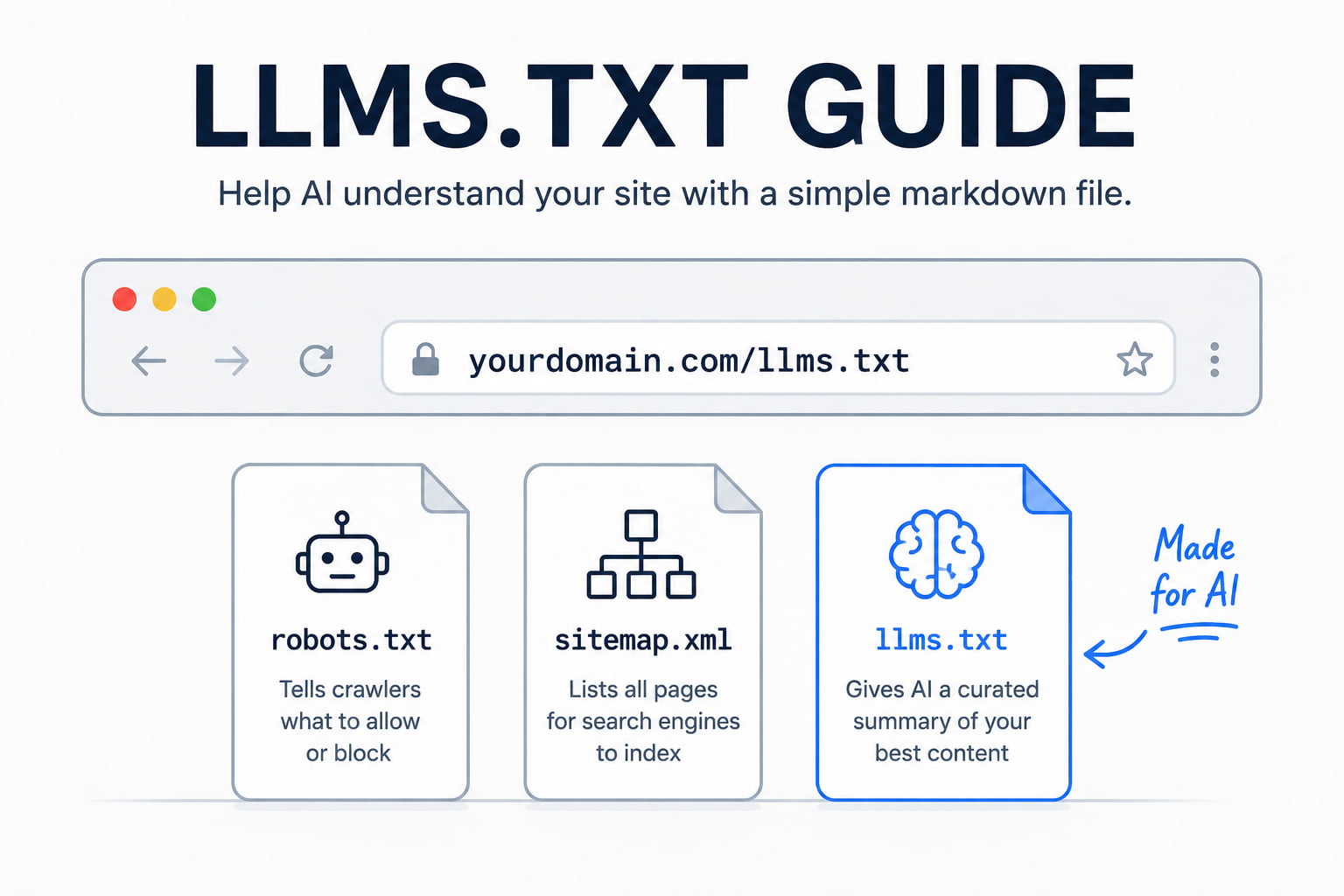
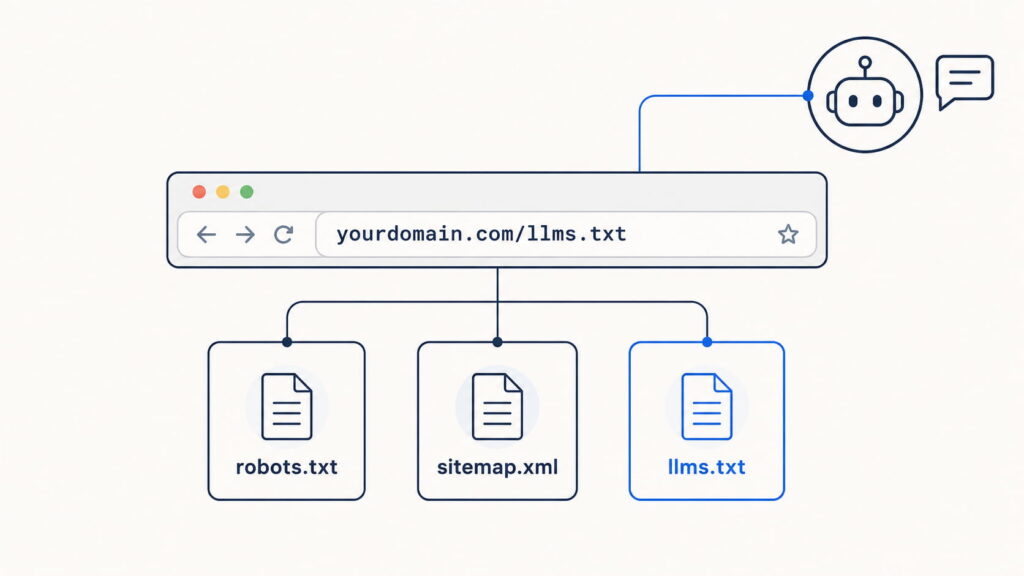
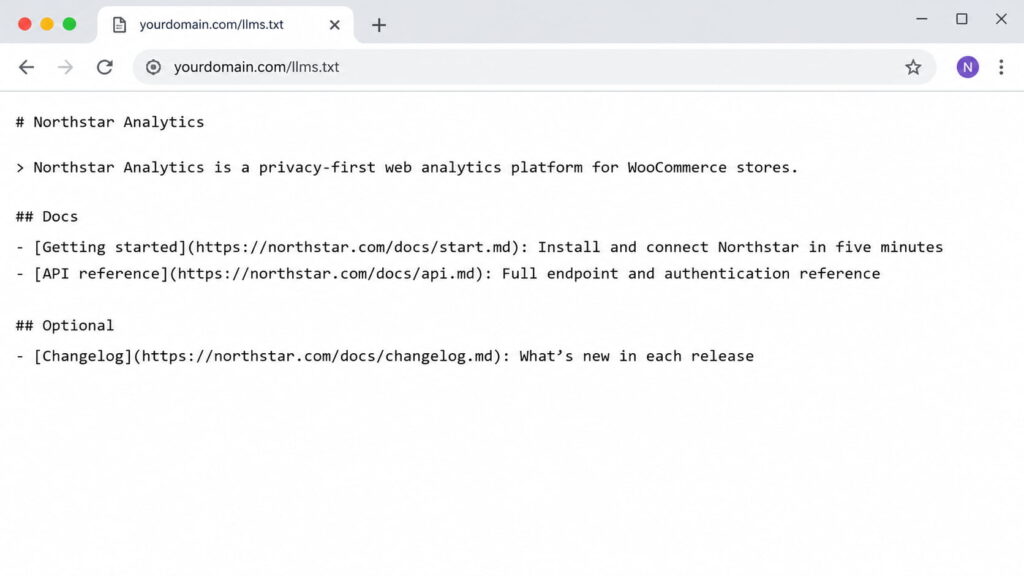
Caption: llms.txt lives at your domain root alongside robots.txt and sitemap.xml, but it serves AI a curated summary instead of crawl rules or a full URL index.
What is an llms.txt file?
An llms.txt file is a markdown document hosted at yourdomain.com/llms.txt that gives language models concise background on your site plus links to the pages that matter. Instead of forcing an AI to parse heavy HTML full of navigation, ads, and JavaScript, you hand it a clean, LLM-friendly summary of your best content.
The goal is AI discoverability: helping models find, interpret, and cite the right pages when someone asks about your business. It is not a way to block crawlers. That job belongs to robots.txt. llms.txt does the opposite. It invites AI in and points it at what you want read.
The format and rules come from the official specification at llmstxt.org, which is the source of truth for everything below.
llms.txt vs. llms-full.txt
llms.txt is the curated index: a short summary plus links with brief descriptions pointing to your key pages. llms-full.txt goes further and concatenates the full content of those pages into one markdown file, so an AI can load everything in a single pass.
Use llms.txt for large sites where a curated map is enough. Reach for llms-full.txt on documentation, where you want the entire text sitting in one place for an assistant to read directly.
llms.txt vs. robots.txt vs. sitemap.xml
These three files all sit at the root, but each solves a different problem. robots.txt controls access and tells crawlers what they may or may not fetch. sitemap.xml lists every URL for search-engine indexing. llms.txt is a semantic layer that prioritizes and describes your best content for AI to consume. It complements the other two. It does not replace them.
File
What it controls
Who it is for
robots.txt
Access and crawling rules
Search and other crawlers
sitemap.xml
A full list of indexable URLs
Search engines
llms.txt
A curated, described set of your best content
LLMs and AI assistants
What to include in an llms.txt file (the format)
An llms.txt file uses standard markdown and follows a specific order. That order is what makes the file both human-readable and machine-parseable, and it is what a generator or a plugin will produce for you. Before you write one, it helps to know each section and why it exists. Here is the exact llms.txt format defined by the spec.
The required and optional sections
The specification defines the following sections, in this order:
# Project/Site Name (H1): the name of the site or project. This is the only required field in the entire file.
A > blockquote: a short summary of the site with the key information a model needs to understand the rest of the file.
Zero or more markdown sections: plain paragraphs or lists (no headings) that add detail or context notes.
## Section headings (H2): each contains a markdown list of links in the format [name](url): description, grouping your best pages.
An ## Optional section: a special H2 whose links can be skipped when a shorter context is needed.
The ## Optional heading carries special meaning: everything under it is safe for a model to drop if it is working with a tight context window. Everything else is treated as core.
What to leave out
Curate hard. Leave out legal pages like privacy, terms, and cookie policies, which an AI will never cite. Drop outdated blog posts and anything thin or off-brand. When two pages cover the same thing, link only the best version, not the duplicates.
The rule: prioritize canonical pages and lead with the documentation you most want AI to quote. A short, sharp file beats a long one that buries your best pages under filler.
How to create an llms.txt file: 3 methods
There are three ways to create the file, depending on your technical comfort and the size of the site. Pick the one that matches how you work.
Method 1: Write it manually
Writing the file by hand gives you the most control and the highest quality, because you choose exactly which pages represent the client. For a small or medium site, do this:
Open a plain-text editor and create a file named llms.txt.
Write a single H1 with the site or project name.
Add a > blockquote summarizing the business in one or two concrete sentences.
Group your best links under ## Section headings, each as - [Title](URL): short description.
Add an ## Optional section for secondary links a model can skip.
Save the file as llms.txt.
Start with the 10 to 20 URLs you most want AI to cite. You can always add more later, but a tight first version is easier to maintain than a bloated one.
Method 2: Use an llms.txt generator
The fastest route is a generator. The flow is the same across tools: you paste your domain, the tool crawls the site, it produces an llms.txt (and often an llms-full.txt) that follows the spec, and you download the result.
Firecrawl offers a well-known web generator, LLMrefs provides another, and several SEO plugins include a generator inside their existing interface. Whichever you use, always review and clean the output. Generators tend to over-include, pulling in pages you would never hand to an AI, so treat the result as a first draft you prune around canonical content.
The advantage over a one-off generator is maintenance. These plugins regenerate the file when your content changes, so a new page or an updated post flows into llms.txt without you touching it. For an agency standardizing across many sites, that automatic refresh is what makes the file worth keeping.
llms.txt example you can copy
Here is a complete, valid file you can copy and adapt. It follows the spec exactly, using a fictional SaaS business so you can drop in any client.
# Northstar Analytics

> Northstar Analytics is a privacy-first web analytics platform for WooCommerce stores. This file indexes our product docs, setup guides, and API reference.

Northstar is a WordPress plugin, not a standalone dashboard. The API is read-only. For billing questions, use the support docs, not the API reference.

## Docs

- [Getting started](https://northstar.com/docs/start.md): Install and connect Northstar in five minutes
- [Configuration](https://northstar.com/docs/config.md): Every setting explained, with defaults
- [API reference](https://northstar.com/docs/api.md): Full endpoint and authentication reference

## Optional

- [Changelog](https://northstar.com/changelog.md): Release history since v1.0
- [Brand assets](https://northstar.com/brand.md): Logos and usage guidelines
To adapt it, change the H1 to the client’s name, rewrite the blockquote to describe their business in one specific sentence, and swap the links for their canonical pages. Keep every description short and informative, and reserve ## Optional for anything an assistant can safely ignore.
Where to upload your llms.txt file
Upload the file to the root of your domain so it resolves at https://yourdomain.com/llms.txt, the same location as robots.txt. It must be publicly accessible and served as plain text or markdown, not as a rendered HTML page.
You have three common ways to get it there. Use your hosting File Manager to drop the file into the site’s root or public folder. Use an FTP client like FileZilla to upload it to the same root directory. Or, on WordPress, let a plugin place and serve it for you.
Across a mixed stack of client sites, the plugin route is the one that scales, since it handles placement and updates without a manual upload per site.
How to test that your llms.txt file works
Testing is the step most guides skip, and it is the one that tells you whether the file does anything. Run these four checks:
Visit yourdomain.com/llms.txt in a browser and confirm it loads as plain text, not a styled HTML page.
Validate the markdown: the H1 is the first line, and every link resolves.
Test comprehension by pasting the file into ChatGPT, Claude, or Perplexity, or asking each about your site, to see whether it interprets your content correctly.
Check your server logs to see whether AI crawlers are actually requesting the file.
If the models answer thinly or wrongly, your descriptions or link choices need work. If nothing requests the file, that is useful signal too, and it leads to the next question.
Caption: A correctly served llms.txt loads as raw plain-text markdown at your domain root, not as a styled web page. This is the first check to run per site.
Does llms.txt actually work in 2026?
Here is the honest answer, since plenty of guides inflate this. Adoption is real but small: roughly 10% of domains have an llms.txt file, and the number is growing (SE Ranking’s analysis of 300,000 domains). Google has publicly confirmed it does not use llms.txt for crawling, indexing, or training, with John Mueller comparing it to the old keywords meta tag (Search Engine Roundtable). No major AI company has published that it formally weights the file either.
The fair framing: llms.txt is a low-risk, low-cost signal, much like schema.org markup in 2014. Back then structured data was not mandatory and not universally honored, but early adopters were ahead when it became expected. llms.txt sits in that same window now.
So it is worth creating, especially on documentation-heavy and SaaS clients, but do not expect miracles or a ranking bump. Treat it as a cheap hedge, decided client by client, not a growth lever, and keep the rest of your AI search optimization doing the heavy lifting.
Level up: pair llms.txt with structured data
An llms.txt file tells AI what to read. Structured data, meaning schema markup for AI search in JSON-LD, tells AI what your content means. Together they maximize how well AI engines understand and cite your pages: one hands over the map, the other labels what is on it.
Writing JSON-LD by hand across 10 or more client sites does not scale. Schemafy, a WordPress schema plugin, automates that markup so you can generate JSON-LD schema and deploy structured data for AEO without writing code, then validate your structured data before it ships.
Caption: A schema plugin can auto-detect and generate JSON-LD across a WordPress site, so structured data ships at scale while your llms.txt handles the curated index.
Frequently asked questions
A few quick answers to the questions that come up most when teams roll out llms.txt.
Is llms.txt required?
No. llms.txt is a voluntary, proposed standard, not required by any search engine or AI provider. As of 2026, only about 10% of domains have one. But because it is low-effort and low-risk, many sites add it early as a signal for AI discoverability, similar to how schema markup was adopted.
Does Google use llms.txt?
No. Google has publicly confirmed it does not read or rely on llms.txt for crawling, indexing, or AI training. The file is aimed at LLM-based tools like ChatGPT, Claude, and Perplexity at inference time, not at Google Search. Use robots.txt and sitemaps for traditional SEO, and remember that on-page signals still matter more than any single file, such as whether meta descriptions are a ranking factor.
Where do I put the llms.txt file?
Place it in your site’s root directory so it is reachable at https://yourdomain.com/llms.txt, the same location as robots.txt. Upload it via your hosting File Manager, an FTP client like FileZilla, or a WordPress plugin that serves it automatically.
What’s the difference between llms.txt and llms-full.txt?
llms.txt is a curated index of links with short descriptions pointing to your key pages. llms-full.txt concatenates the full content of those pages into one markdown file, so an AI can load everything at once. Use llms.txt for large sites, llms-full.txt for documentation.
How often should I update llms.txt?
Update it whenever you publish, remove, or significantly change priority pages. Many WordPress plugins regenerate it automatically on content changes. For manual files, review it quarterly and after any major site restructure to keep the links accurate.
Plenty of SEO advice treats the meta description like a ranking lever: write the perfect one and watch your page climb. Google has said, on the record and more than once, that it doesn’t work that way. Meta descriptions don’t move your rank. They do something else, and that something is still worth your time.
What Are Meta Descriptions?
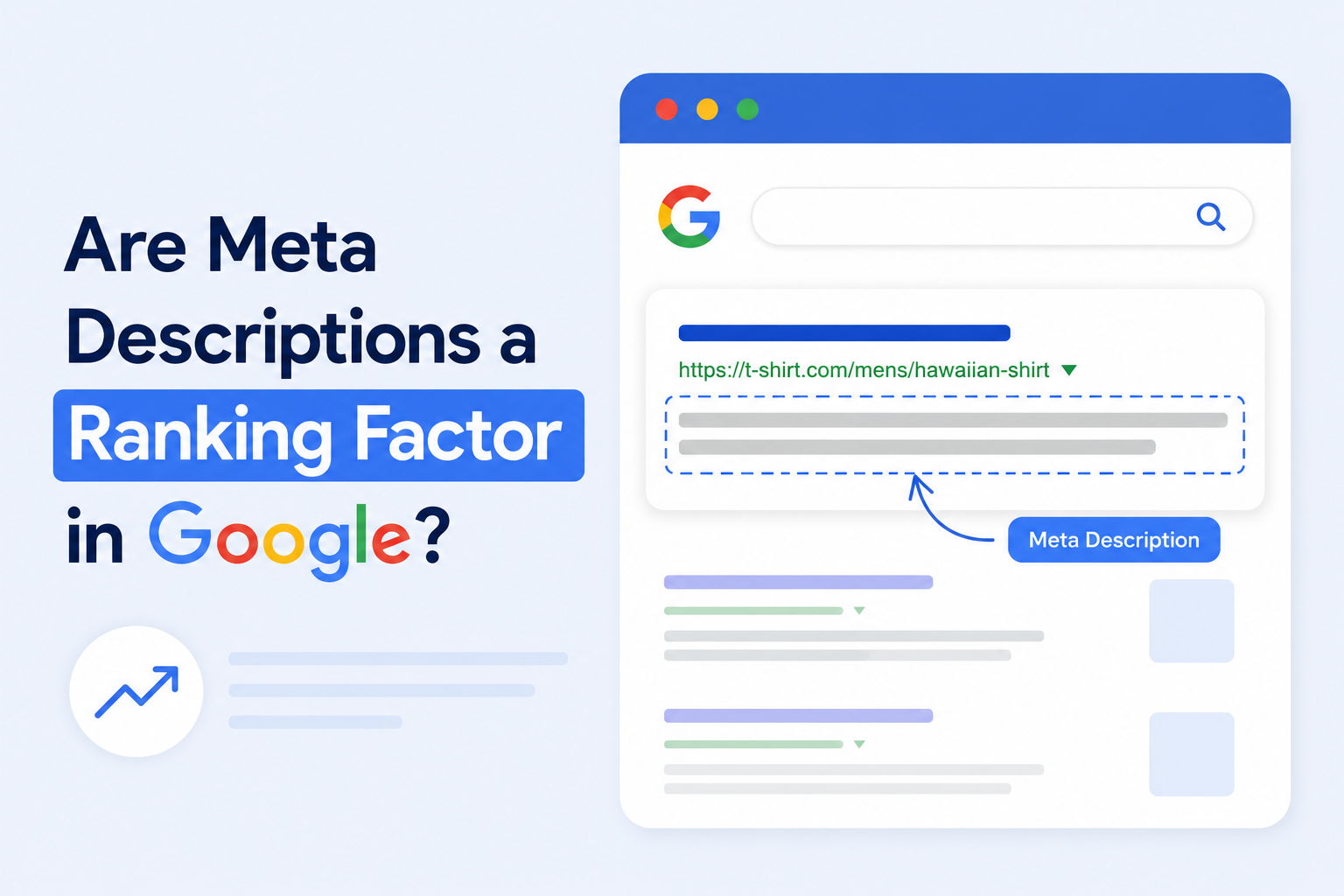
A meta description is a short summary of a page, usually a sentence or two, that search engines can show beneath your page title in the results. Think of it as a one-line elevator pitch for the page: it doesn’t decide whether you show up, it helps decide whether someone clicks once you do.
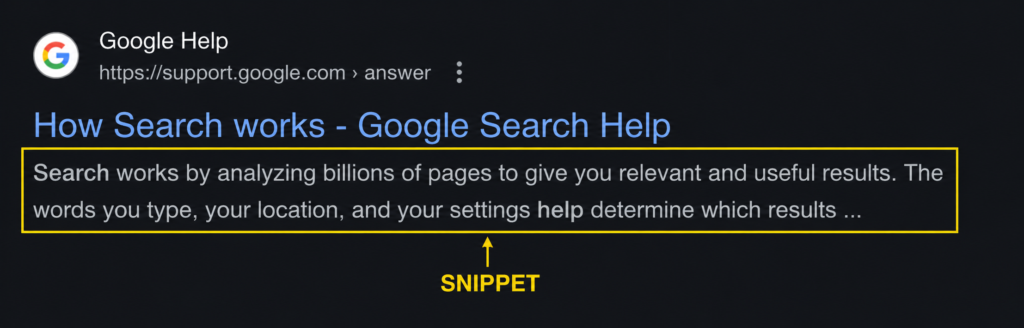
It’s the text that can become your snippet (the gray description line under a search result). WordPress and most content systems don’t write one for you. Leave it blank and the search engine pulls whatever text it can find on the page, often the first sentence it sees, and uses that instead.
Where Meta Descriptions Appear in Google Search
Meta descriptions live in the search snippet: the title, the URL, and the description line that sit together in a result. On desktop, Google typically shows around 155–160 characters before it truncates with an ellipsis; on mobile, the cut comes earlier, around 120 characters (Ahrefs).
That visible space is small and contested. Your description is competing with nine other snippets on the page for the same click, so the part the reader actually sees, the first half, carries most of the weight.
The Difference Between Meta Descriptions and Meta Keywords
These two get confused constantly, and the distinction matters. The meta keywords tag is dead. Google stopped using it for ranking because it was so easily stuffed with terms the visitor never saw. Google announced in 2009 that it disregards the keywords meta tag in web ranking precisely because of that abuse.
The meta description tag is alive and useful. Google still reads it and may use it for your snippet. It just isn’t a ranking factor either. Same announcement, two different tags: one ignored entirely, one used for snippets but not for rank.
Does Google Use Meta Descriptions as a Ranking Factor?
No. Google has confirmed in its official documentation that meta descriptions are not a ranking factor. They don’t affect where your page ranks. Google uses them to help build the search snippet shown under your title, which can influence whether people click, but not your position in the results.
Ranking is decided by other things: content relevance, links, page quality, and the dozens of signals Google weighs to match a page to a query. The meta description sits outside that process. Google’s own SEO Starter Guide states plainly that the description meta tag “will have no effect on your rankings,” while noting a good one can produce a better snippet.
Not a ranking factor is not the same as not important, though. The rest of this article is about the difference.
A standard Google result. The highlighted description line is the snippet, the part a meta description can fill, but not the part that decides rank.
What Google Officially Says About Meta Descriptions
Google Search Central describes the meta description as a summary the search engine may use to generate the snippet. The key statement is from 2009 and has held since: “even though we sometimes use the description meta tag for the snippets we show, [Google doesn’t] use the description meta tag in … ranking” (Google Search Central Blog).
Google’s current guidance on writing meta descriptions reinforces the same split: the description’s job is the snippet, and the snippet’s job is to help users decide what to click.
Google Documentation About Meta Descriptions and Rankings
The page to read is Search Central’s “How to Write Meta Descriptions,” which sits under Google’s documentation on search appearance and snippets. It covers how Google builds snippets and how to write descriptions that earn them, not how descriptions affect rank, because they don’t.
Google’s list of meta tags it supports tells the same story by omission: the description tag and robots directives are there; the keywords tag isn’t.
What Matt Cutts Said About Meta Descriptions
Matt Cutts, who led Google’s Webspam team for years, reinforced the official position publicly: meta descriptions aren’t a ranking signal. His practical advice went a step further: he said that having no meta description is better than having a duplicate one across many pages, and that if you’re short on time, you should prioritize the descriptions on your homepage and most important pages (Search Engine Journal).
That’s a useful prioritization rule, not a ranking claim. It’s about where your limited effort earns the most clicks.
Are Meta Descriptions Used for Rankings or Just Snippets?
Just snippets. Their entire role is to shape the description line in the SERP, the text that helps a searcher decide whether your result is the one worth clicking. Rankings are decided elsewhere. Which raises the obvious question: if they don’t help rankings, why write them at all?
Why Meta Descriptions Still Matter for SEO
Because the meta description is the biggest lever you control over your snippet, and the snippet is what earns the click your ranking already won. Ranking gets you onto the page of results. The snippet decides whether anyone chooses you over the nine other options.
That’s the whole case. You can’t directly raise your rank with a description, but you can directly change how appealing your result looks, and that changes how many of your impressions turn into visits.
Writing a description blind, without seeing how it renders, is where most of them go wrong. A live snippet preview removes the guessing: Schemafy’s Google Preview and standalone tools like a free SERP preview tool show the snippet, with truncation, before you publish.
How Meta Descriptions Improve Click-Through Rate (CTR)
Position still dominates click-through rate, but it isn’t the whole story. Backlinko’s analysis of 4 million results found the first organic position earns about a 27.6% click-through rate, dropping to 18.7% at position #2, 10.2% at #3, and 2.2% by position #10 (Backlinko). Within any given position, the snippet (title, URL, and description) is part of what wins or loses the click.
A specific, benefit-led description beats a generic one at the same rank. Here’s the contrast.
Snippet quality
Example
Why it wins or loses
Strong
“Compare 7 running shoes for flat feet: arch-support scores, durability tests, and current prices.”
Specific, benefit-led, opens with an action verb, fits before truncation
Weak
“This blog post talks about running shoes for people with flat feet and other things.”
Vague, no benefit, no reason to pick it over the result above
Can Better CTR Improve SEO Performance Indirectly?
Maybe, and this is where honesty matters. Google has been careful not to call organic CTR a direct ranking signal in the classic sense, and it’s easy to manipulate, so treat any “higher CTR ranks you higher” claim with caution. What’s clearer is the traffic math: Backlinko found that moving up a single position lifts CTR by about 2.8% on average (Backlinko).
So a better description won’t push you up the page, but it can help you capture more of the clicks available at the position you already hold. That’s a real outcome without overclaiming a ranking effect.
Why Meta Descriptions Help Users Understand Page Content
A clear description sets expectations before the click. When the snippet matches what’s on the page, the people who click are the people who actually wanted that page: better-qualified visitors who are less likely to bounce straight back. A description that oversells or misleads does the opposite: it earns a click and loses the visitor seconds later.
Does Google Rewrite Meta Descriptions?
Yes, and more often than most people expect. An Ahrefs study of roughly 20,000 keywords found Google rewrites the meta description about 62.78% of the time, and shows the description you wrote only around 37% of the time (Ahrefs, 2020).
A rewrite is not a penalty. It’s Google deciding that, for a specific query, a passage pulled from your page describes the result better than your hardcoded line. The fix isn’t to fight it; it’s to write descriptions Google has less reason to replace.
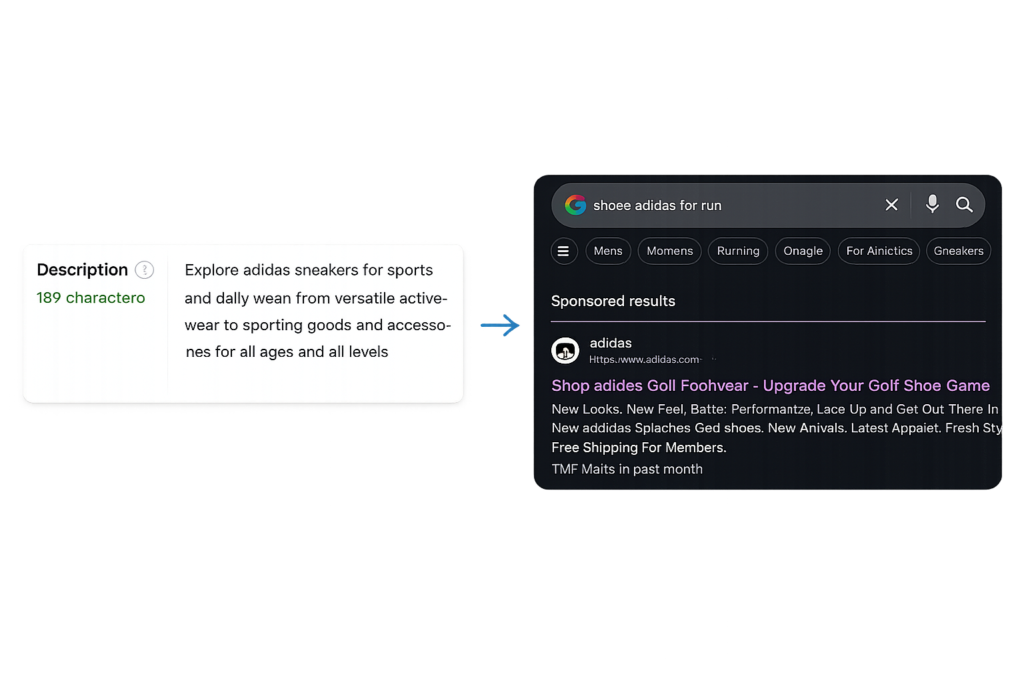
A hardcoded meta description (left) versus the snippet Google generated for a more specific query (right). Rewrites are common and query-driven.
Why Google Rewrites Meta Descriptions
Two main reasons. First, the searcher’s query is more specific than your description, so Google generates a snippet that surfaces the exact words they searched for. Second, your description doesn’t match the page well, so Google pulls a more relevant passage instead. The rewrite rate even shifts by query type: about 59.65% for short head terms and 65.62% for long-tail queries (Ahrefs, 2020), because long-tail searches are more specific and invite more query-matching.
How Often Google Ignores Custom Meta Descriptions
Often enough that you should expect it, not be surprised by it. The same 2020 study put the rewrite rate near 63% across ~20,000 keywords, with your written description showing roughly 37% of the time (Ahrefs). That’s still one in three impressions where your words do the talking, reason enough to write them well rather than skip them.
What Happens When a Page Has No Meta Description
Google generates one for you. It scans the page and pulls a passage, frequently the opening text or whatever best matches the query, and uses that as the snippet. You don’t lose your ranking, but you do lose control of the message. The auto-generated line is rarely as compelling as one written to win the click, which is the whole point of writing one.
Do Long or Spammy Meta Descriptions Increase Rewrite Probability?
Length alone barely matters. Ahrefs found Google rewrote 61.46% of descriptions that were too long versus 63.69% of the rest, essentially the same (Ahrefs, 2020). Relevance and quality matter far more. A keyword-stuffed or off-topic description gives Google an easy reason to replace it; a clear, accurate one gives it a reason to keep it.
How to Write Meta Descriptions That Improve SEO Performance
Optimizing a meta description is a copywriting job with two SEO constraints: length and intent. Write for the human scanning the results, stay inside the visible space, and match what the page actually delivers. Five rules cover it. (If you’re working in WordPress, the mechanics of adding a meta description in WordPress are a separate, quick step.)
Write a unique description for every important page.
Use your keyword once, naturally, in the first half.
Lead with a clear value proposition or call to action.
Match the search intent of the page.
Keep it inside the visible snippet length.
Write Unique Meta Descriptions for Every Important Page
Duplicate descriptions get ignored or rewritten, and they tell Google nothing useful about which page is which. Google’s own 2007 guidance on snippets asks for descriptions that differentiate each page. If you can’t write a unique one for every URL, do what Cutts advised: start with your highest-traffic pages. For a store with hundreds of product or category pages, uniqueness at scale is the real challenge, and the place templated, near-identical descriptions cause the most rewrites.
Use Keywords Naturally Without Keyword Stuffing
Place your target keyword once, ideally in the first half of the description. Google bolds query-matching words in the snippet, so an early, natural mention catches the eye. Repeating the keyword three times doesn’t help rank (descriptions aren’t a ranking factor), and it reads as spam, which costs you the click and invites a rewrite.
Add a Clear Value Proposition or CTA
Tell the reader what they get if they click, and open with a verb. “Learn how to fix WooCommerce schema in four steps” beats “This article is about WooCommerce schema.” Action verbs (Learn, Compare, Get, Build, Discover) read as direct, and a concrete promise outperforms a vague summary every time.
Match Search Intent and Page Content Accurately
Write the description to match the query the page targets and the content it actually delivers. The closer your description is to the search intent behind your keyword, the less reason Google has to rewrite it, and the more the click turns into a satisfied visitor rather than a bounce.
Recommended Meta Description Length
Aim for roughly 150–160 characters on desktop and around 120 on mobile, where truncation hits earlier (Ahrefs). Treat that as pixel-bound guidance, not a hard rule: Google measures width, not an exact character count. The practical move is to keep your value proposition in the first half so a cutoff never removes the part that earns the click. Writing with a SERP preview open makes the truncation point visible before you publish.
Common Meta Description Mistakes That Hurt SEO
“Hurt SEO” here means hurt your click-through rate and snippet quality, not your ranking. These mistakes won’t trigger a ranking penalty, but they will cost you clicks and invite rewrites. Four show up most often:
Duplicate descriptions reused across many pages.
Search-engine-only writing aimed at crawlers instead of readers.
Over-optimized, keyword-stuffed copy.
Misleading descriptions that don’t match the page.
Duplicate Meta Descriptions Across Multiple Pages
Reusing one description across many pages confuses snippet selection and almost guarantees a rewrite. It’s most painful for ecommerce sites, where hundreds of product and category pages often share a templated line. Each important page deserves a description that reflects its specific content.
Writing Meta Descriptions Only for Search Engines
A description written for a crawler, a list of keywords with no real sentence, reads as robotic to the human deciding whether to click. The snippet is a sales line shown to a person, not a field for the algorithm. Write it for the reader scanning ten results.
Over-Optimizing Meta Descriptions With Keywords
Stuffing the keyword multiple times doesn’t improve rank and actively lowers CTR, because it reads as spam. It also gives Google a reason to replace your description with something cleaner. One natural mention is plenty.
Using Misleading Meta Descriptions
A description that promises something the page doesn’t deliver earns the click and loses the visitor: they bounce, and Google often rewrites the misleading line anyway. Honest, accurate descriptions win clicks that stick, which is the only kind worth having.
Do Meta Descriptions Matter for Modern Search Features?
Search is no longer just ten blue links, so it’s fair to ask whether descriptions still earn their keep in AI Overviews, Discover, and large ecommerce results. The short answer: they help with visibility and clicks in these surfaces, but the evidence stops well short of a ranking effect. Where things are still evolving, it’s worth saying “may,” not “does.”
Meta Descriptions and AI Overviews
AI Overviews summarize content drawn from across the web, and clear, accurate page copy, including a well-written description, can only help a system trying to understand and represent your page. But there’s no confirmation that meta descriptions influence whether you appear in or rank within an AI Overview. Write them clearly because clarity helps every reader of your page, human or machine, not because of a confirmed AI ranking boost.
Meta Descriptions in Google Discover
Discover is a feed driven by user interests, not a query you can optimize a description against. Your title, image, and description support how clickable a Discover card looks, but they don’t determine whether you surface there; that’s about content quality and user signals. A strong description still helps the card earn the tap.
Meta Descriptions for Ecommerce and Category Pages
For WooCommerce/WordPress, descriptions are mostly a clickability and uniqueness problem at scale. Product and category pages serve transactional intent, where an auto-pulled snippet (a stray line of product spec text) sells poorly compared with a written line that names the benefit, the range, or the offer. The challenge is writing unique descriptions across a large catalog without falling back on a single template.
Are Meta Descriptions a Direct or Indirect Ranking Factor?
Direct? No, confirmed by Google. Indirect? At most, and only loosely, through click-through rate. The cleanest way to say it: a meta description is not a ranking factor, but it is a click factor, and clicks are downstream of rankings rather than upstream of them.
Direct Ranking Factors vs Indirect SEO Signals
A direct ranking factor is something Google’s algorithm weighs to decide position: content relevance, links, quality. An indirect signal is something that affects an outcome (like CTR or engagement) which may, in turn, relate to performance, without being a dial Google turns directly. Meta descriptions are, at most, an indirect signal: they shape the snippet, the snippet shapes CTR, and CTR is a contested, easily-gamed influence rather than a confirmed lever.
Signal
Direct ranking factor?
How it affects SEO
Meta description
No
Shapes the snippet, which can influence CTR
Title tag
Not a strong direct factor
Influences relevance and CTR
Structured data
No
Enables rich-result eligibility, which lifts CTR
Content relevance and quality
Yes
A core ranking input
What Meta Tags Google Actually Uses for Rankings
The honest list is short. The title tag carries real weight for relevance and heavily influences CTR. Robots and other meta directives control how Google crawls and displays a page; they don’t boost it. Structured data (the code that makes rich results, like star ratings, possible) doesn’t directly raise rank either, but it can earn eye-catching results that lift clicks.
Structured data is the piece many WordPress sites skip, because hand-writing JSON-LD is tedious. Tools handle it without code: a WordPress schema markup plugin or a standalone schema markup generator generates the markup for you. None of this changes the meta description’s status; it just clarifies which tags do the ranking work and which earn the click.
Final Verdict: Should You Optimize Meta Descriptions?
Yes, just for the right reason. A meta description is a click-side lever, not a ranking lever, and it’s worth writing well for the roughly one in three times Google actually shows it. Stop expecting it to move your rank, and start treating it as the sales line for your result.
The fastest place to start: take your highest-traffic pages, rewrite their descriptions with a snippet preview open so you can see exactly what Google will show, and match each one to the query the page targets. That’s a short exercise that compounds into better click-through over time.
Does Google officially say meta descriptions are not a ranking factor?
Yes. Google states in its official documentation that the description meta tag has no effect on rankings, and it confirmed back in 2009 that it doesn’t use the description meta tag in ranking. It’s used for snippets, not position.
Where in Google documentation does it say meta descriptions do not affect rankings?
Google’s SEO Starter Guide states the description meta tag “will have no effect on your rankings,” and Search Central’s snippet documentation explains that descriptions feed the snippet rather than the ranking algorithm.
Do meta descriptions affect Google rankings indirectly through CTR?
At most loosely. A better description can lift click-through rate, but Google has not confirmed organic CTR as a direct ranking signal, and it’s easily manipulated. Treat the link as plausible influence, not a guaranteed ranking effect.
What does Google Search Central say about meta descriptions?
Search Central describes the meta description as a summary Google may use to generate the snippet shown under your title. Its guidance focuses on writing unique, accurate, useful descriptions, for better snippets, not for ranking.
Are meta descriptions used for rankings or just search snippets?
Just search snippets. Their role is to shape the description line in the results, which helps a searcher decide whether to click. They play no part in deciding where your page ranks.
Why are meta descriptions important if they are not a ranking factor?
Because they’re the biggest lever you control over your snippet, and the snippet earns the click your ranking already won. A clear, specific description can win more of the clicks available at your current position.
Does Google rewrite meta descriptions in search results?
Frequently. An Ahrefs study found Google rewrites descriptions about 63% of the time, generating a snippet from page content when it judges that a better match for the query.
How often does Google ignore custom meta descriptions?
In the 2020 Ahrefs study of ~20,000 keywords, Google showed the provided description only around 37% of the time, meaning it rewrote or replaced it for roughly two-thirds of results. Your words still show often enough to be worth writing well.
Can better meta descriptions improve click-through rate?
Yes. Within a given ranking position, a specific, benefit-led description tends to out-click a vague one. The snippet, the title, URL, and description together, is part of what wins the click.
Do meta descriptions help SEO even if they are not ranking factors?
Yes, indirectly. They don’t raise rankings, but they improve click-through rate and set accurate expectations, which means more qualified visitors and fewer quick bounces from your search results.
Are title tags ranking factors while meta descriptions are not?
The title tag carries more weight: it influences relevance and strongly affects CTR, so it does more SEO work than a description. Neither is a simple ranking dial, but the title matters more to how Google understands and displays your page.
What is the difference between meta descriptions and meta keywords?
The meta keywords tag is deprecated. Google stopped using it for ranking in 2009 because it was abused. The meta description tag is still read and may be shown as your snippet, though it isn’t a ranking factor either.
Did Google ever use meta descriptions as a ranking signal?
There’s no reliable evidence Google has used meta descriptions as a ranking signal in the modern era of search. For as long as it has documented its position, Google has treated the description as snippet input, not a ranking input.
What did Google’s Matt Cutts say about meta descriptions and rankings?
Matt Cutts, Google’s former Webspam lead, confirmed descriptions aren’t a ranking signal and advised that no meta description is better than a duplicate one. He recommended prioritizing the homepage and most important pages if time is limited.
Do missing meta descriptions hurt SEO performance?
Not your ranking. A missing description means Google generates a snippet from your page text, so you lose control of the message and often get a less compelling line. It can soften click-through, but it won’t lower your position.
Should every page have a unique meta description?
Ideally, yes. Google asks for descriptions that differentiate each page. If you can’t cover every URL, prioritize the highest-traffic and most important pages first, and avoid reusing one line across many.
Can duplicate meta descriptions affect SEO?
They don’t cause a ranking penalty, but they hurt snippet quality and are more likely to be rewritten. Duplicate descriptions also make your results less distinct, which can lower click-through on the pages that share them.
Does Google generate its own snippets instead of using meta descriptions?
Often. Google builds a snippet from page content when it thinks that better matches the query, which is why your written description appears only about a third of the time. A well-matched description reduces how often that happens.
Do meta descriptions help Google understand page content?
They’re a minor signal of relevance at best, not a tool for ranking comprehension. Google understands your page mainly from its content and structure. A clear description helps users understand the page, which is its real value.
What meta tags does Google actually use as ranking factors?
Very few tags act as ranking factors. The title tag influences relevance and CTR; robots and directive tags control crawling and display without boosting rank. The description and keywords tags aren’t ranking factors at all.
Are meta descriptions important for AI Overviews?
They may help by giving AI systems clear, accurate copy about your page, but there’s no confirmation that meta descriptions influence whether you appear in or rank within an AI Overview. Write them clearly regardless; clarity helps every reader.
Do meta descriptions matter for Google Discover?
They support how clickable a Discover card looks, alongside the title and image, but they don’t determine whether you surface in Discover. That’s driven by content quality and user interest signals, not by optimizing a description.
Can meta descriptions improve organic CTR?
Yes, this is their main practical benefit. A specific, well-written description makes your result more appealing than a generic one at the same position, which can lift the share of impressions that turn into clicks.
What is the ideal meta description length according to Google?
Google doesn’t publish a fixed character limit; snippets are width-based. As a practical guide, aim for about 150–160 characters on desktop and around 120 on mobile, and keep the most important words in the first half.
Does Google documentation recommend writing unique meta descriptions?
Yes. Google’s guidance on snippets recommends unique, accurate descriptions that differentiate each page, rather than a single description reused across the site.
Are meta descriptions a direct or indirect ranking factor?
Not a direct ranking factor; Google has confirmed this. At most they’re an indirect influence, through the click-through rate a better snippet can earn. They shape clicks, not position.
Can spammy meta descriptions hurt SEO?
They can hurt your click-through rate and increase the odds Google rewrites them, but they won’t trigger a ranking penalty by themselves. Stuffed or misleading descriptions read as low-quality and undermine trust before the click.
Do ecommerce category pages need meta descriptions?
They benefit from unique, written descriptions because they serve transactional intent, where an auto-generated snippet often reads poorly. The challenge is writing distinct descriptions across many similar category and product pages without a single template.
How should you optimize meta descriptions for SEO?
Write a unique description per important page, include the keyword once and naturally, lead with a clear benefit, match the page’s search intent, and keep it inside the visible snippet length. Preview the snippet before publishing so you can see truncation.
What happens if a page has no meta description?
Google auto-generates a snippet from your page content, usually the opening text or a passage matching the query. You keep your ranking but lose control of the message, and the generated line is rarely as persuasive as one you write yourself.
Think of schema markup as labels on your content. A search engine reads the labels before it decides how to show your page, as a plain blue link, or as a richer result with stars, prices, or dates. The hard part isn’t the code. It’s choosing the right labels and adding them without breaking anything. This guide walks the whole process for WordPress sites, from picking a type to scaling across an entire site.
What Is Schema Markup?
Schema markup is structured data, a small block of code you add to a page, that tells search engines what the page is about: a product, an article, an event, a business. Search engines read these labels to understand your content and decide whether to show it as a richer, more eye-catching result.
There are two layers to any web page. There’s what your visitors see: the headline, the photo, the price. And there’s what search engines read in the background: the markup that says “this number is a price” and “this date is when the event starts.”
Schema markup is that second layer. It’s built on a shared vocabulary called Schema.org, which is what makes the next section work.
How Does Schema Markup Work?
Schema.org is a shared dictionary. Google, Bing, and other engines all agreed on the same set of terms, Product, Article, LocalBusiness, Event, and hundreds more, so a label means the same thing to every engine that reads it.
You express those terms in a format. JSON-LD (a block of code a search engine reads) is the one Google recommends, because it sits in the page’s code separate from the visible content, which makes it easier to add and maintain. Google has confirmed the markup can live in either the <head> or the <body> of the page (via Google Search Central).
Here’s the flow. A search engine crawls your page, finds the JSON-LD block, parses it, and maps each field to a type it already understands. If the markup is valid and the page qualifies, that page becomes eligible for a rich result, the enhanced listing with extra detail. Note the word eligible: markup earns you a ticket, not a guaranteed seat.
Why Schema Markup Matters for SEO
Let’s be precise, because a lot of guides aren’t: schema markup is not a direct ranking factor. Adding it won’t push you up the results by itself.
What it does is change how your listing looks and how clearly the engine understands you. And that shows up in clicks. One study of more than 4.5 million queries found users click rich results about 58% of the time, versus roughly 41% for plain results (via Lantern Digital).
Rich results: clicked ~58% of the time. Plain results: ~41%.
The case studies Google publishes point the same way. Rotten Tomatoes added structured data across 100,000 pages and measured a 25% higher click-through rate on marked-up pages versus those without; Nestlé reported an 82% higher click-through rate on pages that showed as rich results (via Google Search Central). A schema plugin generates that eligible markup for you, so the win is operational rather than something you hand-code page by page.
Does Schema Markup Help with AI Search and AEO?
AEO, answer engine optimization, is the new worry: will schema get my page into AI Overviews and AI answers? It’s worth answering honestly.
Google’s own position is blunt. It says there is “no special schema.org structured data that you need to add” to appear in its AI features, and no extra technical requirements beyond being indexed and eligible to show in Search (via Google Search Central). Schema is not a hidden door into AI answers.
That doesn’t make it pointless for AI. Structured data still clarifies entities and relationships on a page, what’s a product, who’s the author, how things connect, which supports machine understanding of content you already have. The honest framing: schema makes your page easier for machines to read; it doesn’t guarantee an AI citation.
Tip: Treat schema as machine-readability, not as a guaranteed ticket into AI Overviews. The content still has to earn the citation.
Common Types of Schema Markup
Schema.org defines hundreds of types, but most sites only ever need a handful. The goal is to match the type to what the page actually is. The WordPress schema markup plugin approach covers the common ones, so you pick from a list rather than learning the whole vocabulary.
Here are the types most sites reach for, and when each fits.
Schema type
Best for
Article
Blog posts, guides, news, editorial content
Product
Ecommerce product pages with price, availability, reviews
Article schema is for editorial content: blog posts, guides, and news. The fields that matter most are the headline, the author, the publish date, and a representative image. It’s the default for anything that reads like a story or a how-to.
Product Schema
Product schema describes an item for sale, name, price, availability, and rating. On a WooCommerce store, this is what makes your listings eligible for price and stock detail in search, and it feeds the data Google Merchant Center checks. Get the price and availability right and keep them current.
Organization Schema
Organization schema defines your brand as an entity: name, logo, contact details, and links to your official profiles. It usually lives on the homepage or an “about” page and helps search engines connect every other page to a single, clear identity.
Local Business Schema
Local Business schema is for businesses with a physical presence, a shop, a clinic, a restaurant. It carries address, opening hours, geo-coordinates, and service area. If you do client work, this is one of the most common requests you’ll handle, because local results lean on it heavily.
FAQ Schema
FAQ schema marks up genuine question-and-answer pairs. Be realistic about the payoff: in August 2023, Google restricted FAQ rich results to well-known, authoritative government and health sites, and most other sites stopped seeing them (via Google Search Central). The markup can still help machines parse your Q&A, but don’t add it expecting a rich result, and never invent FAQs just to pad the listing.
Review Schema
Review schema covers ratings and aggregate ratings. Stars earn attention: one analysis found review-star results get about 35% higher click-through than plain links (via Search Engine Journal). Google doesn’t let you star-rate your own business, so reserve this for genuinely eligible review content.
Event Schema
Event schema describes something happening at a time and place, a webinar, a conference, a workshop. The core fields are the name, the start date, the location, and whether it’s online or in person. Useful for marketers running live sessions.
How to Choose the Right Schema Markup Type
The rule is simple: match the schema to the page’s primary purpose, not to whatever type sounds impressive. A product page wants Product. A guide wants Article. A storefront’s homepage wants Organization.
When two types could fit, pick the more specific one. Specific beats generic, LocalBusiness tells an engine far more than the broad Organization it descends from. The more precise the type, the more an engine can do with it.
If guessing makes you nervous, you don’t have to. A scanner can read each page and suggest the type for you, which is the no-code shortcut covered further down. Use this table as a starting map.
Page type
Recommended schema
Blog post or guide
Article
Product page
Product
Homepage / brand page
Organization
Store location page
Local Business
Webinar or event page
Event
How to Use Schema Markup on Your Website
The whole job comes down to six repeatable steps. Run them once and you’ll run them the same way on every page after.
Identify the page type you’re marking up.
Choose the most specific schema type that fits.
Generate the markup in JSON-LD.
Add the markup to the page, paste it manually or auto-inject it with a plugin.
Test the markup with Google’s Rich Results Test.
Monitor results in Google Search Console.
Each step is short. Here’s what each one means in practice.
Step 1: Identify the Page Type
Start by sorting your pages into types: blog posts, product pages, location pages, the homepage, service pages. One page type usually maps to one primary schema, so this first pass tells you most of what you’ll need before you touch any code. A scanner that classifies your pages by type makes this almost automatic on a larger site.
Step 2: Choose the Most Specific Schema Type
For each page, pick the most specific type that describes it. A product is a Product, not a generic Thing. A guide is an Article. Resist the urge to stack five types onto one page, accuracy and specificity matter more than quantity, and you’ll add supporting types only when they genuinely apply.
Step 3: Generate the Schema in JSON-LD
JSON-LD is the format to use, because it’s the one Google recommends (via Google Search Central). You don’t write it by hand. A free schema markup generator takes your details through a simple form and outputs valid code, so even if you’ve never seen JSON-LD before, you end up with a clean block.
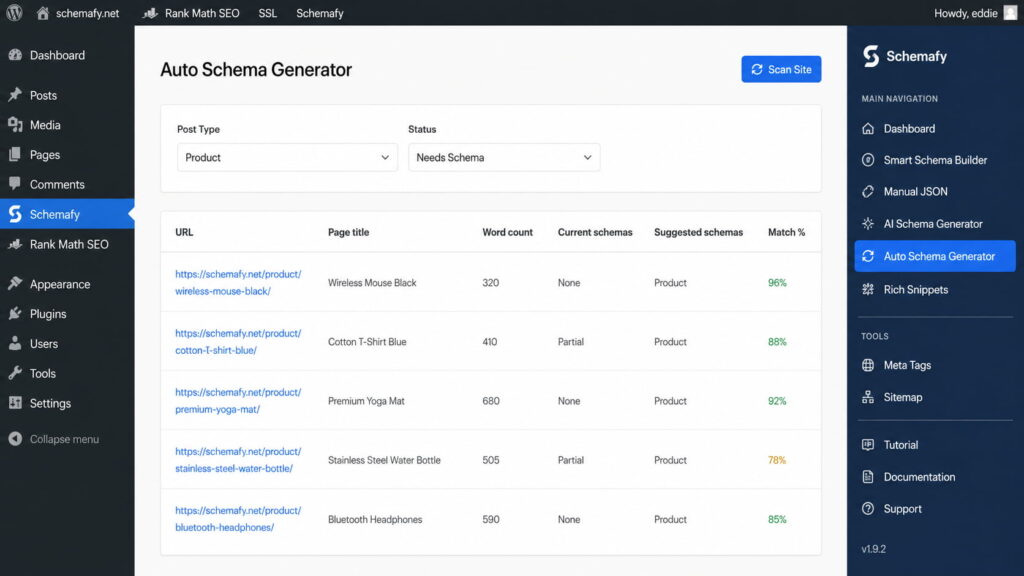
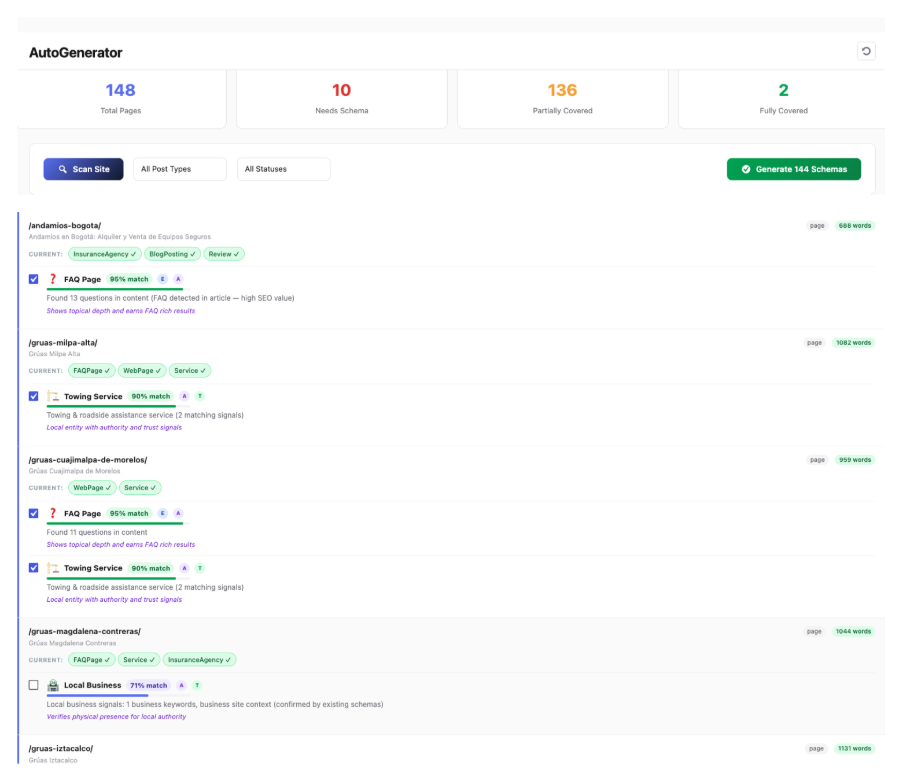
Use Multiple Schema Types When RelevantThe no-code path on WordPress: let a plugin inject it. Open WP Admin → Schemafy → Auto Schema Generator and click Scan Site. Filter by Post Type and set Status to Needs Schema, review the schema suggested for each page, then apply and save. Schemafy writes the JSON-LD into the page for you. For a single page with an unusual type, the AI Schema Generator (next section) builds the block from the page’s content.
Schemafy’s Auto Schema Generator lists each page with its current schema, suggested schema, and a match percentage so you can apply markup in bulk.
Step 5: Test the Markup Before Publishing
Before anything goes live, validate it. Two free tools cover it: Google’s Rich Results Test checks whether the page is eligible for a rich result, and the Schema Markup Validator checks the syntax against the Schema.org spec. If you’re editing code directly, a JSON-LD editor with validation flags problems as you type. Invalid markup is usually ignored, so fix every error before you publish.
Step 6: Monitor Results in Google Search Console
After deployment, watch Google Search Console. The Enhancements and Rich Results reports show which marked-up items are valid, which throw errors, and which carry warnings. Over a few weeks, track impressions and click-through for the affected pages, and you can preview your search snippet to see how a listing reads before it ever appears. Monitoring is what turns “I added schema” into “I know it’s working.”
Schema Markup Code Example
Here’s what a minimal, valid Article block looks like. You won’t type this by hand in practice, a generator fills it in, but it’s worth seeing once so the fields make sense.
{

  "@context": "https://schema.org",

  "@type": "Article",

  "headline": "How to Use Schema Markup: Complete Guide for SEO and AI Search",

  "author": { "@type": "Person", "name": "Author Name" },

  "datePublished": "2026-05-28",

  "image": "https://example.com/cover.jpg",

  "publisher": {

    "@type": "Organization",

    "name": "Your Site",

    "logo": { "@type": "ImageObject", "url": "https://example.com/logo.png" }

  }

}
The @type declares what the page is. The headline, author, datePublished, and image are the fields Google leans on for an article. Swap Article for Product or Event and the required fields change accordingly, which is exactly why a tool that knows each type’s fields saves you the lookup.
How to Add Schema Markup Without Coding
If you run WordPress, you never have to touch JSON-LD. That’s the part most guides skip.
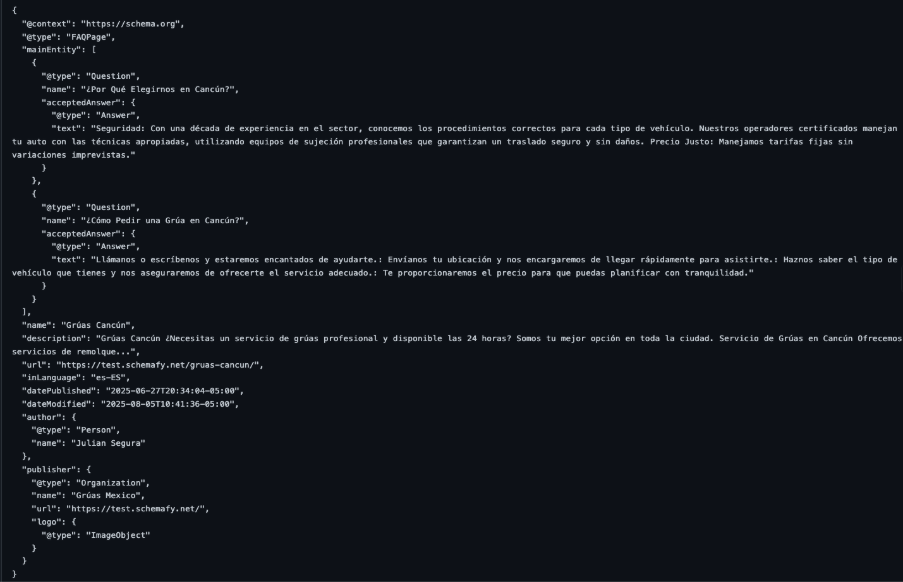
The workflow is short. Open Schemafy → AI Schema Generator, select the page (search for it or paste the URL), choose a schema type, Article, Product, Organization, Local Business, FAQ, or Blog Post, and click Generate Schema with AI. Review the generated fields and the JSON-LD preview, check the validation status, then click Save to Website. No code, no copy-paste into a theme file.
Schemafy’s AI Schema Generator builds the JSON-LD from the page content and shows a validation status before you save.
For sitewide coverage instead of one page at a time, the Auto Schema Generator scans everything and suggests schema per page, so a whole blog or catalog gets marked up from one screen.
How to Scale Schema Markup Across Large Websites
Marking up one page is easy. The real problem shows up at 800 products or 30 client sites, where doing it page by page simply isn’t an option. This is where the workflow has to change from manual to bulk.
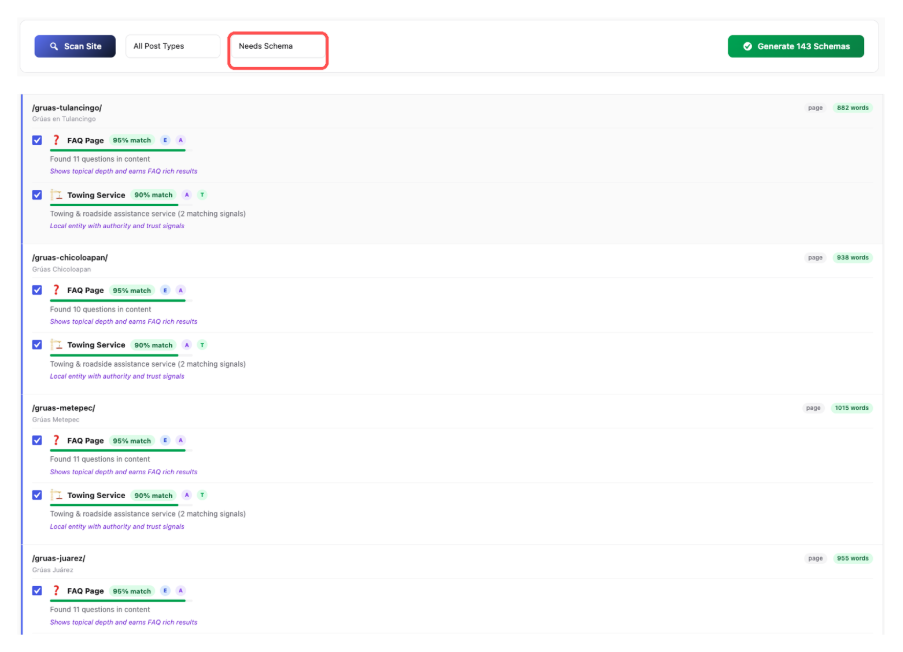
Start with a sitewide scan. In Schemafy → Auto Schema Generator, click Scan Site, then use the Post Type filter (Post, Page, Product, or a custom type) and the Status filter to isolate everything that still needs schema. The bulk selection checkbox and coverage counters let you work through hundreds of pages in passes instead of one at a time.
Meta data scales the same way. Under Schemafy → Meta Tags → Bulk Import CSV, click Download Template, fill the url, meta_title, and meta_description columns for every page you want to change, and click Import Rows, valid rows apply automatically and invalid ones are flagged before they touch the site. It’s the difference between an afternoon and a week.
Filtering the Auto Schema Generator by Post Type = Product surfaces every product still missing schema for bulk handling.
Schema Markup Best Practices
A few rules keep your markup clean, accurate, and safe from Google’s structured-data policies. They take minutes to follow and save you from manual actions later.
Mark up only what’s visible on the page.
Keep business, product, and review data current.
Use multiple schema types only when they genuinely apply.
Avoid spammy or irrelevant markup.
Re-validate after any redesign or CMS change.
Match Schema to Visible Page Content
Google’s rule is that markup must reflect content users can actually see. Marking up hidden text, placeholder content, or information that isn’t on the page gets the markup ignored, and can trigger a penalty under Google’s structured data policies. If it’s not on the page, don’t put it in the schema.
Keep Business, Product, and Review Data Updated
Stale data is worse than no data. A wrong price or a “in stock” label on a sold-out product creates Merchant Center issues and erodes trust. Opening hours, availability, and ratings all need to match reality. On WooCommerce, letting the plugin keep product schema in sync with the store means the markup updates when the product does.
Use Multiple Schema Types When Relevant
A single page can carry more than one schema. A blog post might combine Article and Breadcrumb markup, for instance. The test is relevance, not volume, add a second type only when the page truly contains that thing. You can review every schema applied across the site in one place. You can review every schema applied across the site in one place.
Avoid Spammy or Irrelevant Markup
Markup that misrepresents the page, irrelevant types, fake reviews, marked-up content that doesn’t exist, risks a manual action. Mark up what’s true and relevant to the page, and nothing else. The short-term SERP grab isn’t worth the long-term risk.
Validate Schema Regularly
Schema breaks quietly. A theme update, a CMS migration, or a redesign can strip or mangle your markup without any warning. Make a habit of re-validating after any structural change to the site, a 10-minute check after a redesign catches errors before they cost you rich results.
Common Schema Markup Mistakes to Avoid
Most schema problems come from a short list of recurring errors. Knowing them upfront saves a round of debugging.
Mistake
Why it hurts
Fix
Missing required fields
Page becomes ineligible for the rich result
Use a generator that prompts for required fields
Invalid date or number formats
Markup fails validation
Use ISO formats (e.g., 2026-05-28) and plain numbers
Wrong schema type
Engine misreads the page
Match the type to the page’s actual content
Duplicate markup
Conflicting signals on one page
Keep one source of schema per page
Expecting unsupported rich results
Wasted effort (e.g., FAQ on a non-gov/health site)
Check current eligibility before relying on a result
That last row matters more than it used to: since Google restricted FAQ rich results in 2023 (via Google Search Central), adding FAQ markup expecting stars-style enhancement is a common waste of effort. Generators that prompt for required fields and enforce valid formats quietly remove most of the top rows from this table.
How to Check If Schema Markup Is Working
Three checks tell you whether your schema is doing its job, and together they take about ten minutes.
First, run the page through Google’s Rich Results Test for a per-URL verdict on eligibility. Second, open the Enhancements reports in Search Console to see valid items, errors, and warnings across the whole site over time. Third, watch the live SERP for your marked-up pages, the proof is in how the listing actually appears.
“Working” looks like this: valid items in Search Console, rich-result impressions trending up, and a listing that shows the extra detail you marked up.
Final Thoughts: The Right Way to Use Schema Markup
The right way to use schema markup isn’t a one-time code paste, it’s a habit: choose the most specific type, generate valid JSON-LD, validate it, monitor the results, and scale the same workflow across the rest of the site. Done consistently, it compounds: every new page ships already legible to search engines, and you stop treating structured data as a chore you bolt on after the fact.
Pick your highest-value page type, usually products or your best guides, and mark it up today; on WordPress you can do the whole thing without writing a line of code, then repeat the same six steps across the rest of the site as you grow.